工作头自动清洗机使用说明书.pdf - 第74页
6. 运转方法 INS-HDCLN-002S0 64 工作头自动清洗机使用说明书 6.6.2 检查 1. 请从菜单选择 「检查」 。 2. 显示出检查准备向导画面。请遵从向导进行准备 作业。 备注 )作业的方法请参照 “6.1 事前准备 ”。 3. 识别出已经设定了工作头后,显示出检查准备确 认画面。请确认显示的内容是否实施。 4. 请按 START 按键。开始清洗。 备注 )如果工作头清洗机正面门打开, 或者按下 EMERGENGCY…
INS-HDCLN-002S0 6. 运转方法
工作头自动清洗机使用说明书 63
6.6 工程师模式的运用
把工作头清洗机设置为工程师模式的话,除了通常的清洗外,可以进行工作头清洗机的设定
和工作头的检查。
在工程师模式上,操作画面的背景变为深绿色。
操作员模式和工程师模式画面的切换方法请参照以下的章节。
・“4.4.1 如何将画面显示变成工程师模式 ”
・“4.4.5 把画面的显示设置为操作员模式 ”
6.6.1 主菜单
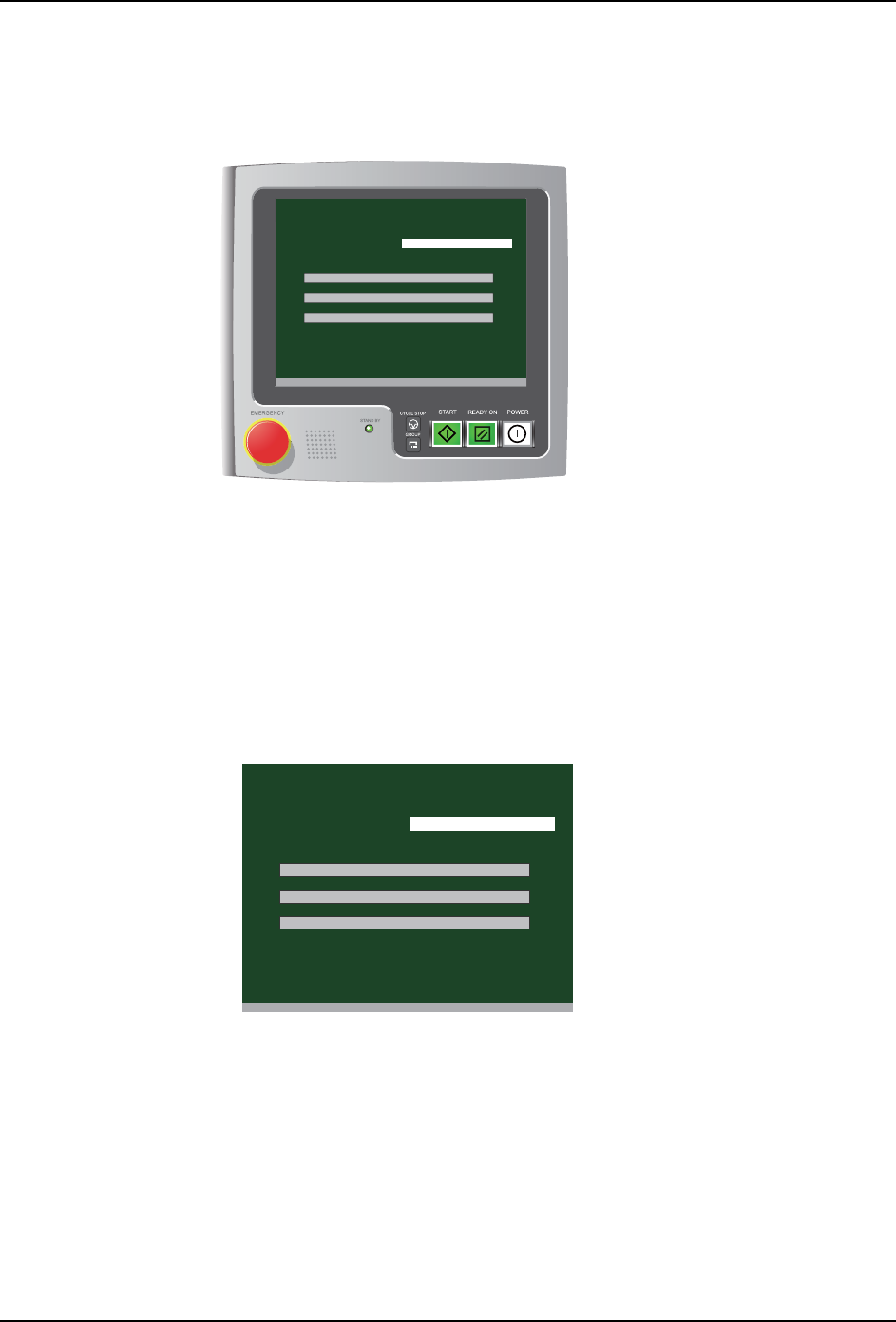
工程师模式的菜单为下面 3 个。请按照需要选择各菜单。
01NST-2672E
[ Main menu ]
V3.00 [ Filter exchange notice ]
Head serial number S/N
Cleaning
Inspection
Settings
清洗 与操作员模式同样可以进行空气清洗、油清洗。操作方法也与在操作员模式的
操作相同。请参照 「6.2 开始工作头的清洗」。
检查 对工作头通气, 进行各吸嘴头的压力测定。 继续进行各轴移动时间的检查。
设定 进行 IP 地址和、日期 · 时间等的设定。设定方法请参照 「4.5 各种设定」。
01NST-2676E
1.Cleaning
2.Inspection
3.Settings
[ Main menu ]
V3.00 [ Filter exchange notice ]
Head serial number S/N
Cleaning
Inspection
Settings
6. 运转方法 INS-HDCLN-002S0
64 工作头自动清洗机使用说明书
6.6.2 检查
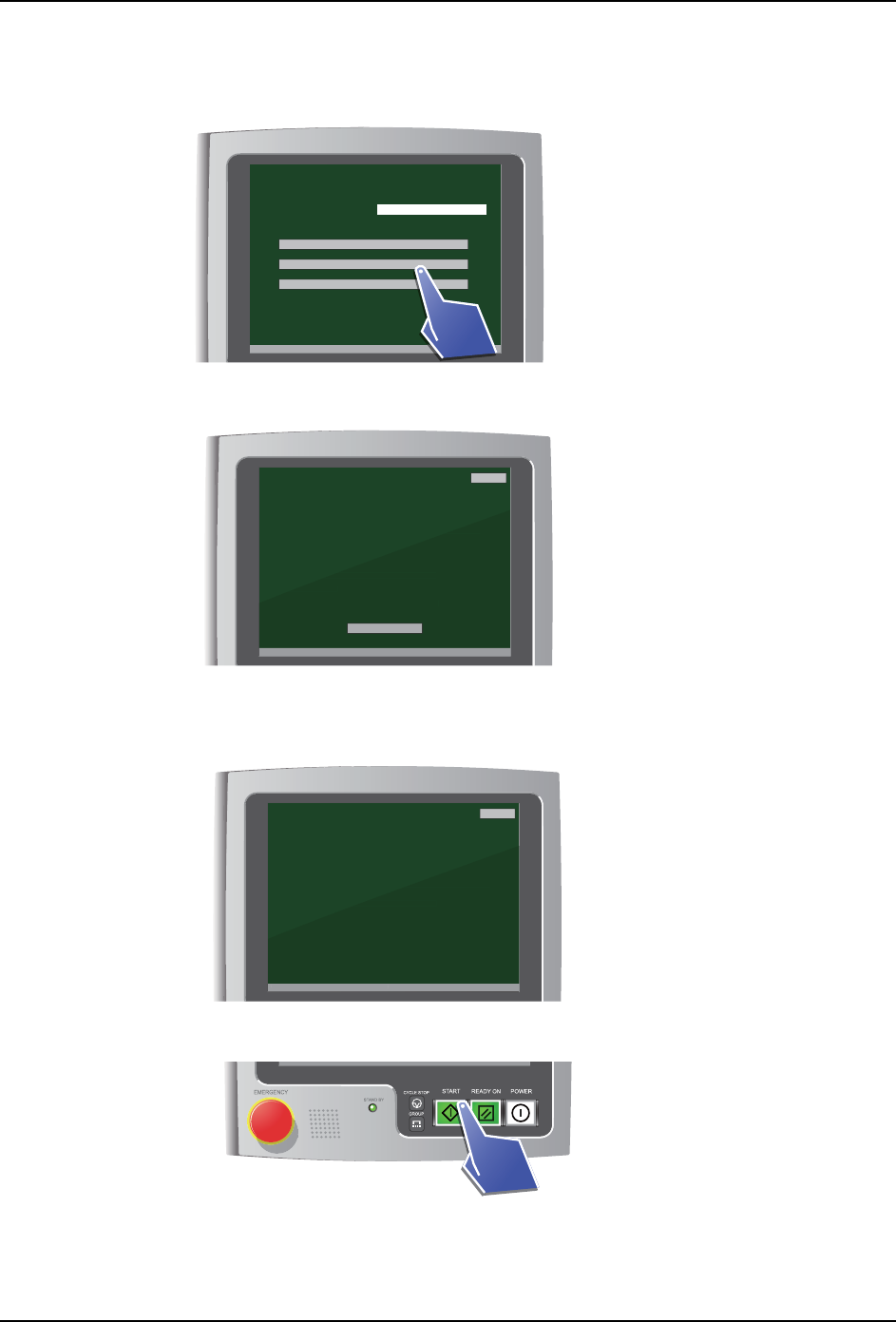
1. 请从菜单选择 「检查」。
2. 显示出检查准备向导画面。请遵从向导进行准备作业。
备注 )作业的方法请参照 “6.1 事前准备 ”。
3. 识别出已经设定了工作头后,显示出检查准备确认画面。请确认显示的内容是否实施。
4. 请按 START 按键。开始清洗。
备注 )如果工作头清洗机正面门打开,或者按下 EMERGENGCY 按键的话,即使按下 START 按键
清洗也不开始。
5. 运转中显示出以下画面。
01NST-2677E
[ Main menu ]
V3.00 [ Filter exchange notice ]
Head serial number S/N
Cleaning
Inspection
Settings
01NST-2678E
[ Inspection preparation details ]
V3.00 [ Filter exchange notice ]
Perform head inspection preparations as directed below.
1 Attach the pressure measuring nozzle to the head.
2 If a dummy filter is attached to the head, then replace
with a standard filter.
3 Open the door.
4 Attach the head.
5 Connect the three connectors to the head.
6 Close the door.
7 The head will be recognized automatically.
Inspection menu
Back
V3
.
00
[
Fi
l
ter exc
h
an
g
e notice
]
en replace
e three connectors to the head.
Close the door.
7 The head will be recognized automatically
.
Inspection men
u
01NST-2679E
[ Inspection preparation check ]
V3.00 [ Filter exchange notice ]
Check the following items for the head.
Push START to begin inspection.
1 The pressure measuring nozzle is attached to the head
START: Begin Inspection
2 A standard filter is attached to the head
Back
V3
.
00
[
Fi
l
ter exc
h
an
g
e notice
]
e is attached to the head
START: Begin Inspectio
n
is attached to the head
01NST-2680E
[g]
[g]
INS-HDCLN-002S0 6. 运转方法
工作头自动清洗机使用说明书 65
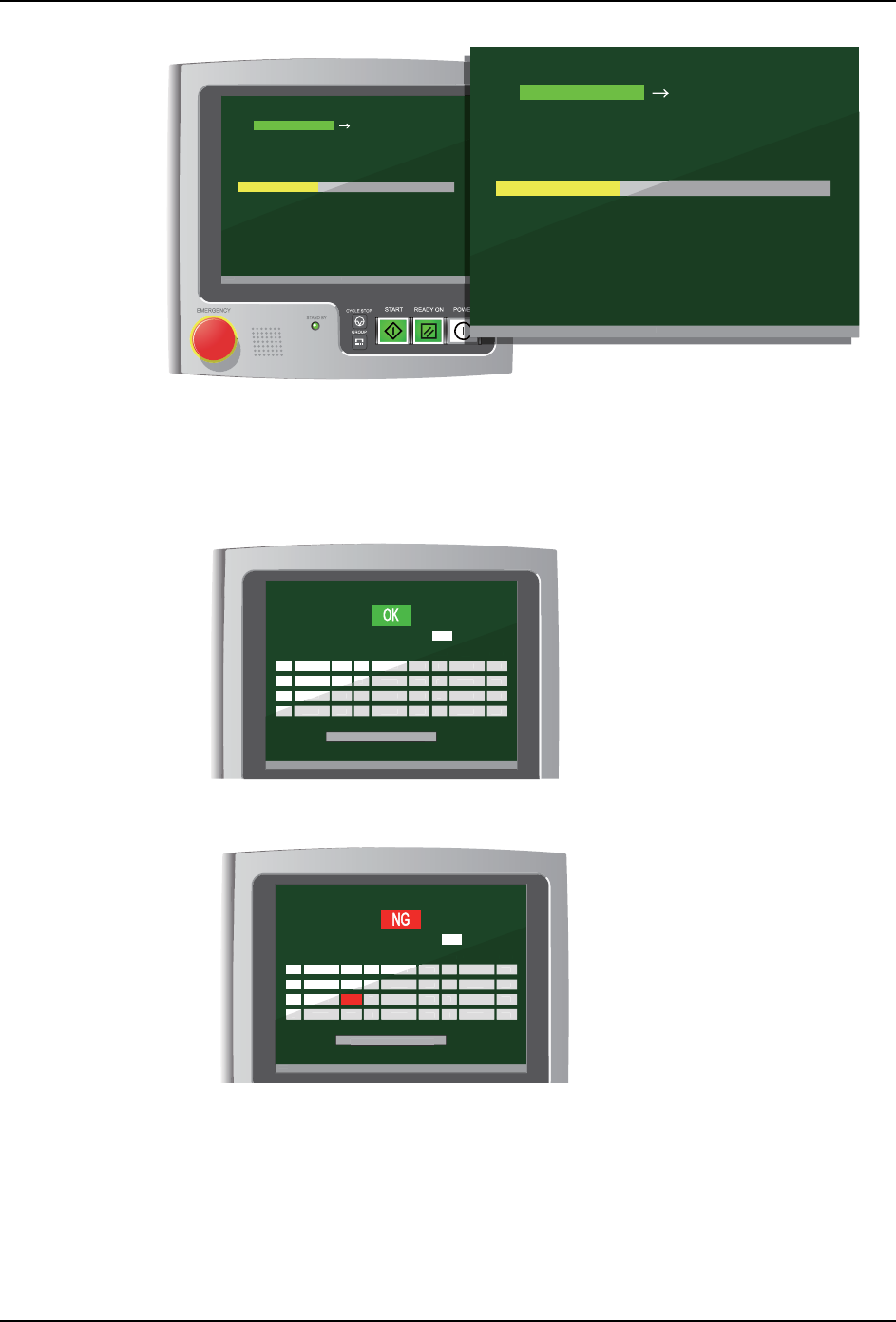
・压力 : 字符的背景为绿色的时候,是压力的检查工序。
・轴移动时间 : 字符的背景为绿色的时候,是各轴移动时间的检查工序。
6. 运转结束的话变成检查结果画面。工作头自动清洗机按每个吸嘴头测定空气压力,当充
足的时候显示出 「OK」的字符。
备注 )即使有一个没满足空气压力的基准的吸嘴头的话,在画面上显示出 「NG」的字符。
7. 到此工作头的检查完成。触摸 「返回到检查菜单」按键的话返回到主菜单画面。
[ Inspection in progress ]
V3.00 [ Filter exchange notice ]
Push CYCLE STOP on the operation panel to pause.
Pressure Axis moving time
V
3.0
0
[
Fi
l
ter exc
h
ange notice
]
01NST-2681E
[ Inspection in progress ]
V3.00 [ Filter exchange notice ]
Push CYCLE STOP on the operation panel to pause.
Pressure Axis moving time
V
3
.
00
[
Filter exchan
g
e notice
]
01NST-2682E
[ Procedure ]
Axis moving time
V3.00 [ Filter exchange notice ]
Return to Inspection Menu
A 00.00 OK
00.00 OK
00.00 OK
00.00 OK
00.00 OK
00.00 OK
00.00 OK
00.00 OK
00.00 OK
00.00 OK
00.00 OK
00.00 OK
Holder Result
Pressure value
(kPa)
Holder Result
Pressure value
(kPa)
Holder Result
Pressure value
(kPa)
B
C
D
E
F
G
H
I
J
K
L
V3
.
00
[
Fi
l
ter exc
h
an
g
e notice
]
Return to Ins
p
ection Men
u
p
00
O
K
00
.
00
O
K
00
OK
00
.
00
OK
00
.
00
OK
00
.
00
OK
00
.
00
OK
00
.
00
OK
00
.
00
OK
00
.
00
OK
Holder
Resul
t
P
ressure valu
e
(
kPa
)
D
F
G
H
I
J
K
L
01NST-2683E
[ Procedure ]
Axis moving time
V3.00 [ Filter exchange notice ]
Return to Inspection Menu
A 00.00 OK
00.00 OK
00.00
00.00 OK
00.00 OK
00.00 OK
00.00 OK
00.00 OK
00.00 OK
00.00 OK
00.00 OK
00.00 OK
Holder Result
Pressure value
(kPa)
Holder Result
Pressure value
(kPa)
Holder Result
Pressure value
(kPa)
B
C
D
E
F
G
H
I
J
K
L
V3
.
00
[
Fi
l
ter exc
h
ange notice
]
Return to Ins
p
ection Men
u
p
00
00
.
00
O
K
00
OK
00
.
00
OK
00
.
00
OK
00
.
00
OK
00
.
00
OK
00
.
00
OK
00
.
00
OK
00
.
00
OK
Holder
Resu
lt
P
ressure valu
e
(
kPa
)
D
F
G
H
I
J
K
L
NG