Printer 710_810 v8 Sensors.pdf - 第6页
SENS ORS OPTO SENSORS 31.6 Technical Reference Manual Chapter Issue 2 Oct 06 T e sting/Adju stment If the sensor fa ils to oper ate, confir m the sensor is faulty as follows: 1. Disconnect the through beam opto. 2. Short…
SENSORS
OPTO SENSORS
Chapter Issue 2 Oct 06 Technical Reference Manual 31.5
Testing Procedure If the sensor fails to operate carry out the following:
1. Disconnect the opto.
2. Short out the signal to earth on the socket.
3. Check the relevant digital input under Diagnostics - System - Display all
Digital Inputs to confirm, or otherwise, that the sensor is defective.
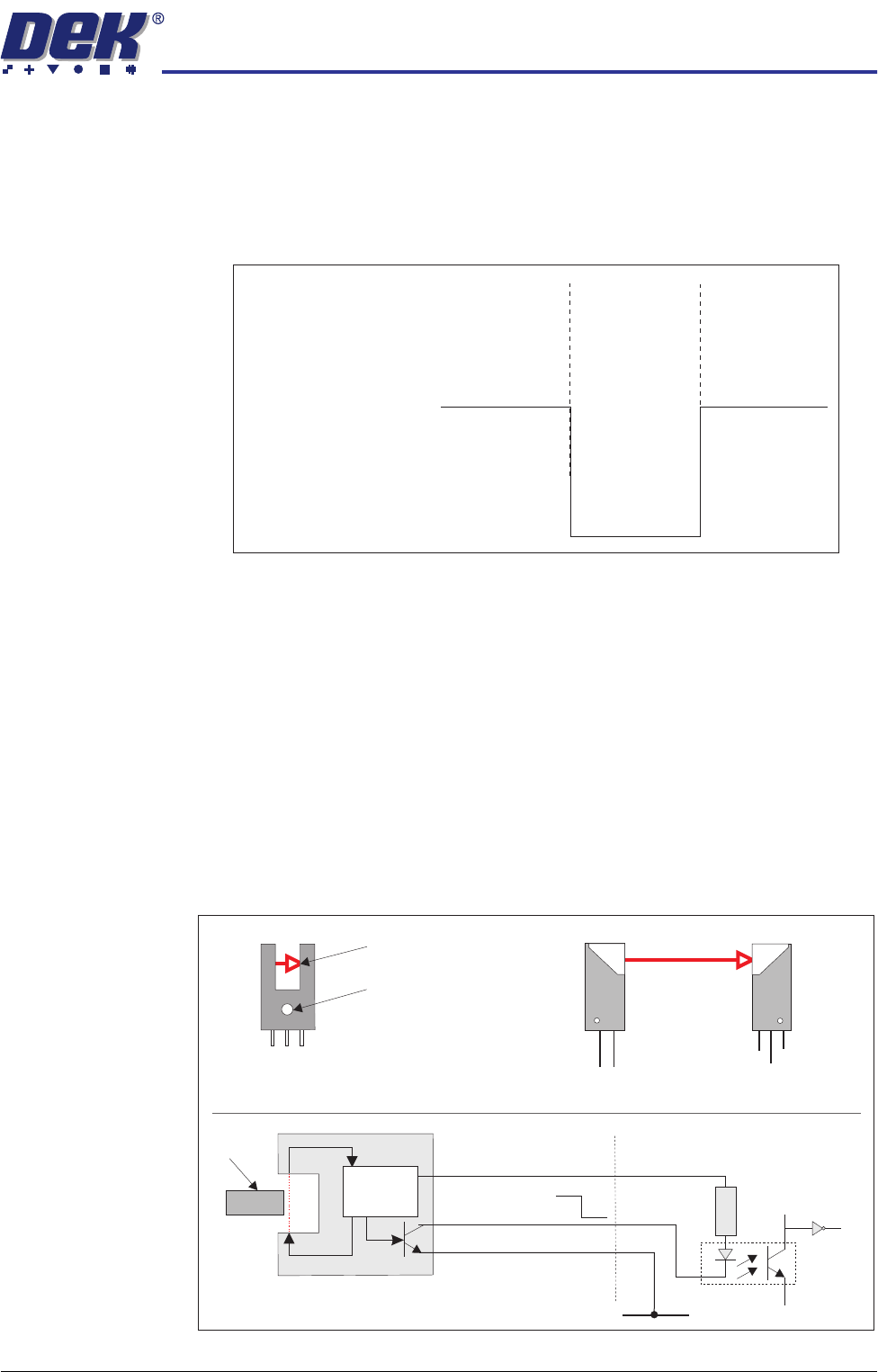
Figure 31-5 Voltage Diagram
Through Beam
Optos
The types of through beam opto used on this machine are:
• Fork Sensor Type
• Long Throw Type
Fork Sensor Type The through beam fork sensor transmits a beam across the gap in the opto.
When a vane enters the gap the beam is broken and the sensors output
transistor is switched on.
Long Throw Type The long throw opto works on the same principal as the through beam type but
uses two individual sensor devices (receiver and emitter) to cover a wider gap,
ie screen at centre indicator.
Figure 31-6 Through Beam Optos
Board
Absent
Present
Absent
12V
0V
Signal
Through Beam Fork Opto
Long Throw Optos
+12V
Operation Indicator
Transmitted Beam
0VSig
+12V
Signal O/P
Emitter
Receiver
0V
+12V
0V
V+ (User)
Opto-isolator
1K8
0V (User)
0V
12V
Signal
12V
0V
Vane
Control
Circuit
Pin 1
Pin 2
Pin 3
Digital Input

SENSORS
OPTO SENSORS
31.6 Technical Reference Manual Chapter Issue 2 Oct 06
Testing/Adjustment If the sensor fails to operate, confirm the sensor is faulty as follows:
1. Disconnect the through beam opto.
2. Short out the signal to earth on the socket.
3. Check the relevant digital input under Diagnostics - System - Display all
Digital Inputs to confirm, or otherwise, that the sensor is defective.
Figure 31-7 Voltage Diagram
Vane
Out
In
Out
12V
0V
On
Off
Off
Indication Light
Signal
SENSORS
CAPACITIVE PROXIMITY SENSOR
Chapter Issue 2 Oct 06 Technical Reference Manual 31.7
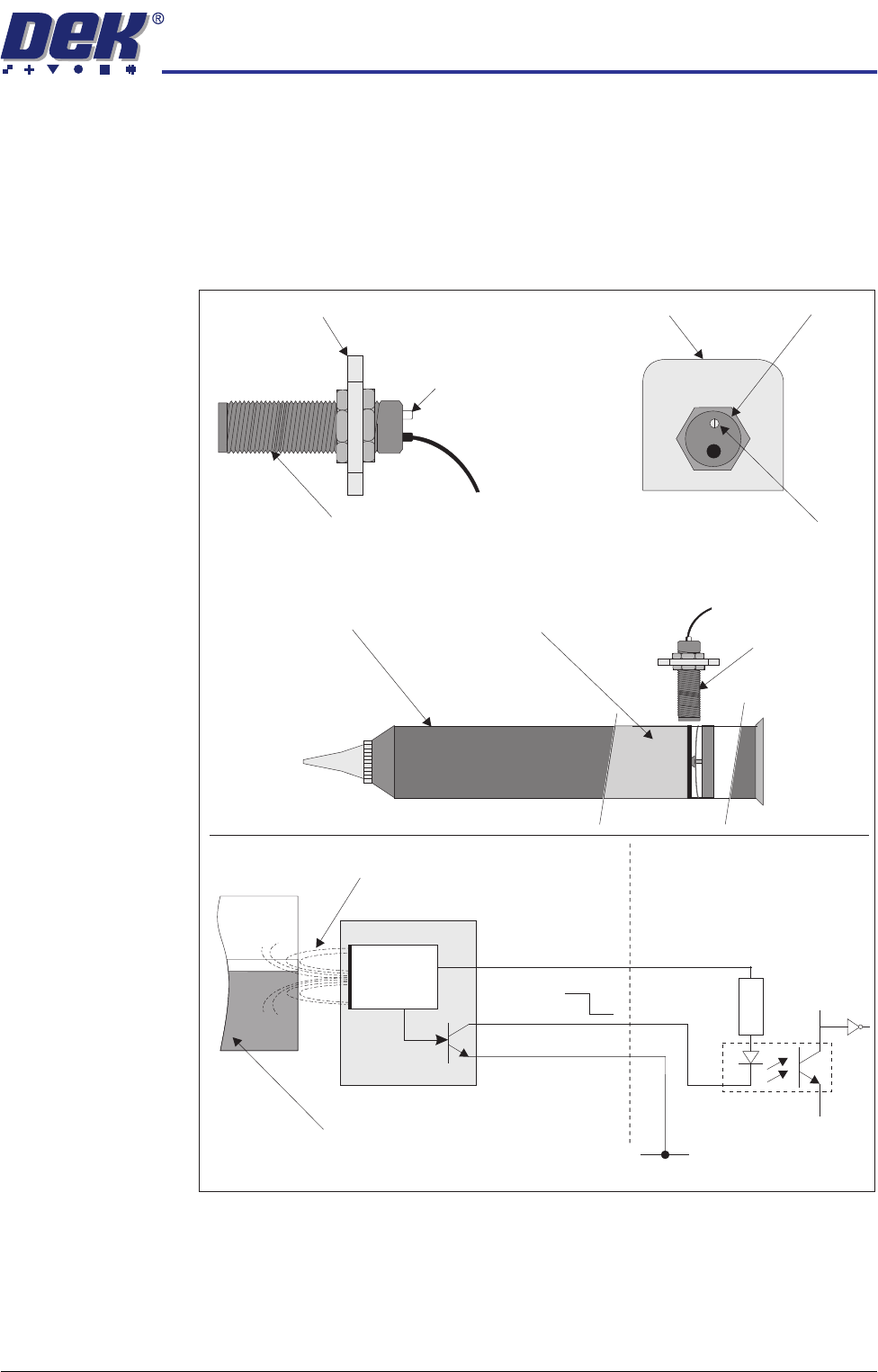
CAPACITIVE PROXIMITY SENSOR
Description A capacitive proximity sensor consists of an RC oscillator which emits a
frequency field. When the target, in this case the solder paste, moves away
from the sensing range (ie paste low), the capacitance increase effectively
changes the internal current which is detected by an adjustable trigger. The
control circuit switches the output transistor on.
Figure 31-8 Capacitive Proximity Sensor
Capacitive Proximity Switch
Sensor Bracket
LED
Paste Level Sensor
LED Adjuster
and Indicator
Sensor Bracket
Sensor
PastePaste Cartridge
Paste Level
Sensor
V+ (User)
Opto-isolator
1K8
0V (User)
0V
12V
RC Frequency Field
Solder Paste
12V
0V
Pin 1
Control
Circuit
Pin 2
Pin 3
Digital Input