00197192-02_VD_EDM_2.1_DE_EN.pdf - 第28页
EDM V2.1 / Versio n Desc ription Ausgabe 11/2012 Edit ion 28 4.7 ED M L ine Se rvice Th e EDM Line Serv ice is th e count erpart to th e EDM Master S ervice a nd perf orms the followin g tasks: ● Th e EDM Line Serv ice m…
EDM V2.1 / Version Description Ausgabe 11/2012 Edition
27
4.6 EDM Configuration Manager
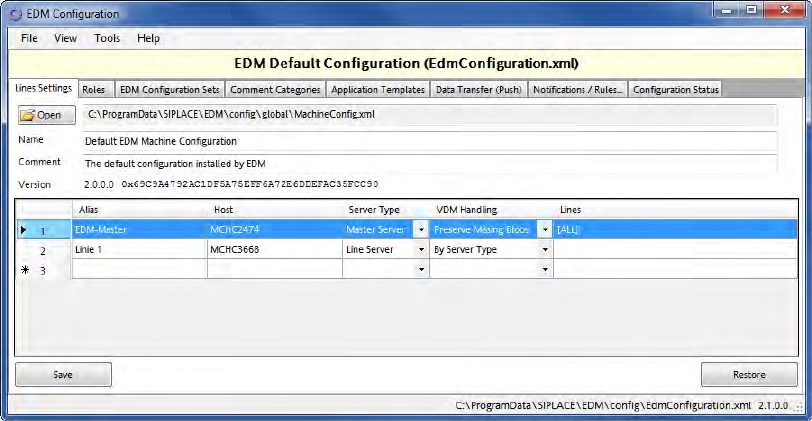
The EDM Configuration Manager is the central tool for configuring the EDM system. The EDM
Configuration Manager brings the following advantages:
● It provides a central point for the configuration of EDM. Thus, the cumbersome and error prone
manual configuration of every single EDM installation in the factory can be avoided. E.g., it is
not necessary to keep multiple configuration files persistent when configuring the Line Server
alias names anymore, what ensures that no inconsistent information is transferred to the
Clearing Pool.
● It distributes the changed configurations automatically to the affected Line servers. There is no
need to copy them manually to the Line Servers anymore.
Figure 4-26: EDM Configuration Manager
The EDM Configuration Manager provides the functionality to define and change configuration sets
to support multiple EDM scenarios. A configuration set consists of references to all configuration
items, such as:
● Filter rule settings
● Settings for email notification on incoming notifications
● EDM Master Server storage location
Based on certain rules (Roles), the EDM Configuration Manager assigns exactly one configuration
set to each EDM Client computer, defining its behavior.
A detailed description of the EDM Configuration Manager with its options and user interface can be
found in the "Configuration" chapter in the EDM Installation Manual, item no. 00197193-xx.
EDM V2.1 / Version Description Ausgabe 11/2012 Edition
28
4.7 EDM Line Service
The EDM Line Service is the counterpart to the EDM Master Service and performs the following
tasks:
● The EDM Line Service monitors the changes made by users to the local SIPLACE Pro
database, documents the changes and sends them to the master service for entry in the
Clearing Pool.
● The EDM Line Service sends requests to the master service, receives requests from it and
forwards them for processing to the EDM Client.
● The EDM Line Service receives and processes push data packages and supplies status
information to the EDM master.
EDM V2.1 / Version Description Ausgabe 11/2012 Edition
29
4.8 EDM Filter Rules
CAUTION
These settings are very sensitive. Please check the used values accurately. If "incorrect"
values are set, important change notifications might get lost or too many change
notifications might cause a jam in the Clearing Pool.
On a Line Server a multitude of processes take place, all of them producing change notifications.
However, all change notifications will not be of equal interest for you. By default, most of the
change notifications are transferred to the Master Server.
EDM V 2.1 provides pre-defined rules that may be adjusted or completed by newly defined rules
according to your requirements. The change notifications are automatically filtered according to
these rules and may be further processed depending on their relevance. In this way, it is possible
to sort out notifications that are not of interest for you and only transfer the important notifications to
the Clearing Pool on the Master Server.
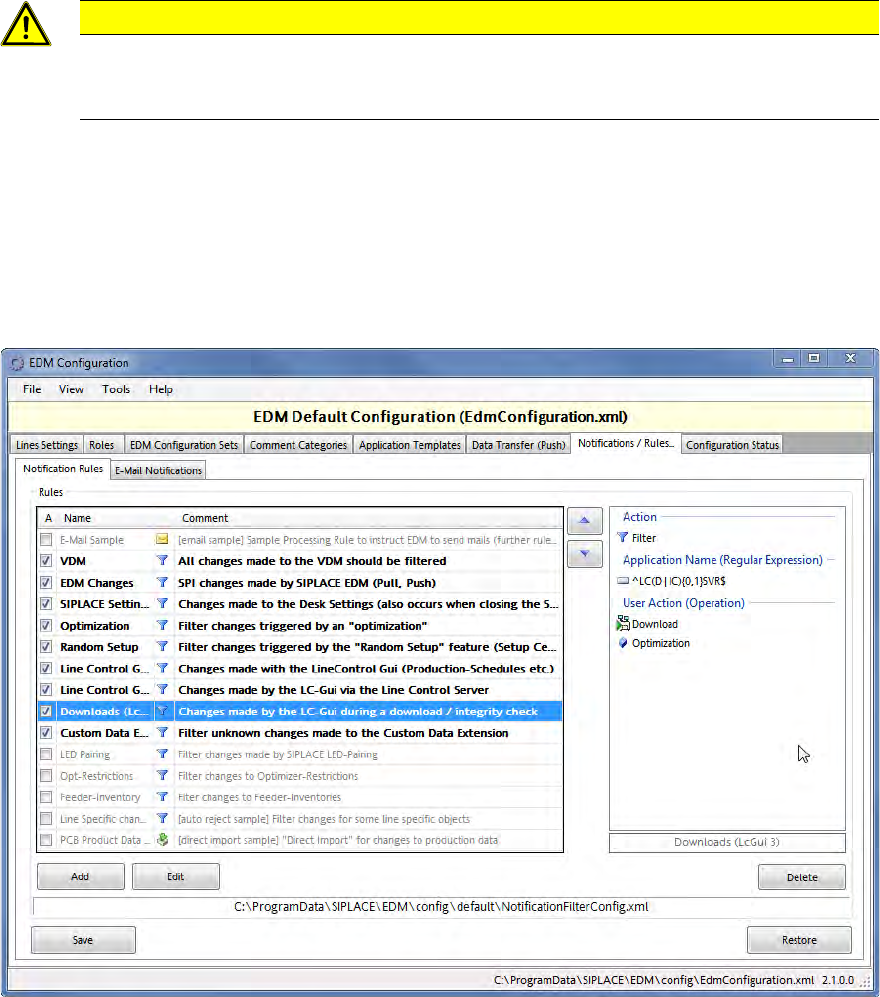
Figure 4-27: Overview of notification rules
This figure displays an overview of the provided rules. The rules that are currently in use are
activated to the left. The rules are presented as follows:
Bold:
Active filter rule that filters the changes directly at the EDM Line Server
Gray:
Inactive rule
Italic:
Active processing rule
Normal: Active rule that does not fulfill any of the other conditions
(e.g. Auto Reject and Direct Import rules)