00197192-02_VD_EDM_2.1_DE_EN.pdf - 第8页
EDM V2.1 / Versio n Desc ription Ausgabe 11/2012 Edit ion 8 3 Requi rements Th e software and s ystem requirem ents f or SIPLACE EDM 2.1 br oadl y correspon d to those f or SIP LAC E Pro 10. 1 . The Supp ort Medi a DVD i…
EDM V2.1 / Version Description Ausgabe 11/2012 Edition
7
2 Scope of Delivery
2.1 Software Components
The supplied data medium contains:
● SIPLACE EDM Master Server
● SIPLACE EDM Configuration Manager
● SIPLACE EDM Clearing Pool
● SIPLACE EDM Line Server
● SIPLACE EDM Client
● SIPLACE EDM Data Transfer Manager
● SIPLACE EDM Tool
2.2 Languages
The standard package contains German, English and Chinese (Simplified) versions.

EDM V2.1 / Version Description Ausgabe 11/2012 Edition
8
3 Requirements
The software and system requirements for SIPLACE EDM 2.1 broadly correspond to those for
SIPLACE Pro 10.1.
The Support Media DVD included in the installation package checks the necessary system
requirements of your system and installs these. Amongst others e.g. Microsoft .NET Framework,
the License Manager and the Error Reporting tool.
The use of the Support Media V1.14 is obligatory.
NOTICE
The system requirements (supported operating systems and database variants) and an
overview of the interoperable products can be found in the SIPLACE Support Media
Installation Manual, item no. [00197214-xx].
EDM V2.1 / Version Description Ausgabe 11/2012 Edition
9
4 Description of the Software Components
4.1 EDM Master Service
The EDM master service is the server component of EDM. It replies to queries from EDM line
services and distributes the data in the central SIPLACE Pro database among the lines.
In return, the EDM Master Service accepts change notifications and collects them in the EDM
database. The Clearing Pool can be selectively bypassed (see the EDM Installation Manual,
section 5.3.7 Notification/Rules…).
4.2 EDM Client
The EDM Client enables user interaction on the line. It implements customer specific data
distribution. This user interface implements pull mode and forced pull mode. The push mode
workflow, on the other hand, is based on the EDM Data Transfer Manager and is described in
section 4.3.
4.2.1 Getting Data from the Master (Pull Mode)
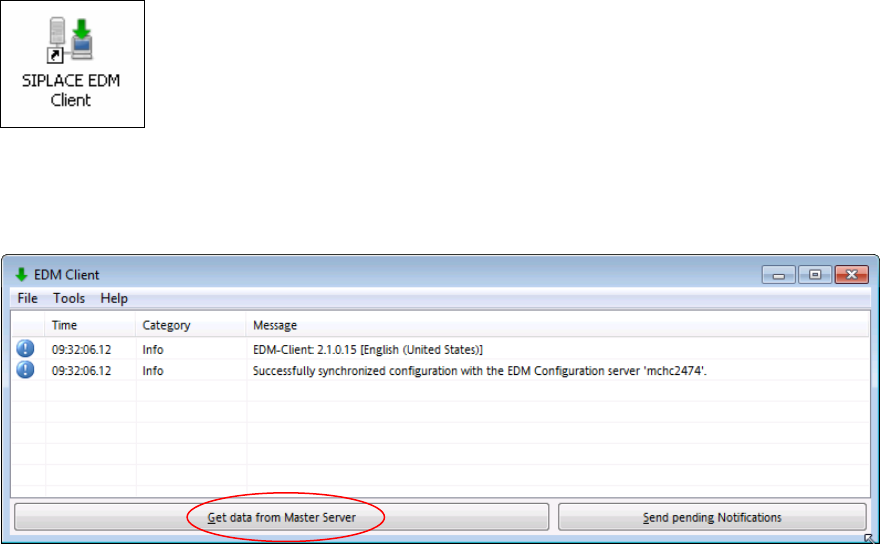
► Double click the icon on your desktop to start the EDM Client.
The EDM Client opens:
Figure 4-1: EDM Client
► Click the Get data from Master Server button.