TK26522.Chip Vacuum Check.pdf - 第8页
S M T S o f t w a r e E n g i n e e r i n g G r o u p I M O p e r a t i o n s Y A M A H A M O T O R C O . , L T D MDOC-SOFT50395 5. Setting Method Settings to use this function are as follows. T able 5.1 Machine Setting …

SMT Software Engineering Group
IM Operations YAMAHA MOTOR CO., LTD
MDOC-SOFT50395
When parts adjustment is executed on the [Parts Adjust] screen opened from the Ea13143
message, it is not allowed to edit the parts data on the right. Also, parts data is not updated
by Test. (
※
)
Parts Adjust screen opened from the Ea13143 message is used only for confirmation.
(※) When “Test” is executed on the [Parts] - [Parts Adj] screen, [Comp. Intensity] in parts data is
automatically updated. Meanwhile, when it is executed on the [Parts Adj] screen opened from the
Ea13143 message, [Comp. Intensity] is not updated.
4. Recovery from error
When “Ea13143: PARTS DROP BEFORE MOUNT” occurs, press the [Parts Adj] button on
the message, and execute “Test” to check the picking condition of the error nozzle. If no
chip is on the nozzle, it may have been dropped on a board. In that case, please remove it.
Then close the error message and press the [START] button. All error heads perform
dumping action and auto-running starts.
SMT Software Engineering Group
IM Operations YAMAHA MOTOR CO., LTD
MDOC-SOFT50395
5. Setting Method
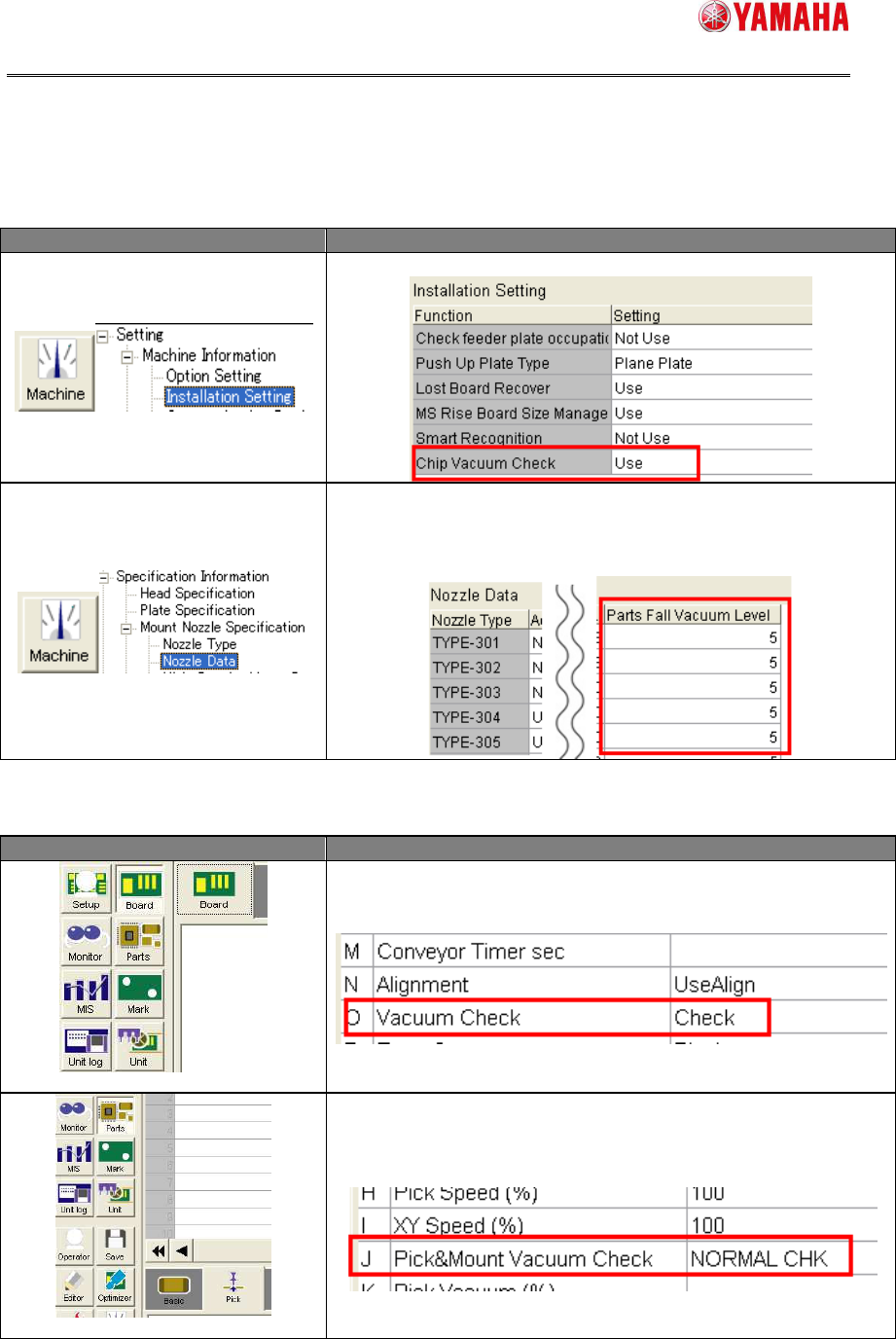
Settings to use this function are as follows.
Table 5.1 Machine Setting
Menu Description
Set [Chip Vacuum Check] to “Use”.
Enter a value in [Parts Fall Vacuum Level] of each nozzle.
The range is 0 to 255.
When “0” is entered, Chip Vacuum Check is not performed.
(Recommended value is 5)
Table 5.2 Board data
Menu Description
[Board] – [Board]
Set [Vacuum Check] to “Check”.
[Parts] – [Pick]
Set [Pick&Mount Vacuum Check] to “NORMAL CHECK” or
“SPECIAL CHECK”.
SMT Software Engineering Group
IM Operations YAMAHA MOTOR CO., LTD
MDOC-SOFT50395
6. Log Function
6.1 Overview
With this function enabled, a log is output when “Ea13143:PARTS DROP BEFORE
MOUNT” occurs. Destination of the log is specified on the software setting.
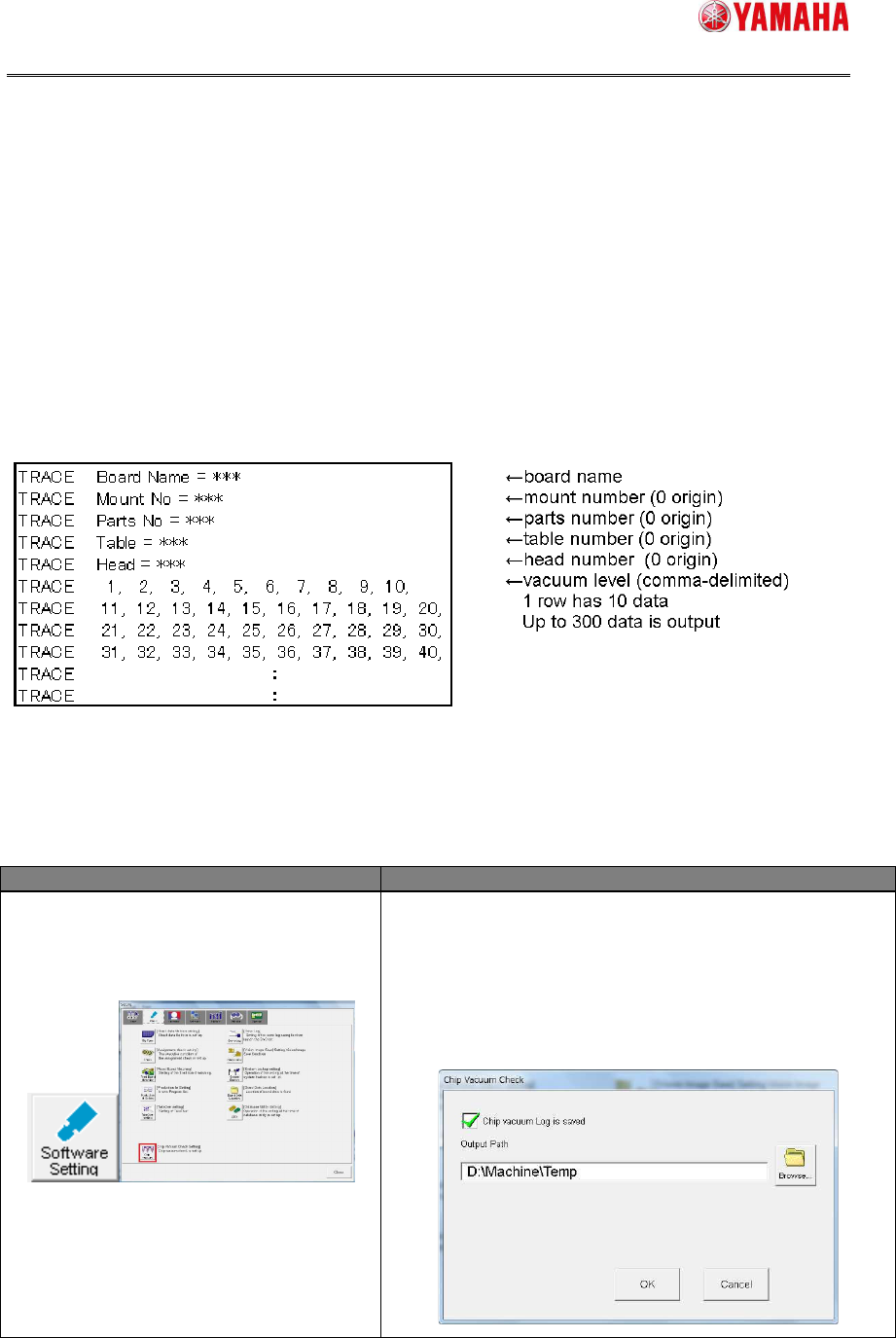
6.2 Format
File name of the log is “ChipVacuumCheck_T**_H**_yymmddhhmmss.log”.
(“T**” means table number of the error. “H**” means head number of the error.)
The format is as follows.
Fig 6.1 Format
6.3 Setting Method
Table 6.1 Setting Item (Software Setting)
Menu Description
[Software Setting]-[Basic]
-[Chip Vacuum]
Check the [Chip Vacuum Log is saved] check box.
Then, enter a destination folder path into [Output
Path].
※ The destination folder needs be in a drive with
5MByte or more free space. (If a drive with less
than 5MByte free space, the log is not output.)