TS577R-UserGuide.pdf - 第14页
14 5.3 Setup for Auger Valve with Encoder Motor Procedure to control encoder motor valve is very similar to non-encod er valve. The dispense cycle of encoder motor valve is controlled mainly through encoder counts. 1. To…
13
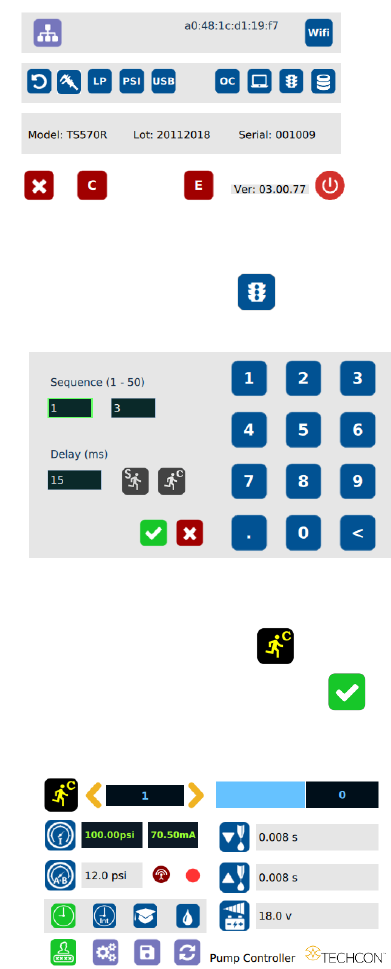
2. Touch the “Run Method” icon
3. Enter the delay time (ex. 5000 ms)
4. Touch the “Countinous Run” icon
5. Touch the Check Mark icon to save and exit
The screen will look similarly to the screen below:
Note: If the controller is set to activate memory cell 1 and the delay time is
set at 5000 ms, the controller will activate memory 1 contiuously with 5000
ms delay between each activation.
14
5.3 Setup for Auger Valve with Encoder Motor
Procedure to control encoder motor valve is very similar to non-encoder valve.
The dispense cycle of encoder motor valve is controlled mainly through
encoder counts.
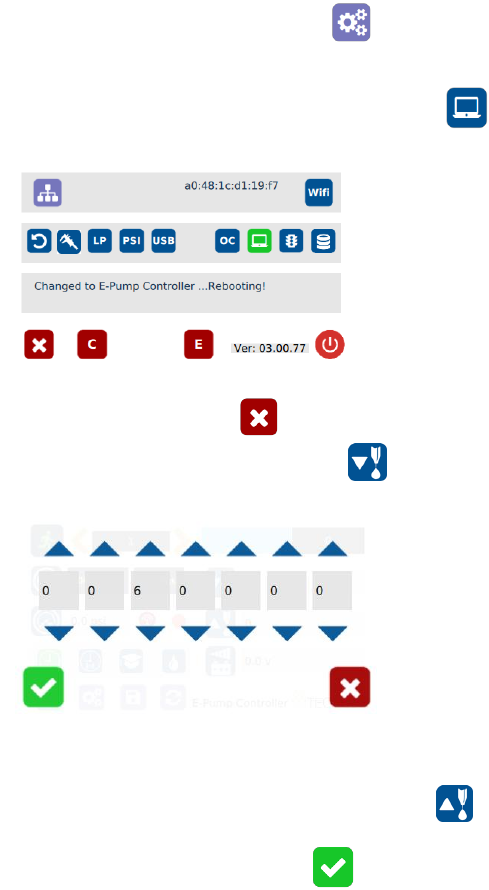
1. Touch the Setup icon to enter the setup screen
2. Touch the Controller type icon to switch to Encoder controller
“E-Pump Controller”
3. Touch the X icon to save and exit
4. Touch the Dispense icon to enter the setup screen
5. Touch the Up or Down arrows to set the dispense encoder count
Note: if suck back is needed, touch the “Reverse” icon to setup
motor reverse encoder count
6. Touch the Check Mark icon to save and exit
7. Select desired dispense mode to continue (Timed, Interrupt, Teach or Purge)
15
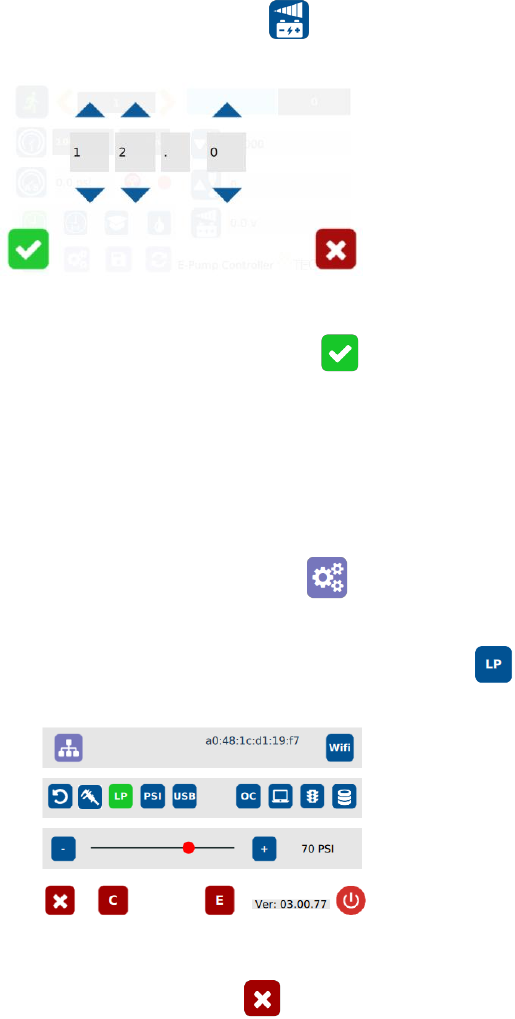
8. Touch the Voltage icon to set voltage
9. Touch the Up or Down arrows to set input voltage
10. Touch the Check Mark icon to save and exit
5.4 Low Pressure Alarm Setting
Note: This controller is equipped with an adjustable “Low Pressure” alarm
function. If the set pressure dropped below the “Low Pressure” setting, the
controller will not activate. The “Low Pressure” setting is pre-set at the factory
to 70 psi (4.8 bars). When the supplied pressure drops below 70 psi (4.8 bars)
the unit will not function. The “Low Pressure” setting can be adjusted. Follow
instruction below:
1. Touch the Setup icon to enter setup screen
2. Touch the Low Pressure (LP) icon to set the desired low pressure
3. Slide the pressure scale to set the desired low pressure threashold
4. Touch the X icon to save and exit