TS577R-UserGuide.pdf - 第30页
30 3. Proceed to fill out the form User Name: Enter desired User Name Select “Admin” New Password: Enter desired passwor d
29
6.3 Receive Notification From The Controller
The web-base application enables user to set notification when the following
event occur from the controller:
• Low pressure alarm
When the output pressure dropped below the set pressure, the unit will
send out notification by phone text message or by email to the user.
• “Over current” protection alarm
When the motor of the valve/pump is drawing excessive current the
controller will send out notification by phone text message or by email to
the user.
• Flow Rate Feedback
When the flow rate of the PC Pump is less than 10% of the set flow rate,
the controller will send out notification by phone text message or by email
to the user.
6.3.1 Setup Notification
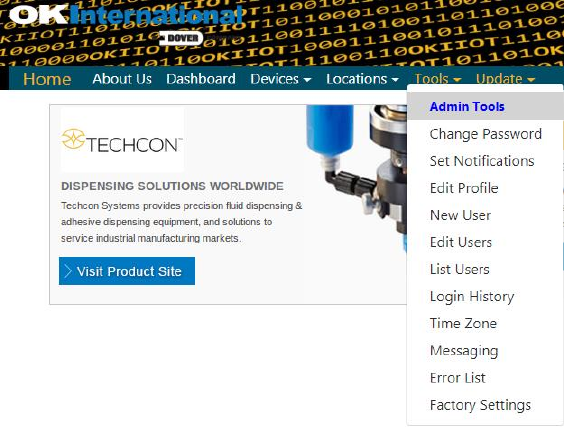
1. Click on the Tool menu
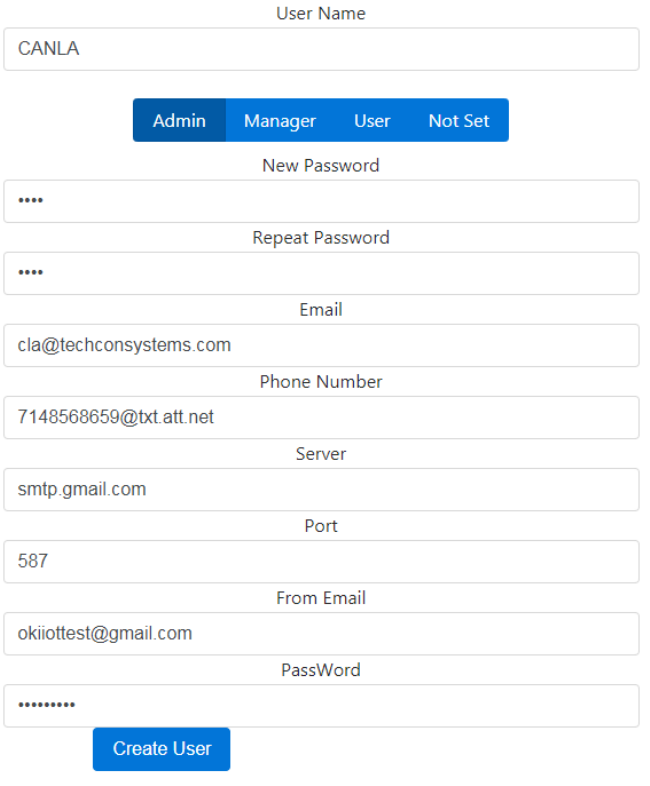
2. Select New User, fhe new user form will appear as shown
below
30
3. Proceed to fill out the form
User Name: Enter desired User Name
Select “Admin”
New Password: Enter desired password
31
Email: Enter email address that you want to receive
notification
Phone number: Enter the phone number that you want to
receive text message notification.
Note: use mobile email address (SMS address) format.
Make sure to check your phone carrier for the correct
format
Server: Enter your smtp server address
Port: Enter your smtp port
From Email: This is the sender email
Note: Your IT staff will need to setup the sender email
account. This email account can be used for multiple
controllers.
Password: Enter the password for the sender email
4. After the form is completely filled out, Click “Create
User”
6.3.2 Select controller to receive notification
1. Click on the Tools menu
2. Select “Set Notification” from the drop-down menu
3. Select desired controllers to receive notification from by
checking the box next to “Upon On/Off” (make sure the Mac
address on the controller matches the Mac address on the Set
Notification page)
4. Click “Update Notifications” box
5. Selected controllers will send error notifications to the
registered phone or email that set in previous steps