X-Series-Maintenance-Manual(1).pdf - 第97页
Major Maintenance Overview of Lubrication Points Maintenance Tasks for CPP Head Maintenance Manual SIPLACE X Series 97 Overview of Lubrication Points 5.6.3 Overview of Lubrication Points Star bearing 24 x 2 µl Isoflex To…
Major Maintenance
Maintenance Tasks for CPP Head Preparatory Steps
96 Maintenance Manual SIPLACE X Series
Filling and Settin g the Multipette
5.6.2.3 Filling and Setting the Multipette
► Place a cloth or similar material on your working surface so that this is not soiled with lubricant when
you set the multipette.
► Take the tip of the combitip out of the lubricant and wipe any excess lubricant off the combitip.
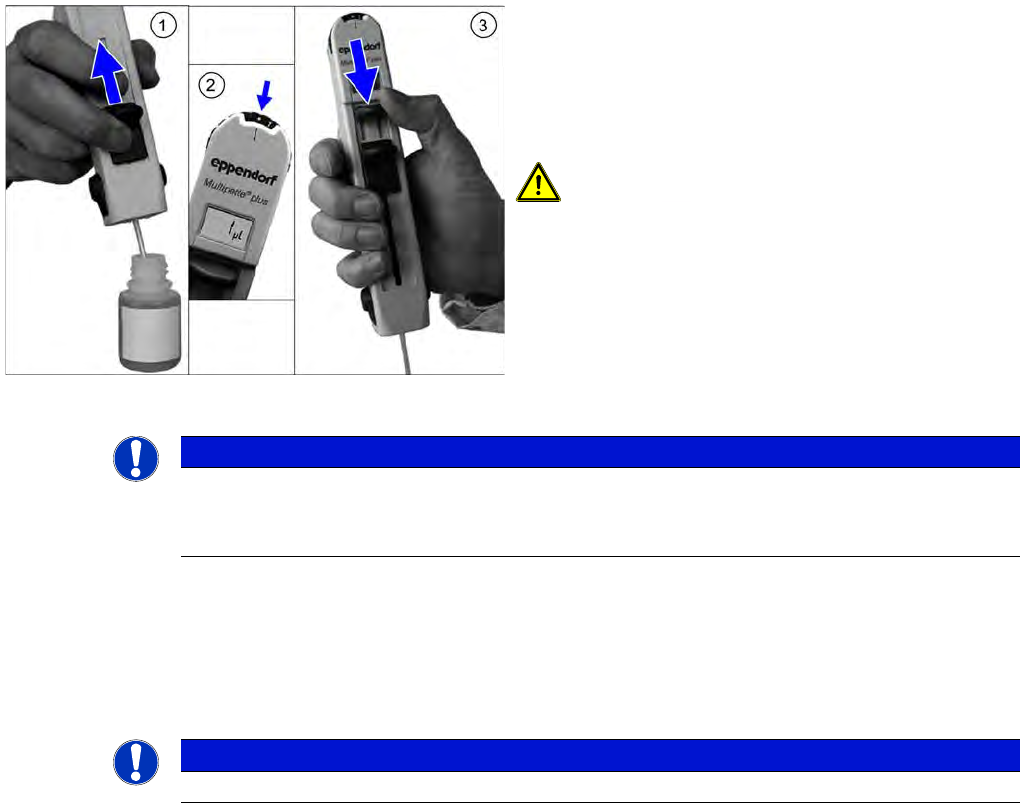
► (2) Set the multipette gauge to the dot on the left, next to the "1". The display should now show "1 µl".
► (3) Push the application lever as far as the end stop, in the direction of the combitip.
This removes any air trapped in the combitip. The volume shown is then accurate.
► Test the application volume on the cloth.
The multipette is now ready for use.
Releasing the Combitip from the Mu ltipette
5.6.2.4 Releasing the Combitip from the Multipette
► Hold the combitip over a container with the relevant lubricant or a waste bin and push the filling lever
right down. The remaining lubricant will be pressed out.
► Pull the filling lever back up again.
► Press the two reject buttons simultaneously. The combitip will be released from the multipette. The
display will be deleted.
► Push the filling lever as far as the end stop, in the
direction of the combitip.
► Dip the tip of the combitip into the relevant lubricant.
► (1) Slowly push the filling lever in the direction of the
display, to pull the lubricant into the multipette.
CAUTION! Do not apply the filling lever too
quickly, otherwise a strong vacuum will be created. The
fluid will then be enriched with air bubbles, which can
lead to inaccurate application volumes.
However, the small air bubble in the upper section of the
cylinder does not affect the application volume.
NOTICE
Fill the combitip completely
If you do not completely fill the combitip, the display will not flash. In this case, you need to
return the initial volume to the bottle and then refill the combitip.
NOTICE
You can change the volume between applications by simply turning the volume setting wheel.
Major Maintenance
Overview of Lubrication Points Maintenance Tasks for CPP Head
Maintenance Manual SIPLACE X Series 97
Overview of Lubrication Points
5.6.3 Overview of Lubrication Points
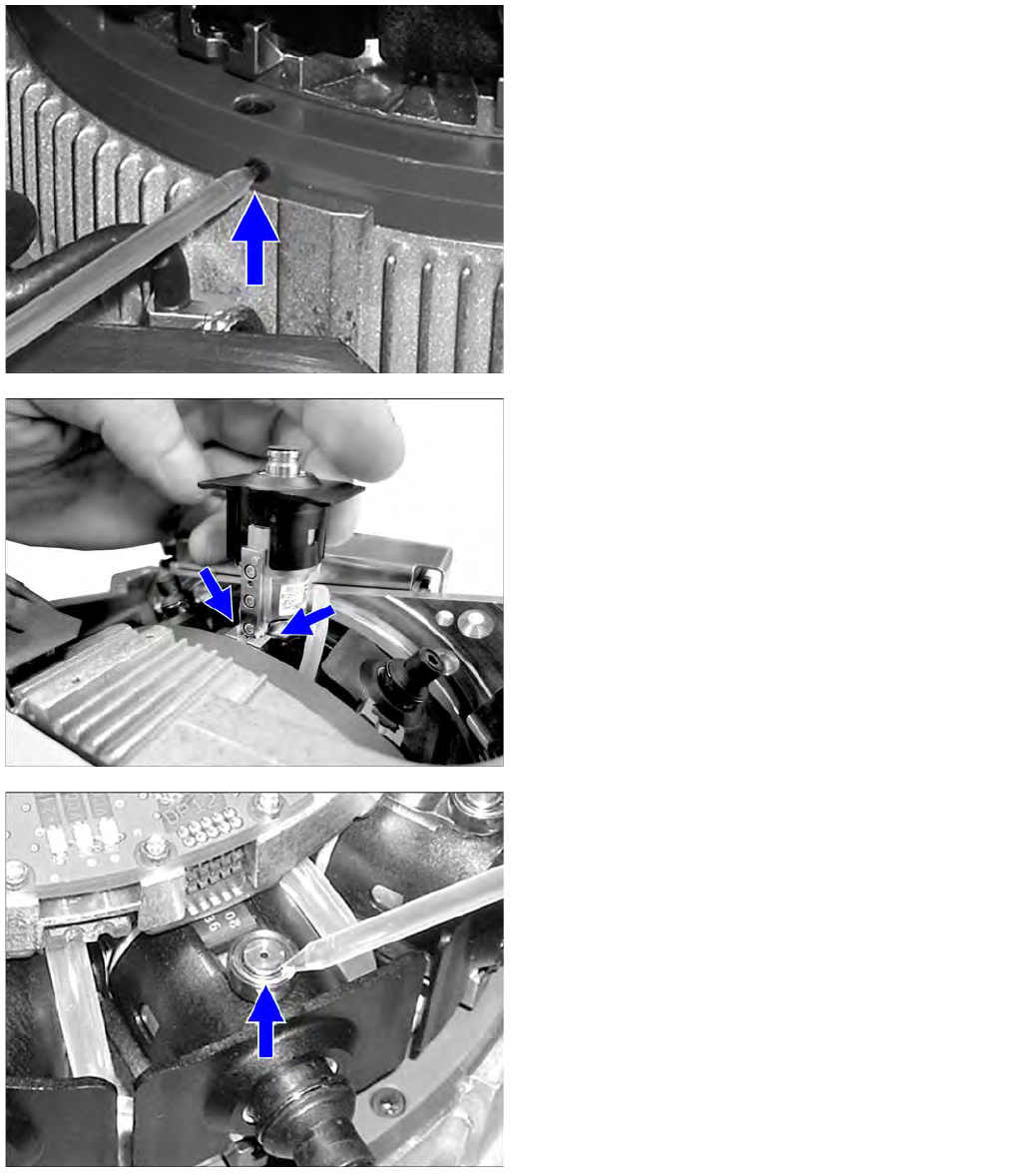
Star bearing
24 x 2 µl Isoflex Topas NCA 5051 (green combitip) into
star bearing
DP segment guide
2 x 2 µl Lubcon Thermoplex ALN 1001/00 (blue combitip)
per ball groove at each segment
Driver bearing
1 x 1 µl Klüberalfa DH 3-100 (black combitip)
per driver bearing
Major Maintenance
Maintenance Tasks for CPP Head Performing Maintenance Tasks
98 Maintenance Manual SIPLACE X Series
Performing Maintenance Tasks
5.6.4 Performing Maintenance Tasks
Oiling th e Z Axis Lin ear Guidance
5.6.4.1 Oiling the Z Axis Linear Guidance
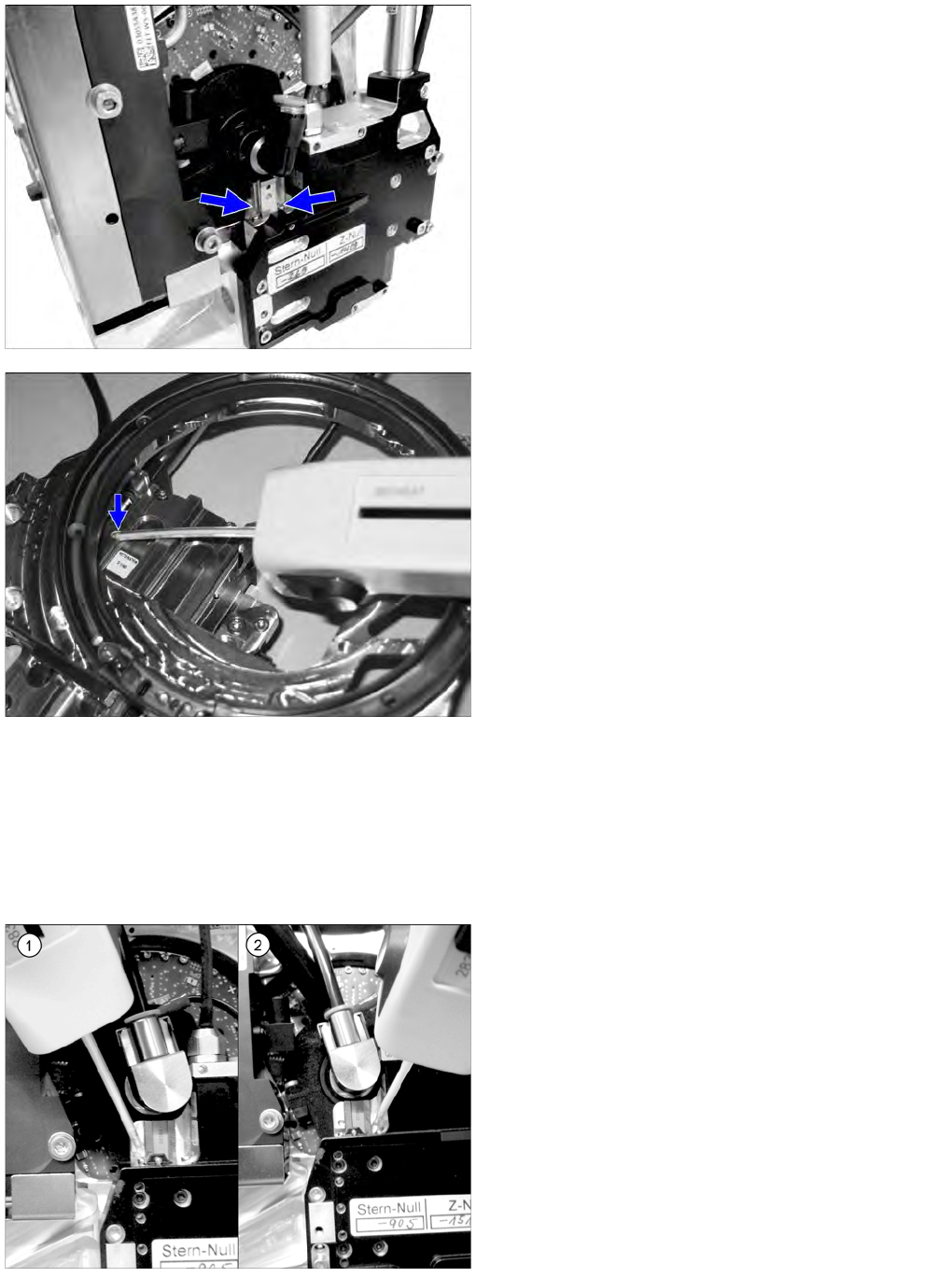
► For this maintenance task, use the blue combitip with Thermoplex ALN 1001/00.
► Set the multipette to 4 µl.
Z linear guide
2 x 4 µl Lubcon Thermoplex ALN 1001/00 (blue combitip)
per ball groove
Support roller
1 x 1 µl Klüber oil GEM 1 220 N (yellow combitip) on the
supporting roller
► Apply 4 µl of lubricant to the left and right sides of the
guide track and move the Z axis approx. 5 times
manually in and out.
► Apply another 4 µl of lubricant to the left and right
sides of the guide track and move the Z axis approx.
another 5 times manually in and out.
► A total of 2 x 4 µl must be applied to each guide track.