LBO für minimale LP-Breite 50mm an D4.pdf - 第45页
LBO 50 mm SIPLACE D4 2 Assembly instructions SOKO Stopper LBO for minimum board size 50 mm SIPLACE D4 11/2007 Edition 45 2.2 Sof tware 2.2.1 Conveyor Firmware : S tart SITEST . : Download the SOKO conveyor firm ware via …
2 Assembly instructions SOKO Stopper LBO for minimum board size 50 mm SIPLACE D4 LBO 50 mm SIPLACE D4
11/2007 Edition
44
2.1.5 Adjustment of the sensor for stopper position "up"
: Start SITEST.
: Use the SITEST conveyor functions to feed a test board to placement position 2, second stop-
per position. The stopper is activated now.
: Fix the sensor at a stopper position where the LED is active.
: Deactivate the stopper with the SITEST function.
Check if the LED is deactivated in the "down" position.
The signal "Stopper up" will be given to the machine control unit and the placement starts.
2

LBO 50 mm SIPLACE D4 2 Assembly instructions SOKO Stopper LBO for minimum board size 50 mm SIPLACE D4
11/2007 Edition
45
2.2 Software
2.2.1 Conveyor Firmware
: Start SITEST.
: Download the SOKO conveyor firmware via the SITEST functions.
2
2
This SOKO firmware only runs with machine software 603.xx and 604.xx. 2
2
2.2.2 SITEST adjustments
: Select in SITEST "conveyor functions" at the Icon bar.
: Select the menu item "options and configuration".
: Select the item "conveyor mode" and the function "change conveyor mode", activate "Long
board option and confirm with "Accept".
: Reboot the placement system.
2
Hex file:
TS510613.HEX
Type:
Application
Machine:
SIPLACE D4
Assembly group:
TSP301
HardwareId:
5
HW variant:
S
SW version:
06.13
SW date:
04.10.2007
2 Assembly instructions SOKO Stopper LBO for minimum board size 50 mm SIPLACE D4 LBO 50 mm SIPLACE D4
11/2007 Edition
46
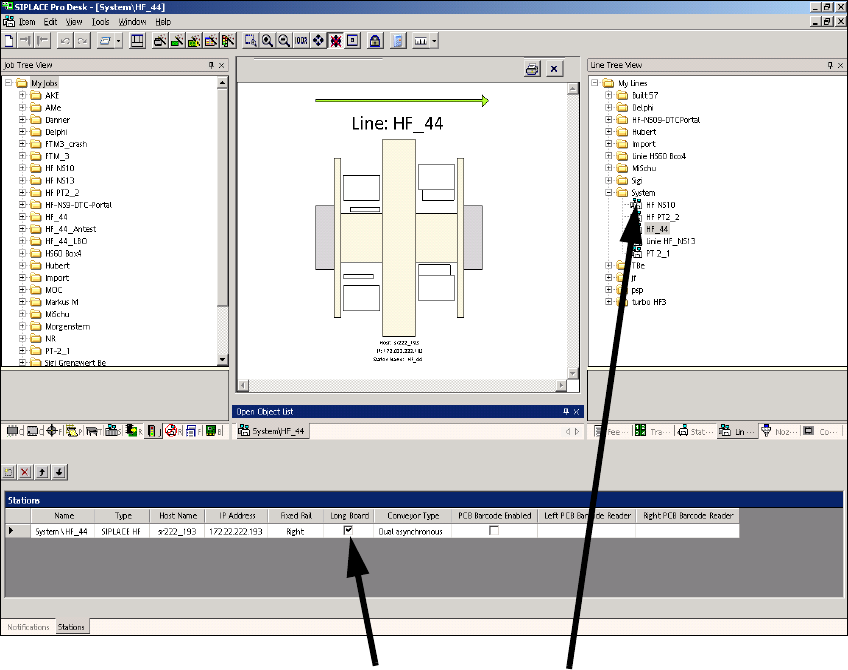
2.2.3 Changes in SIPLACE PRO
The option must be entered in the line configuration in SIPLACE PRO and in the set-up. 2
2.2.3.1 Line configuration
: Select a line and check the Long board check box.
2
2
2
2
2
2
2
2
Click on Long board
Select the line
Click on Long board