Printer 710_810 v8 High Throughput Conveyor Module.pdf - 第6页
HIGH THROUG HPUT CONVEY OR (HTC) MOD ULE ADJUS TMEN TS AND SE TTINGS 17.6 Technical Reference Manual Chapter Issue 3 Oct 06 ADJUSTMENTS AND SETTINGS Rail Lif t ed Sensors 1. In Diagnosti cs select Risi ng T able . 2. Sel…
HIGH THROUGHPUT CONVEYOR (HTC) MODULE
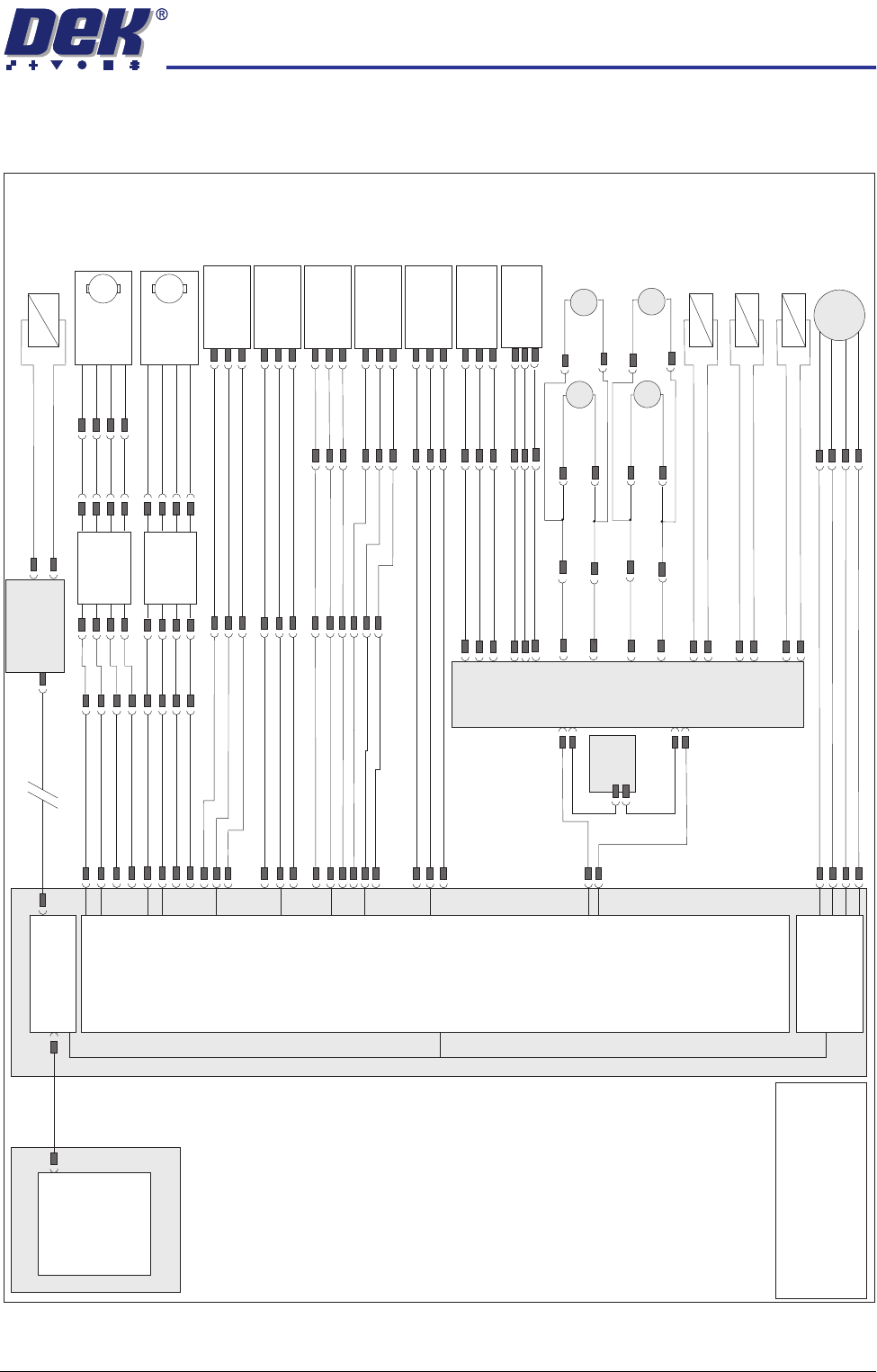
ELECTRICAL SCHEMATIC
Chapter Issue 3 Oct 06 Technical Reference Manual 17.5
ELECTRICAL SCHEMATIC
3 Stage
(M27)
Conveyor
Controller
Machine PC
Motherboard
Machine Control Enclosure
DIG IN 10
DIG IN 11
DIG IN 6
Rail Lift Left
(8SE5)
Board at Right
Sensor (8SE7)
Board at Left
Sensor (8SE8)
8PL10
8PL117
M36PL17
8PL116
8PL12
Dual Stepper
X3
NextMove
Interface Card
X4
Front HTC Belt
Drive (M27M05)
M
8PL23
8PL22
Rear HTC Belt
Drive (M27M06)
M
Phase
Channel
+5V
GND
8PL21
M36PL18
!DIG OUT 3
DIG OUT 3
DIG OUT 2
DIG OUT 2
NextMove ES
(I/O Node 1)
X5
Main Machine
I/O Node 2
Board Clamp/
Snugger Solenoid
(16SOL10)
DIG OUT 9
GND
N2PL4
CAN Bus
N2SK2
USB
Moving Rail
Home (8SE6)
8PL26
M36PL19
DIG IN 5
DIG IN 7
Rail Lift Right
(8SE4)
+12V
8PL15
Sig
0V
NOTE
The breaks in the CAN Bus chain
reflect that additional I/O Nodes may
be fitted, refer to Machine Control
chapter for the complete CAN Bus
chain.
+12V
Sig
0V
+12V
Sig
0V
+12V
Sig
0V
+12V
Sig
0V
M36PL22
Moving Rail
Stepper
Motor 2B-
Motor 2A-
Motor 2B+
Motor 2A+
8PL20
8M2
+12V
Sig
0V
+12V
Sig
0V
Left Auxiliary
Rail Sensor
(27SE01)
Right Auxiliary
Rail Sensor
(27SE02)
M27PL05
M27PL14
M36PL04
M27PL02
M27PL01
M27PL03
M27PL11
Conveyor Board
Stop Solenoid
(M27SOL01)
Upline Board Stop
0V
M27PL08
Conveyor Board
Stop Solenoid
(M27SOL02)
Downline Board Stop
0V
M27PL20
Conveyor Board
Stop Solenoid
(M27SOL03)
Downline Board Stop
0V
M27PL21
Left Auxiliary Rail
Belt Drive
MIU
M01PL1
Speed
Controller
BGE 3004
M27SK24
M27PL26
Speed
Controller
BGE 3004
M27SK25
Phase
Channel
+5V
GND
Rear
(M27M04)
Rear
(M27M02)
M27PL17
M27PL07
Front
(M27M03)
Front
(M27M01)
Right Auxiliary Rail
Belt Drive
M27PL12
M27PL04
M27PL15
M27PL09
M
M
M
M
M27PL16
M27PL06
HIGH THROUGHPUT CONVEYOR (HTC) MODULE
ADJUSTMENTS AND SETTINGS
17.6 Technical Reference Manual Chapter Issue 3 Oct 06
ADJUSTMENTS AND SETTINGS
Rail Lifted Sensors 1. In Diagnostics select Rising Table.
2. Select Select Module.
3. Select Home Rising Table.
4. Select Run Diagnost, the table moves to the home position.
5. Select Exit.
6. Select Rail System.
7. Select Select Module.
8. Select Home Rail Width.
9. Select Run Diagnost, the rear rail moves to the home position.
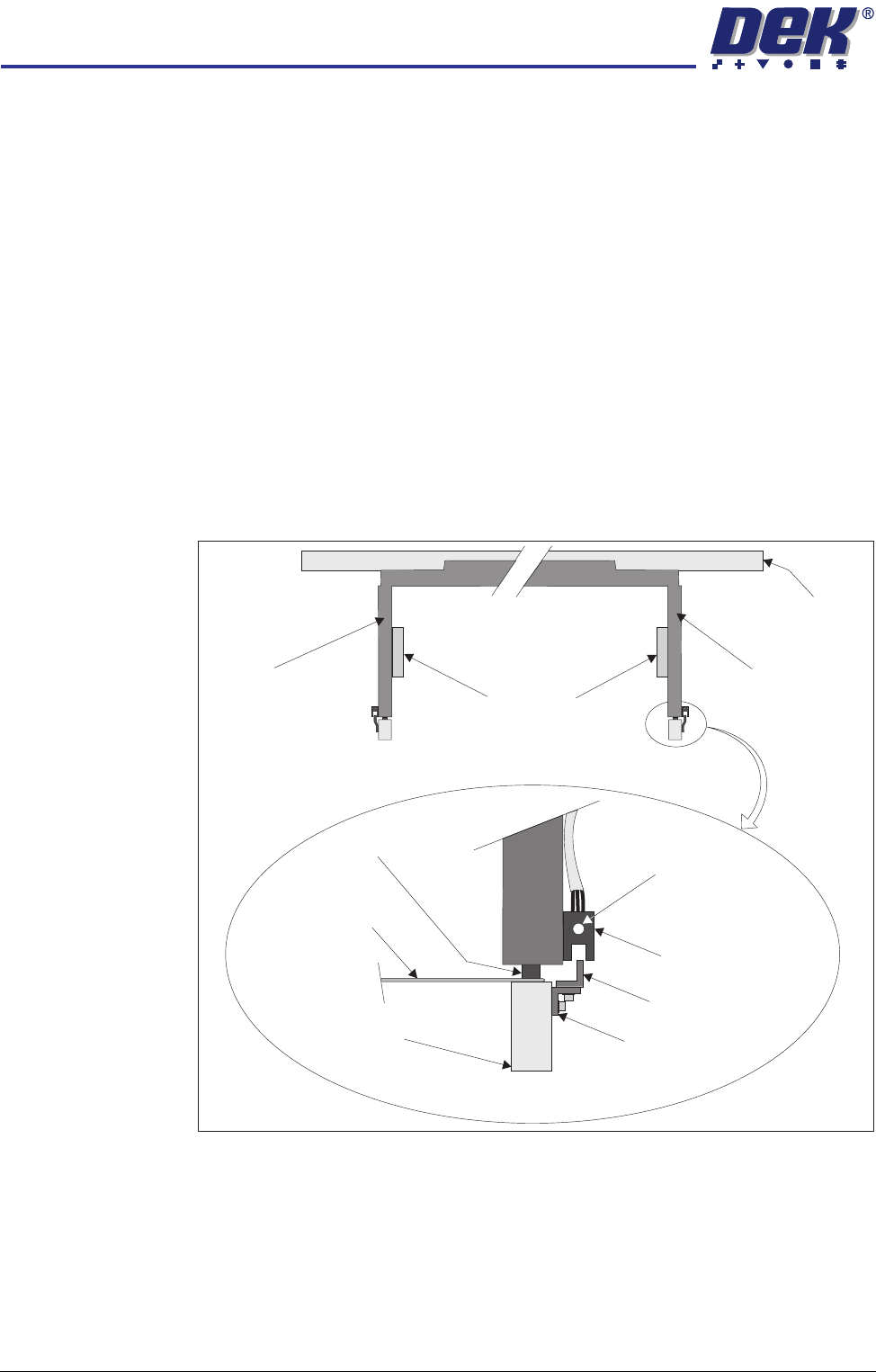
10. Place a 0.5mm feeler gauge between the rail shock absorber on the rear
right rail transport leg and the rail stop bar (clatter bar). Adjust the vane
bracket using a 2.5mm Allen key, so that the sensor LED is On with a 0.5mm
feeler gauge fitted and Off with a 0.7mm feeler gauge fitted.
11. Repeat Step 10 for left hand end of rear rail.
12. Select Drive Rail To Board Width.
13. Select Run Diagnost.
Right Transport Leg
Rear Rail
Front View of Rail System
Left Transport Leg
Linear Bearing
Feeler Gauge
Rail Stop Bar
(Clatter Bar)
Opto Vane
Bracket
Opto Vane
Opto
Shock Absorber
Sensor LED
Enlarged View of Right Rail Opto
HIGH THROUGHPUT CONVEYOR (HTC) MODULE
ADJUSTMENTS AND SETTINGS
Chapter Issue 3 Oct 06 Technical Reference Manual 17.7
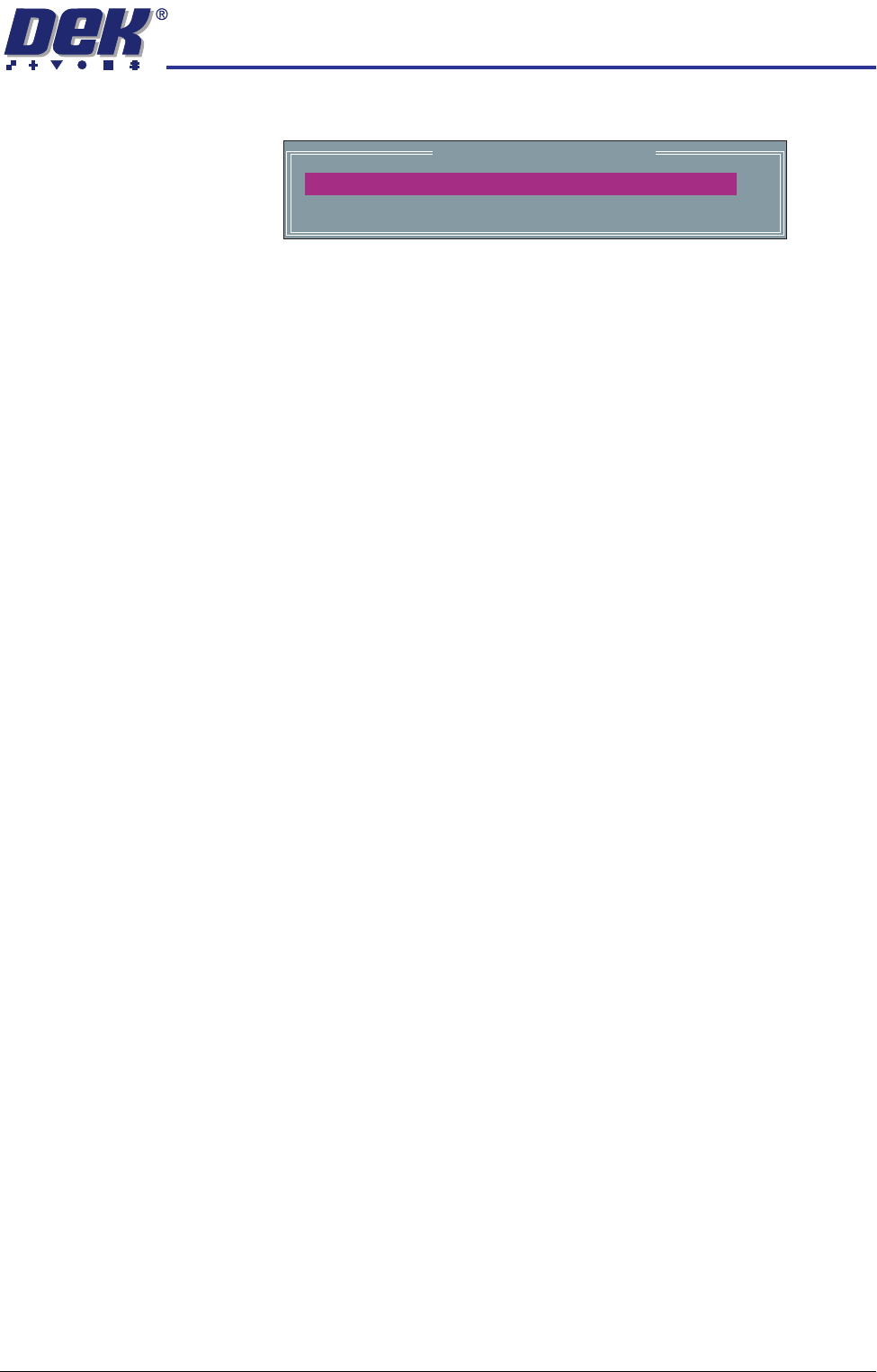
14. Select Adjust, the following window is displayed:
15. Using the Next, Previous, Incr. and Decr. keys, set the Board Width to
50mm.
16. Select Exit.
17. Select Drive Rail To Board Width, the rear rail moves to the new board
width.
18. Repeat Steps 10 and 11 for setting the vane at the 50mm width. Lock the
adjusting screws.
19. Select Home Rail Width.
20. Select Run Diagnost, the rear rail moves to the home position.
21. Repeat Steps 10 and 11 at the home position, adjust vanes if necessary.
22. Select Cycle Rails.
23. Select Run Diagnost, ensure the sensors LED are On over the full travel of
the rail.
Rail System Test Parameters
BOARD WIDTH
CYCLE COUNT
250.0
50
mm
Cycles