00196449-04_UM_FCCS_digital_DE_EN.pdf - 第76页
4 Camera Calibration in Stations from SW705.03 4.8 Result Assessment 76 Operating Manual / Bedienungsanleitung Camera Calibration FCCS digital Kamerakalibrierung FCCS digital 04/2020
4 Camera Calibration in Stations from SW705.03
4.8 Result Assessment
Operating Manual / Bedienungsanleitung Camera Calibration FCCS digital Kamerakalibrierung FCCS digital 04/2020 75
NOTICE
Camera soiling in red area
If the marker in the display is in the red section, showing "Cleaning is due",
no camera calibration will be performed!
4.8 Result Assessment
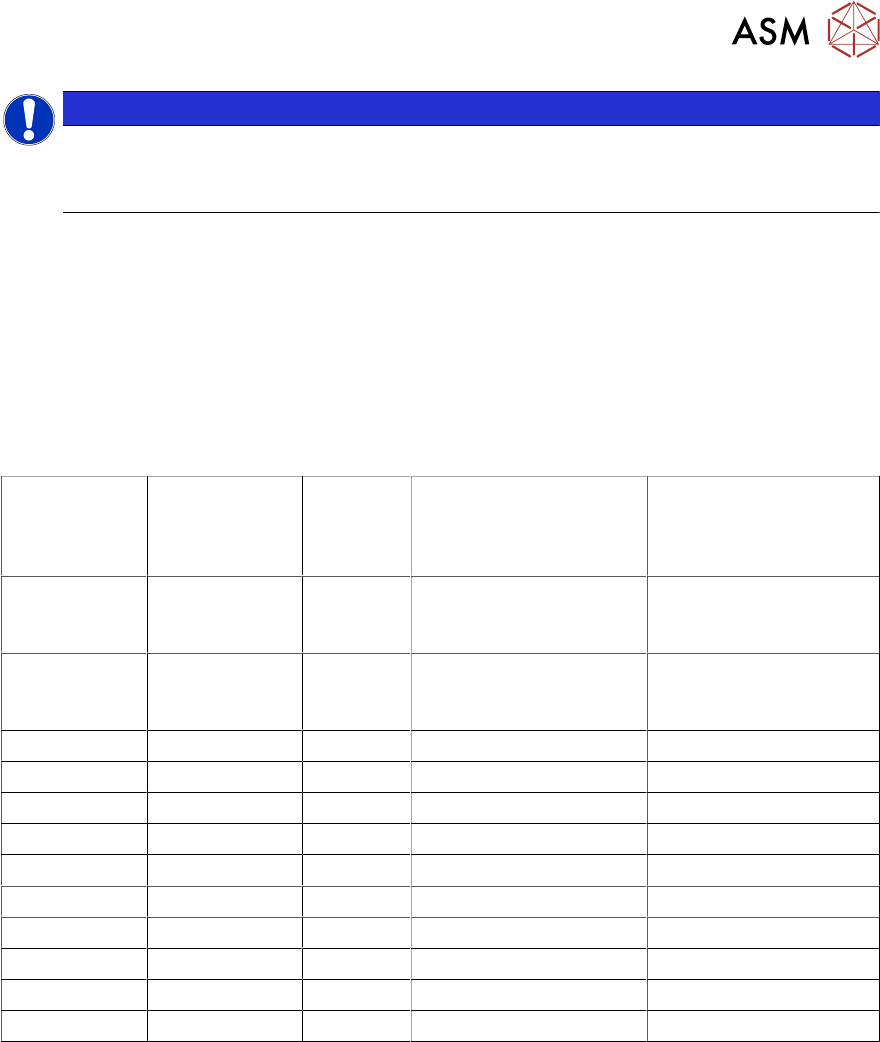
The station software always decides if the illumination calibration of a camera has been success-
fully completed or not. Thus, the camera may be used as long as the calibration completes suc-
cessfully.
All integrated illumination levels should have similar basic brightness values. Illumination levels
with high deviations are an indication of damage to the LEDs or their control systems. The following
applies for the result assessment:
Camera type max. camera
Gain
max.
Factor
Threshold value: soft-
ware (FCCS result for
illumination levels)
Threshold value: ex-
change recommended
(FCCS result for illu-
mination levels)
SST23
(to
06.07.2011)
8 97 776 500
SST23
(from
07.07.2011)
4 97 388 200
SST24 8 98 784 500
SST 25 8 97 776 500
SST28 8 97 776 500
SST 29 7 97 679 400
SST 30 4 97 388 200
SST 33 7 97 679 400
SST 34 8 97 776 500
SST 36 8 97 776 500
SST 38 7 97 679 400
SST 41 7 97 679 400
This is valid for "Threshold value: software":
If this threshold value is exceeded, the FCCS software notifies that the camera calibration has not
been successfully completed.
This is valid for "Threshold value: exchange recommended":
If this value is exceeded, we recommend to send the camera to ASM Assembly System for main-
tenance.

4 Camera Calibration in Stations from SW705.03
4.8 Result Assessment
76 Operating Manual / Bedienungsanleitung Camera Calibration FCCS digital Kamerakalibrierung FCCS digital 04/2020
5 Camera Calibration at the Vision Teach Station VTS
5.1 Introduction
Operating Manual / Bedienungsanleitung Camera Calibration FCCS digital Kamerakalibrierung FCCS digital 04/2020 77
5 Camera Calibration at the Vision Teach
Station VTS
5.1 Introduction
If a camera calibration shall be performed during production, we recommend to perform it on all
available machines, but especially in the case of a central data management.
Then in most cases, illumination settings of the component shapes have to be adjusted after a
camera recalibration or adjustments will be required on uncalibrated cameras in the near future.
What applies for the cameras on the machines applies even more for a Vision Teach Station VTS,
if existing.
5.2 Prerequisites
5.2.1 Software
The functions required for a camera calibration are available in the VTS software as of the
SIPLACE Vision Teach Station V5.1.1 version.
The SIPLACE Vision Teach Station works with SIPLACE Pro V5.0 SP2 and higher (currently to
SIPLACE Pro V11.1).
5.2.1.1 Supported Windows Versions
The SIPLACE Vision Teach Station runs under Windows XP SP3, Windows Vista and Windows 7
(the respective 32-bit and 64-bit versions).
The VTS adapter is installed with SIPLACE Pro. Thus, the VTS adapter supports all Windows ver-
sions also supported by SIPLACE Pro V5.1 and higher. These are Windows XP SP3, Windows
Vista and Windows 7.
NOTICE
Supported Windows versions
ASM line software products from release R19-2 onwards will no longer support the Win-
dows 7 operating system.
This means that the computers need to be upgraded to Windows 10 or replaced, before
SIPLACE Pro 17.0 or higher or Vision Teach station software 5.7.1 or higher is installed.
NOTICE
The "Check camera soiling" function can not be performed at the Vision Teach station.
5.2.2 Hardware
For a camera verification at the VTS, the same white standards are used as for the machines.
Adapters are required to position these white standards on the camera.
They will be positioned on the component contact surface of the respective camera.