00193703-01.pdf - 第47页
SIPLACE Návod pro software SR.504.xx 4 Vypnutí a zapnutí linky SIPLACE Vydání 01/2003 CZ 4.1 Zapnutí linky SIPLACE 47 4 V ypnutí a zapnutí linky SIPLACE V této kapitole nalezne te nápov ě du k zapnutí a vypnutí linky SIP…
3 Grafické rozhraní uživatele SIPLACE Návod pro software SR.504.xx
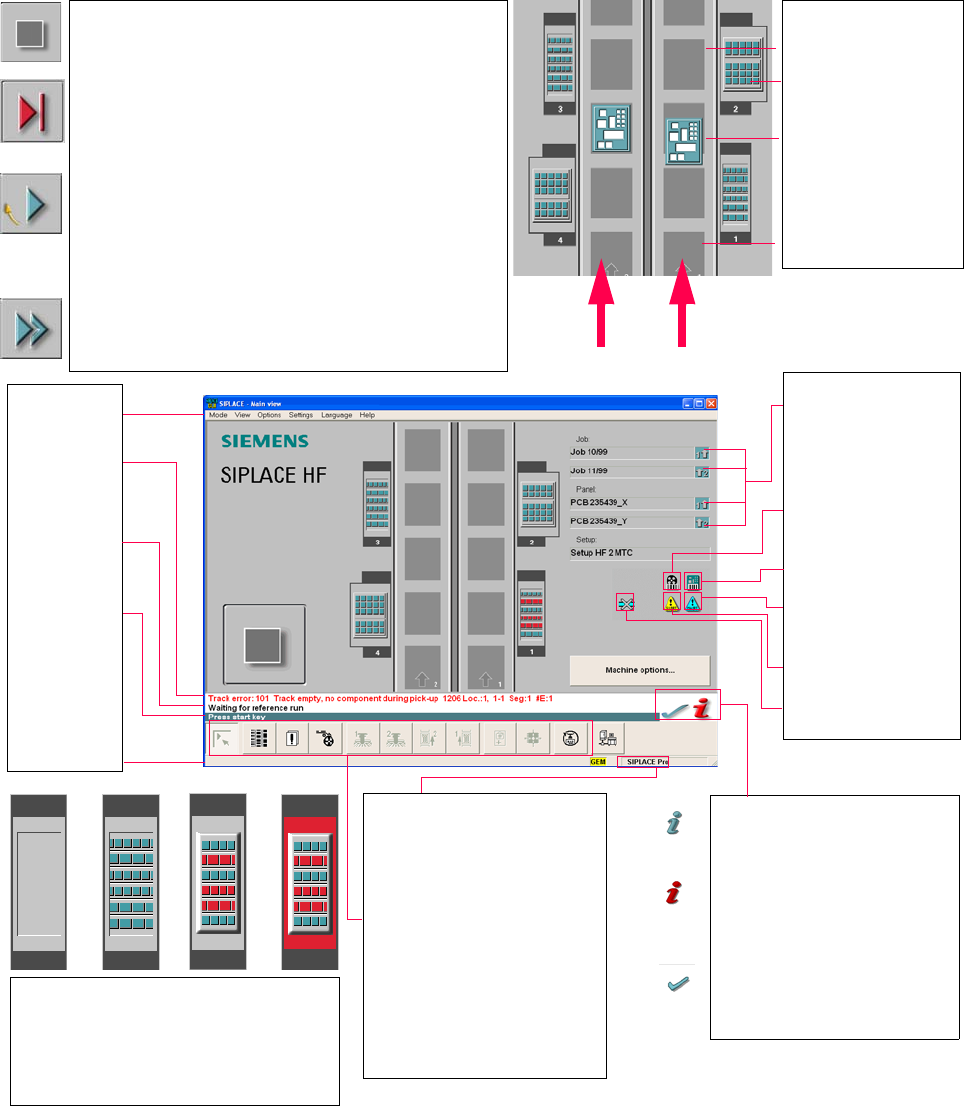
3.4 Vývojový diagram k základnímu náhledu Vydání 01/2003 CZ
46
3.4 Vývojový diagram k základnímu náhledu
3
3
3
Pull-down menus
3
Error information
bar
3
Status indication
and process status
3
Notification about a
specific action to
carry out
3
Information bar
3
Control modes:
Stand alone
SIPLACE Pro
3
Submenu icons with info box:
Main view
Setup
Error
Feeders
Gantry 1, 2
PCB conveyor 2, 1
Teach fiducial
Test component
SITEST
GEM
3
Output conveyor
The output conveyor is empty.
MTC on location 2
Central conveyor
The PCB is supplied.
Input conveyor
The input conveyor is empty.
3
Context-sensitive help system
This also provides a short description of all
displayed operating elements.
3
Help system for errors
Starts a help system displaying possible
causes of the current error along with correc-
tive actions.
3
Error deletion
After the error has been successfully cor-
rected, the currently active error is deleted.
Conveyor 2
Conveyor 1
3
Identifies the job or panel of the
right conveyor lane, or of the
single conveyor, and of the left
conveyor lane (dual conveyors
only).
3
Barcode-supported component
refilling
3
PCB barcode is activated.
3
Machine options have been
changed
3
Software options configured
3
Compressed air switch-off
mechanism configured
1234
1 No setup available on the corresponding location
2 Setup available
3 Setup available - at least one empty track error
4 Machine standstill due to track error
3
This display appears during the start-up process of the machine. Only when the
reference run has been completed successfully will the display appear in the form
of a button.
3
Status
The machine is running, or is in its 'ready' state.
Pressing the button:
The machine stops.
3
Status
The machine is placing components; 'stop' is activated. The assembly of the
PCBs located in processing conveyors 1 and 2 or in the central conveyor will be
terminated and the PCBs will be transported to the intermediate or output
conveyor. Subsequently, the machine will stop.
Pressing the button:
The machine continues to run without interruption.
3
Status
Machine is in the stopped state.
Pressing the button:
The machine resumes the placement operation.

SIPLACE Návod pro software SR.504.xx 4 Vypnutí a zapnutí linky SIPLACE
Vydání 01/2003 CZ 4.1 Zapnutí linky SIPLACE
47
4 Vypnutí a zapnutí linky SIPLACE
V této kapitole naleznete nápovědu k zapnutí a vypnutí linky SIPLACE 4
4.1 Zapnutí linky SIPLACE
4.1.1 Spuštění programovacího systému SIPLACE Pro
Æ Spust’te SIPLACE Pro spouštěcím menu Windows NT
Start --> Programy --> položka Siemens SIPLACE
nebo
Æ Spust’te SIPLACE Pro
prostřednictvím ikony na desktopu.
Systém se nyní spojí do serveru SIPLACE Pro a otevře uživatelské rozhraní SIPLACE Pro. 4
Zatímco systém vytváří spojení se serverem SIPLACE Pro, vidíte následující zobrazení na
obrazovce. 4
4 Vypnutí a zapnutí linky SIPLACE SIPLACE Návod pro software SR.504.xx
4.1 Zapnutí linky SIPLACE Vydání 01/2003 CZ
48
4
Obr. 4.1 - 1 SIPLACE Pro se spouští
4.1.2 Na co máte dbát, dříve než zapnete stanice
POZOR
Dříve než zapnete stanice, proveďte prosím dále popsané pracovní operace. 4
Æ Zkontrolujte, jestli jsou připojené stanice na napájecím proudovém zdroji a na zařízení pro
zásobování stlačeným vzduchem.
Æ Proveďte vizuální kontrolu stanic. Dbejte především na to, aby se v oblasti pojíždění portálů
nevyskytovaly žádné překážky.
Æ Zajistěte, aby se osy z všech hlav nacházely ve svých horních koncových polohách.
Æ Zavřete kryty dopravníku a ochranné poklopy.
Æ Zajistěte, aby v disketové mechanice staničního počítače nebyla vložena žádná disketa.