00192211-02_RI_ObliqueLighting.pdf - 第32页
Retrofit Instructions Oblique Lighting for SIPLACE 80 S-20 /F4/S-23/ F5 /HS-50/HF 8.5 Moving In the Component Changeover Table 05/15 Issue 34 ► Plug the 2-pin connector onto the two pins assi gned to th e st andard light…
Oblique Lighting for SIPLACE 80 S-20 /F4/S-23/ F5 /HS-50/HF Retrofit Instructions
05/15 Issue 8.5 Moving In the Component Changeover Table
33
10 HS-50
To activate "oblique lighting blue", you must proceed as follows: 10
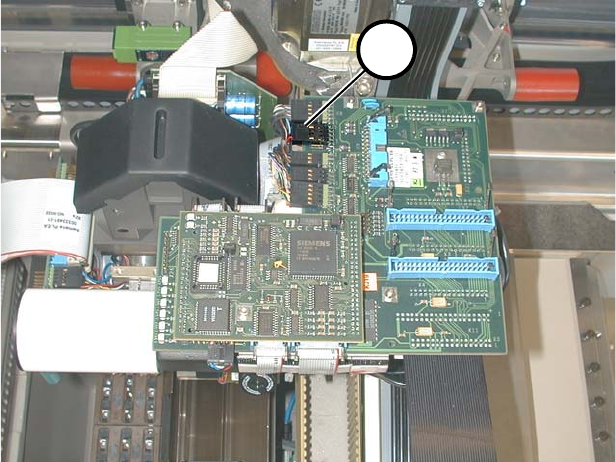
► Unplug the 8-pin connector (1 in Fig. 10.0.1 and 10.0.2) of the standard lighting.
10
Fig. 10.0.1 S50: 8-Pin Connector of the Standard Lighting
1
2
1
Retrofit Instructions Oblique Lighting for SIPLACE 80 S-20 /F4/S-23/ F5 /HS-50/HF
8.5 Moving In the Component Changeover Table 05/15 Issue
34
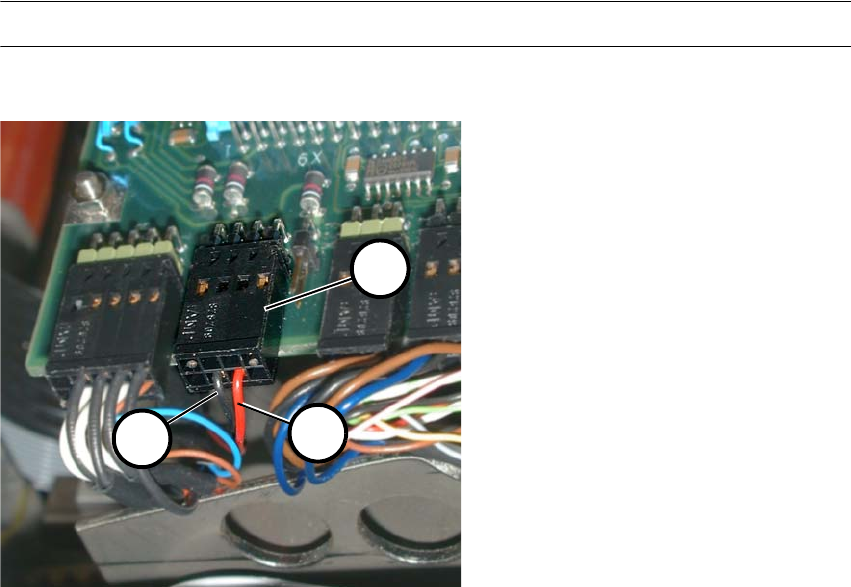
► Plug the 2-pin connector onto the two pins assigned to the standard lighting (watch the polar-
ity!) (2+3 in Fig. 10.0.2).
► Use a cable tie to fasten the connector that you don’t need.
Note: No changes have to be made in the software. 10
10
Fig. 10.0.2 HS50: 8-Pin Connector of the Standard Lighting with Cables
(4) 8-pin connector
(5) Red cable
(6) Black cable
1
2
3
35