00196678-0102_RI_CAN-Knoten_X-Serie70x_De+EN.pdf - 第64页
Installation Final wor k Installing the Solenoid Valve for the Nozzle Station CAN Nodes 64 Retrofit Instructions CAN Node X Series SW70x 6.7 Final work X Check whether you have removed all the tools and assemblies which …
Installation
Installing the Solenoid Valve for the Nozzle Station CAN Nodes Converting the C&P20 Nozzle Station
Retrofit Instructions CAN Node X Series SW70x
63
6.6.2 Installing the Solenoid Valve for the Nozzle Station CAN Nodes
Assembly kit: "Hose for nozzle station with valve" [03051467-xx]
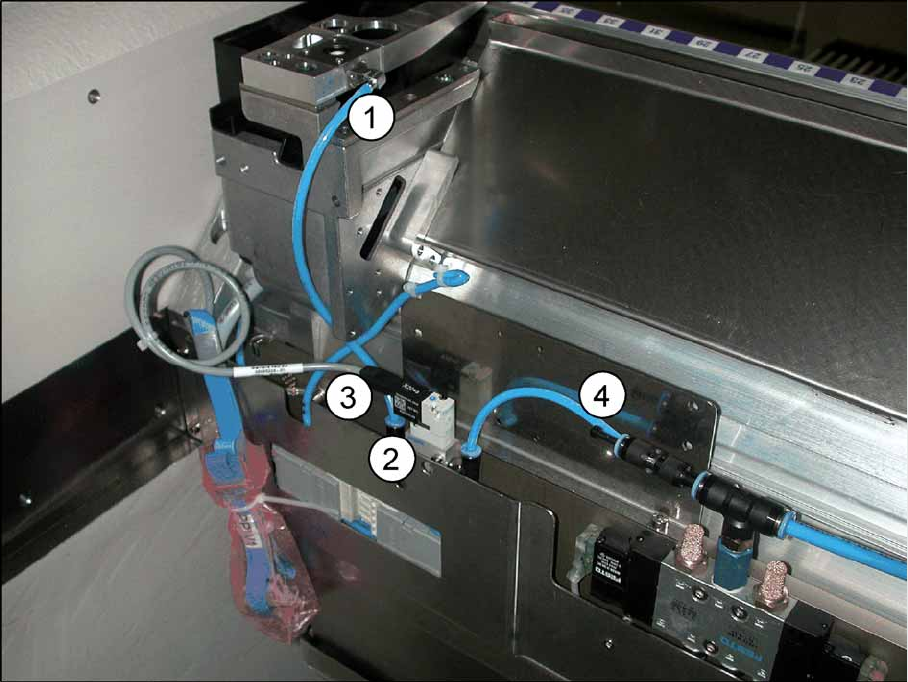
6-24: Hose for nozzle station with valve [03051467-xx]
X Install the solenoid valve (2) with the two DIN912-M3x16-A2-70 screws to the component trolley
feed-in device. If the required holes are not present, fix the solenoid valve and the hose to the
component trolley feed-in device with cable ties, after completing the work to be performed.
X Replace, unless already performed, the QSC-6H plug at the solenoid valve feed-in control with the
Y connector (4).
X Connect the "hose PUN4 125 mm" with the Y connector (4) and the solenoid valve (2). The second
opening on the Y press-fit connection needs to be connected with the pneumatic hose of the nozzle
changer or closed with the QSC-4H plug.
X Connect the hose (1) with the solenoid valve (2) and the nozzle station.
X Connect the cable which has already been connected in the component trolley feed-in device (3) to
the solenoid valve (2).
X As shown in the diagram above, fix the solenoid valve (2) with two screws (DIN 7991-M4x20-8.8) to
the component trolley feed-in device.
(1) Hose for nozzle station PUN4 200 mm (2) Solenoid valve assembly for nozzle station
[03055785-xx]
(3) Cable of feed-in device for X series [03053223-
xx]
(4) "Y connector with sleeve QSY-6H-4"
[03055792-xx]
Installation
Final work Installing the Solenoid Valve for the Nozzle Station CAN Nodes
64 Retrofit Instructions CAN Node X Series SW70x
6.7 Final work
X Check whether you have removed all the tools and assemblies which are not needed for operating
the machine from the travel range of the placement heads.
X Switch the machine on.
X Move the component trolley into the machine.
X Download the embedded software.
X Perform a firmware download to the tape cutter control board.
Function check and troubleshooting
Check the functions by enabling the tape cutter components in the single functions and, if present, by
opening and closing the nozzle changer, checking the reject bin queries and by switching on the nozzle
station solenoid valve.
X Remove the component trolley.
X Switch off the machine.
X Fit the cover from the retrofitting kit onto the CAN nodes assembly.
X Shorten the cable ties if this has not already been done.
X Fit the box PC unit and the "power supply for the component trolley feed-in device FCU" back into
place in the machine backpack.
X Fit all covers.