00198574-01_Process_Foundation_DEK_Micron_EN.pdf - 第4页
1 Machine Safety 1.4 E STOP OPERATION 4 Process Foundation DEK Micron-Series 12/2017 Symbol Definition CAUTION HANDLING SOLVENT AND SOLDER. WHEN USING OR HANDLING ANY SOLDER PASTE OR SOLVENT FORMULATION THE MANUFACTURERS…
1 Machine Safety
1.1 GENERAL
Process Foundation DEK Micron-Series 12/2017 3
1 Machine Safety
1.1 GENERAL
CAUTION
Any staff working on the machine must be familiar with the safety instructions in the
technical reference manual and observe these at all times. The following safety instructions
are only an excerpt from the chapter "Operational Safety" in the machine technical
reference manual. For further detailed safety information please refer to the manuals that
was supplied with your machine.
1.2 HAZARDOUS MATERIALS
Hazardous materials, as defined by NFPA 497 (National Fire Protection Association), are not
recommended by ASM for use on this machine. If one or more hazardous materials are used,
decontamination must be carried out in accordance with SEMI S12 or equivalent local regulations.
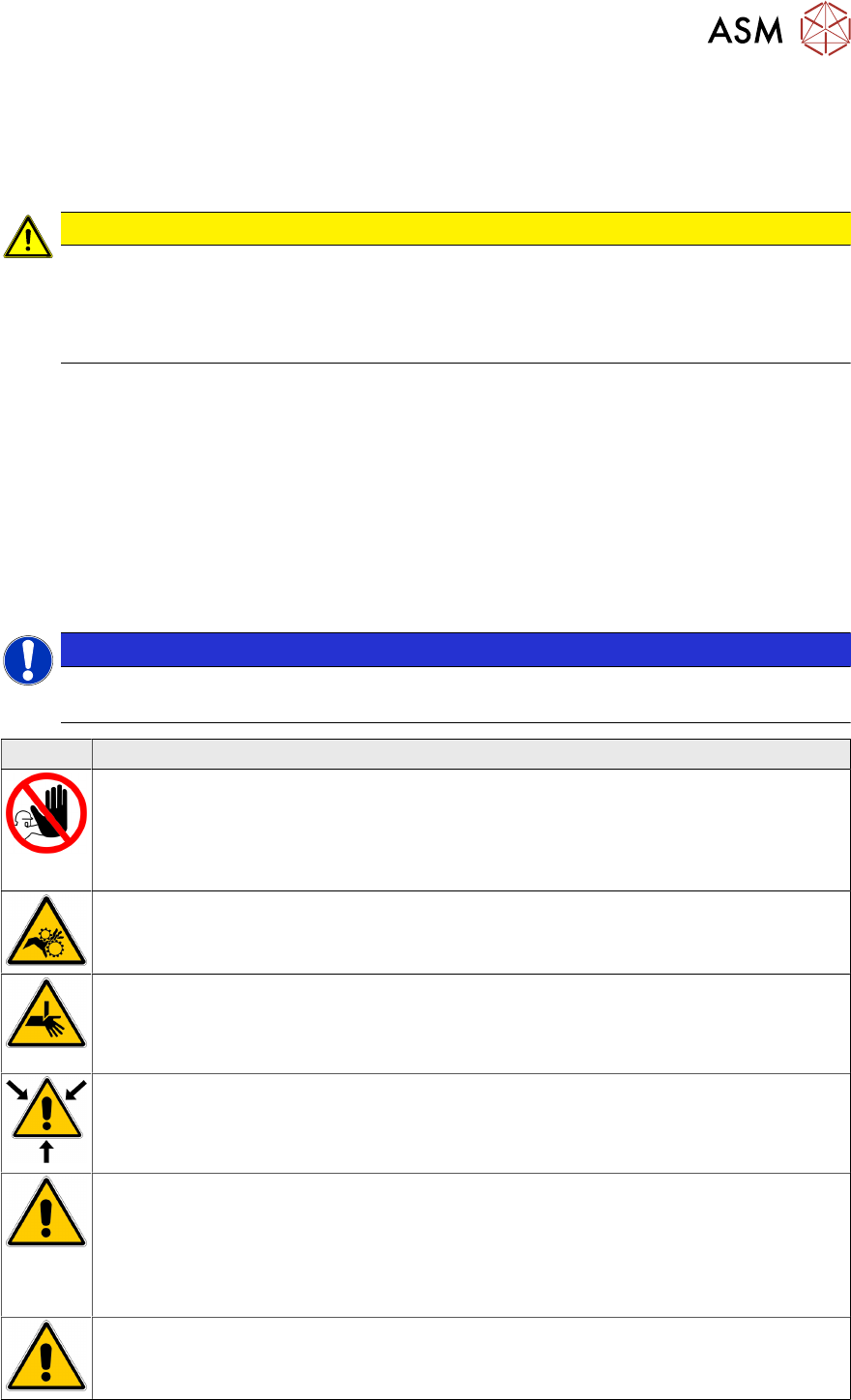
1.3 Warnings, Prohibitions, and Cautions
The warning, prohibition and caution notices below are fitted to the machine and shown in the
relevant procedures within this manual.
NOTICE
NOTE
Some of the warning symbols below may not be applicable to your machine.
Symbol Definition
PROHIBITION
MACHINE COVERS. IN ORDER TO PROTECT PERSONNEL AND TO PREVENT
DAMAGE TO THE MACHINE, COVERS ARE FITTED TO THE MACHINE FRAME.
THESE PANELS MUST ONLY BE REMOVED BY SUITABLY QUALIFIED
PERSONNEL.
WARNING
MOVING PARTS. MOVING PARTS ARE PRESENT IN THE VICINITY OF THIS
WARNING LABEL, THESE PARTS HAVE THE POTENTIAL TO CAUSE INJURY.
WARNING
BOARD CLAMPS. EXTREME CARE MUST BE EXERCISED WHEN WORKING IN
THE TOOLING AREA OF THE MACHINE TO AVOID INJURY. THE FOILS ON THE
FRONT AND REAR BOARD CLAMPS ARE VERY SHARP.
WARNING
SOLVENT SPRAY. THE UNDERSTENCIL CLEANER SPRAYS A FINE JET OF
SOLVENT SOLUTION ON TO THE CLEANER. APPROVED PROTECTIVE
CLOTHING SHOULD BE WORN.
CAUTION
RECOMMENDED SOLVENTS. ANY SOLVENTS USED MUST COMPLY WITH
LOCAL ENVIRONMENTAL GUIDELINES. ASM RECOMMEND USING SOLVENTS
THAT ARE ENVIRONMENTALLY FRIENDLY, IE CFC FREE AND WATER BASED.
SOLVENTS USED MUST HAVE FAST EVAPORATION RATES AND FLASHPOINT
SPECIFICATIONS GREATER THAN 39°C.
CAUTION
SOLVENT SOLUTION. DO NOT MIX SOLVENT SOLUTIONS. FLUSH THE SOLVENT
TANK THOROUGHLY WHEN CHANGING TO A DIFFERENT SOLVENT SOLUTION.
1 Machine Safety
1.4 E STOP OPERATION
4 Process Foundation DEK Micron-Series 12/2017
Symbol Definition
CAUTION
HANDLING SOLVENT AND SOLDER. WHEN USING OR HANDLING ANY SOLDER
PASTE OR SOLVENT FORMULATION THE MANUFACTURERS’ SAFETY DATA
SHEETS MUST BE STRICTLY ADHERED TO.
CAUTION
TOXIC CHEMICALS MAY BE PRESENT. WEAR EYE PROTECTION.
CAUTION
TOXIC CHEMICALS MAY BE PRESENT. WEAR SAFETY GLOVES.
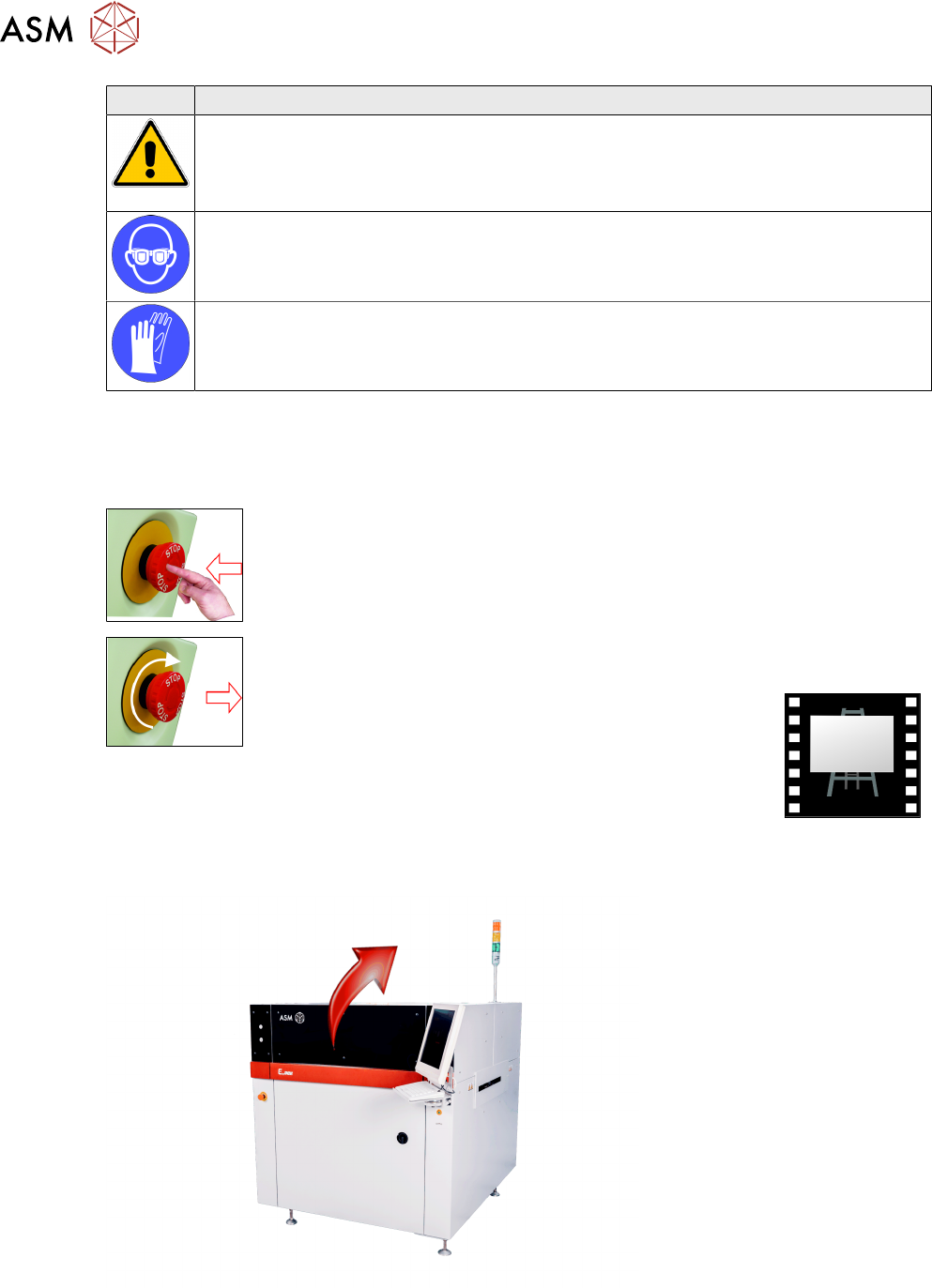
1.4 E STOP OPERATION
With the machine powered up, activating the red Emergency Stop button (E Stop)causes the
machine to stop in a controlled manner.
To activate:
press the E Stop button, electrical power to the machine is suspended.
To reset:
turn the E Stop button clockwise until it unlatches.
1.5 PRINTHEAD COVER
Raising the printhead cover suspends operation of the machine to allow the operator safe access
to the tooling area.
1 Machine Safety
1.6 SAFETY INTERLOCKS
Process Foundation DEK Micron-Series 12/2017 5
1.6 SAFETY INTERLOCKS
The safety features designed into the printer are for the protection of all operators and maintenance
personnel. ASM strongly recommend safety devices are never overridden.
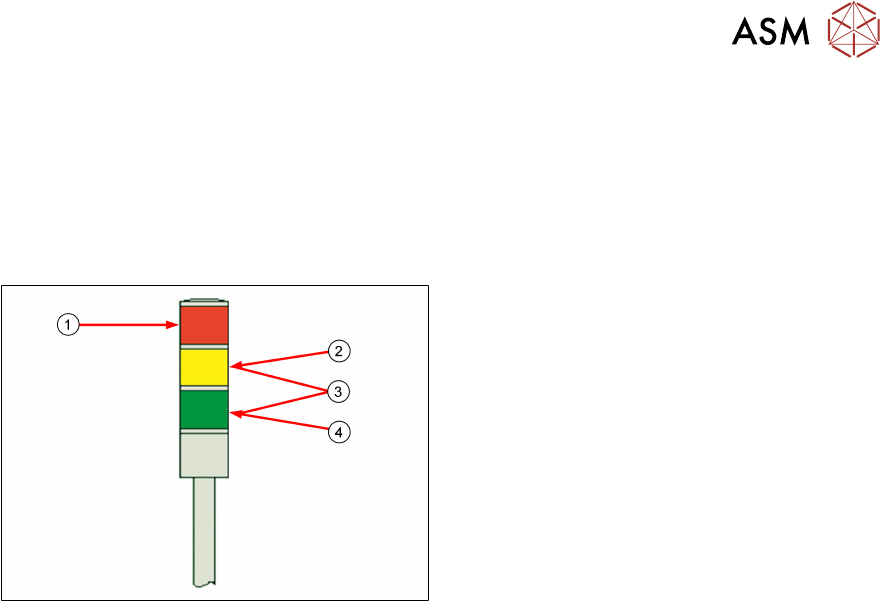
1.7 TRI Colour Beacon
1. Machine is not operational
System power is down
Error message displayed
2. Machine is not in a ready state
Machine is initializing
Machine is in set up
Machine is in maintenance
3. Paper Empty
Solvent Empty
4. Machine is operational
Machine is waiting in a ready state
1.8 ESD Guidelines
Do not touch electronic modules unless it is absolutely essential to do so. If it is necessary, make
sure that you do not touch the pins or printed conductors when you pick up flat modules.
Do not touch components unless
●
you are constantly earthed by an ESD wrist strap or
●
you are wearing ESD shoes or ESD shoe earthing strips on an ESD floor.
Always discharge yourself before you touch an electronic module. To do this, simply touch a
conductive and earthed object immediately before you touch the module (such as unpainted parts
of a switch cabinet, a water pipe, etc.).
Do not allow modules with chargeable and highly insulating materials to touch one another, e.g.
plastic films, insulating table surfaces or items of clothing made from synthetic fibers.
Always place the modules on a conductive surface (table with an ESD coating, conductive ESD
foam, ESD bag or container).
Do not bring modules near visual display units, monitors or televisions. Keep them at least 10 cm
away from the screen.
Do not take measurements on such modules unless
●
the measuring device is earthed (e.g. via PE conductors)
●
you discharge the measuring head before taking measurements with a potential-free
measuring device (e.g. by touching an unpainted metal part of the controller casing).
Always use an earthed soldering iron if you carry out any soldering work.
► Always store modules and components in conductive packaging (e.g. metallized plastic bags
or metal sleeves) and dispatch them in conductive packaging.
► If the packaging is not conductive, place the modules in a conductive envelope before
packaging. Use conductive expanded rubber, ESD bags, domestic aluminum foil or paper, for
example. NEVER use plastic bags or film.
► If the module has integral batteries, ensure that the conductive packaging does not touch or
short-circuit the battery terminals and, if necessary, first cover the terminals with insulating
tape or material.