00196778-02_VB Setup Center 4.2_DE_EN.pdf - 第38页
System Requirements Resource Requirements 38 Setup Center 4.2 Setup Center 4.2 4.2 Resource Requirements 4.3 Supported Software Programming system SIPLACE Setup Center supports t he following version in online a nd offli…
System Requirements
Computers
Setup Center 4.2 Setup Center 4.2 37
4 System Requirements
4.1 Computers
NOTICE
NTFS partitioning
SIPLACE Setup Center requires a NTFS partitioning for installation. FAT or FAT32 file systems
are not supported.
Installation of SIPLACE Setup Center onto a FAT partitioning will be interrupted by the setup
program.
NOTICE
Lizenzmanager 2.2
SIPLACE Setup Center 4.2 requires license manager 2.2 for operation.
Depending on the selected function one or more licenses are required for operating Setup
Center.
Database Server
Or
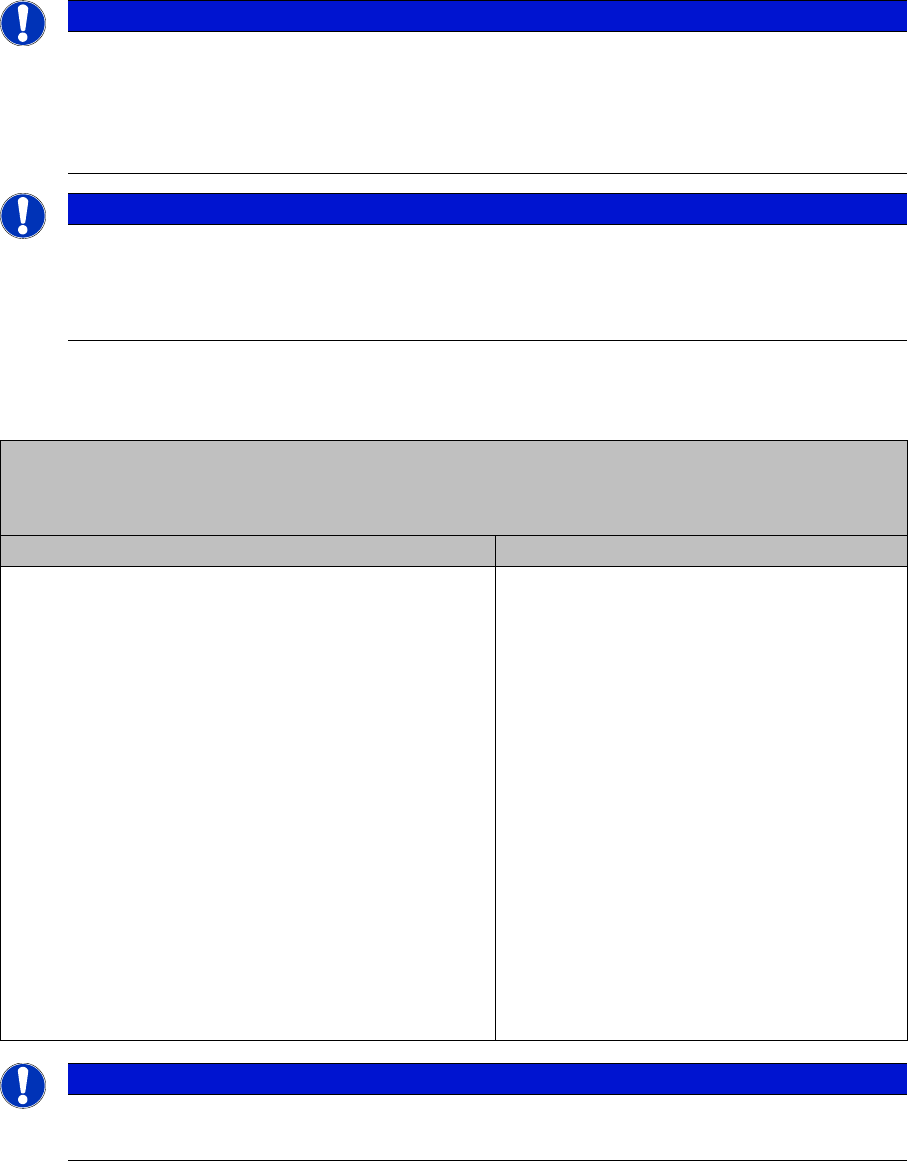
Complete System for SIPLACE Setup Center Single Computer Configuration
Software (required) Hardware (recommended)
▪ Preferred:
Windows Server 2008 SP2 (64 Bit)
▪ Compatible:
Windows Server 2003 SP2 (32 and 64 Bit)
Windows Server 2008 SP2 (32 and 64 Bit)
Windows Server 2008 R2 (32 and 64 Bit)
▪ Preferred:
Microsoft SQL Server 2008 R2 /
Express Edition R2 (64 Bit)
▪ Compatible:
Microsoft SQL Server 2005 SP3/ Express Edition
SP3 (32 and 64 Bit)
Microsoft SQL Server 2008 SP1/ Express Edition
SP1 (32 and 64 Bit)
Microsoft SQL Server 2008 R2 / Express Edition R2
(32 Bit)
▪ Microsoft .NET Framework 3.5 SP1
▪ E. g. 2x Intel E5520 2.26 GHz 8MB
▪ 4096 MB RAM
▪ >= HDD SATA II 500 GB
▪ Optional: data backup drive (e.g. DVD,
DAT)
▪ 21" screen (minimum 19")
▪ Optional: uninterruptible power supply
NOTICE
The size of the database server depends on the amount of the batch data.
►Large data amounts require a higher server performance.

System Requirements
Resource Requirements
38 Setup Center 4.2 Setup Center 4.2
4.2 Resource Requirements
4.3 Supported Software
Programming system
SIPLACE Setup Center supports the following version in online and offline mode:
Station software
SIPLACE Setup Center requires the SIPLACE Setup Center Station Package in online mode with forced
setup verification. Thus, the relevant interfaces are installed in the station software:
Pre-Setup Unit for X-Tables
The pre-setup unit for X-tables (docking station) requires the following:
Setup Center GUI Computer
Software (required) Hardware (recommended)
▪ Preferred:
Windows 7 (64 Bit)
▪ Compatible:
Windows XP SP3 (32 Bit)
Windows Vista SP2 (32 and 64 Bit)
Windows 7 (32 Bit)
▪ Microsoft .NET Framework 3.5 SP1
▪ E. g. 1xCore 2 Duo E8500r
▪ 4096 MB RAM
▪ >= HDD SATA II 250 GB
▪ 21" screen (minimum 19")
▪ Black and white laser printer with 300 dpi (con-
figured in operating system)
▪ Optional: 1 x RS232 for connection of Datalog-
ic Scanner
▪ Optional: 1 x PCI slot for CAN bus board at X/
SX docking station.
Attention! CAN bus board doesn't fit in Low-
Profile PC box.
Hard Disk Main Memory
▪ Windows approx. 2500 MB
▪ Program files approx. 90 MB
▪ Database = number of recorded batches x 1
KB
▪ Windows approx. 200 MB
▪ SQL Server with Setup Center database ap-
prox. 150 MB
▪ Setup Center GUI approx. 100 MB
SIPLACE Pro Interface Version SIPLACE Pro Desk Version
5.0 SP1, 5.2, 6.0, 7.0,8.0, 9.2 or 9.3 5.0 SP1, 5.2, 6.0, 7.0, 8.0, 9.2 or 9.3
Forced Setup Verification Unforced Setup Verification
SC Station interface:
407.05 (Hotfix 3), 505.05SP1 und 605.01SP2
10x, 40x, 50x, 60x and 70x
SSI interface:
703.xx and 704.xx
CAN bus PCI card X FCU X Feeders
Sontheim PCI CAN driver 6.2.4.0
or higher version (on the product
CD)
The version can be upgraded
with Setup Center.
The version can be upgraded
with Setup Center.
System Requirements
Supported Hardware
Setup Center 4.2 Setup Center 4.2 39
4.4 Supported Hardware
Supported Barcode Readers
▪ Datalogic DRAGON TM M101 (1D barcode)
▪ Datalogic DRAGON TM M131 (1D barcode)
▪ Datalogic PowerScan® M8300 (1D-Barcode)
▪ Datalogic PowerScan® M8500 (2D-Barcode)
▪ Symbol MC70 Pocket-PC (2D barcode)
▪ Motorola MC70 Pocket-PC (2D barcode)
▪ Motorola MC75 Pocket-PC (2D barcode)
Supported Barcode Types
▪ Datalogic 1D barcode reader:
– Automatic recognition of all standard linear codes and linear GS1 DataBar ™ codes.
– Code 16K; Code 49; GS1 DataBar Expanded Stacked; GS1 DataBar Stacked; GS1 DataBar
Stacked Omnidirectional
▪ Datalogic 2D barcode reader:
– Automatic recognition of all standard linear codes and linear GS1 DataBar ™ codes.
– Aztec Code; Aztec Mesas; Data Matrix; MaxiCode; QR Code; Post Codes; Australian Post; Brit-
ish Post; Canadian Post; China Post; Japanese Post; KIX Post; Korea Post; Planet Code; Post-
net; Royal Mail; Code (RM4SCC) ; EAN/JAN Composites; GS1 DataBar Composites; GS1
DataBar Expanded Stacked; GS1 DataBar Stacked; GS1 DataBar Stacked Omnidirectional;
MacroPDF; MicroPDF417; PDF417; UPC A/E Composites
▪ Symbol / Motorola 2D barcode reader:
– Codabar; Code 11; Code 39; Code 93; Code 128; D2OF5; EAN-8; EAN-13; I2OF5; RSS-14;
RSS Expanded; RSS Limited; UPCA; UPCE0; UPCE1; Data Matrix; Macro Micro PDF; Macro
PDF; Maxi Code; Micro PDF; Micro QR; PDF417; QR Code
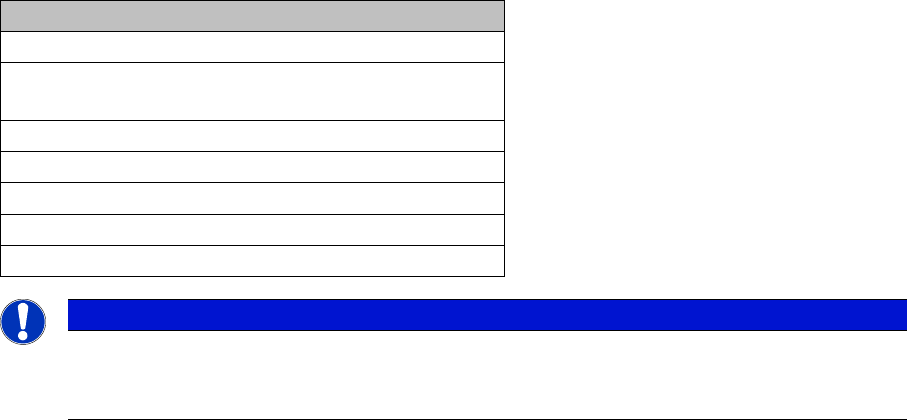
Supported Machines
Machine
SIPLACE 80 F4, F4-6, S20; F5, F5 HM, S23
SIPLACE S25 HM, S27 HM, HS50, HS 50+, HS60, HF,
HF3
SIPLACE X2, X3, X4; D1, D2, D3, D4
SIIPLACE CF, CS
SIPLACE X2, X3, X4, X4I
SIPLACE SX1, SX2, SX4
SIPLACE DX1, DX2, DX4
NOTICE
Restrictions
Please note that the programming system SIPLACE Pro and the Setup Center Station Package
may limit this selection.