00196778-02_VB Setup Center 4.2_DE_EN.pdf - 第42页
New Functions in Setup Center 4.2 New User interface (split table display) 42 Setup Center 4.2 Setup Center 4.2 5.5 New User interface (split table display) Purpose The display of the l oc ations is divi ded into two are…
New Functions in Setup Center 4.2
Packaging unit data from MES
Setup Center 4.2 Setup Center 4.2 41
5 New Functions in Setup Center 4.2
5.1 Packaging unit data from MES
Purpose
The packaging unit data can be requested from MES, if they are not available in the data base of Setup
Center.
Function
This function can be activated in Setup Center 4.2 with Extras > Settings => MES.
5.2 Mapping of MSD level, RoHS and Brightness class
Purpose
If a barcode fragment contains non-standard values, it is possible to insert alternative values.
Function
This function can be configured in Setup Center 4.2 with Extras > Settings => Barcode labels.
5.3 64-bit CAN board
Purpose
Setup Center 4.2 supports the use of a 64-bit CAN board.
Function
It is possible to install the driver for the 64-bit CAN board during the installation of Setup Center.
5.4 Scanner with USB interface
Purpose
Setup Center 4.2 supports the use of a scanners with USB interface.
Function
It is possible to install the driver for the USB interface during the installation of Setup Center.
New Functions in Setup Center 4.2
New User interface (split table display)
42 Setup Center 4.2 Setup Center 4.2
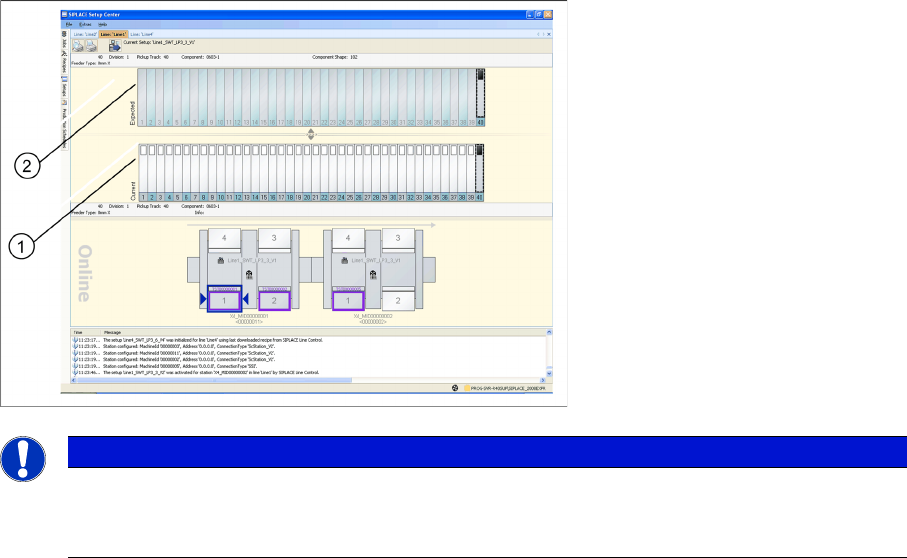
5.5 New User interface (split table display)
Purpose
The display of the locations is divided into two areas. The user is able to view the expected setup (2)
(target setup of Siplace Pro) and actual setup (1) (actual setup at the machine) at a glance and to run
the different functions. The Look&Feel was adapted to the design of the station software.
5.6 Feeder replacement 8 mm X – 2x8 mm X
Purpose
It is possible to interchange flexibly the feeder types 8 mm X and 2x8 mm X without changing the setup
in SIPLACE Pro. The machine is able to start the pick up immediately after a feeder type changeover.
For possible exchange scenarios see the station software documentation.
Function
This function can be activated in Setup Center 4.2 with Extras > Settings => Line.
5.7 Transmit User ID to OIB
Purpose
The user ID is transmitted to OIB as a message. A user must be defined in Setup Center as precondition.
See the OIB documentation for further information.
Function
If in Setup Center 4.2 with Extras => Settings => Material reorder the option Reorder Material via: =>
Web Service is activated, the user ID will be transmitted, too.
NOTICE
User interface in the conventional view
It is possible to switch the user interface to the conventional view with Extras > Settings =>
Common .
New Functions in Setup Center 4.2
Enable Feeder type Exchange
Setup Center 4.2 Setup Center 4.2 43
5.8 Enable Feeder type Exchange
Purpose
It is possible to interchange the 12 mm X feeder type with the factory-optimized 12 mm X (without LCD
display) and the 16mm X feeder type with the factory-optimized 16mm X (without LCD display) without
changing the setup in SIPLACE. The machine is able to start the pick up immediately after a feeder type
changeover.