00196098-02_IM_SIPLACE_Explorer_2.4_DE.pdf - 第19页
Installations- und Konfigurationsanleitung SIPLACE Explorer 2 Systemkomponenten und -Konfigurationen Ausgabe 08/2008 DE 2.3 Standard-Installations-Varianten des SIPLACE Explorer 19 2.3.2 Factory Layout Distri buted Insta…
2 Systemkomponenten und -Konfigurationen Installations- und Konfigurationsanleitung SIPLACE Explorer
2.3 Standard-Installations-Varianten des SIPLACE Explorer Ausgabe 08/2008 DE
18
2
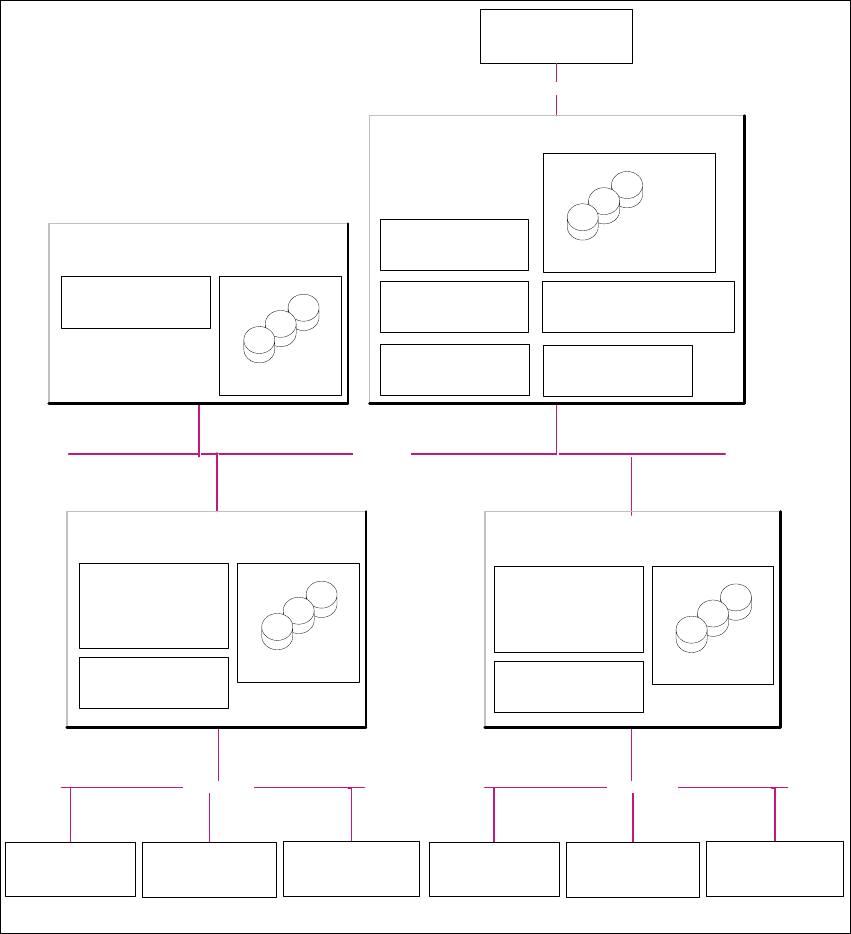
Abb. 2.3 - 1 Installations-Variante: Factory-Layout Cl
Kunden-LAN
SIPLACE-LAN
Stations-Computer:
- OIS Client
- SW Software, Plattform I
Multi-Linie "A"
- Line Control Server /GUI
- SIPLACE Pro Desk
- OIS Server/ OIS Client
-SIS Server
SIPLACE Explorer
Webpages :
- MS internet Explorer
-OIS-DB
-SIS-DB
SIPLACE Line Server
(schon vorhanden)
Stations-Computer:
- OIS Client
- SW Software, Plattform II
- Line Control Server /GUI
- SIPLACE Pro Desk
- OIS Server/ OIS Client
- SIS Server
SIPLACE Explorer
Webpages :
- MS internet Explorer
SIPLACE Line Server
(schon vorhanden)
SIPLACE Explorer
Webpages:
- MS internet Explorer
SIPLACE Explorer Server
SIPLACE Explorer
Factory Host
SIPLACE Explorer
Runtime Environment
SIPLACE Explorer Webserver:
-Tomcat
- Java 2SE
Berichts -Generierung :
-MSXM
- Excel
SQL-Server
-OIS-DB
-SIS-DB
SQL-Server
- SIPLACE Explorer-DB
- SIPLACE Explorer Factory-DB
SQL-Server
- SIPLACE Pro Server
- SIPLACE Pro Desk
- SIPLACE Pro-DB
Factory- Server
(schon vorhanden)
SQL-Server
Kunden-Computer
SIPLACE Explorer Websites:
- MS Internet Explorer
Kunden-LAN
Stations-Computer:
- OIS Client
- SW Software, Plattform III
SIPLACE-LAN
Stations-Computer:
- OIS Client
- SW Software, Plattform I
Multi-Linie "B"
Stations-Computer:
- OIS Client
- SW Software, Plattform II
Stations-Computer:
- OIS Client
- SW Software, Plattform III

Installations- und Konfigurationsanleitung SIPLACE Explorer 2 Systemkomponenten und -Konfigurationen
Ausgabe 08/2008 DE 2.3 Standard-Installations-Varianten des SIPLACE Explorer
19
2.3.2 Factory Layout Distributed Installation (DI)
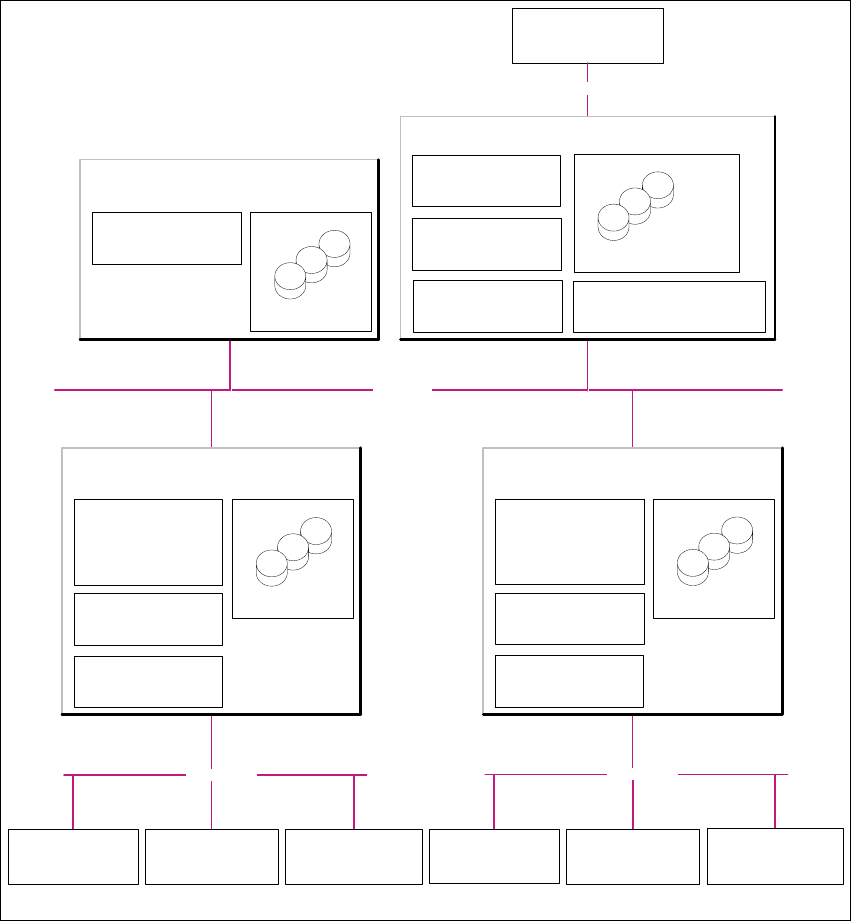
Mit dem Factory-Layout-Dl werden sog. "Multi Lines" unterstützt, d.h. innerhalb einer Fertigungs-
linie werden verschiedene Plattformen der Stations-Software unterstützt. Der gesamte Betrieb der
Fertigungslinien wird über ein zentrales SIPLACE Pro mit den entsprechenden OIS-/SIS-Installa-
tionen gesteuert. 2
SIPLACE Pro ist auf dem SIPLACE Linien-Server und auf dem Factory-Server installiert und OIS/
SIS auf dem SIPLACE Linien-Server. 2
Bei dieser Installations-Variante wird SIPLACE Explorer V2.4 auf mehreren Computern installiert.
Dabei wird SIPLACE Explorer Runtime Environment auf dem SIPLACE Linien-Server installiert.
Alle übrigen Komponenten von SIPLACE Explorer werden auf dem SIPLACE Explorer Server in-
stalliert. 2
Auf dem SIPLACE Explorer Server werden die zu überwachenden Daten von allen dazugehöri-
gen Fertigungslinien gesammelt. 2
HINWEIS
Mit dem SIPLACE Linien-Server (der Computer auf welchem SIPLACE Explorer Runtime
Environment installiert ist) kann eine Fertigungslinie mit bis zu 7 Stationen überwacht werden. 2
Die folgende Übersicht stellt ein Beispiel für die Installations-Variante "Factory-Layout Dl" dar: 2
2 Systemkomponenten und -Konfigurationen Installations- und Konfigurationsanleitung SIPLACE Explorer
2.3 Standard-Installations-Varianten des SIPLACE Explorer Ausgabe 08/2008 DE
20
2
Abb. 2.3 - 2 Installations-Variante: Factory-Layout Dl
Kunden-LAN
- Line Control Server /GUI
- SIPLACE Pro Desk
- OIS Server/ OIS Client
-SIS Server
SIPLACE Explorer
Webpages:
- MS internet Explorer
-OIS-DB
-SIS-DB
SIPLACE Line Server
(schon vorhanden)
SIPLACE Explorer
Webpages:
- MS internet Explorer
SIPLACE Explorer Server
SIPLACE Explorer
Factory Host
SIPLACE Explorer Webserver:
-Tomcat
- Java 2SE
Berichts-Generierung :
- MSXM
- Excel
SQL-Server
- SIPLACE Explorer-DB
- SIPLACE Explorer Factory-DB
SQL-Server
- SIPLACE Pro Server
- SIPLACE Pro Desk
- SIPLACE Pro-DB
Factory- Server
(schon vorhanden)
SQL-Server
Kunden-Computer
SIPLACE Explorer Websites:
- MS Internet Explorer
Kunden-LAN
SIPLACE Explorer
Runtime Environment
SIPLACE-LAN
Stations-Computer:
- OIS Client
- SW Software, Plattform I
Multi-Linie "A"
Stations-Computer:
- OIS Client
- SW Software, Plattform II
Stations-Computer:
- OIS Client
- SW Software, Plattform III
- Line Control Server /GUI
- SIPLACE Pro Desk
- OIS Server/ OIS Client
- SIS Server
SIPLACE Explorer
Webpages:
- MS internet Explorer
-OIS-DB
-SIS-DB
SIPLACE Line Server
(schon vorhanden)
SQL-Server
SIPLACE Explorer
Runtime Environment
SIPLACE-LAN
Stations-Computer:
- OIS Client
- SW Software, Plattform I
Multi-Linie "B"
Stations-Computer:
- OIS Client
- SW Software, Plattform II
Stations-Computer:
- OIS Client
- SW Software, Plattform III