4OM-1011-002.pdf - 第84页
0305-001 Tg0860-PM-MM 3.3.6 Component Pick-Up/Component Placement Information When the [COMP . PICK-UP/COMP . PLACE INFO.] key is pressed at the “MANAGEMENT DA T A (TYPE 1)” display , the following display appears on the…
0305-001 Tg0860-PM-MM
[B: COMP. MSNG.] Key
Shown is the number of missing components detected in the recognition
processing for each nozzle.
[C: VAC. SNSR] Key
Shown is the total number of component pick-up errors detected by the
vacuum sensor (errors not detected through the component recognition) for
each individual feeders.
[D: COMP. RECOG.] Key
Shown is the number of errors detected by the recognition processing for
each nozzle.
[TOTAL ERRORS] Key
Shown is the total number of errors detected by the above-described func-
tions ([A: COMP. MSNG.] through [D: COMP. RECOG.] keys).
[RATE OF ERROR (%)] Key
Shown are the percentages of errors per number of components to be picked
up.
[NOZZLE CLEAR/CHANGE DATE] Key
Shown are the updated dates for each nozzle.
[NOZZLE CHANGE ERROR] Key
Shown is the total number of errors detected during nozzle change opera-
tion.
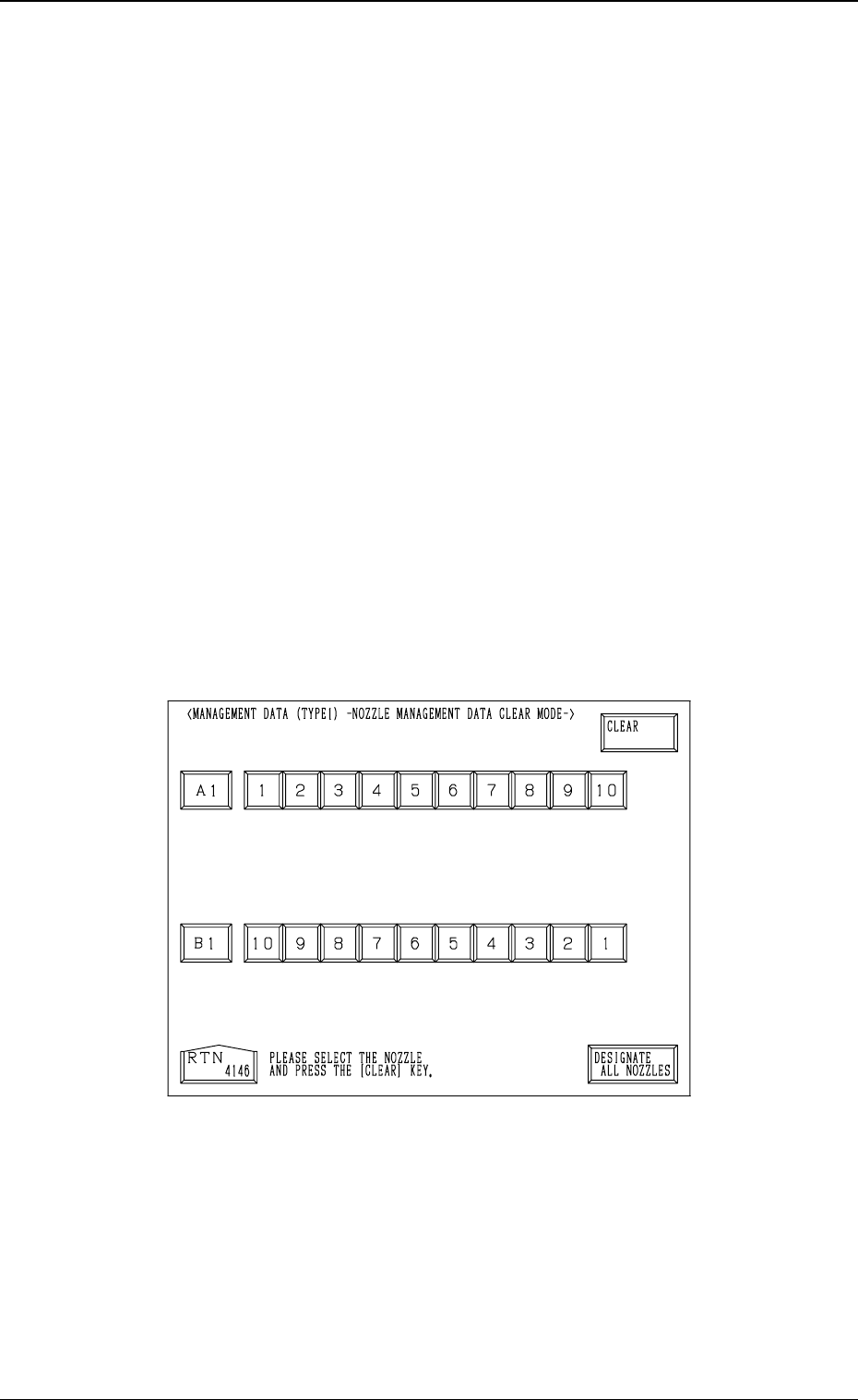
How to Clear the Nozzle Management Data
(1) Press the [CLEAR NOZZLE MGT. DATA] key.
The following display appears on the screen.
(2) Select one of the nozzle # keys whose management data should be cleared.
• To select the nozzle Nos. individually, press the related nozzle # key.
The selected nozzle # key turns blue.
• To select all nozzle # keys at a time, press the [DESIGNATE ALL
NOZZLES] key.
All nozzle # keys turn blue, indicating that all nozzles are designated.
(3) Press the [CLEAR] key.
The management data of the selected nozzle # is cleared.
(The date when the [CLEAR] key is pressed is displayed in the “NOZZLE
CLEAR/CHANGE DATE” text field.)
3-32
3.3 Management Data (Type 1)
Fig. 4C39
0305-001 Tg0860-PM-MM
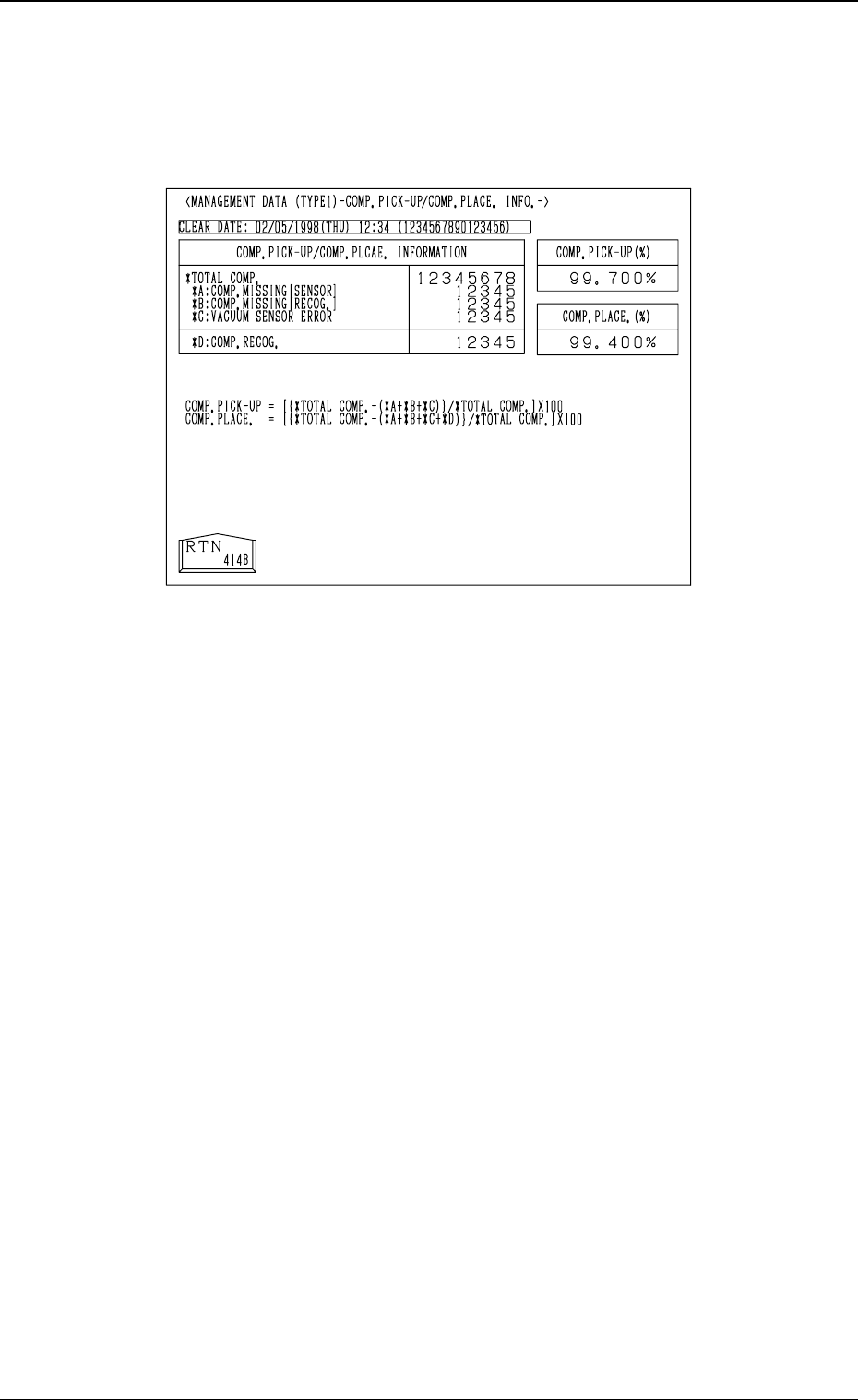
3.3.6 Component Pick-Up/Component Placement Information
When the [COMP. PICK-UP/COMP. PLACE INFO.] key is pressed at the
“MANAGEMENT DATA (TYPE 1)” display, the following display appears
on the screen.
TOTAL COMP.
Shown is the number of component picks.
A: COMP. MISSING [SENSOR]
Shown is the number of missing components detected by the vacuum sen-
sor.
(Case: “NG” (No Good) in Component Recognition and Vacuum Sensor)
B: COMP. MISSING [RECOG.]
Shown is the number of missing components detected in the component
recognition processing.
This applies only when the vacuum sensor is not used (when “Component
Missing” is detected in the recognition).
C: VACUUM SENSOR ERROR
Shown is the number of components judged “NG” (No Good) by the vacuum
sensor although the components are judged “OK” through component rec-
ognition operation.
D: COMP. RECOG.
Shown is the number of components judged “NG” (No Good) through rec-
ognition operation.
Ref.: A component recognition error occurs when components are judged
“OK” by the vacuum sensor but they are judged “NG” through com-
ponent recognition operation.
When “DISABLE” is set in the “COMP. MISSING CHK (SEN-
SOR)” data box of the component library data, a component recog-
nition error occurs only in the case of components judged “NG”
through component recognition operation.
3-33
3.3 Management Data (Type 1)
Fig. 4C40

0305-001 Tg0860-PM-MM
COMP. PICK-UP (%)
Shown is the percentage determined by the following formula.
[(*TOTAL COMP. - (*A: COMP. MISSING [SENSOR] + *B: COMP.
MISSING [RECOG.] + *C: VACUUM SENSOR ERROR)]/* TOTAL
COMP.] × 100
COMP. PLACE. (%)
Shown is the percentage determined by the following formula.
[(*TOTAL COMP. - (*A: COMP. MISSING [SENSOR] + *B: COMP.
MISSING [RECOG.] + *C: VACUUM SENSOR ERROR + *D: COMP.
RECOG.)]/*TOTAL COMP.] × 100
Data Counting
• Counting of “*A: COMP. MISSING [SENSOR]” and “*B: COMP. MISS-
ING [RECOG.]”
Although the machine stops in an error condition according to the number
of times (the number of continuous component missing errors to be counted
to stop the machine in an error condition) set in the “ERROR PROCESS
DATA 1” data box at the “COMPONENT LIBRARY” display, the number
of missing component errors is not added to the number of picks and the
number of pick-up errors.
3-34
3.3 Management Data (Type 1)