4OM-1011-002.pdf - 第86页
0305-001 Tg0860-PM-MM 3.3.7 Management Data (T ype 1) Clear Mode T o clear all of the management data, press the [CLEAR MANAGEMENT DA T A (TYPE 1)] key at the “MANAGEMENT DA T A (TYPE 1)” display . The following display …

0305-001 Tg0860-PM-MM
COMP. PICK-UP (%)
Shown is the percentage determined by the following formula.
[(*TOTAL COMP. - (*A: COMP. MISSING [SENSOR] + *B: COMP.
MISSING [RECOG.] + *C: VACUUM SENSOR ERROR)]/* TOTAL
COMP.] × 100
COMP. PLACE. (%)
Shown is the percentage determined by the following formula.
[(*TOTAL COMP. - (*A: COMP. MISSING [SENSOR] + *B: COMP.
MISSING [RECOG.] + *C: VACUUM SENSOR ERROR + *D: COMP.
RECOG.)]/*TOTAL COMP.] × 100
Data Counting
• Counting of “*A: COMP. MISSING [SENSOR]” and “*B: COMP. MISS-
ING [RECOG.]”
Although the machine stops in an error condition according to the number
of times (the number of continuous component missing errors to be counted
to stop the machine in an error condition) set in the “ERROR PROCESS
DATA 1” data box at the “COMPONENT LIBRARY” display, the number
of missing component errors is not added to the number of picks and the
number of pick-up errors.
3-34
3.3 Management Data (Type 1)
0305-001 Tg0860-PM-MM
3.3.7 Management Data (Type 1) Clear Mode
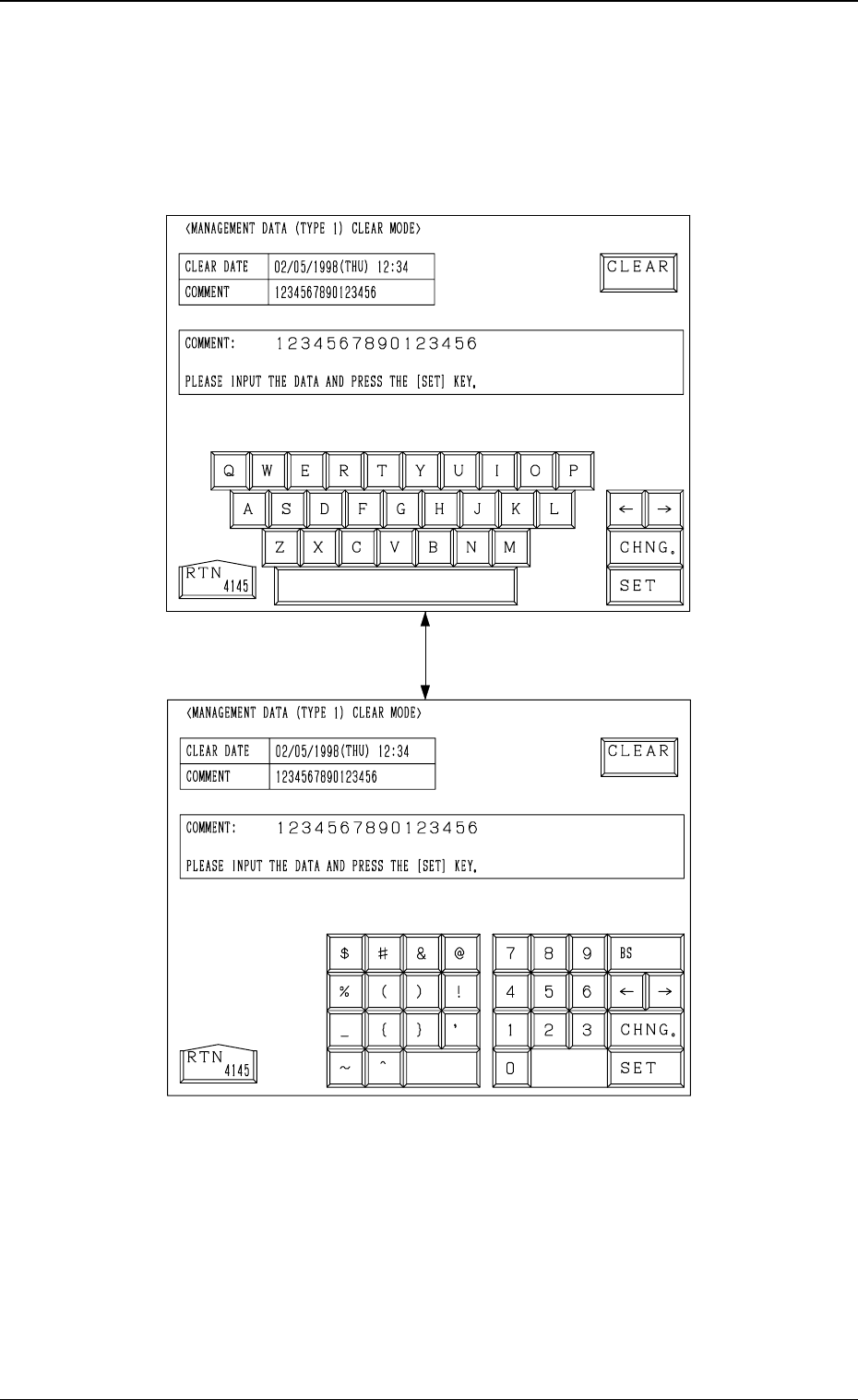
To clear all of the management data, press the [CLEAR MANAGEMENT
DATA (TYPE 1)] key at the “MANAGEMENT DATA (TYPE 1)” display.
The following display appears on the screen.
Every time the [CHNG.] key is pressed, the display changes.
• When the [CLEAR] key is pressed, all of the management data is cleared.
• The date when the [CLEAR] key is pressed is displayed in the “CLEAR
DATE” text box.
• Enter a comment in the “COMMENT” text box, using the ten-key pad and
press the [SET] key. The current comment is changed to the entered one.
Fig. 4C41
Fig. 4C42
3-35
3.3 Management Data (Type 1)
[CHNG.] Key
0305-001 Tg0860-PM-MM
4. RECALL MESSAGES Display
Menus are provided to recall device errors, handling errors, recognition errors,
and machine information which occurred in the past.
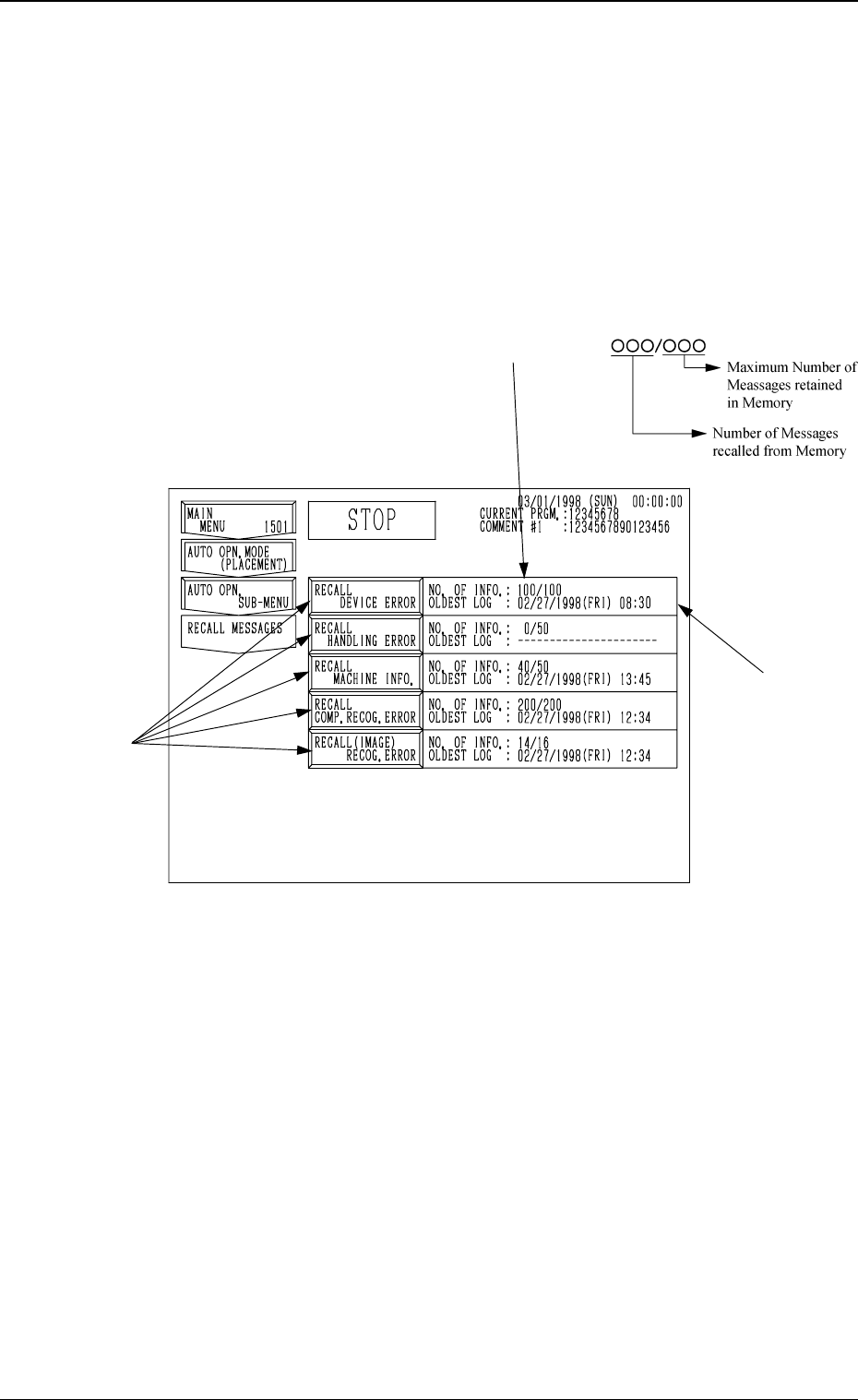
When the [RECALL MASSAGES] key is pressed at the “SPECIAL SEL.”
display, the following display appears on the screen.
This display can also be opened from the “AUTO OPN. SUB-MENU”
display.
*1 NO. OF INFO.
Shown is the number of information messages retained in the current memory
area. The numerator shows the number of retained messages and the de-
nominator the maximum number of retainable messages in memory.
*2 OLDEST LOG
Shown is the oldest date and time for the currently retained information
messages.
When no information message is retained in memory, “--------” appears.
• When one of the keys A is selected, the corresponding display appears on
the screen. The “RECALL DEVICE ERROR”, “RECALL HANDLING
ERROR”, “RECALL MACHINE INFO.”, “RECALL COMP. RECOG.
ERROR”, or “RECALL (IMAGE) RECOG. ERROR” display (Figs. 4C44
through 4C48) will appear accordingly.
3-36
4. RECALL MESSAGES Display
Fig. 4C43
*1
*2
A