00196416-01_IM_OIS_SIS 7.0_DE EN.pdf - 第22页
Installationsanleitung OIS Client, OI S Server, SIS Server Version 7.0 Installation Manual 3.3 Modifying the installation The Modify function allows you to change the installation entri e s made to date. This allows you,…
OIS Client, OIS Server, SIS Server Version 7.0 Installationsanleitung
Installation manual
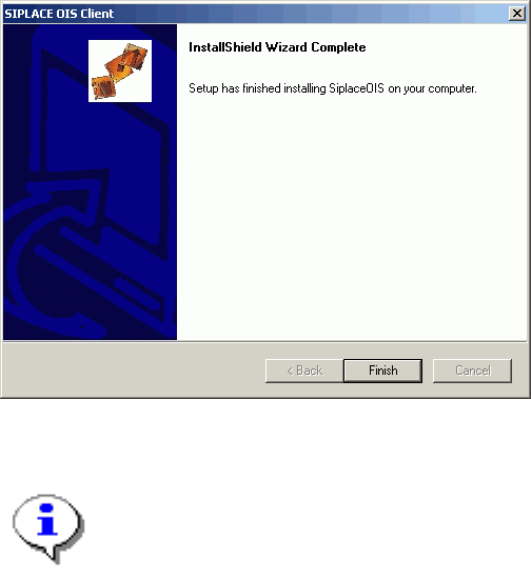
3.2.5 Finishing the installation
Once the installation process has been completed, the following dialog box appears.
¾ Click Finish to close the setup.
Note:
If this dialog box suggests rebooting the computer, you should do so, as the installation is only
completed after a reboot.
21 von 50
Installationsanleitung OIS Client, OIS Server, SIS Server Version 7.0
Installation Manual
3.3 Modifying the installation
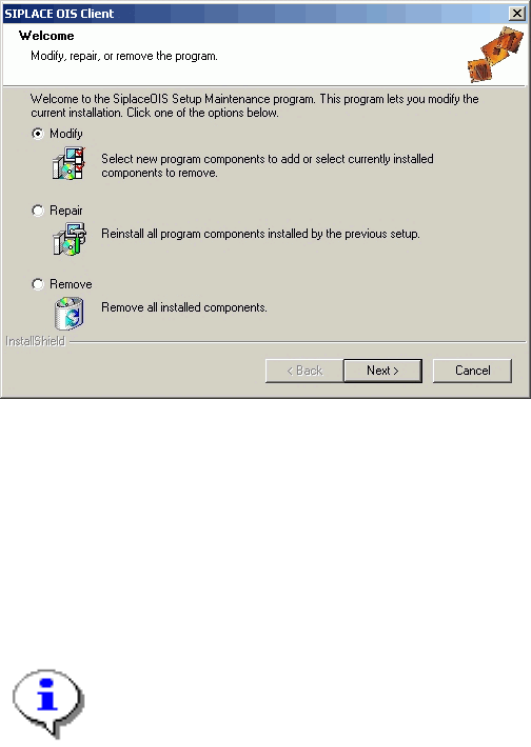
The Modify function allows you to change the installation entries made to date. This allows you, for instance,
to add or remove a language.
3.4 Repairing the installation
This function is used to repair an existing installation. The program is restored using the specifications and
entries originally specified.
22 von 50
OIS Client, OIS Server, SIS Server Version 7.0 Installationsanleitung
Installation manual
3.5 Removing the program (Uninstallation)
This option removes all the installed components, including all the corresponding entries in the Registry.
You have the option to keep or remove the database.
¾ Click the Windows Start button and select Settings and then Control Panel.
¾ Start the Add/Remove Programs dialog, by double-clicking on Add/Remove Programs.
¾ Select the program from the list (SIPLACE OIS / SIPLACE OIS Server / SIPLACE SIS Server) and
click on Change/Remove.
The setup program will start and display the following dialog.
¾ Select Remove, and then click Next.
¾ Confirm the subsequent prompt with Yes.
The program is uninstalled. Follow the subsequent stages of the setup program.
Additional information for removing OIS/SIS Server:
¾ If you want to delete the OIS/SIS database also, respond to the confirmation request with Yes.
Note:
If you delete the database, all the recipe and setup data of the OIS/SIS system are lost.
23 von 50