00195813-03_IM_SSW 605.02_DE EN.pdf - 第40页
Installation Manual, Station Software Version 605.02 11/2009 Edition 6 Uninst alling the SIPLACE software Note: You must be logged in as administr ator to uninstall the software. → Open the Start menu and choose Programs…

Installation Manual, Station Software Version 605.02 11/2009 Edition
5.6 Finish the Installation
5.6.1 Machine files
There are 2 databases in Version 605 of the software, MA-Daten.mdb and MA-Achsen.mdb.
Machine-related configuration, measurement and parameter data is stored in *.XML and *.MA files.
The MA-Daten.mdb database contains all standard data except the standard data for the axes. This data is
stored in the MA-Achsen.mdb database.
Note:
All machine data and the database (see machine data database feature) must be of revision
level 265 (version 265.605.01). Current machine data must not
be replaced by revision level
s
of an earlier version, either completely or partially, e.g. revision level 80 (version 80.603.01).
5.6.2 Miscellaneous
• Check the eSW firmware versions and download if necessary.
• Start the reference run of the machine.
• After an upgrade to the 605.xx software version, calibrate the heads of the D1, D2 and D4
machines, if necessary. The temperature compensation is activated for these machines.
If the data base for the axes has changed after an upgrade or an installation, and one or more gantry axes
(X,Y) are displaced by exactly 50mm, the reference point on the axis/axes scale has been displaced by
one position and the zero point correction is not correct for these axes anymore. In this case the following
steps are required:
• Recalibrate the machine zero point.
• Redetermine the traversing range.
39 of 48
Installation Manual, Station Software Version 605.02 11/2009 Edition
6 Uninstalling the SIPLACE software
Note:
You must be logged in as administrator to uninstall the software.
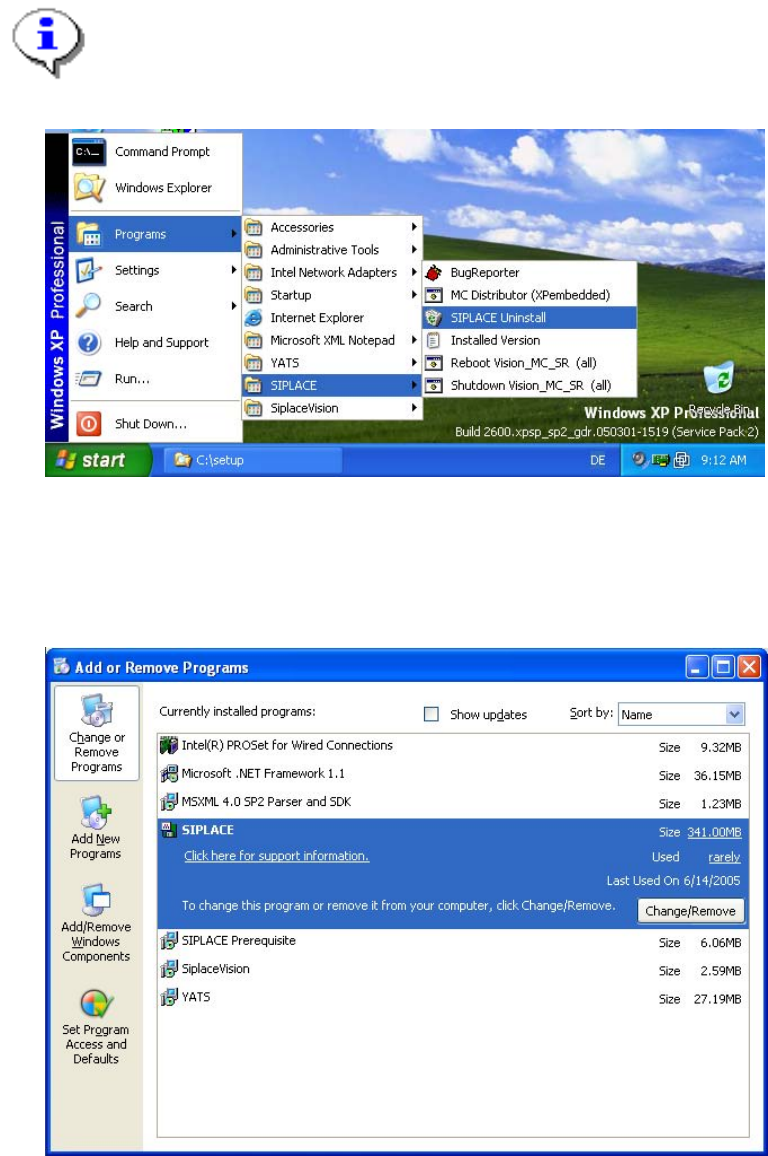
→ Open the Start menu and choose Programs Æ SIPLACE Æ SIPLACE Uninstall.
Fig. 6-1: Starting uninstallation (alternative 1)
Or:
→ Open the Start menu and choose Settings Æ Control Panel.
→ Double-click Add/Remove Programs.
Fig. 6-2 Starting uninstallation (alternative 2)
→ Select SIPLACE from the list of installed programs.
→ Click the Change/Remove button.
40 of 48
Installation Manual, Station Software Version 605.02 11/2009 Edition
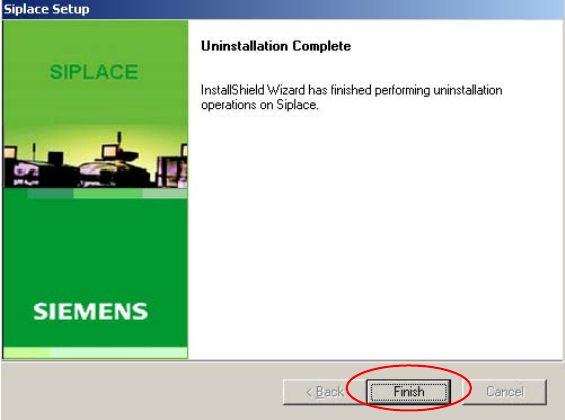
The installation program now uninstalls the SIPLACE software including the SIPLACE hotfixes, SIPLACE
Language Pack and SIPLACE Vision.
Fig. 6-3: Finalizing uninstallation
→ Click the Finish button.
The SIPLACE software and SIPLACE Vision have now been uninstalled correctly.
41 of 48