A700000009046784.pdf - 第14页
14 Work with the Manip ulator The manipulator MPP1 was developed for manual assembling of SMD components. With differen t types of feeders it is possib le to assemble SMD co mponents from strips bu t also from IC stick s…

13
Using the Vision system
For assembling small components of size 0402 as well as for precise placing of the integrated circuits
with a very fine pitch, a miniature CCD camera is built into the assembling head. The camera has 2
positions and shows either assembling needle or dispensing nozzle.
Enlarged image taken at a small angle is displayed on a large 15" monitor. The focus of the CCD
camera is set at the factory, it does not require any adjustments from the operator.
It is technically impossible to install the camera onto the vertical axis of the assembling needle, that´s
why it is installed in a small angle. This can result in a slightly blurred image around the edges of the
LCD display.
Technical data of Vision system:
CCD camera:
Viewing angle: 78°
CMOS sensor: 1/4" - 8 Mpx
Video resolution: 1080p / 30fps - Full HD
PC monitor
Display dimensions: 15.6" (40 cm) widescreen 16:9
Resolution: 1366 x 768 px
Dimensions with stand: 378 x 281 x 189 mm
The PC monitor has standard settings (brightness, contrast, color), which can be individually adjusted
according to the actual need.
The main switch on the control box turns on/off the camera electronics as well as the lighting
in the head. The lighting can be adjusted with a rotary knob on the front wall of the box.
14
Work with the Manipulator
The manipulator MPP1 was developed for manual assembling of SMD components. With different
types of feeders it is possible to assemble SMD components from strips but also from IC sticks.
Before switching on the manipulator, check that all cables are connected correctly and that the
vacuum hose is connected to both the vacuum pump and to the manipulator. Ground the
manipulator with an ESD cable (included). Plug the monitor, vacuum pump and adapter into an
electrical outlet (AC 230 V). If all cables are connected and the vacuum pump is switched on, you
can switch on the manipulator with the main button on the right. The button lights up and the camera
view appears on the screen within 3 - 5 seconds. If the preview does not appear, check that all cables
are connected properly.
Do not disconnect any cables, disconnect the adapter or the vacuum pump from the socket when
the manipulator is switched on! Place the feeders on the assembling desk as described.
Assembling
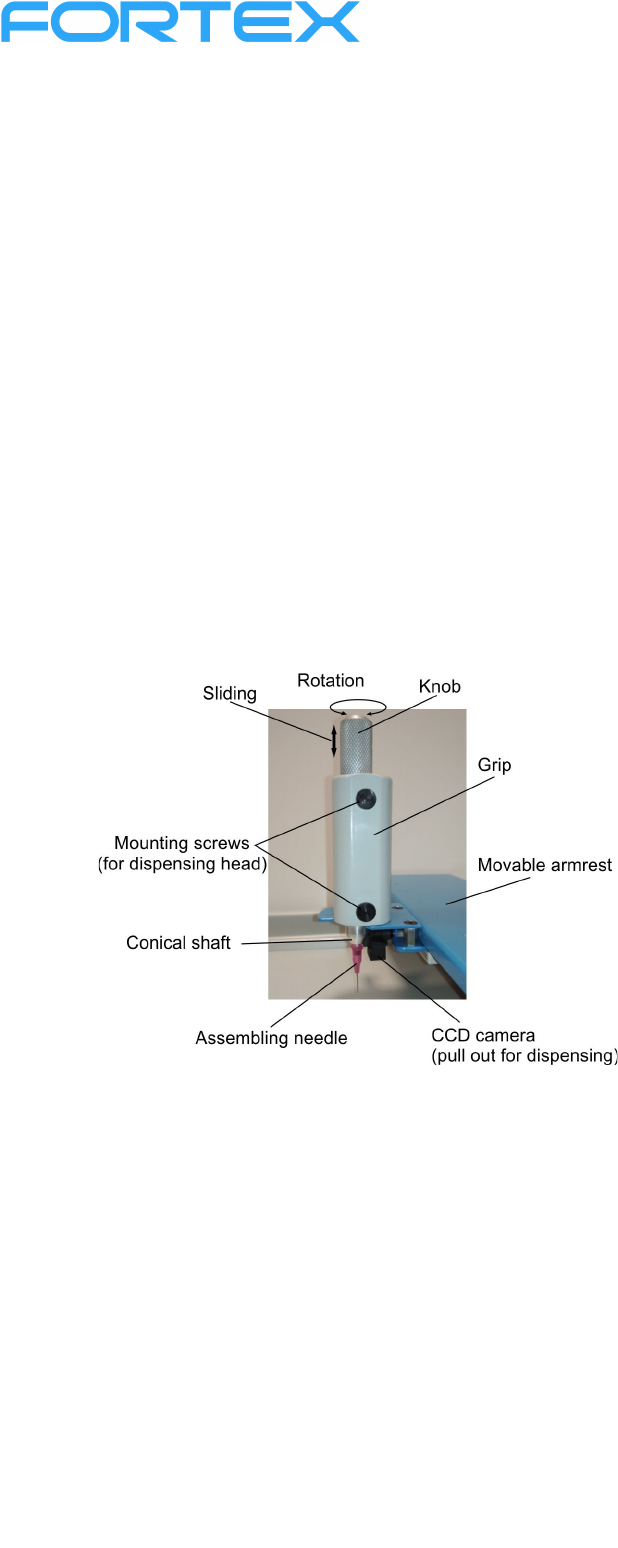
Attach the needle to the conical shaft - put it gently so that it can be easily removed. For small
components (0201, 0402) use a thinner pink needle, for larger components (603, 1206, SO8, SO16
etc.) a thicker brown needle. Use a rubber suction cup to fit larger integrated circuits or the processors.
Slide the rubber suction cup onto the assembling needle so that the end of the assembling needle
stayed inside the suction cup. Place the required number of assembled PCBs on the PCB holders.
Place your left hand on the left
armrest, your right hand put on the
movable armrest and grasp the
assembling head with your palm. The
thumb controls the rotation of the
knob (ie the component) as well as the
vertical movement of the assembling
needle. The conical shaft of the needle
has a free movement in the range of 4-
5 mm, which is used to turn the
vacuum on and off.
Move the assembling head over the
component, carefully bring the end of
the needle closer to the component
surface and lightly touch it. This sucks
the component to the end of the
needle. When the needle touched the
component and the component is sucked, stop the downward movement of the button. Gently release
the button to return to its primary upper position. Move to the desired position, turn the knob to direct
the component correctly and press down the knob to place the component on the PCB.
When the mounting head is pushed to the lowest position, the vacuum is switched off (reduced to a
minimum) and the part remains stuck in the paste. When we release the head and the spring pushes it
to the highest position, the vacuum is switched on again (increased to the maximum).
Small parts adhere to the paste without reducing the vacuum.
Always switch-off the manipulator with the main button! After switching off the manipulator
(using the main button), you can disconnect the monitor, adapter and vacuum pump from the
socket.

15
Maintenance
The manipulator does not require special maintenance. Make sure that the round rod of movable
armrest is neither covered in dust nor messed with various impurities. It must be kept lightly oiled.
Larger impurities (metal or wood sawdust etc.) can damage linear bearing. The assembling needle
must be cleaned from solder paste after work, because later cleaning can be problematic if the paste
dries up.
The assembling head is maintenance-free, no further lubrication is required. Improper intervention can
damage the assembling head, e.g. non-linear movement may occur or excessive oiling can leak and
degrade the PCB.
Always keep the feeders dust-free and it is recommended that you clean the sliders from dust before
use to prevent them from sticking to the IC´s pins.
Service
In case of manipulator failure, please contact the dealer or the device manufacturer. Only original
spare parts available from the manufacturer must be used for repair. Do not repair in any case the
manipulator yourself.
Disposal
Dispose of the packaging in an environmentally friendly manner. It is made of ecological materials,
which can either be recycled or disposed of in local waste recycling site.
Do not dispose of electrical tools in the municipal waste. Dispose of electronic tools in accordance
with European directive no. 2012/19/EU, which states that worn out electronic tools and devices must
be collected separately and handed in for ecological recycling.
To get more information about disposal of worn out electronic devices, please inquire at the relevant
public administration body.
We reserve the right to make any changes in the operating manual of the device.