A700000009046784.pdf - 第7页
7 Tape feed er Multichannel tape feeder is a compact device w hich enables the r emoval of t he covering foil from tapes and picking component. Furthermore it secures the position of tapes while picking the components an…
6
Technical data:
Manipulator dimensions: 760 x 385 x 195 (H) mm
Manipulator + feeders dimensions: 1145 x 430 x 195 mm
Motion of head in X/Y/Z axes: 480 x 235 x 15 mm
Weight: 6 kg
Maximum PCB dimensions : 380 x 295 mm
Working area dimensions: 380 x 250 mm
Power supply: 230 V /12 V
Vacuum pump power supply: 230 V, 6 W
Vacuum/flow: >0,024 MPa / 5 dm
3
/min
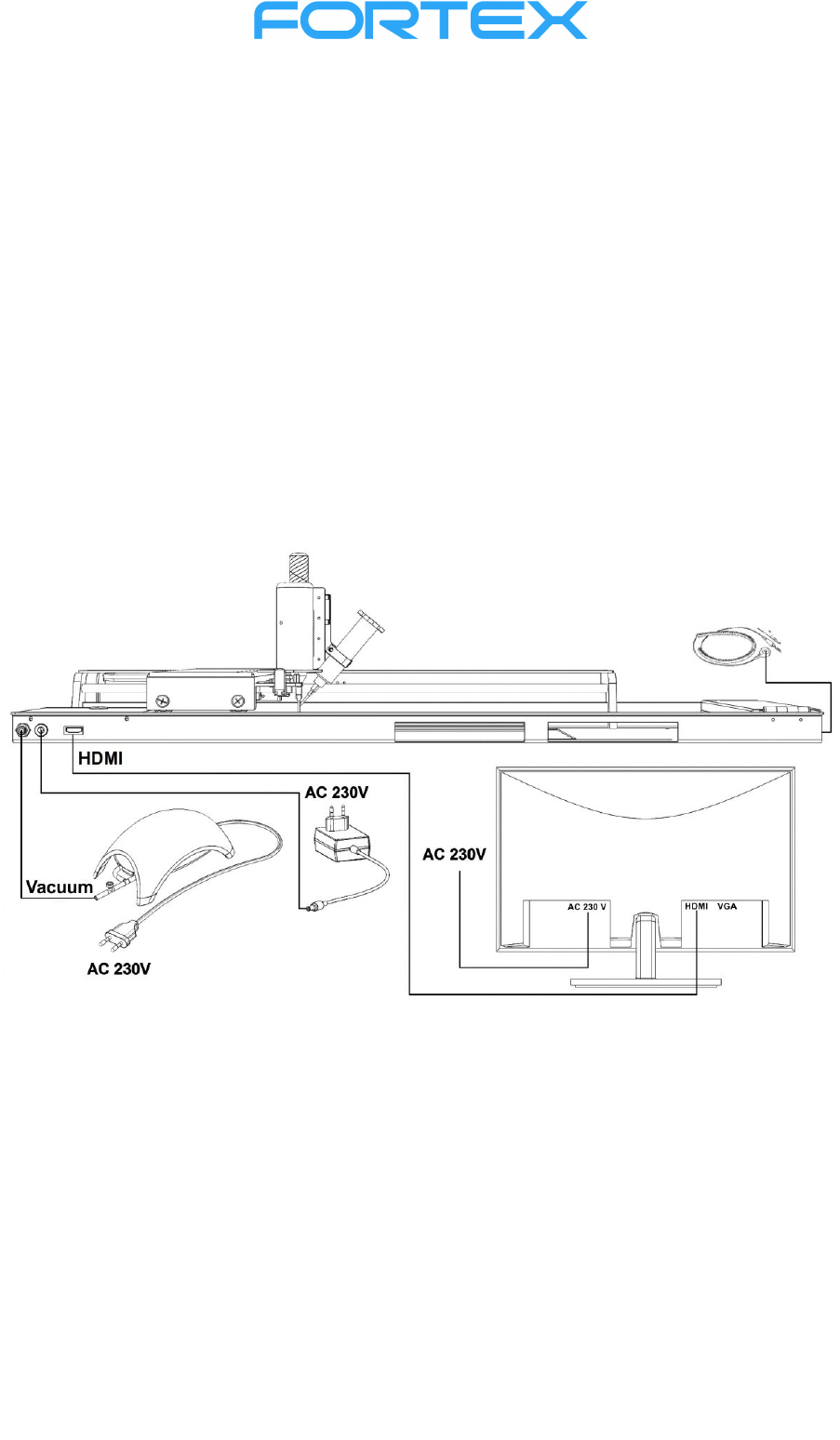
Scheme:
Caution!!!
Before switching-on the device, make sure that all cables are connected correctly and that the
vacuum hose is connected to both the pump and the manipulator. Ground the device with an
ESD cable (included).
Plug the monitor, vacuum pump, and adapter into an electrical socket (AC 230V).
Do not disconnect any cables, disconnect the adapter or the vacuum pump from the socket while
working with the manipulator! Always switch off the device with the main button!
After switching-off the manipulator, you can disconnect the monitor, adapter, and vacuum
pump from the socket.
7
Tape feeder
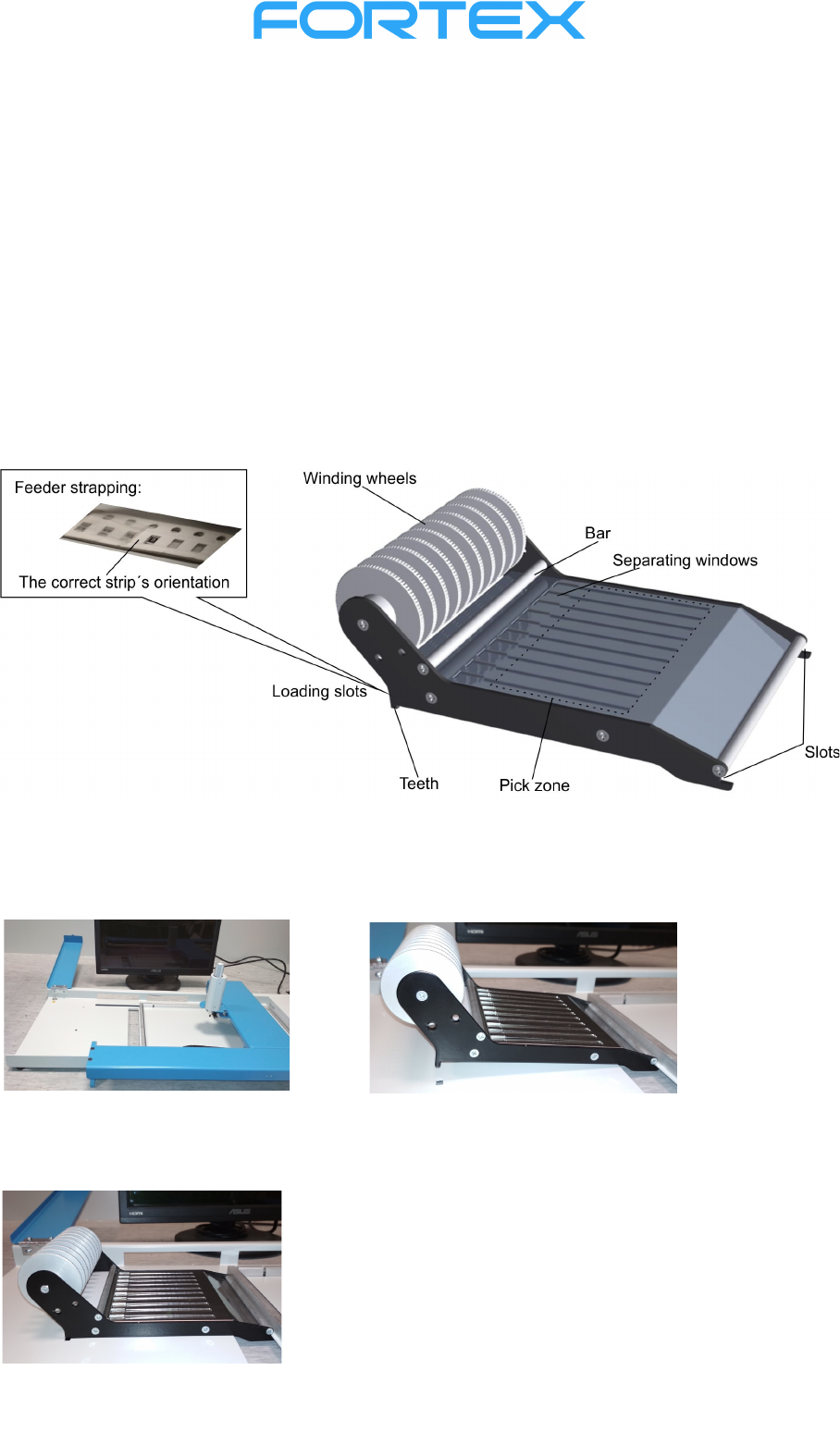
Multichannel tape feeder is a compact device which enables the removal of the covering foil from
tapes and picking component. Furthermore it secures the position of tapes while picking the
components and it ensures the removal of empty tapes. Flexible pinch plates allow loading the tapes of
various thicknesses. Tape feeder is easily removable from the assembling desk. When using more than
two feeders it is possible to avoid unnecessary loading or unloading (which is a time consuming
operation), particularly, it is advised that frequently repeated types of assembling had their respective
feeders.
Reel holders can be attached to the feeders, which is beneficial while feeding the tapes from the reels.
It increases the comfort of assembling and ensures continuous feeding of the components tape. Once
the work is finished it is possible to remove the reel holder along with the attached feeder at once, or
to replace it with another, which ensures swift transition between individual tasks.
Placement of tape feeder on the assembling desk
It is possible to put two tape feeders on an assembling desk at once:
Tilt the left armrest.
Tilt the Feeder
forward and slide it all
the way into the slot.
When the feeder is inserted correctly, the teeth
under the wheels fit into the small holes that fix
the feeder against shifting.
8
Feeder strapping
Important: It is recommended to perform this operation on the assembling desk. Always load
the strips according to the principle that the strips must be inserted into the feeder from left to
right, with the cover foil facing up and the holes in the strip on the far side from the operator.
Otherwise the picking of the components will be difficult and the tape foil will deform while
winding!
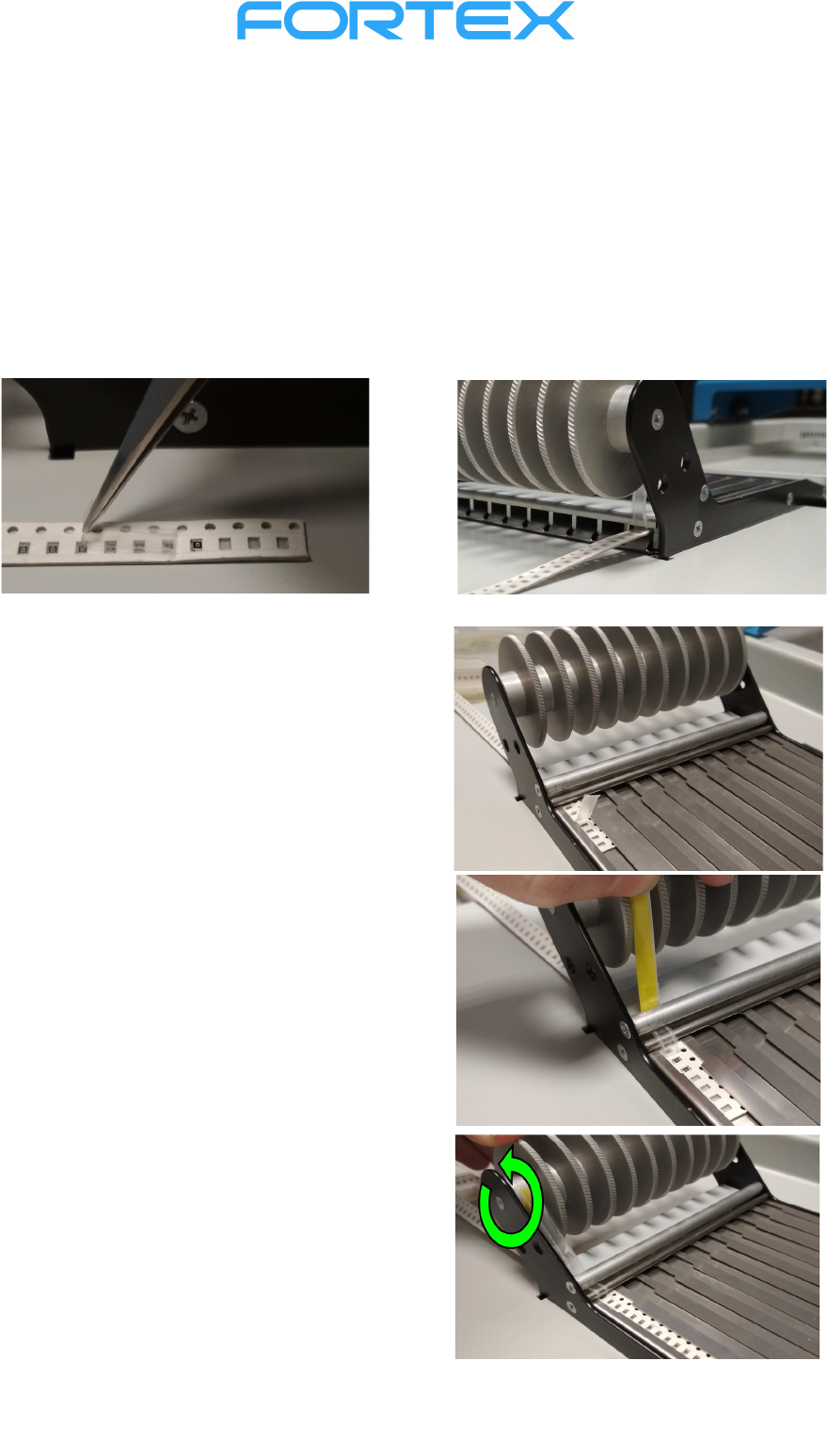
Before inserting the tape of SMD components to loading slot, peel the foil to 15-20 mm and insert it
into the slot under the winding wheel. (The foil can as well be peeled in the separating window in front
of the winding wheel and the bar using tweezers.)
Carefully slide the strip forward until it appears in the
separating window in front of the bar. Grasp the foil
and peel it to a length of 5-7 cm.
While foil is peeled, strip in the channel is moving
forward, so make sure that the components do not
pop out!
Drag the end of the foil under the bar in front of the
winding wheels. Stick the adhesive tape (size approx.
6 x 50 mm) on the free end of the foil, then stick the
foil onto the winding wheel so that it winds
anticlockwise. (Dragging the foil over the bar can
result in its rupture or an uneven movement of the
tape!)
Move SMD component tape forward carefully by foil
winding onto the winding wheel. If the strips are
damaged or broken, the strip may jam or slide heavily
(e.g. short-cut straps).