manual-biron-500-precision-soldering-tool-jbc-0034642_ID-251816_EN.pdf - 第4页
Reference Mark Reference Mark R e f er en c e Ri n g R e f er en c e Ri n g R i ng R i ng I n s e r ti ng C 1 1 5 C a r tr i d g e s P u s h t h e c a r t r i d g e s i n s i d e t h e h a n d l e u n t i l t h e r e f e…
3
40 mm
50 mm
60 mm
80 mm
100 mm
130 mm
130 mm
para manuales - color gris
200 mm
300 mm
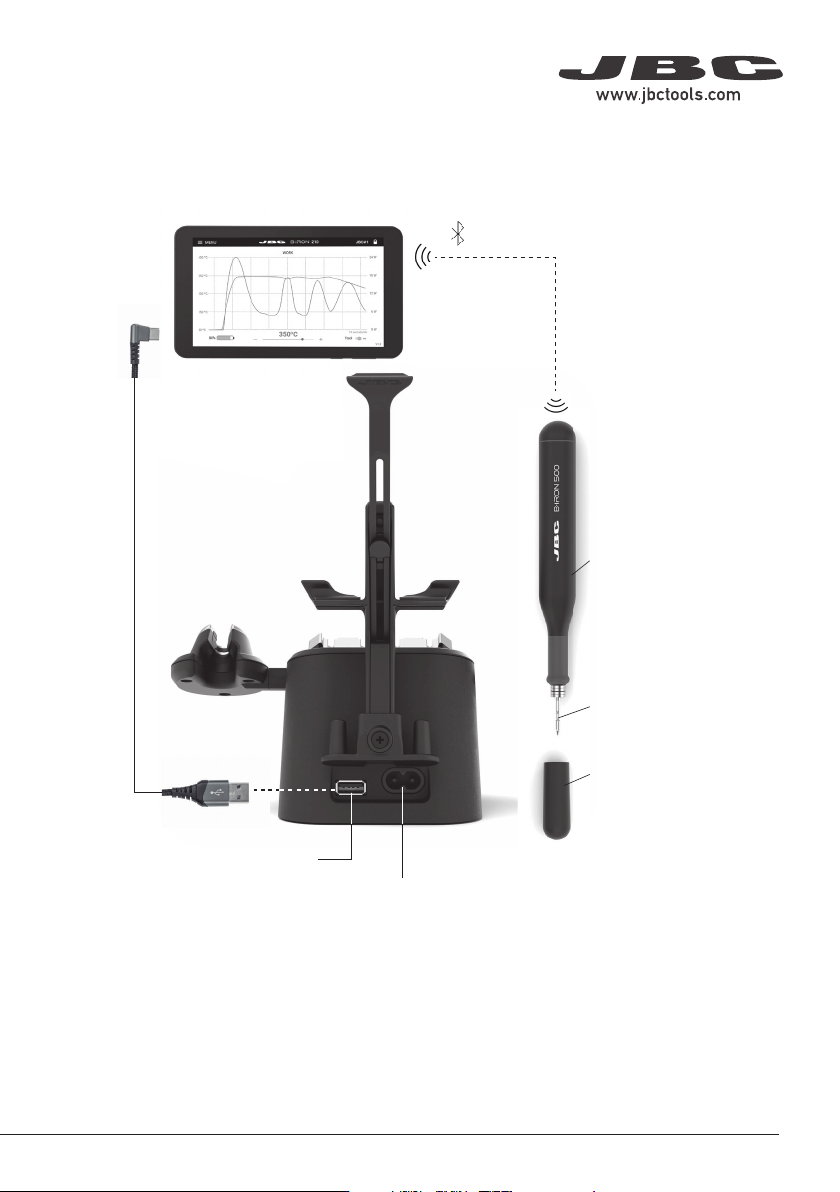
B·500
Handle
for B·IRON
Power Socket
USB Connector
Bluetooth
Connection
PDS
Portable Display 7”
for B·IRON *
B1596
Safety Cap
for B·IRON Handles
C210
Cartridge
Range
* Not included, sold separately.
Connection with B·IRON Station
Cable USB-A to USB-C *
Ref. 0032705
ESD Safe Connection
Note: All B·IRON components comply with CE standards, but the tool by itself is not grounded. Therefore,
to comply with ESD regulations, the user of the B·IRON tool must be ESD-compliantly grounded.
JBC offers ESD tablemats, earthing cables, plugs and wristbands. More information on www.jbctools.com.
Reference Mark
Reference Mark
Reference Ring
Reference Ring
Ring
Ring
Inserting C115 Cartridges
Push the cartridges inside the handle until the
reference ring rests against the sealing plug.
Inserting C115 Cartridges
Push the cartridges inside the tweezers until
the first ring rests against the tool.
Inserting C210 Cartridges
Push the cartridges inside the handle until
the reference mark is aligned with the edge
of the handle.
C210 Cartridge Holder
The cartridge holder (4x slots) is used to
store cartridges. It allows having different
cartridges quickly at hand and it works with
C210 Cartridges.
Cartridge Holder
Slots
C115 Cartridge Adapters
(Ref. B0643 includes 4 adapters)
Since C115 Cartridges have a smaller diameter
than C210 Cartridges, adapters must be used
to store them in the cartridge holder.
These adapters must simply be inserted from
above into the slots of the cartridge holder.
C115 Cartridge Adapters
(Ref. B0643 includes 4 adapters)
Since C115 Cartridges have a smaller diameter
than C210 Cartridges, adapters must be used
to store them in the cartridge holder.
These adapters must simply be inserted from
above into the slots of the cartridge holder.
Cartridge
Adapters
Cartridge
Adapters
ø 1
ø 1,5
ø 3,5
4
Conical Chisel Conical Bent Bevel
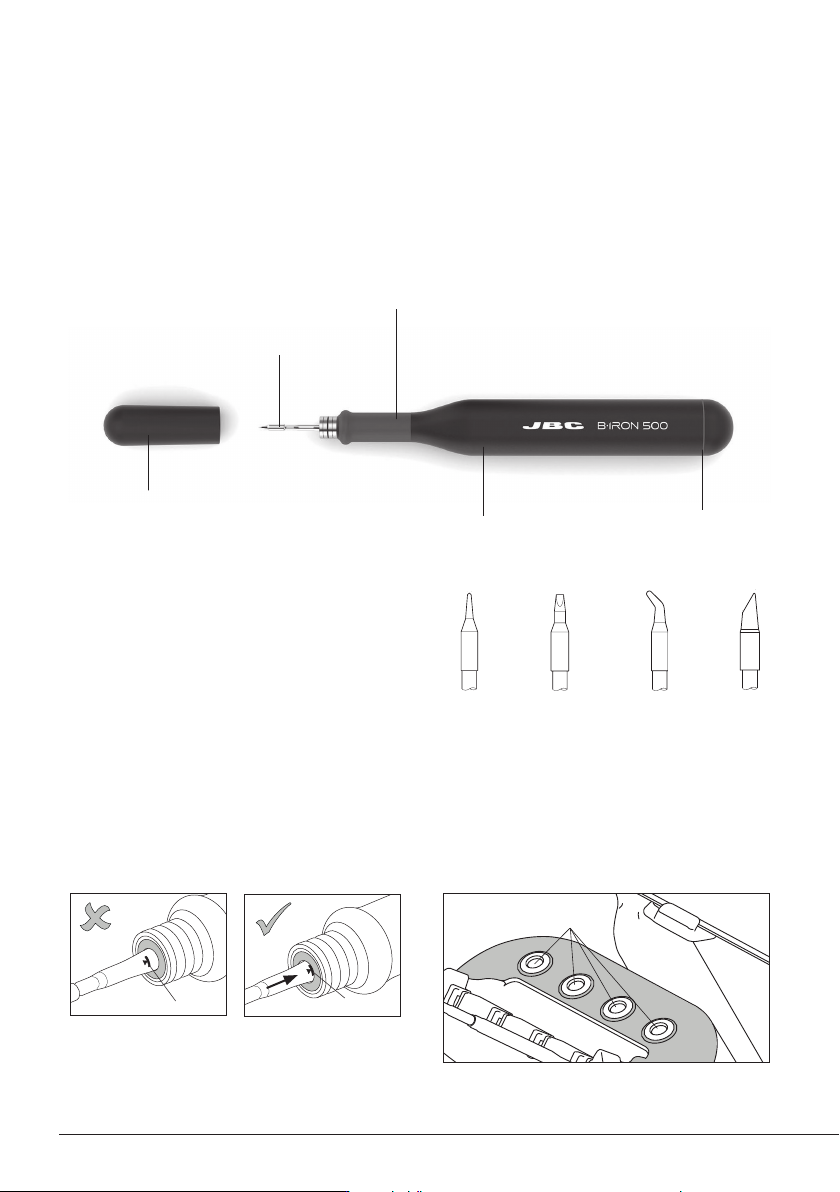
B·500 Handle works with C210 Cartridges.
Find the model that best suits your soldering
needs on www.jbctools.com
Compatible Cartridges*
Features
C210*
Cartridge Range
Status LightbandHandle
B5050
Grips for B·IRON
Handles
B1596
Safety Cap
for B·IRON Handles
* Not included, sold separately.
B·500 performs up to 500 medium-sized SMD soldering joints per charge and is the ideal tool for
continuous and intensive work with larger components or ones connected to ground planes.
Note: To charge the tool a B·IRON station is needed.
1
3
4
1
2
Mark
Retention
Clamps
C115
Cartridge
C210
Cartridge
Cartridge
Exchanger
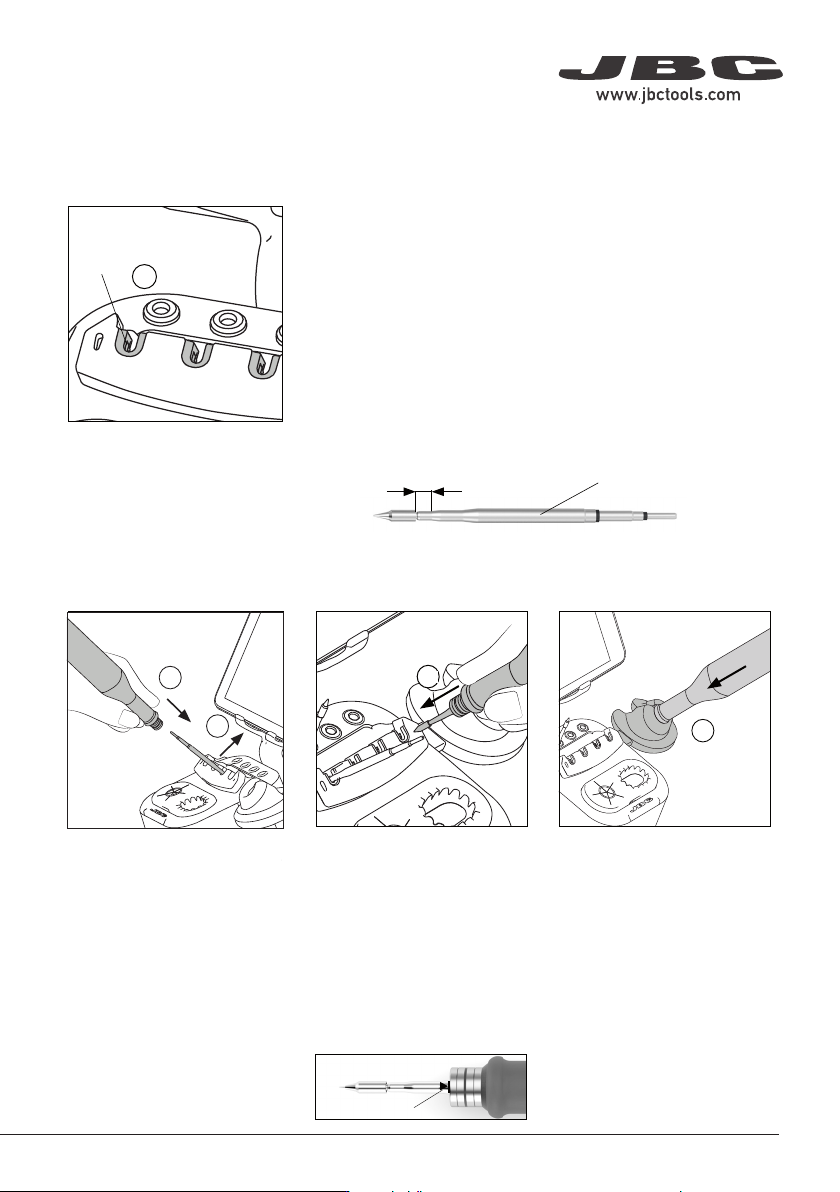
To insert a cartridge, carry out
the same steps as before in
reverse order.
Note: Cartridges must be inserted up to the mark for a proper
connection and function.
Place the tool in the charging
holder (4) to charge it. A beep will
sound when the tool is properly
placed and charging. The volume
can be adjusted using the left
button on the display.
Important: Charge the tool
completely before using it for
the first time.
A full charge takes:
-30min for B·100
-60min for B·500
-30min for B·NANO
-45 min for B·TWEEZERS
Gently press the tip against
the holes on the sides of the
cartridge exchanger (3) to
ensure that the cartridge is
appropriately inserted.
Place the tool with the cartridge
over the cartridge exchanger
slots and press down (1) until it
clicks. To remove the cartridge
pull the handle out (2).
The exchanger is suitable for C115 and C210 cartridges.
C115 Cartridges
The holding area of C115 Cartridges is delimited by the two
rings at the cartridge shaft (x).
Cartridge Exchanger
The cartridge exchanger allows
to insert / change cartridges
safely without switching the
tool off. Cartridges are held in
place thanks to the retention
clamps (1).
C210 Cartridges
The holding area of C210 Cartridges goes from the collar of
the tip until the cartridge begins to widen (x).
Cartridge Changing
Cartridge Fixing Tool Charging
Station Set Up (continuation)
x
x
Cartridge Insertion and Tool Charging
1
2
Place the tool over a cartridge
and press the tool down to insert
the cartridge (1). To release the
tool with the cartridge inserted
from the extractor, lift the tool
upward (2).
Cartridge Inserting
Reference Mark
Reference Mark
Reference Ring
Reference Ring
Ring
Ring
Inserting C115 Cartridges
Push the cartridges inside the handle until the
reference ring rests against the sealing plug.
Inserting C115 Cartridges
Push the cartridges inside the tweezers until
the first ring rests against the tool.
Inserting C210 Cartridges
Push the cartridges inside the handle until
the reference mark is aligned with the edge
of the handle.
C210 Cartridge Holder
The cartridge holder (4x slots) is used to
store cartridges. It allows having different
cartridges quickly at hand and it works with
C210 Cartridges.
Cartridge Holder
Slots
C115 Cartridge Adapters
(Ref. B0643 includes 4 adapters)
Since C115 Cartridges have a smaller diameter
than C210 Cartridges, adapters must be used
to store them in the cartridge holder.
These adapters must simply be inserted from
above into the slots of the cartridge holder.
C115 Cartridge Adapters
(Ref. B0643 includes 4 adapters)
Since C115 Cartridges have a smaller diameter
than C210 Cartridges, adapters must be used
to store them in the cartridge holder.
These adapters must simply be inserted from
above into the slots of the cartridge holder.
Cartridge
Adapters
Cartridge
Adapters
5
40 mm
50 mm
60 mm
80 mm
100 mm
130 mm
130 mm
para manuales - color gris
200 mm
300 mm