00196283_Install_WinXP_unattended_CD.pdf - 第34页
Installation Manual for Windows XP (unattended setup) CD V3.0 02/2011 US+DE Installationsanleitung für Windows XP (unattended setup) CD V3.0 34 9 V oraussetzungen 9.1 Hardware Stations-Rechner: 128 MB RAM Unterstützte Co…
Installation Manual for Windows XP (unattended setup) CD V3.0 02/2011 US+DE
Installationsanleitung für Windows XP (unattended setup) CD V3.0
33
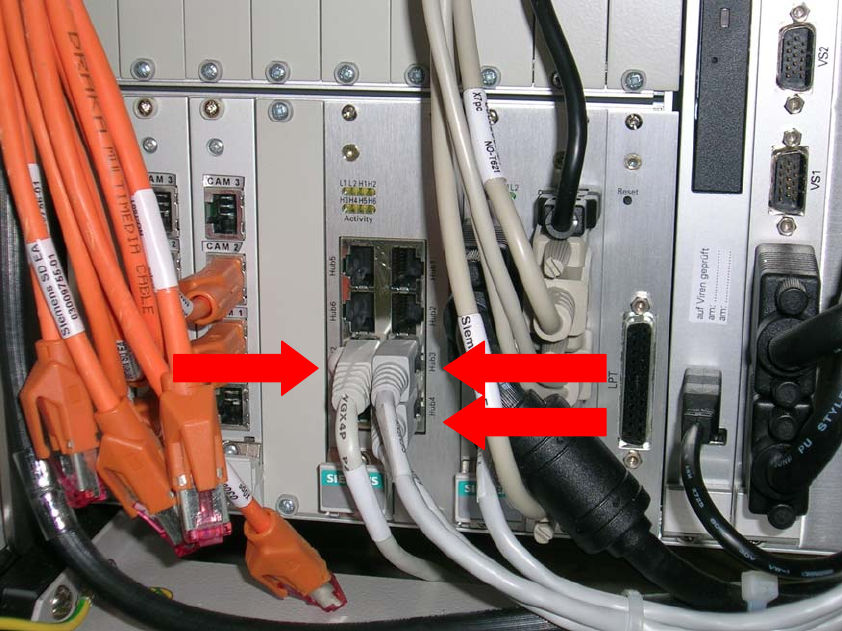
8.2 Netzwerkkartenaufteilung an einer X- Serien Maschine
Der Stationsrechner PC 086 besitzt eine Einschubnetzwerkkarte mit 2 LAN Anschlüssen, sowie
einen integrierten Hub. Für die Kommunikation mit dem MC wird die Verbindung “Hub4”
verwendet. “Hub3” ist die Verbindung zur Station selbst. Die Verbindung “LAN2” der
Einschubnetzwerkkarte wird für die die Verbindung zum Programmiersystem genutzt.
1 3
2
Abb. 8-2: Anschlüsse
4 Legende:
• 1: Anschluss zum Programmiersystem (“LAN 2”)
• 2: Anschluss des Hubs zum MC (“Hub4”)
• 3: Anschluss des Hubs zur Station(“Hub3”)
Installation Manual for Windows XP (unattended setup) CD V3.0 02/2011 US+DE
Installationsanleitung für Windows XP (unattended setup) CD V3.0
34
9 Voraussetzungen
9.1 Hardware
Stations-Rechner:
128 MB RAM
Unterstützte Computer Hardware in dieser CD version V 3.0:
SCENIC C 600 J SIPLACE Compact
with Board D1544
SCENIC C 610 J SIPLACE Compact
with Board D1644
SCENIC N 300 J SIPLACE F5 HM / S-20 / S-23 / S-25HM / S-27HM / F4 / F5
with Board D1561
SCENIC N 320 J SIPLACE F5 HM / S-20 / S-23 / S-25HM / S-27HM / F4 / F5
with Board D1521/D1561/D1961
SCENIC P 300 J SIPLACE HS-60 / HS 50/ 50+
with Board D1561
SCENIC P 320 J SIPLACE HS-60 / HS 50/ 50+
with Board D1521/D1561/D1961
CPU 076 J SIPLACE HF-Series
CPU 086 J SIPLACE X-Series
Unterstützte Touch Screen Bildschirme:
Elo Touch (15”)
Micro Touch (15”)
PenMount Touchscreen (15”)
Nicht unterstützte Computer Hardware, Unterstützung nur in der DVD Version ab V 2.09 / 3.0:
ECONEL 30 J SIPLACE Pro
with Board D1447
ECONEL 40 J SIPLACE Pro
with Board D1755
ECONEL 50 J SIPLACE Pro
with Board D1859
ECONEL 100 J SIPLACE Pro
with Board D2179
ECONEL 100 (Dual Core) J SIPLACE Pro
with Board D2179
Celsius W360 J SIPLACE Pro
with Board D2587

Installation Manual for Windows XP (unattended setup) CD V3.0 02/2011 US+DE
Installationsanleitung für Windows XP (unattended setup) CD V3.0
35
SIMATIC Box PC 627 J SIPLACE HS-D / X-Series
with Board a5e00329102
ESPRIMO E 5700 J SIPLACE F5 HM / S-20 / S-23 / S-25HM / S-27HM / F4 / F5
with Board D2334
ESPRIMO P 5700 J SIPLACE HS-60 / HS 50/ 50+
with Board D2331
ESPRIMO C 5910 J SIPLACE Compact
with Board D2364
ESPRIMO E 5915 J SIPLACE F5 HM / S-20 / S-23 / S-25HM / S-27HM / F4 / F5
with Board D2344
ESPRIMO P 5915 J SIPLACE HS-60 / HS 50/ 50+
with Board D2312
ESPRIMO E 5925 J SIPLACE F5 HM / S-20 / S-23 / S-25HM / S-27HM / F4 / F5
with Board D2598
9.2 Erforderliche Konfigurationsparameter
Für die Setup-Prozedur sind folgende Angaben bereitzuhalten:
• 1
Benutzername
• 2
Firmenname
• 3
IP-Adresse des Stationsrechners (Default: 172.22.100.100)
• 4
IP-Adresse des zum Stationsrechner gehörigen Programmiersystems (Default: 172.22.100.102)
• 5
IP-Adresse des Standard-Gateways (optional, sollte leer bleiben, wenn kein Remote Support
vorhanden ist. Default: leer)
• 6
Subnet Maske des lokalen IP-Netzwerkes