00196283_Install_WinXP_unattended_CD.pdf - 第9页
Installation Manual for Windows XP (unattended setup) CD V3.0 02/2011 US+DE Installationsanleitung für Windows XP (unattended setup) CD V3.0 9 3 Requirement s 3.1 Hardware Station computer: 128 MB RAM Supported Computer …
Installation Manual for Windows XP (unattended setup) CD V3.0 02/2011 US+DE
Installationsanleitung für Windows XP (unattended setup) CD V3.0
8
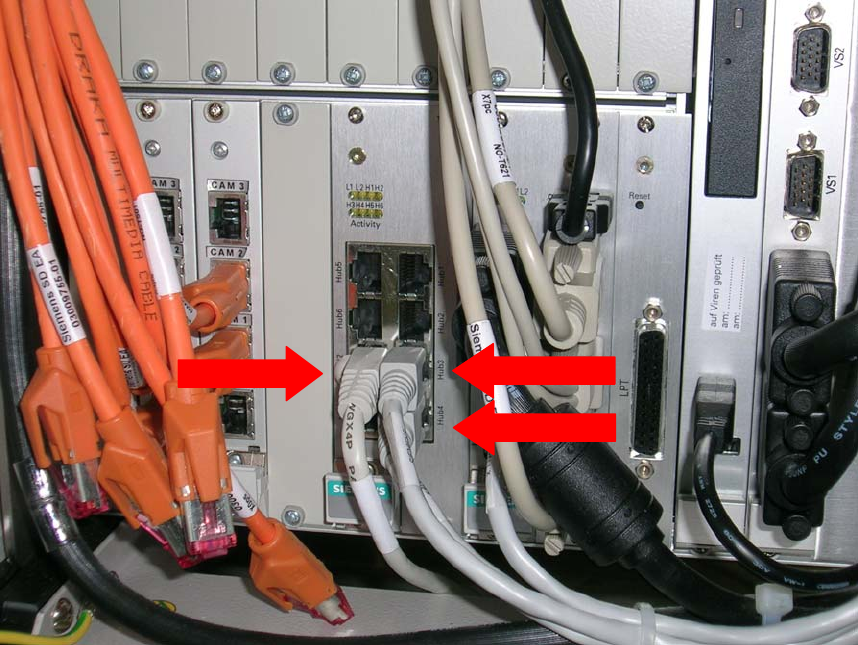
2.2 Network Cards for X-Series
The station computer PC 086 has 2 LAN connections and an integrated hub. For the
communication with the Machine controller the “Hub4” connection will be used. “Hub3” is the
connection to the station itself. The “LAN2” connection is used to connect to the programming
system.
3
2
1
Fig. 2-2: Connections
2 Legend:
• 1: Connection to the programming system (“LAN 2”)
• 2: Connection from hub to the machine controller (“Hub4”)
• 3: Connection from hub to station (“Hub3”)
Installation Manual for Windows XP (unattended setup) CD V3.0 02/2011 US+DE
Installationsanleitung für Windows XP (unattended setup) CD V3.0
9
3 Requirements
3.1 Hardware
Station computer:
128 MB RAM
Supported Computer Hardware in this CD version V 3.0:
SCENIC C 600 J SIPLACE Compact
with Board D1544
SCENIC C 610 J SIPLACE Compact
with Board D1644
SCENIC N 300 J SIPLACE F5 HM / S-20 / S-23 / S-25HM / S-27HM / F4 / F5
with Board D1561
SCENIC N 320 J SIPLACE F5 HM / S-20 / S-23 / S-25HM / S-27HM / F4 / F5
with Board D1521/D1561/D1961
SCENIC P 300 J SIPLACE HS-60 / HS 50/ 50+
with Board D1561
SCENIC P 320 J SIPLACE HS-60 / HS 50/ 50+
with Board D1521/D1561/D1961
CPU 076 J SIPLACE HF-Series
CPU 086 J SIPLACE X-Series
Supported Touch Screen Displays:
Elo Touch (15”)
Micro Touch (15”)
PenMount Touchscreen (15”)
Not Supported Computer Hardware, Support Only In DVD Version V 2.09 / 3.0 and later:
ECONEL 30 J SIPLACE Pro
with Board D1447
ECONEL 40 J SIPLACE Pro
with Board D1755
ECONEL 50 J SIPLACE Pro
with Board D1859
ECONEL 100 J SIPLACE Pro
with Board D2179
ECONEL 100 (Dual Core) J SIPLACE Pro
with Board D2179
Celsius W360 J SIPLACE Pro
with Board D2587

Installation Manual for Windows XP (unattended setup) CD V3.0 02/2011 US+DE
Installationsanleitung für Windows XP (unattended setup) CD V3.0
10
SIMATIC Box PC 627 J SIPLACE HS-D / X-Series
with Board a5e00329102
ESPRIMO E 5700 J SIPLACE F5 HM / S-20 / S-23 / S-25HM / S-27HM / F4 / F5
with Board D2334
ESPRIMO P 5700 J SIPLACE HS-60 / HS 50/ 50+
with Board D2331
ESPRIMO C 5910 J SIPLACE Compact
with Board D2364
ESPRIMO E 5915 J SIPLACE F5 HM / S-20 / S-23 / S-25HM / S-27HM / F4 / F5
with Board D2344
ESPRIMO P 5915 J SIPLACE HS-60 / HS 50/ 50+
with Board D2312
ESPRIMO E 5925 J SIPLACE F5 HM / S-20 / S-23 / S-25HM / S-27HM / F4 / F5
with Board D2598
3.2 Required configuration parameters
For the installation procedure, please note the following information:
• 1
User Name
• 2
Company Name
• 3
IP address of the station computer (Default: 172.22.100.100)
• 4
IP address of the programming system (Default: 172.22.100.102)
• 5
IP address of the default gateways (Optional, if no Remote Support was installedÆ no entry.
Default: no entry)
• 6
Subnet mask of the local IP network