00900085-04_IG_ASMProcessEngine_2.0-R18-1_EN.pdf - 第16页
4 Installation 4.2 Installing ASM ProcessEngine 16 Installation Guide ASM ProcessEngine 2.0 (Pre-Placement) (R18-1) 10/2018 Packages and Features dialog box ► Select the packages and features you want to install (1) . NO…
4 Installation
4.2 Installing ASM ProcessEngine
Installation Guide ASM ProcessEngine 2.0 (Pre-Placement) (R18-1) 10/2018 15
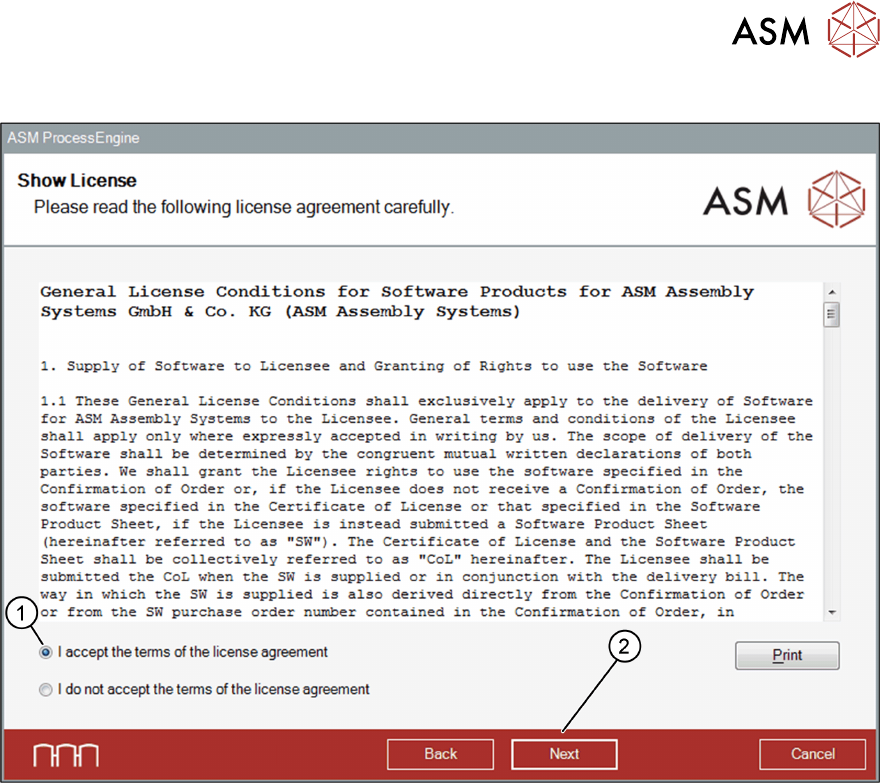
Show License dialog box
► Read the license agreement and select the I accept ... option (1).
► Click Next (2).
The Packages and Features dialog box opens.
4 Installation
4.2 Installing ASM ProcessEngine
16 Installation Guide ASM ProcessEngine 2.0 (Pre-Placement) (R18-1) 10/2018
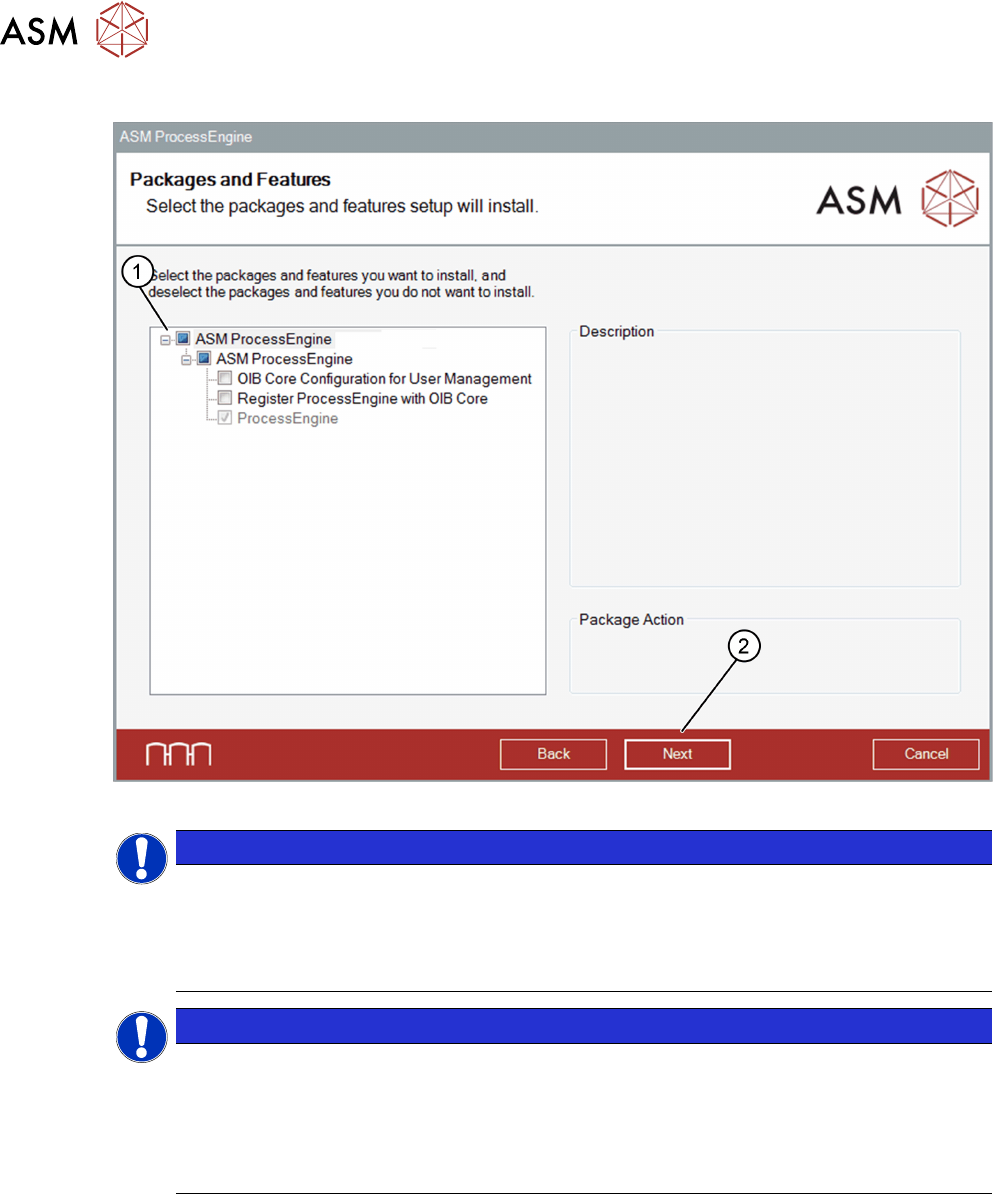
Packages and Features dialog box
► Select the packages and features you want to install (1).
NOTICE
OIB Core Configuration for User Management
This package is necessary if you want to use the OIB User Management functionality.
Prerequisite: The OIB Core must be installed first.
With DFM Health Check Stand-Alone, no OIB connection is necessary and selecting this
package has no impact.
NOTICE
Register ProcessEngine with OIB Core
This package is necessary if you want to read out the line configuration from OIB or
SIPLACE Pro.
Prerequisite: The OIB core and the OIB SIPLACE Pro Adapter must be installed first.
With DFM Health Check Stand-Alone, no line connection is necessary and selecting this
package has no impact.
► Click Next (2).
► If you install ASM ProcessEngine with the OIB Core Configuration for User Management
package, ASM OIB Core Connection dialog box opens. Proceed as described in section
ASM OIB Core connection dialog box.
► If you install ASM ProcessEngine without the OIB Core Configuration for User Manage-
ment package, SQL Server Login dialog box opens. Proceed as described in section SQL
Server Login dialog box.
4 Installation
4.2 Installing ASM ProcessEngine
Installation Guide ASM ProcessEngine 2.0 (Pre-Placement) (R18-1) 10/2018 17
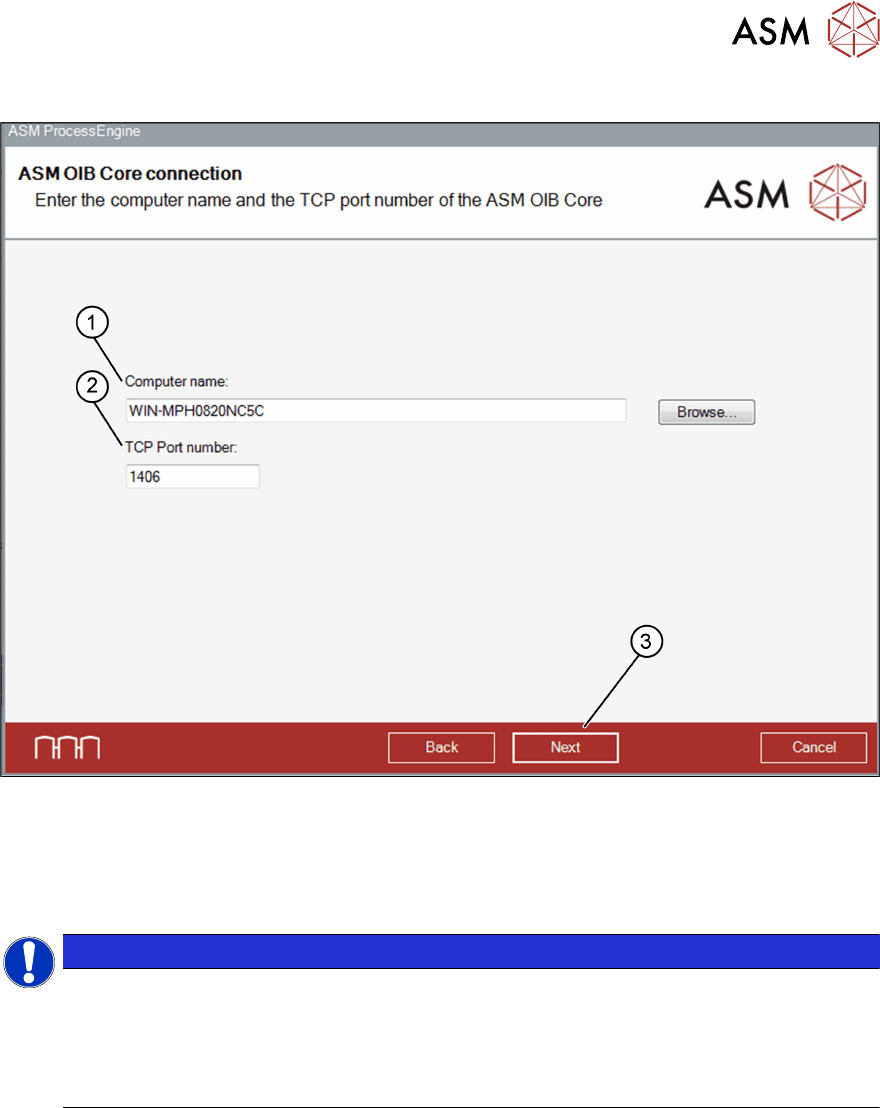
ASM OIB Core connection dialog box
► In the Computer name: field (1), browse to the relevant computer on which the OIB Core is
installed.
► In the TCP Port number: field (2), enter the port number of the specified computer. The de-
fault port number for the OIB Core is: 1406.
► Click Next (3) to continue.
NOTICE
Default user account
A default account and a default password will be created in the User Manager, if you install
the OIB Core Configuration for User Management package:
Account: ProcessEngineUser
Password: ProcessEngine
The SQL Server Login dialog box opens.