TS500R-PC-USER-GUIDE-FINAL.pdf - 第11页
11 PULL/PUSH FITTING CHANGE GUIDE NOTE: the wrench on the left is NOT allowed to move. 8. SPARE PARTS AND ACCESSORIES For TS 500R- PC spare parts and a ccessories information, please visit the User Guide webpage at http:…

10
7. Press the Mode button (#2) for 2 seconds to exit sequential mode
6. TROUBLESHOOTING
PROBLEM
POSSIBLE CAUSE
CORRECTION
LCD does not
light
No power input
Check power cord
connections
Turn on power
System will not
actuate
Supplied pressure
dropped below set
pressure
Foot switch not plugged
in or improperly plugged
in
Defective foot switch
Broken wire or loose
connection inside unit
Defective solenoid
Defective PC board
Increase supplied pressure
Check foot switch
connection
Foot switch needs to be
repaired or replaced
Unplug power cord and
disconnect air supply.
Remove cover and check
for broken wires or loose
connections
Replace solenoid
Replace PC board
System will not
pressurize
Insufficient air pressure
Air hoses not plugged in
Regulator defective
Increase air supply
pressure
Check connection
Replace regulator
No Motor
Response
Foot switch connection is
loose
Motor cable connection is
loose
Input Voltage is too low
Dispense time is too low
Check Foot switch
connection
Check Motor cable
connection
Increase input voltage
Increase dispense time
Inconsistent
dispensing
Air bubbles in adhesive
Dispense time is too low
Dispense needle started to
clog
De-air material
Increase dispensing time
Replace needle
7. MAINTENANCE
The dispenser is designed and built to be relatively maintenance free. To assure
trouble free operation, please follow below steps:
1. Make certain air supply is clean and dry.
2. Avoid connecting the unit to excessive moisture or solvent saturation.
3. Avoid connecting air supply exceeding 100 psi (6.9 bar).
4. Use only Amyl Alcohol to clean outside surface of the main housing.
5. Use only soft cloth to clean the LCD.
11
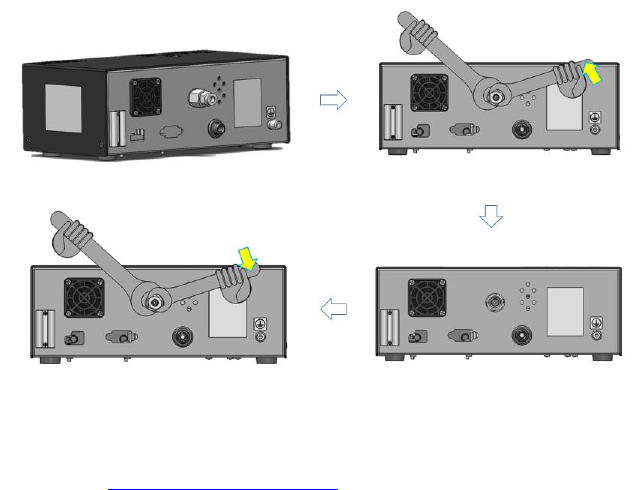
PULL/PUSH FITTING CHANGE GUIDE
NOTE: the wrench on the left is NOT allowed to move.
8. SPARE PARTS AND ACCESSORIES
For TS500R-PC spare parts and accessories information, please visit the User Guide
webpage at http://www.techconsystems.com
9. LIMITED WARRANTY
OK International warrants this product to the original purchaser for a period of two (2)
years from date of purchase to be free from material and workmanship defects but not
normal wear-and-tear, abuse and faulty installation. Defective product or subassembly
and components under warranty will be repaired or replaced (at OK
International's option) free of charge. Customer with defective product under warranty
must contact the nearest OK International office or distributor to secure a return
authorization prior to shipping the product to the assigned OK International authorized
service center. For nearest OK International office or distributor contact information,
please visit www.techconsystems.com. OK International reserves the right to make
engineering product changes without notice.
12
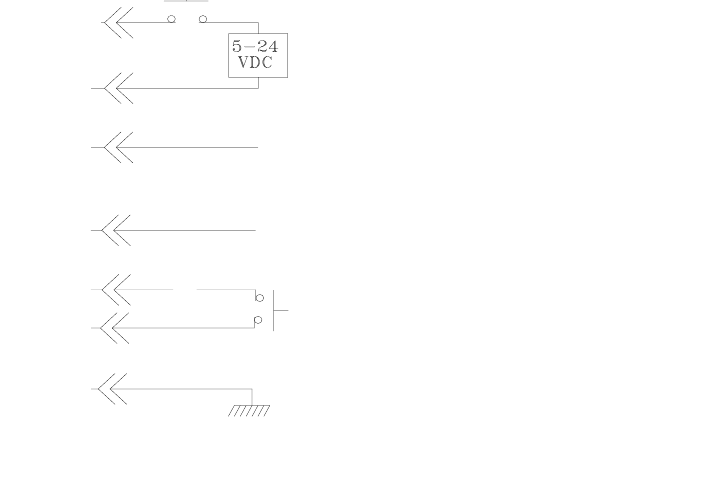
10. I/O CONFIGURATION AND END OF CYCLE FEEDBACK
During a dispense cycle, an open collector circuit closes and remains closed while the
valve is dispensing. Pin 3 and 4 can be as feedback signal to synchronize with other
devices. Power from an external source is allowed to pass through the circuit to
operate a 5 to 24 VDC load. Power consumption must not exceed 250 mA. The load
could be a relay, solenoid, counter, LED, or any device that will operate within a 5 to
24 VDC range and a maximum of 250 mA.
Note:
During the dispense cycle, pin 3 will be grounded. Please make sure the
external device (your machine that controls the dispenser/controller) has the
same ground as the TS500R controller.
7000-5730_A
Pin 7, 8, and 9 = Available
Chasis Ground
To initiate a dispense cycle with
contact closure
When low pressure alarm is triggered, Pin 4 is grounded (-)
When low pressure alarm is turned off,
Pin 4 is not connected (opened)
End of Cycle Feedback
During dispensing cycle, Pin 3 is grounded (-)
End of dispensing cycle,
Pin 3 is not connected (opened)
To initiate a dispense cycle with voltage
Pin 1 (+)
Pin 2 (-)
Pin 3
Pin 4
Pin 5
Pin 6
Pin 5