TS500R-PC-USER-GUIDE-FINAL.pdf - 第7页
7 5.2 Purge the valve (Purge Dispense Cycle Setting) 1. Press the Mode b utton un til “ PURGE” appears on the Display 2. Press and hold the Fo ot Switch until a steady stream of material flowing out the pump outlet witho…
6
TS8100
PC Pump
Compressed Air
Motor Cable
Compressed
Air
5. SETUP INSTRUCTIONS
CAUTION: A 5-micron filter (TSD800-6) must be installed with the unit to ensure proper air
filtration
Note: Make sure the controller is turned off when connecting
the motor cable to port C
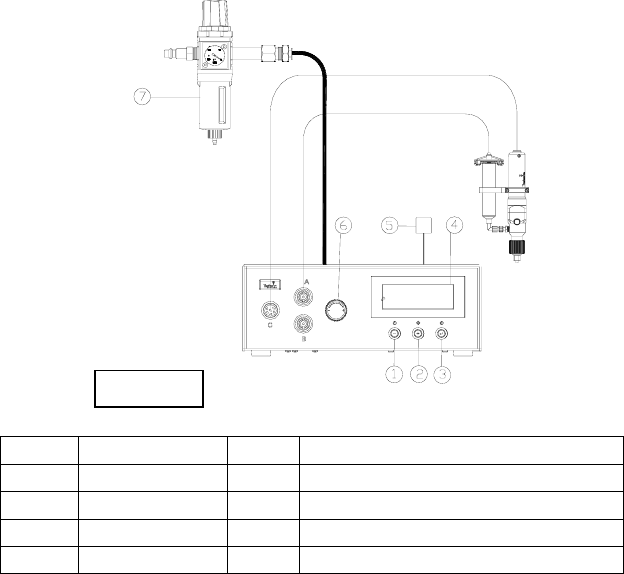
5.1 Connect the valve to the controller: Refer to diagram above
1. Connect the power cord and foot switch to the back of the unit.
2. Connect Motor Cable to Port C. Notes: Make sure the controller is turned off
when connecting the motor cable to port C
3. Connect syringe air hose to a regulated air source
4. Set air pressure to feed the material to the pump
Notes: for low viscosity material the pressure setting should be 1 – 9 psi; for
medium viscosity material the pressure range setting should be 10-19 psi; for
high viscosity material the pressure range should be 20-80 psi
Do not set air pressure more than 30 psi (2 bar) for material viscosity of
1000 Cps or less.
5. Press the Power button (1) to turn on the unit.
Items
Description
Items
Description
1
Power Button
5
Power Adapter
2
Mode Button
6
Air pressure regulator knob
3
Set Button
7
Air Filter
4
LCD Display
Figure 6.0
7
5.2 Purge the valve (Purge Dispense Cycle Setting)
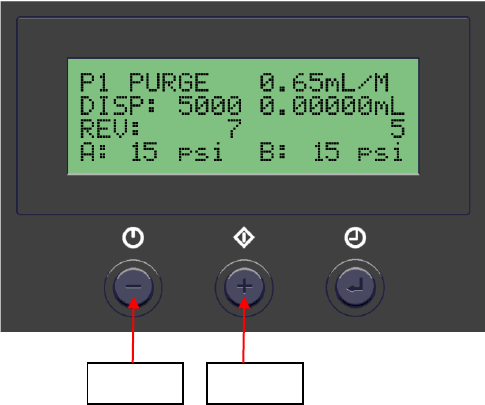
1. Press the Mode button until “PURGE” appears on the Display
2. Press and hold the Foot Switch until a steady stream of material flowing out the
pump outlet without air bubbles.
3. Attach a dispense needle to the valve outlet
4. Repeat step #2
Notes: if air bubbles still appear in the material, open the vent hole #6 to allow
air bubbles to escape.
5.3 Dispensing (Automatic Dispense Cycle Setting)
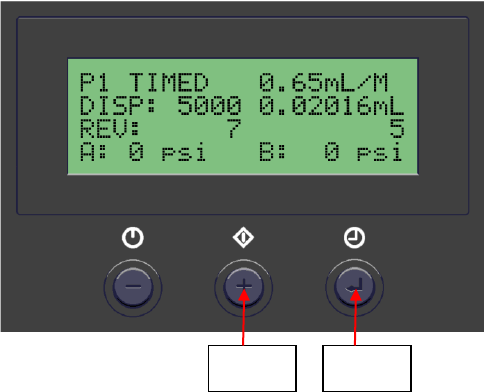
1. Push the Mode button (2) to select “TIMED MODE”
2. Press and hold the Set button (3) for two seconds to enter set up screen. The
dispense time (DISP) will be highlighted.
3. Press the (+) or (-) button to set the motor counts
4. Notes: to achieve high dispense repeatability the pump
5. needs to be set to dispense at least one complete revolution (2650 counts).
6. Press and hold the Set button (3) for two seconds to move the cursor to the
reverse counts.
7. Press the (+) or (-) button to set reverse count.
8. Notes: Recommended reverse count is 7P
9. Press and hold the Set button (3) for two seconds to move the cursor to the output
voltage.
10. Press the (+) or (-) button to change the voltage value.
11. Notes: The recommended voltage setting is 10.5V.
12. Press and hold the Set button (3) for two seconds to save the data.
13. Press and release the Foot Switch to activate the dispense cycle
Power
Button
Mode
Button
8
5.4 Iteration for Encoder Count Setting.
The maximum default encoder count is 60,000P. However there is an ITERATION
“Itr” feature that can be used to increase the dispense duration up to 4 times
(240,000 counts) without interruption.
1. Press and hold the Setup button (#3) for 2 seconds to enter setup screen
2. Press both Power button (#1) and Mode button (#2) simultaneously (3 times)
until “Itr” appear.
3. Press both the Setup button (#3) and (+) button simultaneously to increase
iteration.
4. Press both the Setup button (#3) and (-) button simultaneously to decrease
iteration
5. Press the Setup button (#3) to save data and return to main screen
Mode
Button
Set
Button