TS500R-PC-USER-GUIDE-FINAL.pdf - 第9页
9 5.5 PROGRAM SELECTION This controller has 10 programs (memories) slots to allow 10 different parameters setting storage. Follow steps below to select a desired program: 1. Press the Set butt on (3) to highlight the pro…
8
5.4 Iteration for Encoder Count Setting.
The maximum default encoder count is 60,000P. However there is an ITERATION
“Itr” feature that can be used to increase the dispense duration up to 4 times
(240,000 counts) without interruption.
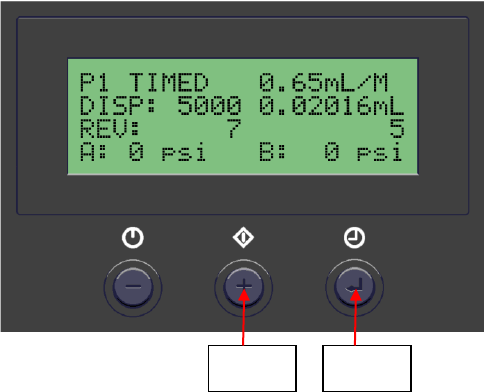
1. Press and hold the Setup button (#3) for 2 seconds to enter setup screen
2. Press both Power button (#1) and Mode button (#2) simultaneously (3 times)
until “Itr” appear.
3. Press both the Setup button (#3) and (+) button simultaneously to increase
iteration.
4. Press both the Setup button (#3) and (-) button simultaneously to decrease
iteration
5. Press the Setup button (#3) to save data and return to main screen
Mode
Button
Set
Button
9
5.5 PROGRAM SELECTION
This controller has 10 programs (memories) slots to allow 10 different
parameters setting storage. Follow steps below to select a desired program:
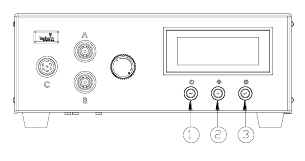
1. Press the Set button (3) to highlight the program number selection.
2. Press the (+) or (-) buttons to select desired program.
3. Press the Set button (3) to exit.
5.6 CYCLE COUNTER (Refer to Figure 9.0)
The cycle counter records the numbers of automatic dispense cycle being
activated. Up to 60,000 cycles can be recorded. To reset the counter, follow
steps below:
1. Press and hold Set button (3) for two seconds to enter setup screen.
2. Press and hold both Set button (3) and Mode button (2) simultaneously to
clear the counter.
3. Press and hold Set button (3) for two seconds to exit setup screen.
Figure 9.0
5.7 TO CHANGE PRESSURE UNIT DISPLAY (Refer to Figure 9.0)
The default pressure unit display is “psi”. To change pressure unit display to
“bar” follow steps below:
1. Press and hold Set button (3) for two seconds to enter setup screen.
2. Press both (+) and (-) button simultaneously two times. The unit “psi” will
be flashing.
3. Press both Set button (3) and (+) button simultaneously to change unit
display to “bar”. Repeat this step to change unit display back to “psi”
4. Press and hold Set button (3) for two seconds to exit setup screen.
5.8 MULTIPLE SHOTS SETTING
Up to ten individual or sequential shots can be stored in the TS500R. Sequential
mode is activated in numerical order.
1. Follow steps in sections “5.1.2 Program Selection” & “5.1.4 Automatic
Dispense Cycle Setting” to set dispense time in desired programs
2. Press and hold the Mode button (#2) for 2 seconds to turn on sequential mode
3. Press and release the Set button (#3) to enter the sequential program setup
mode
4. Press the (+) or (-) button to set the number of programs to be dispensed
5. Press and release the Set button (#3) to save selected sequential shot program
6. Depress Foot switch to activate sequential dispensed cycle

10
7. Press the Mode button (#2) for 2 seconds to exit sequential mode
6. TROUBLESHOOTING
PROBLEM
POSSIBLE CAUSE
CORRECTION
LCD does not
light
No power input
Check power cord
connections
Turn on power
System will not
actuate
Supplied pressure
dropped below set
pressure
Foot switch not plugged
in or improperly plugged
in
Defective foot switch
Broken wire or loose
connection inside unit
Defective solenoid
Defective PC board
Increase supplied pressure
Check foot switch
connection
Foot switch needs to be
repaired or replaced
Unplug power cord and
disconnect air supply.
Remove cover and check
for broken wires or loose
connections
Replace solenoid
Replace PC board
System will not
pressurize
Insufficient air pressure
Air hoses not plugged in
Regulator defective
Increase air supply
pressure
Check connection
Replace regulator
No Motor
Response
Foot switch connection is
loose
Motor cable connection is
loose
Input Voltage is too low
Dispense time is too low
Check Foot switch
connection
Check Motor cable
connection
Increase input voltage
Increase dispense time
Inconsistent
dispensing
Air bubbles in adhesive
Dispense time is too low
Dispense needle started to
clog
De-air material
Increase dispensing time
Replace needle
7. MAINTENANCE
The dispenser is designed and built to be relatively maintenance free. To assure
trouble free operation, please follow below steps:
1. Make certain air supply is clean and dry.
2. Avoid connecting the unit to excessive moisture or solvent saturation.
3. Avoid connecting air supply exceeding 100 psi (6.9 bar).
4. Use only Amyl Alcohol to clean outside surface of the main housing.
5. Use only soft cloth to clean the LCD.