TS500R-PC-USER-GUIDE-FINAL.pdf - 第8页
8 5.4 Iteration for Encode r Count Setting. The maximum default encoder count is 60,000P. How ever there is an ITERATION “Itr” feature that can be used to increa se the dispense duration up to 4 times (240,000 counts) wi…
7
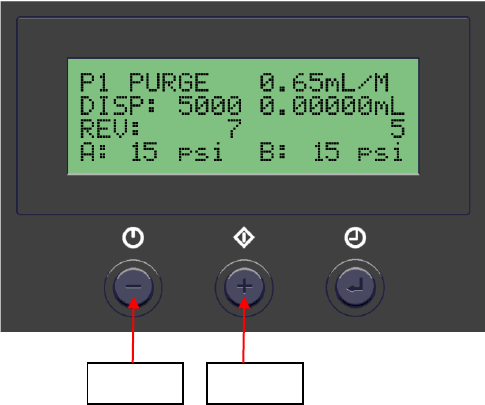
5.2 Purge the valve (Purge Dispense Cycle Setting)
1. Press the Mode button until “PURGE” appears on the Display
2. Press and hold the Foot Switch until a steady stream of material flowing out the
pump outlet without air bubbles.
3. Attach a dispense needle to the valve outlet
4. Repeat step #2
Notes: if air bubbles still appear in the material, open the vent hole #6 to allow
air bubbles to escape.
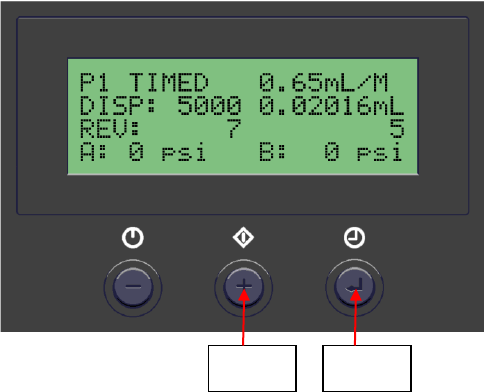
5.3 Dispensing (Automatic Dispense Cycle Setting)
1. Push the Mode button (2) to select “TIMED MODE”
2. Press and hold the Set button (3) for two seconds to enter set up screen. The
dispense time (DISP) will be highlighted.
3. Press the (+) or (-) button to set the motor counts
4. Notes: to achieve high dispense repeatability the pump
5. needs to be set to dispense at least one complete revolution (2650 counts).
6. Press and hold the Set button (3) for two seconds to move the cursor to the
reverse counts.
7. Press the (+) or (-) button to set reverse count.
8. Notes: Recommended reverse count is 7P
9. Press and hold the Set button (3) for two seconds to move the cursor to the output
voltage.
10. Press the (+) or (-) button to change the voltage value.
11. Notes: The recommended voltage setting is 10.5V.
12. Press and hold the Set button (3) for two seconds to save the data.
13. Press and release the Foot Switch to activate the dispense cycle
Power
Button
Mode
Button
8
5.4 Iteration for Encoder Count Setting.
The maximum default encoder count is 60,000P. However there is an ITERATION
“Itr” feature that can be used to increase the dispense duration up to 4 times
(240,000 counts) without interruption.
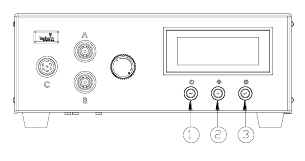
1. Press and hold the Setup button (#3) for 2 seconds to enter setup screen
2. Press both Power button (#1) and Mode button (#2) simultaneously (3 times)
until “Itr” appear.
3. Press both the Setup button (#3) and (+) button simultaneously to increase
iteration.
4. Press both the Setup button (#3) and (-) button simultaneously to decrease
iteration
5. Press the Setup button (#3) to save data and return to main screen
Mode
Button
Set
Button
9
5.5 PROGRAM SELECTION
This controller has 10 programs (memories) slots to allow 10 different
parameters setting storage. Follow steps below to select a desired program:
1. Press the Set button (3) to highlight the program number selection.
2. Press the (+) or (-) buttons to select desired program.
3. Press the Set button (3) to exit.
5.6 CYCLE COUNTER (Refer to Figure 9.0)
The cycle counter records the numbers of automatic dispense cycle being
activated. Up to 60,000 cycles can be recorded. To reset the counter, follow
steps below:
1. Press and hold Set button (3) for two seconds to enter setup screen.
2. Press and hold both Set button (3) and Mode button (2) simultaneously to
clear the counter.
3. Press and hold Set button (3) for two seconds to exit setup screen.
Figure 9.0
5.7 TO CHANGE PRESSURE UNIT DISPLAY (Refer to Figure 9.0)
The default pressure unit display is “psi”. To change pressure unit display to
“bar” follow steps below:
1. Press and hold Set button (3) for two seconds to enter setup screen.
2. Press both (+) and (-) button simultaneously two times. The unit “psi” will
be flashing.
3. Press both Set button (3) and (+) button simultaneously to change unit
display to “bar”. Repeat this step to change unit display back to “psi”
4. Press and hold Set button (3) for two seconds to exit setup screen.
5.8 MULTIPLE SHOTS SETTING
Up to ten individual or sequential shots can be stored in the TS500R. Sequential
mode is activated in numerical order.
1. Follow steps in sections “5.1.2 Program Selection” & “5.1.4 Automatic
Dispense Cycle Setting” to set dispense time in desired programs
2. Press and hold the Mode button (#2) for 2 seconds to turn on sequential mode
3. Press and release the Set button (#3) to enter the sequential program setup
mode
4. Press the (+) or (-) button to set the number of programs to be dispensed
5. Press and release the Set button (#3) to save selected sequential shot program
6. Depress Foot switch to activate sequential dispensed cycle