Galaxy EX Barcode Reader.pdf - 第5页
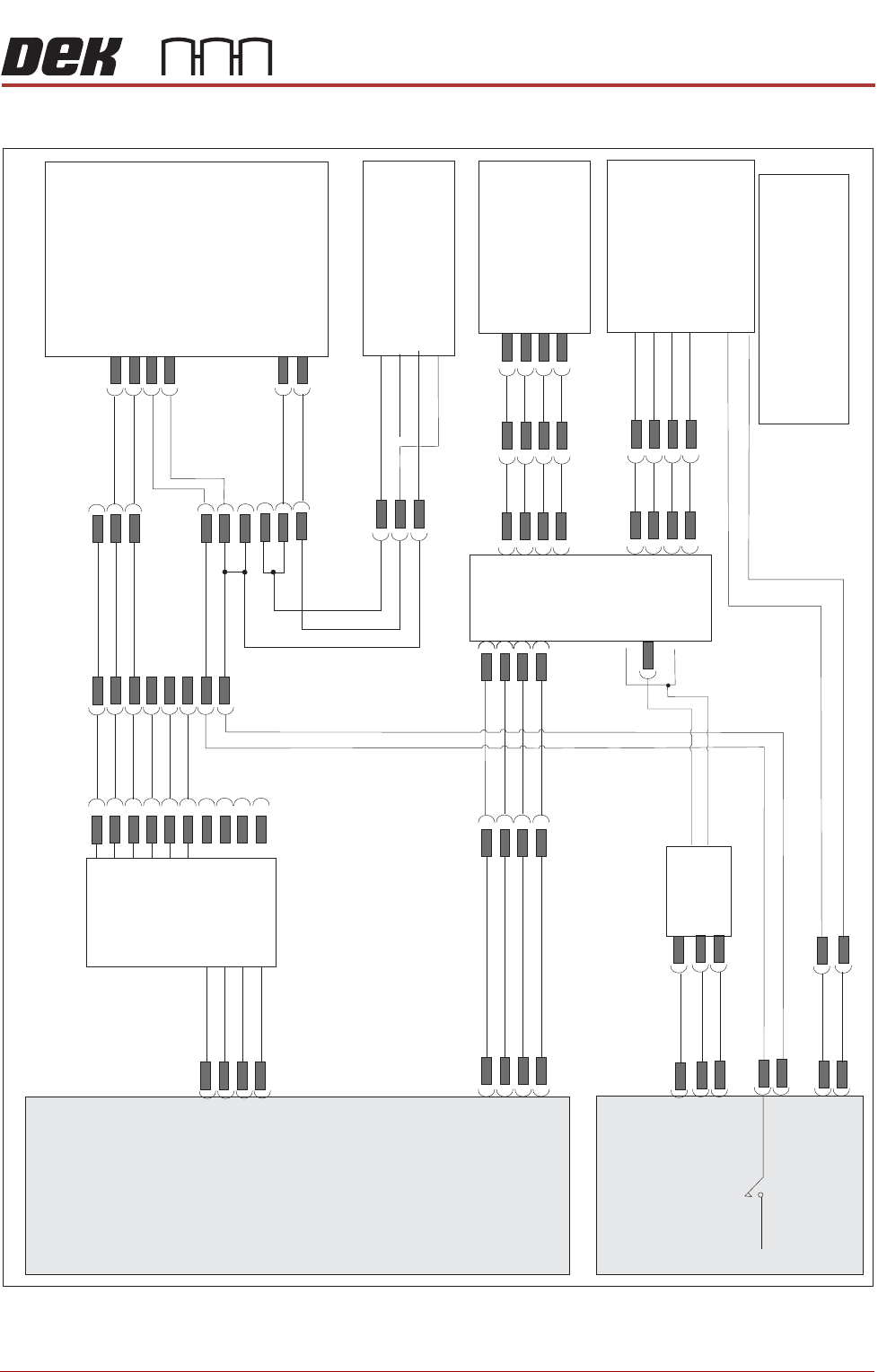
BARCODE RE ADER EL ECT R IC A L SC H EM A T IC Ch apte r Is sue 3, Au g 14 Tech nical Ref erenc e Manual 23 .5 ELECTRICAL S CHEMA TIC M37 Power Supply +12V CB30 1.5A +12V 0V 0V L N E 8PL65 8PL45 USB HUB PSU M37PL13 M37PL…

BARCODE READER
OVERVIEW - VERIFICATION AND TRACEABILITY
23.4 Technical Reference Manual Chapter Issue 3, Aug 14
OVERVIEW - VERIFICATION AND TRACEABILITY
Introduction Verification and traceability is a software tool that validates (verification)
certain items before printing and records data (traceability) to a file.
Purpose Verification ensures that the product and the consumable items used in the
print process match the information stored in the product file.
At the end of each print cycle, verification information is written to the
traceability file. This information may be used to trace particular batches of a
product run and identify all the consumables used for that batch.
Operation At the beginning of a product run, the operator is required to verify the
consumables fitted to the machine. This is achieved by either scanning the
barcode using the handheld barcode reader or entering the identity information
using the keyboard.
During the print run, the product is automatically scanned by the remote
barcode reader located on the input conveyor; the data scanned in, is stored
for traceability with the print data. Each board is checked against the
information stored in the product file.
When a consumable item is replaced on the machine, the operator is
requested to verify the item by entering the identity of the item. This is checked
against the information stored in the product file before the print cycle can
continue.
BARCODE READER
ELECTRICAL SCHEMATIC
Chapter Issue 3, Aug 14 Technical Reference Manual 23.5
ELECTRICAL SCHEMATIC
M37 Power Supply
+12V
CB30 1.5A
+12V
0V
0V
L
N
E
8PL65
8PL45
USB HUB
PSU
M37PL13
M37PL14
M37PL 33
Machine PC
Handheld
Barcode
Reader
(Option)
2D Handheld
Barcode
Reader
(Option)
6PL23
6PL23
NC
TX232
RX232
Signal GND
V+
IN+
Trigger
Trigger
Barcode
Scan
6SE07
+12V
0V
Signal
Alarm
Remote Barcode Reader
3PL57
4PL1
8PL37
4PL4
4PL4
4SK6
+5V
850PL
8SK38
14SK37
6PL17
6SK22
3PL20
USB to
RS232
Converter
See Note
3PL59
USB8
USB6
NOTE
The USB to RS232 Converter
is moulded into the 9 Pin D type
connector hood.
4 Port
USB Hub
BARCODE READER
REPALCEMENT PROCEDURES
23.6 Technical Reference Manual Chapter Issue 3, Aug 14
REPALCEMENT PROCEDURES
These procedures detail how to fit and set up the equipment.
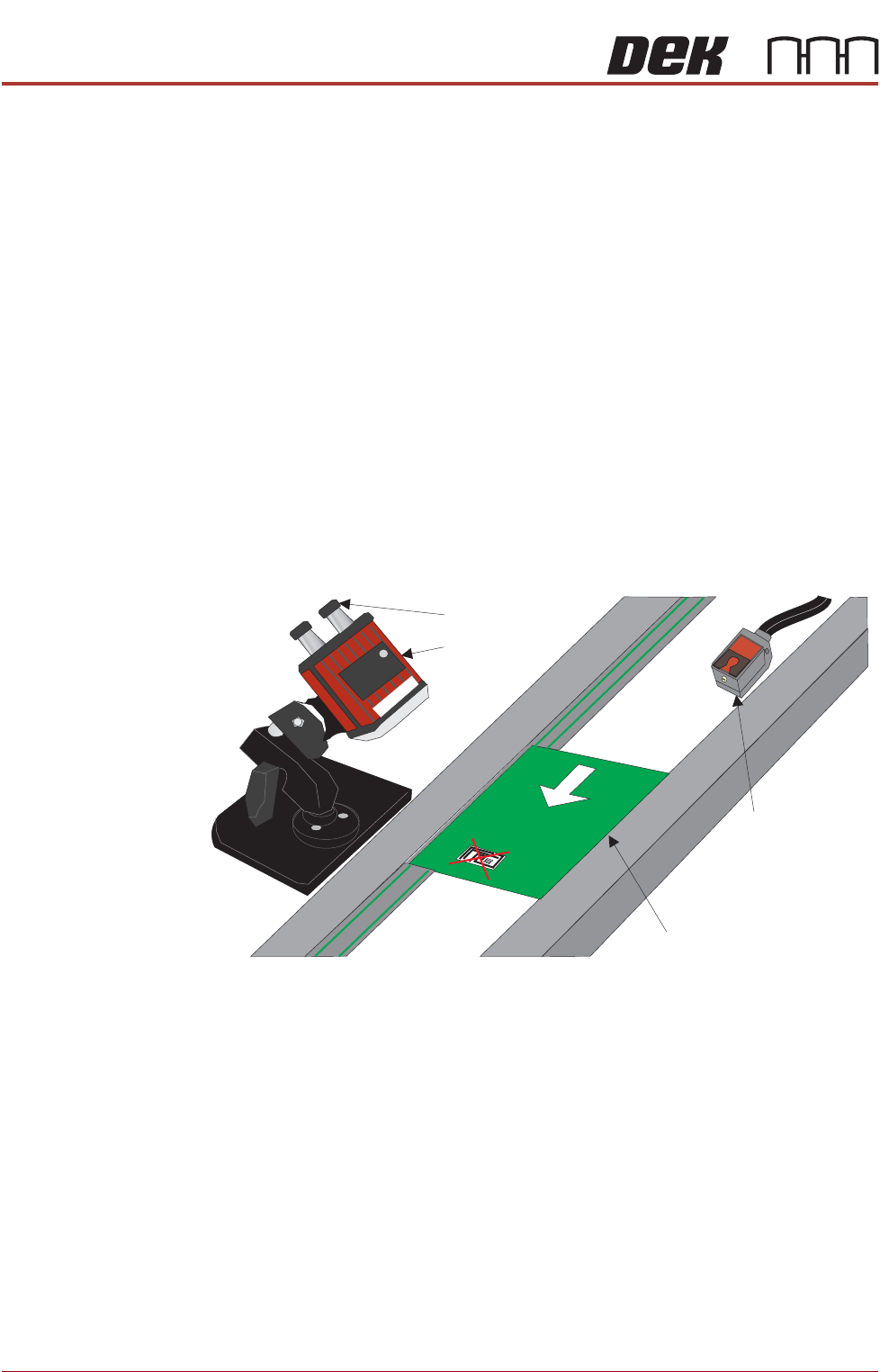
Fitting the Remote
Barcode Reader
1. Select Shut Down and switch the mains isolator to OFF.
2. Securely mount the remote barcode reader on it’s mounting stand.
3. Mount the unit onto the upline conveyor, ensuring that the reader is in a
position to read the barcode on the product.
NOTE
Because conveyor systems vary, the remote barcode reader is supplied on
a fully adjustable mounting stand. This stand should be secured in a suitable
location on the input side of the conveyor.
4. Fit the trigger sensor just before the reader (a Velcro fastener is used for
attaching it).
NOTE
The leading edge of the incoming board, triggers the remote barcode
reader into activation, enabling it to read the barcode on the board. A
crosshair provides an alignment check to target the label in the correct
location.
5. Remove the printer’s rear panel to gain access to the PC.
NOTE
Style 4 Machine PC modules are located and accessed from the front of
the machine.
6. The Power and Signal (Barcode Reader) and the Trigger Sensor cables
are combined into one loom. Route the loom from the conveyor, under the
DEK printer exiting at the rear.
7. Attach the D type connector to the USB conversion cable - 9-pin D type
(USB to Serial (RS232)).
8. Power up the printer at the mains isolator.
9. On the MMI, select Start.
10. Select Run.
11. Type ‘pnpon’ in the command box.
Product with Barcode Label
Trigger Sensor
Barcode Reader
Power and Signal
Board Feed Direction