TK48247.Stride Board Buffering Function.pdf - 第11页
Product Engineering Division SMT Sect ion IM Operations Y AMAHA MOTOR CO., L TD MDOC-SOFT 5 0038-001 1 1/15 Fig7.2 St ride Board Buff ering Setting Please set it in the f ol lowing procedur es with [S tr ide Board Buffer…
Product Engineering Division
SMT Section
IM Operations
YAMAHA MOTOR CO., LTD
MDOC-SOFT50038-001 10/15
7 Appendix
7.1 Automatic settings
The work of this chapter is not necessary unless line constitution is changed.
The following setting is necessary when line constitution is changed or when upstream /
downstream machine is changed. However, the mechanical change of the conveyor in
upstream machine or this machine or downstream machine exists, please refer to "Chapter.7.2.
Manual Settings".
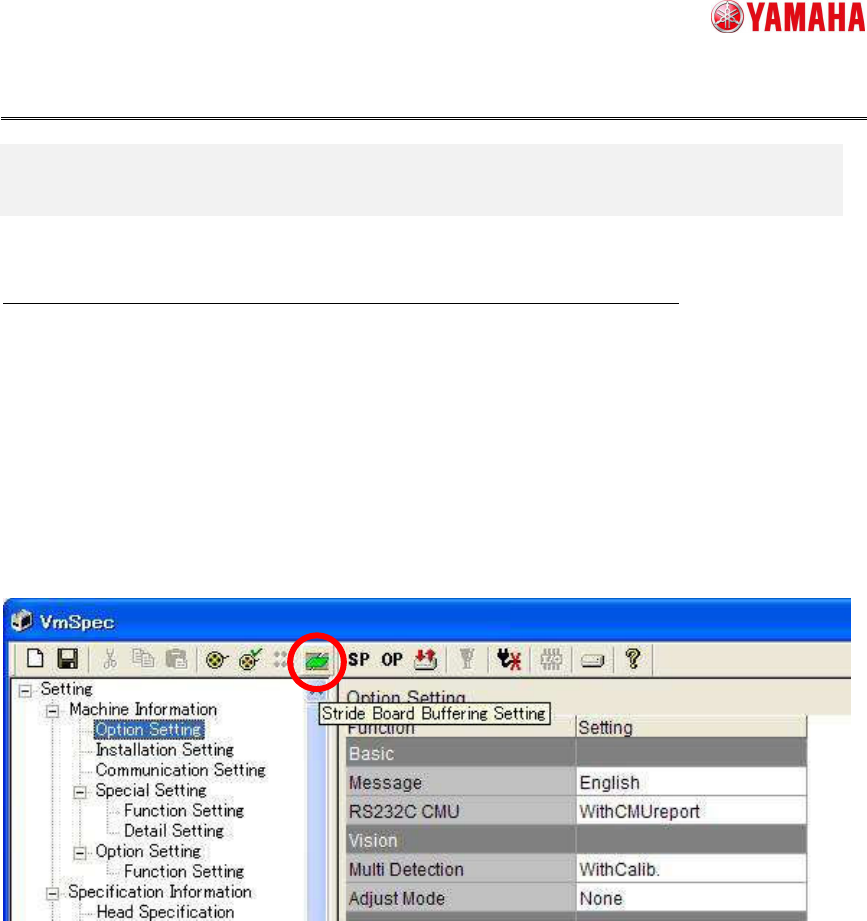
Please tap on [VmSpec] – [Toolbar] – [Stride Board Buffering Setting] button (See Fig.7.1).
When it is taped, [Stride Board Buffering Setting] screen opens.
Fig.7.1 VmSpec Screen
Product Engineering Division
SMT Section
IM Operations
YAMAHA MOTOR CO., LTD
MDOC-SOFT50038-001 11/15
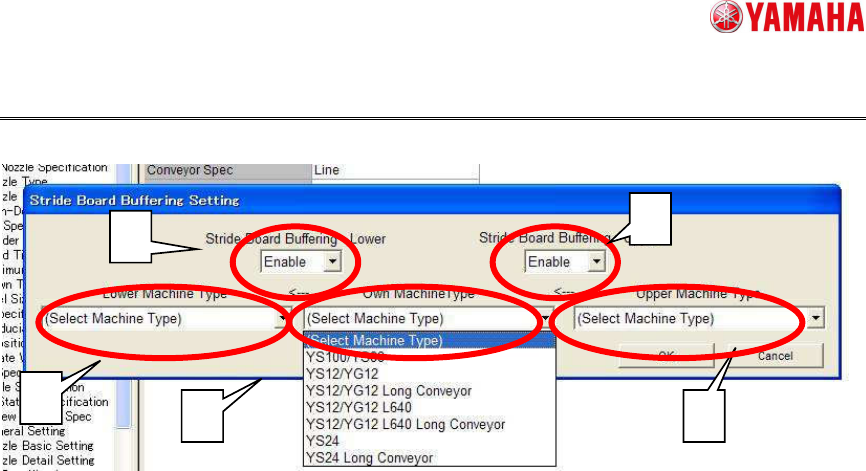
Fig7.2 Stride Board Buffering Setting
Please set it in the following procedures with [Stride Board Buffering Setting] screen (See
Fig.7.2).
1. Set “Enable” on [Stride Board Buffering – Lower] and [Stride Board Buffering – Upper] comb
box.
The following settings are set on [Setting] - [Installation Setting] - [Software].
1) [Stride Board Buffering(Upper)] or [Stride Board Buffering(Lower)] is set to “Enable”.
2) [Upper Handling] or [Lower Handling] is set to “ADVANCED GATE”.
2. Set the settings on [Lower Machine Type], [Own Machine Type] and [Upper Machine Type].
Please choose the downstream machine, this machine, upstream machine from the combo
box. The following settings at [Machine data] - [Mechanical] - [Position] - [Stride Board
Buffering] are set
1) [Upper Machine Max Board Size]
2) [Lower Machine Min Board Size]
3) [Lower Machine Max Board Size]
When the machine type that you want to choose is not displayed at the combo box, please
set “Disable” on [Stride Board Buffering –Lower] or [Stride Board Buffering – Upper].
1
1
2
2
2
Product Engineering Division
SMT Section
IM Operations
YAMAHA MOTOR CO., LTD
MDOC-SOFT50038-001 12/15
7.2 Manual settings
The work of this chapter is not necessary unless line constitution is changed.
The following setting is necessary when line constitution is changed or when upstream /
downstream machine is changed. When the mechanical change of the conveyor in upstream
machine or this machine or downstream machine exists, manual setting is needed. If the
mechanical change does not exist, please refer to "Chapter.7.1. Automatic Settings".
●Installation Settings
To use this function, please set “Enable” on [Stride Board Buffering(Lower)] and [Stride Board
Buffering(Upper)] (please refer to Chapter.5.1. Way of Settings).
In addition, please set “ADVANCED_GATE” on [Setting] - [Installation Setting] - [Upper
Handling / Lower Handling].
●Mechanical Position Settings
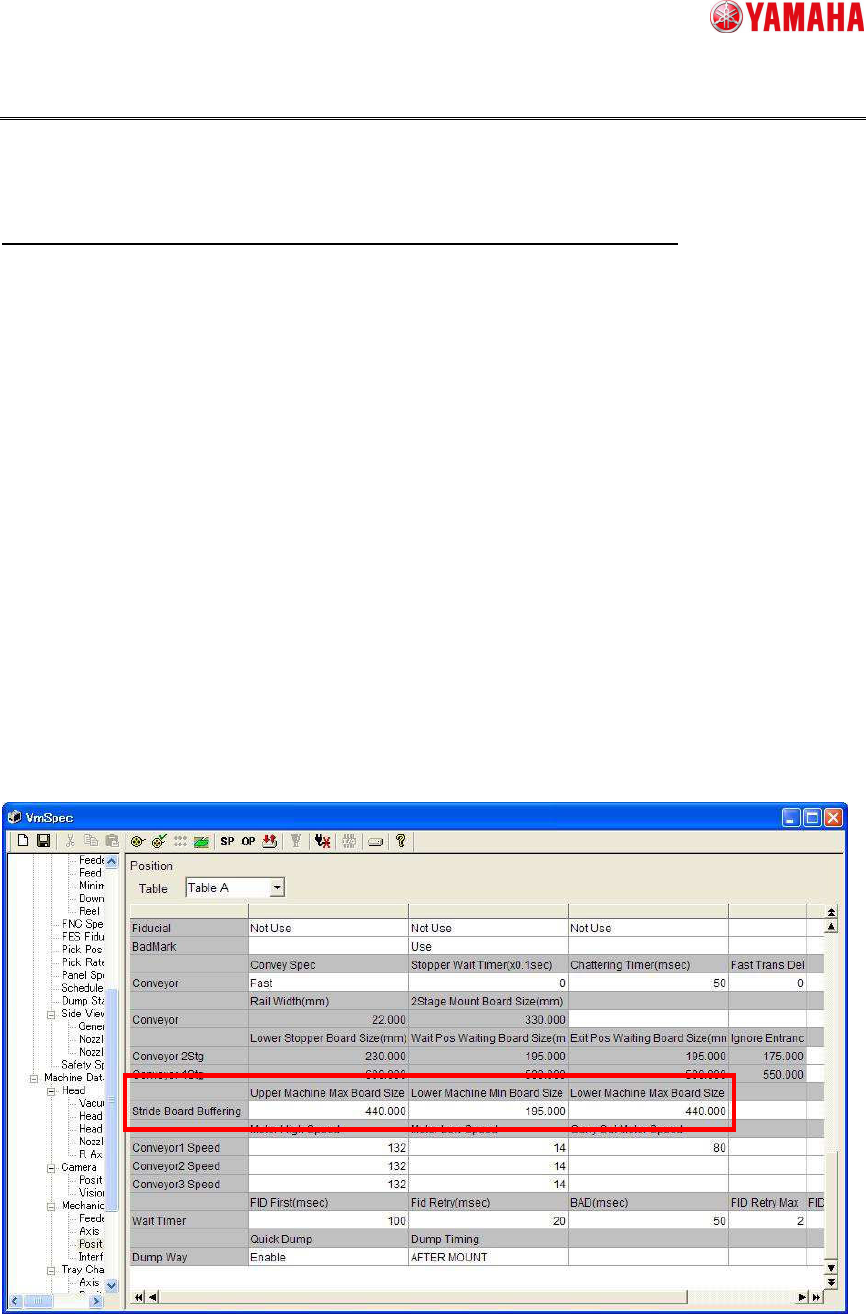
From this version, the settings [Stride Board Buffering] are added on [Machine Information] -
[Installation Setting] - [Software] (See Fig7.3). The conveyor dimensions that is necessary for
this function is able to be set.
Fig 7.3 [Mechanical Position] screen