IPC-7527.pdf - 第18页
Problem A.5.2 Solder Paste Residues Around Deposit (Figure A-15) Possible causes: • Incorrect stencil cleaning. • Printing pressure too high. • Excessive solder mask thickness. • Excessive silk screen thickness. • Double…
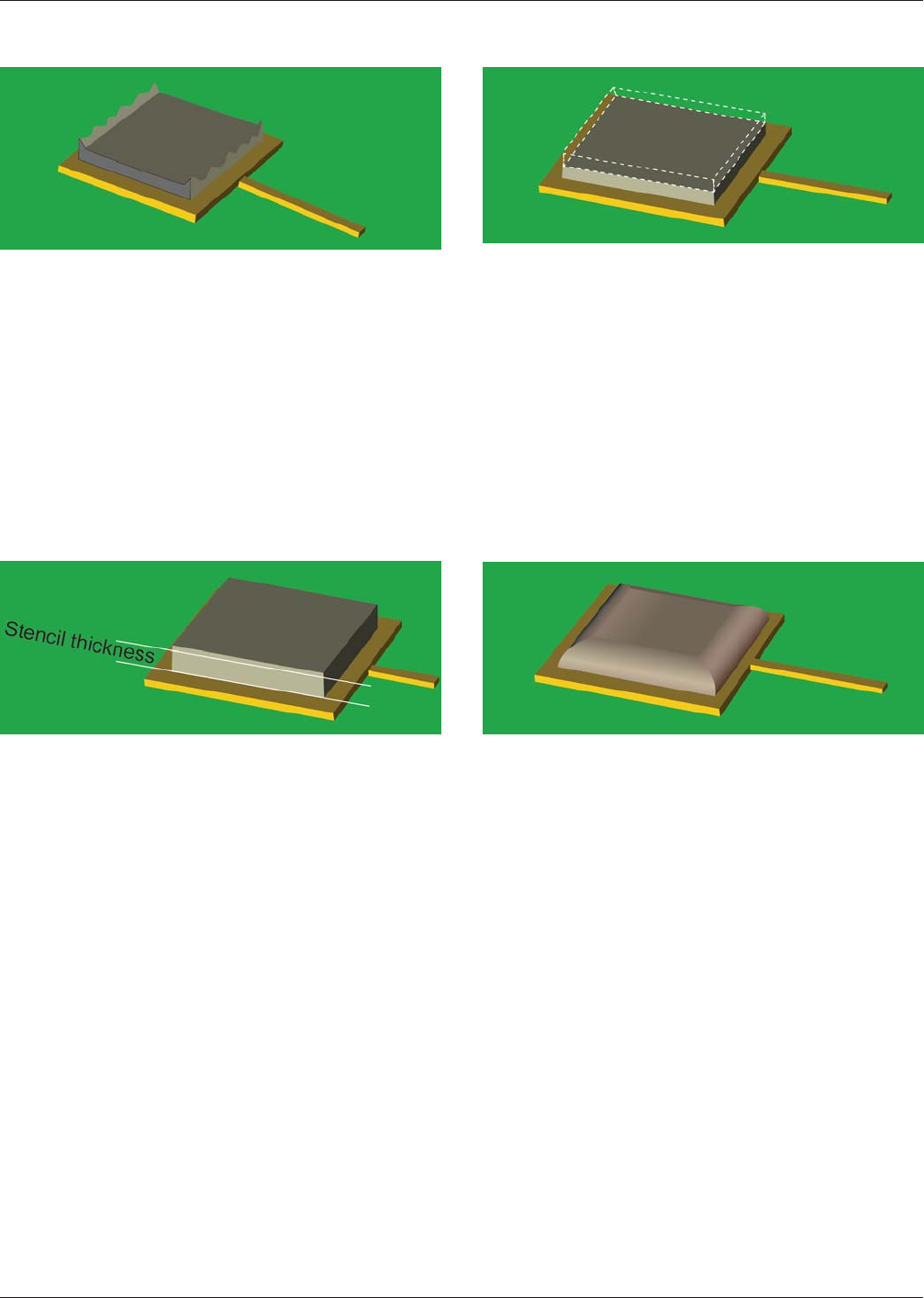
Problem A.3.3 Spikes on Paste Deposit
(Figure A-11)
Possible causes:
• Incorrect solder paste viscosity.
• Poor stencil quality.
• Dried out solder paste residues in stencil aperture.
• Incorrect separation speed.
• Squeegee pressure too low.
A.4 Varying solder paste deposits quantities
Problem A.4.1 Increased Quantity Compared to Stencil
Thickness (Figure A-12)
Possible causes:
• Incorrect down stop.
• Print pressure too low.
• Incorrect parallelism.
• Print speed too high.
• Incorrect snap off.
• Excessive solder mask thickness.
• Excessive silk screen thickness.
• Incorrect adjusted PCB thickness.
• Incorrect/insufficient board support.
Problem A.4.2 Decreased Quantity Compared to Stencil
Thickness (Figure A-13)
Possible causes:
• Dried solder paste.
• Print speed too high.
• Insufficient solder paste on stencil.
• Dried solder paste in stencil aperture.
A.5 Solder Paste Residues Outside Designated Print
Area
Problem A.5.1 Slumping/Smearing
(Figure A-14)
Possible causes:
• Temperature too high in printing area.
• Incorrect solder paste viscosity.
• Printing pressure too high.
• Excessive solder mask thickness.
• Excessive silk screen thickness.
• Uneven surface on footprint, e.g., Hot Air Solder Level
(HASL).
• Incorrect snap off.
• Misalignment of solder paste printing.
• Insufficient stencil tension.
• Excessive paste pressure in closed head printing system.
Figure A-11 Spikes on Paste Deposit
Figure A-12 Increased Deposit Quantity
Figure A-13 Decreased Quantity
Figure A-14 Slumping/Smearing
May 2012 IPC-7527
11
SINGLE USER LICENSE - NOT FOR USE ON A NETWORK OR ONLINE
Problem A.5.2 Solder Paste Residues Around Deposit
(Figure A-15)
Possible causes:
• Incorrect stencil cleaning.
• Printing pressure too high.
• Excessive solder mask thickness.
• Excessive silk screen thickness.
• Double printing.
A.6 Printing Problems with Solder Past Residues on Top
Side of Stencil
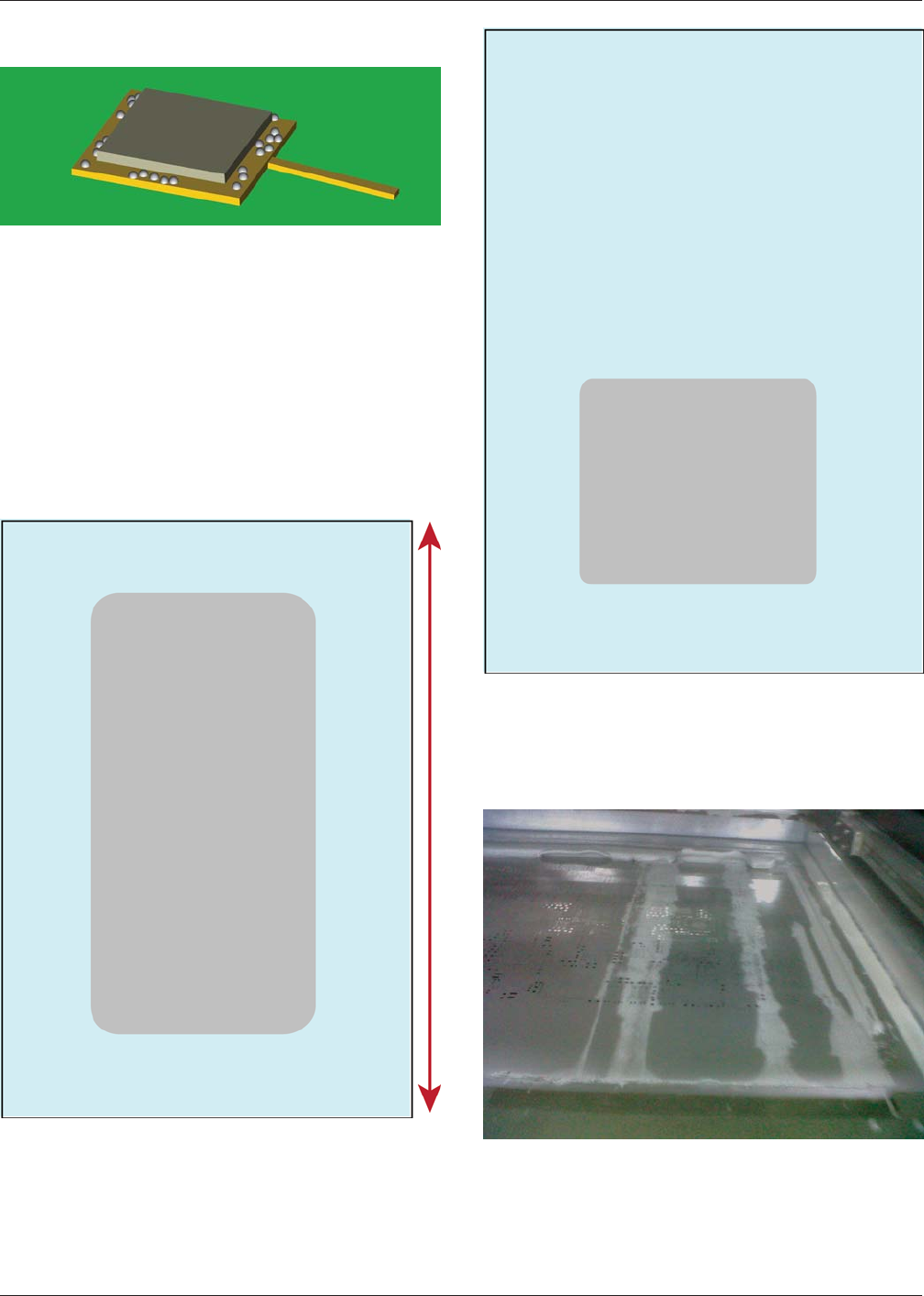
Figures A-16 through A-19 show how the
solder paste residues are distributed on the stencil surface.
Possible causes:
• Print pressure.
• Print speed.
• Downstop.
• Board support.
Possible causes:
• Parallelism.
• Board support.
Possible causes:
• Defect squeegee.
• Defect stencil.
Figure A-15 Paste Residues
Figure A-16 Long Smear
Figure A-17 Offset
Figure A-18 Excess Residue Along Direction of Travel
IPC-7527 May 2012
12
SINGLE USER LICENSE - NOT FOR USE ON A NETWORK OR ONLINE
Possible causes:
• Board support.
• PCB.
• Stencil/print pressure.
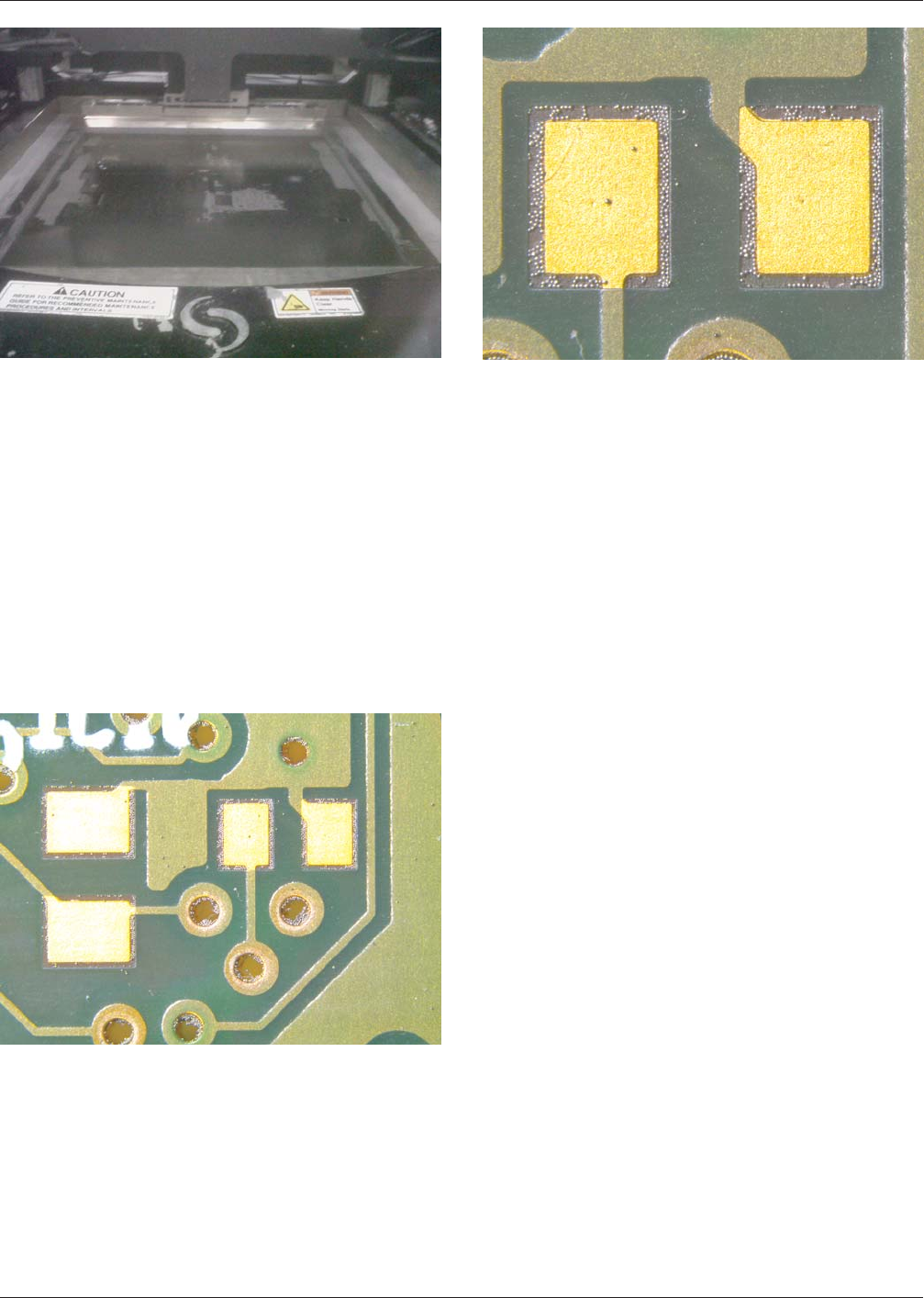
A.7 Issues with Cleaning Misprinted PCBs Misprinted
PCBs that are rejected by a visual inspection system
(manual inspection, AOI, SPI) require cleaning. Manual
cleaning will often result in solder paste being wiped over
the PCB leaving solder balls (Figures A-20 and A-21) on
the PCB surface and in via holes which can result in a short
circuit.
It is often more difficult to remove solder paste and par-
ticles than cleanable flux residues. The most effective
method for removing solder paste is a combination of
mechanical and chemical cleaning.
Because solder balls are held in place by the flux, an inte-
grated cleaning process will be required to first loosen the
solder balls, followed by a rinsing process to remove them.
The reader is directed to IPC-7526, Stencil and Misprinted
Board Cleaning Handbook for more information on clean-
ing misprinted boards.
It may not be possible to clean a PCB so it will be in new
condition!
A.8 Issues with Stencil Cleaning
A.8.1 Under-Screen Cleaning
Reliable solder paste
printing for fine and ultra-fine pitch components places
high demands on the materials and equipment in the print-
ing process. Stencils for fine pitch printing require a higher
frequency of cleaning to minimize smearing and ensure a
precise placement of the deposited solder paste. Automatic
stencil cleaning systems are normally integrated in the
screen printer that use solvents and lint free paper can be
programmed to remove solder paste residues from the bot-
tom side of the stencil.
A.8.2 Manual Cleaning of Stencil The disadvantages
and problems connected with manual cleaning are normally
greater than the advantages. Cleaning stencils is considered
as the most critical process. Manual cleaning of stencils is
normally conducted at the expense of the cleanliness of the
stencil aperture. There will often be solder balls in the
stencil apertures. Effective manual cleaning of the stencil
apertures using tools can be difficult and lead to damaging
the stencil.
Compressed air that is used to blow the apertures clean will
cause damage to fragile areas between fine pitch apertures.
High pressure water cleaning may cause damage to sensi-
tive areas. Compressed air also can spread solder paste to
other surfaces or operators. Solder paste that has dried in
the stencil aperture can harden and can be very difficult to
remove.
Dried solder paste is the most common cause for blocking
of the stencil aperture affecting an insufficient paste
deposit. An automatic stencil washing system will normally
Figure A-19 Residue Across Direction of Travel
Figure A-20 Solder Balls
Figure A-21 Close Up of Solder Balls
May 2012 IPC-7527
13
SINGLE USER LICENSE - NOT FOR USE ON A NETWORK OR ONLINE