IPC-7527.pdf - 第20页
reduce these dangers and ensure a more consistent and pre- dictable result. However , this is under the condition that the cleaning process is monitored and maintained. When using certain types of stencil cleaning system…
Possible causes:
• Board support.
• PCB.
• Stencil/print pressure.
A.7 Issues with Cleaning Misprinted PCBs Misprinted
PCBs that are rejected by a visual inspection system
(manual inspection, AOI, SPI) require cleaning. Manual
cleaning will often result in solder paste being wiped over
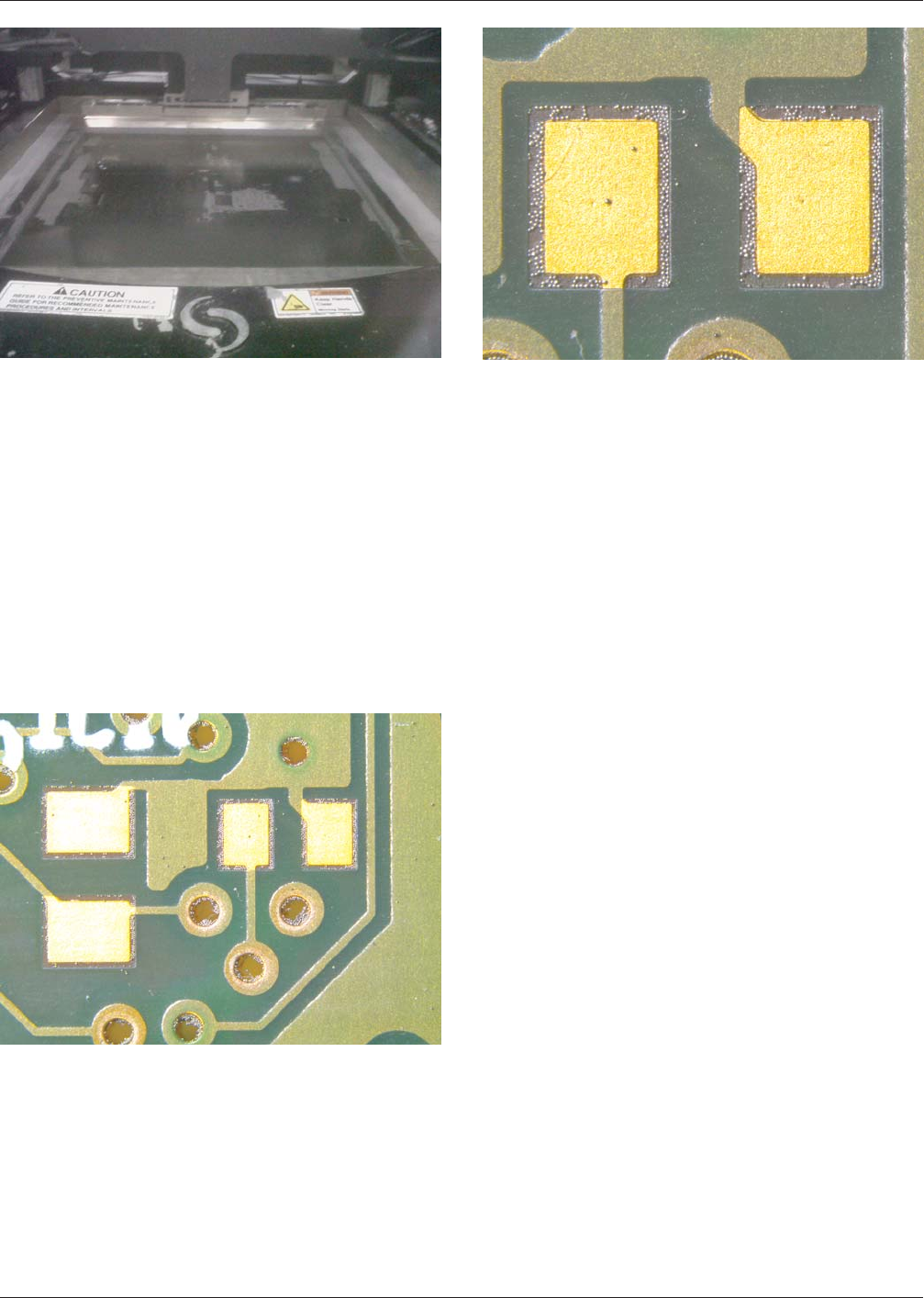
the PCB leaving solder balls (Figures A-20 and A-21) on
the PCB surface and in via holes which can result in a short
circuit.
It is often more difficult to remove solder paste and par-
ticles than cleanable flux residues. The most effective
method for removing solder paste is a combination of
mechanical and chemical cleaning.
Because solder balls are held in place by the flux, an inte-
grated cleaning process will be required to first loosen the
solder balls, followed by a rinsing process to remove them.
The reader is directed to IPC-7526, Stencil and Misprinted
Board Cleaning Handbook for more information on clean-
ing misprinted boards.
It may not be possible to clean a PCB so it will be in new
condition!
A.8 Issues with Stencil Cleaning
A.8.1 Under-Screen Cleaning
Reliable solder paste
printing for fine and ultra-fine pitch components places
high demands on the materials and equipment in the print-
ing process. Stencils for fine pitch printing require a higher
frequency of cleaning to minimize smearing and ensure a
precise placement of the deposited solder paste. Automatic
stencil cleaning systems are normally integrated in the
screen printer that use solvents and lint free paper can be
programmed to remove solder paste residues from the bot-
tom side of the stencil.
A.8.2 Manual Cleaning of Stencil The disadvantages
and problems connected with manual cleaning are normally
greater than the advantages. Cleaning stencils is considered
as the most critical process. Manual cleaning of stencils is
normally conducted at the expense of the cleanliness of the
stencil aperture. There will often be solder balls in the
stencil apertures. Effective manual cleaning of the stencil
apertures using tools can be difficult and lead to damaging
the stencil.
Compressed air that is used to blow the apertures clean will
cause damage to fragile areas between fine pitch apertures.
High pressure water cleaning may cause damage to sensi-
tive areas. Compressed air also can spread solder paste to
other surfaces or operators. Solder paste that has dried in
the stencil aperture can harden and can be very difficult to
remove.
Dried solder paste is the most common cause for blocking
of the stencil aperture affecting an insufficient paste
deposit. An automatic stencil washing system will normally
Figure A-19 Residue Across Direction of Travel
Figure A-20 Solder Balls
Figure A-21 Close Up of Solder Balls
May 2012 IPC-7527
13
SINGLE USER LICENSE - NOT FOR USE ON A NETWORK OR ONLINE

reduce these dangers and ensure a more consistent and pre-
dictable result. However, this is under the condition that the
cleaning process is monitored and maintained.
When using certain types of stencil cleaning systems, it
may be necessary to pre-clean the stencil. This step can be
conducted while the stencil is in the screen printer or
immediately before the stencil is placed in the cleaning
system. Normally it is possible to remove excessive solder
paste by using a squeegee or spatula.
When the material for wiping the stencil is to be chosen, it
is important that the material is designed for cleaning sten-
cils and will not release fibers, lint, or glue residues onto
the stencil. These pollutants can have a negative influence
on the subsequent screen printing process.
If the cleaning process requires a pre cleaning with chemi-
cals, a solvent should be chosen with the following proper-
ties:
• Nontoxic.
• Dries without leaving residues or odors.
• Dissolve solder paste.
• Complies with the solder paste manufacturer recommen-
dations.
The recommendations in the safety data sheet should
always be adhered to when cleaning!
A.9 Recommendations
A.9.1 Test Prints
A test print is as a visual check of the
print. A non-production board can be used to avoid
repeated cleaning of a production board.
According to the complexity and volume of the product,
the determination will need to be made as to the value of
test printing.
After printing of the test board, the operator can visually
verify alignment and deposit appearance. If all parameters
are met, production can begin.
IPC-7527 May 2012
14
SINGLE USER LICENSE - NOT FOR USE ON A NETWORK OR ONLINE
ANSI/IPC-T-50 Terms and Definitions for
Interconnecting and Packaging Electronic Circuits
Definition Submission/Approval Sheet
The purpose of this form is to keep
current with terms routinely used in
the industry and their definitions.
Individuals or companies are
invited to comment. Please
complete this form and return to:
IPC
3000 Lakeside Drive, Suite 309S
Bannockburn, IL 60015-1249
Fax: 847 615.7105
SUBMITTOR INFORMATION:
Name:
Company:
City:
State/Zip:
Telephone:
Date:
❑ This is a NEW term and definition being submitted.
❑ This is an ADDITION to an existing term and definition(s).
❑ This is a CHANGE to an existing definition.
Term Definition
If space not adequate, use reverse side or attach additional sheet(s).
Artwork: ❑ Not Applicable ❑ Required ❑ To be supplied
❑ Included: Electronic File Name:
Document(s) to which this term applies:
Committees affected by this term:
Office Use
IPC Office Committee 2-30
Date Received:
Comments Collated:
Returned for Action:
Revision Inclusion:
Date of Initial Review:
Comment Resolution:
Committee Action: ❑ Accepted ❑ Rejected
❑ Accept Modify
IEC Classification
Classification Code • Serial Number
Terms and Definition Committee Final Approval Authorization:
Committee 2-30 has approved the above term for release in the next revision.
Name:
Committee: Date:
IPC 2-30
SINGLE USER LICENSE - NOT FOR USE ON A NETWORK OR ONLINE