00198765-01_VD_713.0_R19-2_EN_DE.pdf - 第10页
Station Software 713.0 (R19-2) / Version Description 11/2019 Edition 10 4 Features of the 713.0 Station Software Version All features of the previous 7xx station software versions are also s upported in the 713.0 station…

Station Software 713.0 (R19-2) / Version Description 11/2019 Edition
9
3 Compatible Mode
Some station software versions may be used as lower versions in compatible mode. This means
that the new functions of the current version can be used in the compatible version as far as
possible.
The compatible mode is provided to operate stations with lower line software versions in order to
keep the line software version in case of a station upgrade.
The 713.0 station software version can be operated as Version 712.2 in compatible mode.
The visibility and functionality of the new functions in compatible mode are explained in the
following table.
Compatible Mode
Meaning
Complete
Complete function support.
Compatible
The function is visible and executable at the station. However, new add-
ons in the station software or in the line products are not supported.
Hidden
The function is invisible/inactive, e.g. due to licensing or unsupported
SIPLACE Pro download/upload.
Not supported
The function is not supported, e.g. because of failing hardware.
Table 3-1: Visibility and functionality in compatible mode
The respective visibility/functionality in compatible mode is specified for the new features in
chapter 4.
The compatible mode can be activated under Settings – SIPLACE station interface clients on
the GUI.
Please also refer to chapter 6.
Station Software 713.0 (R19-2) / Version Description 11/2019 Edition
10
4 Features of the 713.0 Station Software Version
All features of the previous 7xx station software versions are also supported in the 713.0 station
software version. The main new features of the 713.0 station software version are listed below.
NOTICE
Detailed information on the individual functions can be found in the Online help for the
station software.
4.1 Smart Pin Support for TX V2 – Enhancements
The Smart Pin Support for the TX V2 has been enhanced by the functions described below.
Using Partly Accessible Nozzle Magazines
Compatible mode: Complete
A new nozzle magazine with 20 garages has been introduced for the CPP head and C&P20 P / P2
head each:
– Nozzle magazine for CPP head: 20xx magazine, item no. [03135469-xx]
– Nozzle magazine for C&P20 P / P2 head: 40xx magazine, item no. [03218226-xx]
If the TX V2 is configured with Smart Pin Support, not all garages in these nozzle magazines can
be reached by the placement head. To avoid the entire nozzle magazine from being blocked, only
the garages out of reach are blocked and marked as such. All reachable garages can be used.
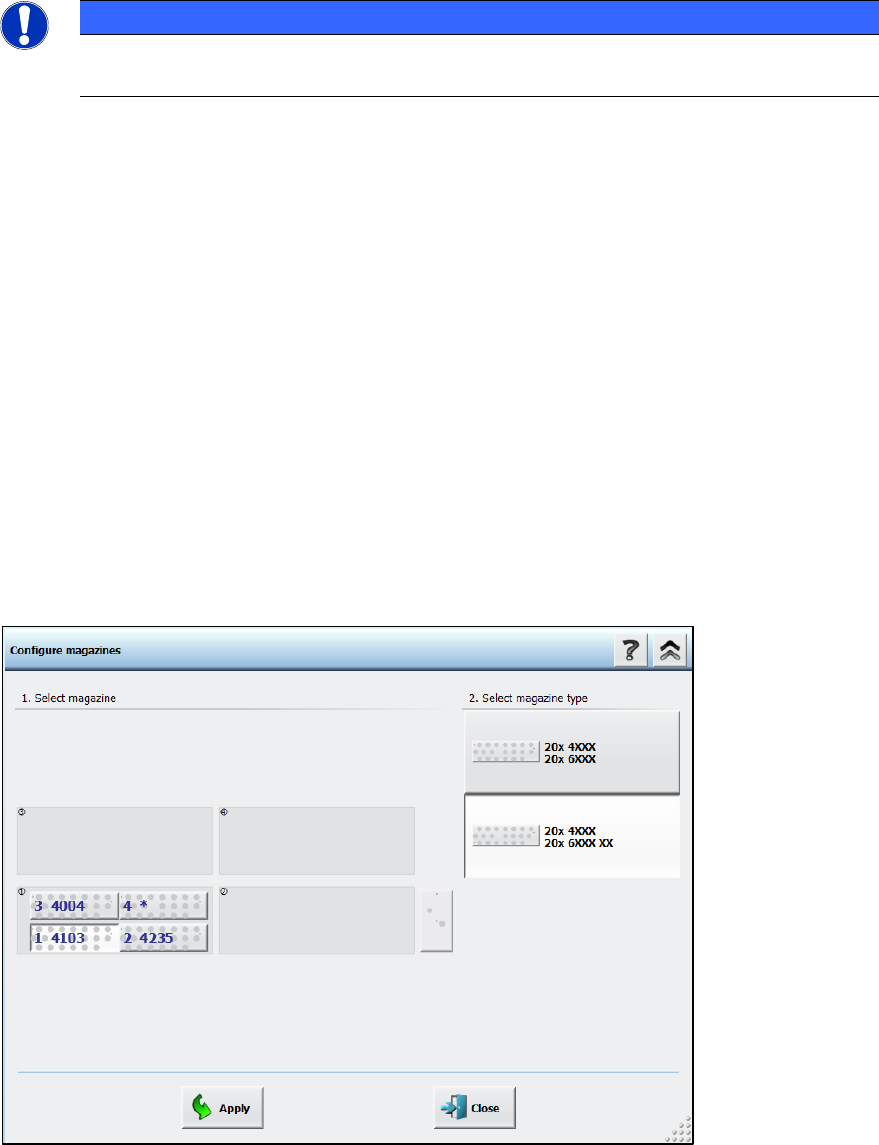
Nozzle magazines that are only partially reachable are marked with an additional “XX” behind the
magazine type name in the Configure magazines dialog.
Figure 4-1: Partly reachable nozzle magazine in Configure magazines dialog
Station Software 713.0 (R19-2) / Version Description 11/2019 Edition
11
Restrictions
– This functionality is only available for the nozzle magazines 6xxx(20), item no. [03218226-xx]
for the C&P20 P2 head and 20xx(20), item no. [03226630-xx] for the CPP head.
– At least two fiducials of partly reachable nozzle magazines must be in reach of the PCB
camera on the placement head.
– All nozzles that are in reach of the placement head must also be in reach of the PCB camera
on the placement head in order to scan the nozzle IDs.
Combination of Smart Pin Support with TwinHead on TX V2
Compatible mode: Complete
The combination of Smart Pin Support with a TwinHead on the TX V2 is supported.
4.2 Automatic Cavity Calibration for Linear Dipping Unit 2 X (LDU 2 X)
Compatible mode: Complete
When exchanging an auto cavity dipping plate, the cavity depth of automatic cavity can be adjusted
manually. The configuration can be saved in the flash memory of the LDU. If the LDU is restarted,
the cavity depth will be adjusted according to the saved configurations.
The cavity depth can be adjusted by clicking the Adjust cavity of dipping plate button in the
station GUI, which opens the Adjust cavity of dipping plate dialog.
For further information, please refer to the Linear Dipping Unit 2 X User Manual, item no.
[00198517-xx].
4.3 Five Color Signal Tower Supported for SIPLACE SX V3 Machine
Compatible mode: Complete
The SIPLACE SX V3 machines optionally support a five color signal tower. The colored lights of
the signal tower have the following meanings:
● Red: serious technical malfunction or irregular condition
● Yellow: setting-up or manual mode
● Blue: change over
● Green: automatic mode or regular operation
● White: powered on, i.e. ready, but not producing