00191374-04.pdf - 第26页
2 Operational Safety Adjust men t Ins tru ct ion s SIPL ACE H S-50 2.2 Safety Equipm ent Edition 12/00 26 6DIHW\ (TXLSPHQW 3 URWHFWLY H&RYHUV .(< The travel ling ra nge of t he gantri es is cov e…

Adjustment Instructions SIPLACE HS-50 2 Operational Safety
Edition 12/00 2.1 Safety Instructions
25
– The latching disk will swivel up as well.
NOTE:
If you cannot swivel up the latching disk to the upper end position, you must raise the rail.
Å Fix the lifting device to the rail.
Å &DUHIXOO\, open the rail clamping.
Å Lift the rail, until the end of the tube protuberates the clamping approximately 1 mm.
Å Fix the screws of the rail clamping.
Å Then, unscrew the adjusting screw to the right dimension and use a locknut to lock it.
Å &DUHIXOO\, open the rail clamping .
Å Lower the rail until the adjusting screw sits on the latching disk.
Å Tighten the rail clamping.
Å Check the distance from the rail to the floor.
Å Mantle the internal panel.
Å Lift the table plate and remove the spacer block.
2 Operational Safety Adjustment Instructions SIPLACE HS-50
2.2 Safety Equipment Edition 12/00
26
6DIHW\(TXLSPHQW
3URWHFWLYH&RYHUV
.(<
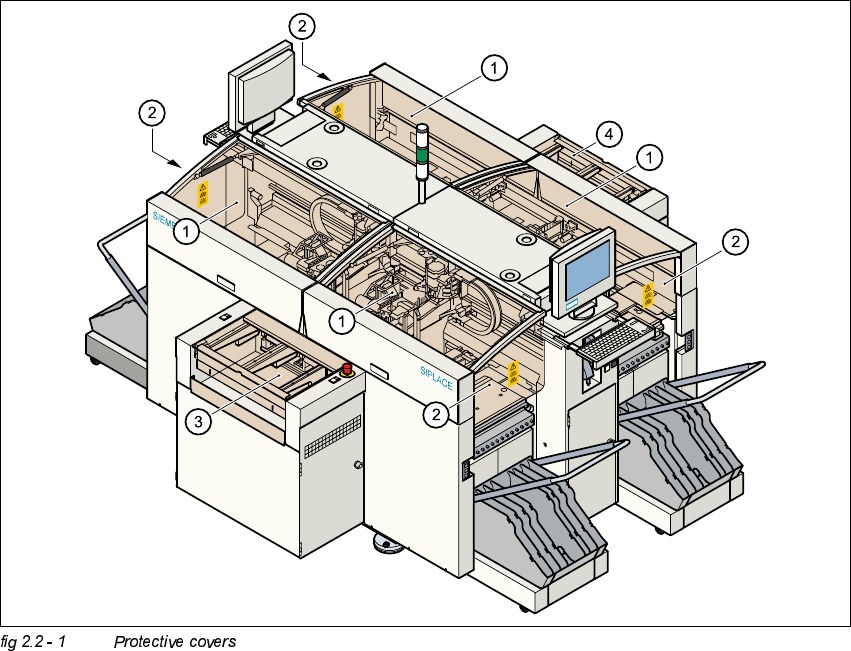
The travelling range of the gantries is covered by four protective covers which can be folded up.
Side panels prevent access to the inside of the placement system from the side. The covers over
the input and output belts of the PCB conveyor and the guards on the input and output belts
prevent access to the PCB conveyor.
(1) Protective covers
(2) Safety panels
(3) Cover and guard on the input conveyor
(4) Cover and guard on the output conveyor
Adjustment Instructions SIPLACE HS-50 2 Operational Safety
Edition 12/00 2.2 Safety Equipment
27
)XQFWLRQ
If one of the protective covers is folded up or one of the covers on the PCB conveyor is raised, the
power supply to the gantry axes will be interrupted at once. The gantry axes will stop.
– The message "Close covers" will appear on screen.
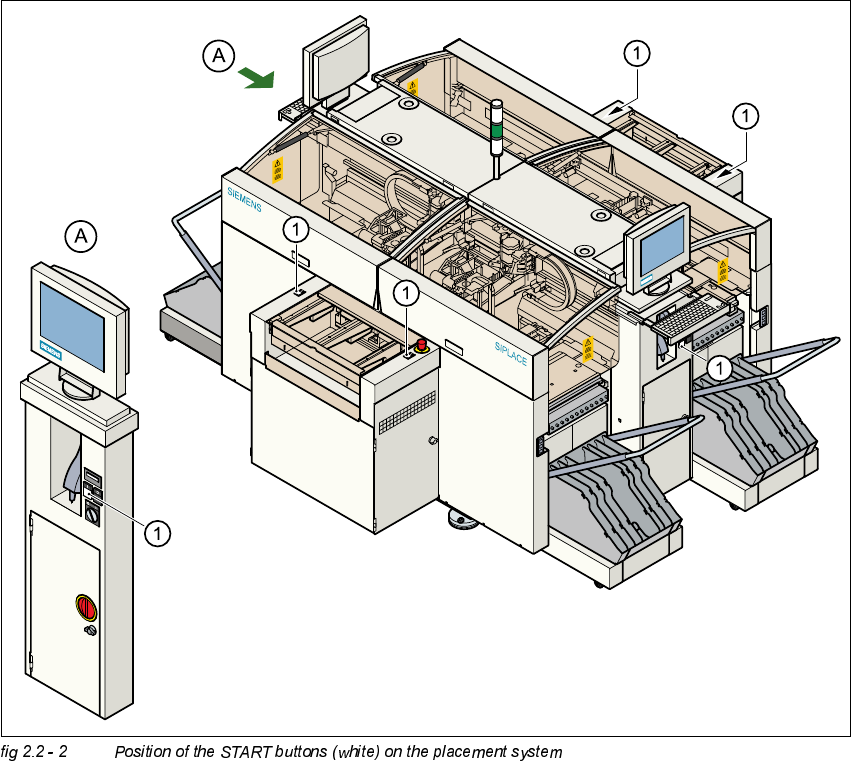
Å Close the protective covers and press one of the START buttons to continue placement.
.(<
(1) START button (white) on the system