00197499-05_VD_Material_Manager_2.2_DE_EN.pdf - 第11页
Material Manager / Software Ver sion Description Ausgabe 01/2016 Edition 11 3 Requirements The requirement s for installing t he SIPLACE Materi al Manager are described in the I nstallation Manual, item no. [001975 00 - …
Material Manager / Software Version Description Ausgabe 01/2016 Edition
10
At the storage on-site, the SIPLACE Material Manager is operated by PDAs with integrated
barcode readers.
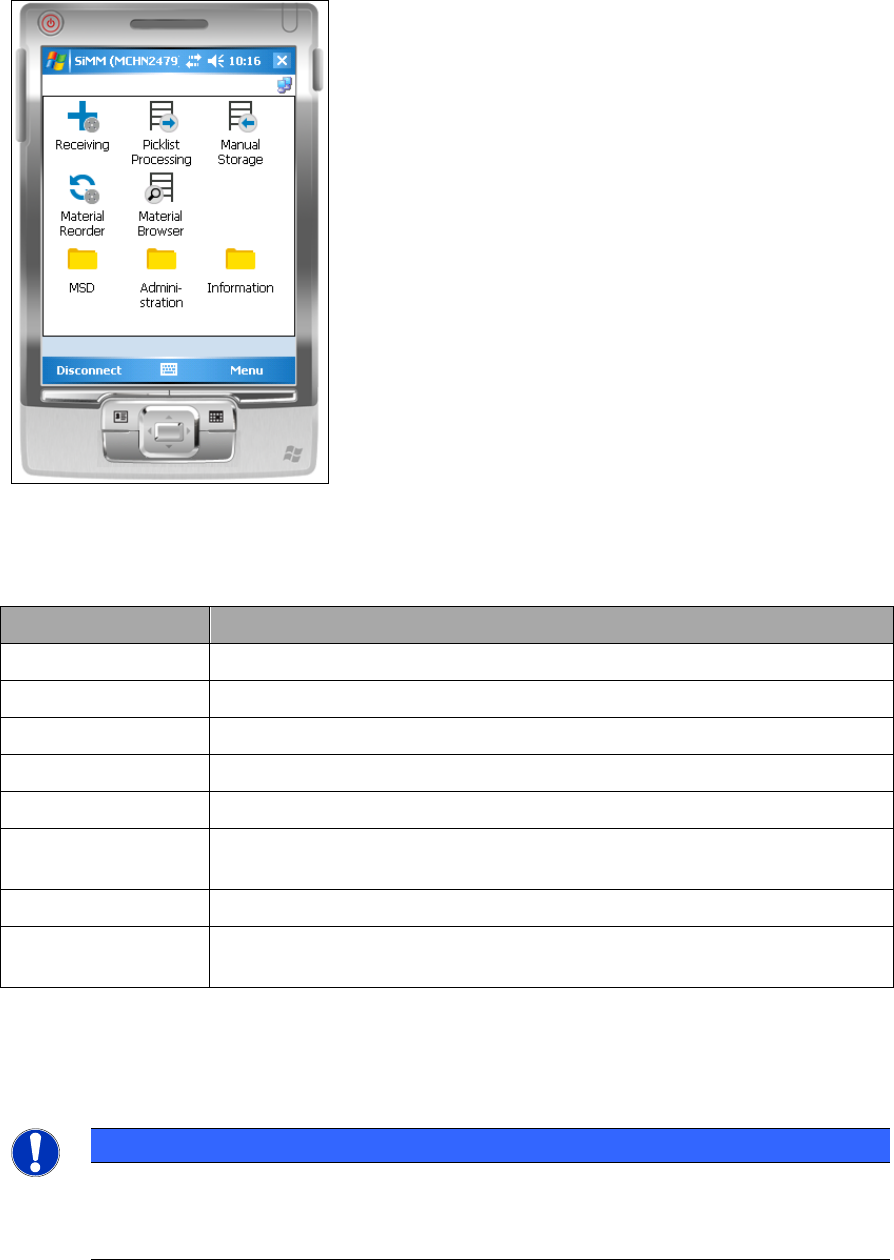
The following figure displays the main window on the PDA.
Figure 2-2: Main window on the PDA
The following tasks can be performed within the dialogs and folders:
Dialog/Folder Task
Receiving Booking a packaging unit into a specific storage bin of a storage zone.
Picklist Processing Selecting a pick list and starting the picking process.
Manual Storage Storing a packaging unit in a specific storage bin of a storage zone.
Material Reorder Request a new packaging unit for a production line
Material Browser Check where a specific material can be found within your plant.
MSD Functions for editing the MSD open times or remaining times of packaging
units.
Administration Key functions for editing materials.
Information Key functions for gathering information on specific packaging units and
materials.
Table 2-2: Dialogs/folders and tasks on the PDA
If required, the configuration that was set during the installation of the SIPLACE Material Manager
can be changed afterwards with the ConfigurationHelper program.
NOTICE
Further Information
Detailed information about the user interface and work flows can be found in the
Operating Manual SIPLACE Material Manager, item no. [00197587-xx].

Material Manager / Software Version Description Ausgabe 01/2016 Edition
11
3 Requirements
The requirements for installing the SIPLACE Material Manager are described in the Installation
Manual, item no. [00197500-xx].
The necessary system requirements for the SIPLACE Material Manager correspond basically to
the system requirements for SIPLACE Setup Center and are described in the Version Description
SIPLACE Setup Center, item no. [00197381-xx] and in the Operating Manual SIPLACE Material
Manager, item no. [00197587-xx].
NOTICE
System requirements
The Support Media DVD included in the installation package checks the necessary
system requirements of your system and installs these. Amongst others e.g. Microsoft
.NET Framework, the License Manager and the Error Reporting tool.
The use of the Support Media V2.2 is obligatory.
The system requirements (supported operating system and database variants) and an
overview of mutually compatible products can be found in the SIPLACE Support Media
Software Version Description, item no. [00197793-xx].
Material Manager / Software Version Description Ausgabe 01/2016 Edition
12
4 Installation
Detailed information about installing the SIPLACE Material Manager can be found in the Installation
Manual, item no. [00197500-xx].