00197499-05_VD_Material_Manager_2.2_DE_EN.pdf - 第7页
Material Manager / Software Ver sion Description Ausgabe 01/2016 Edition 7 1.1 Scope of Delivery SIPLACE Material Manager Server V 2. 2 , item no. [00117400 - xx] contains : – 1 SIPLACE Material Manager F actory License …
Material Manager / Software Version Description Ausgabe 01/2016 Edition
6
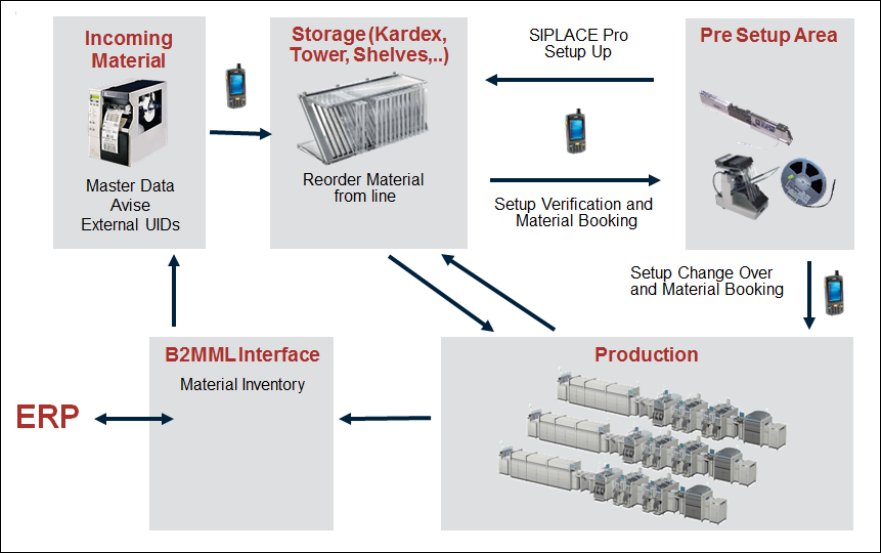
Process overview
Figure 1-1: Process overview
Incoming material
– Identify and generate packaging units and print labels.
– Forward material information to SIPLACE Setup Center.
Storage
– Warehouse management for SMT material based on packaging units.
– Support for various storage systems (Kardex, Royonic, SMD Tower) or manual storage.
– Find materials easily using the convenient browse feature.
– MSD component handling, keeping track of MSD open times and locking the material or track if
the open time has been exceeded (SIPLACE Setup Center).
Pre Setup Area
– Set up materials on the component table using SIPLACE Pro setup lists or production
schedules with SIPLACE Setup Center.
– Optimized material reordering.
Production
– Log and report consumed component quantities for each package unit.
– Create material requirements lists for the timely reordering of materials.
B2MML interface
– Online inventory support through ongoing feedback on current stock levels.
– Import packaging unit data, e.g. from ERP.

Material Manager / Software Version Description Ausgabe 01/2016 Edition
7
1.1 Scope of Delivery
SIPLACE Material Manager Server V2.2, item no. [00117400-xx] contains:
– 1 SIPLACE Material Manager Factory License (without Machine Connections)
SIPLACE Material Manager Media Package V2.2, item no. [00117409-xx]. This package
contains:
– Software CD-ROM SIPLACE Material Manager V2.2
– DVD SIPLACE NET Support Media Version 2.2, item no. [00117951-xx]
– Software Installation Manual SIPLACE Material Manager V2.2, item no. [00197500-xx]
NOTICE
To Support Media DVD:
Please use the Navigation Guide button of the Support Media Launcher to navigate
through the documentation.
The navigation guide and all related documents are available on the Support Media DVD
that is shipped with the installation package.
1.2 Languages
The GUI and the Online Help are available in German, English and Simplified Chinese.
Material Manager / Software Version Description Ausgabe 01/2016 Edition
8
2 Brief Description
The following most important functions can be performed with the SIPLACE Material Manager:
– MSD handling
– Controlling automatic storage systems, such as Shuttle, Paternoster or Material Tower
– Managing high bay rackings
– Configuring plant layout
– Creating master data
– Receiving incoming materials
– Storing, picking and requiring materials
– Searching for materials and checking the material stock
– Performing inventories
– Performing IC programming to transfer a packaging unit to another part number, e.g. through
flashing.
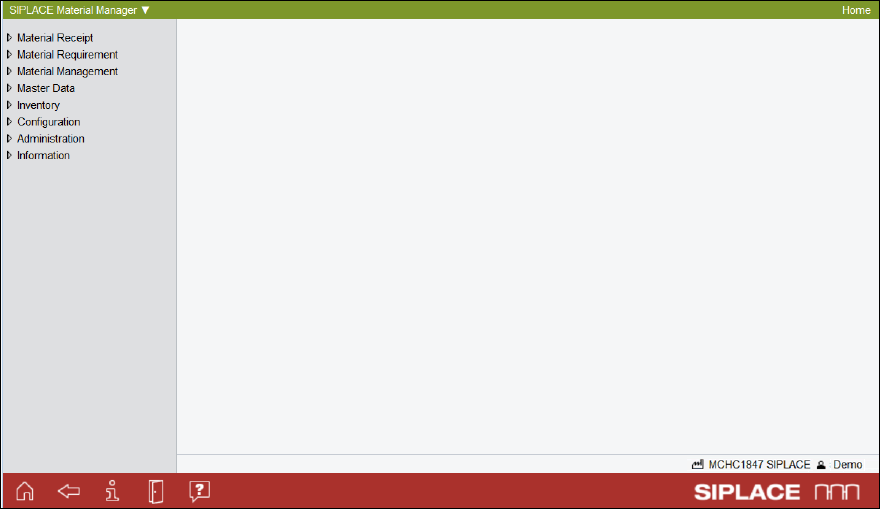
The following figure displays the main window of the SIPLACE Material Manager.
Figure 2-1: Main window of the SIPLACE Material Manager