00197499-05_VD_Material_Manager_2.2_DE_EN.pdf - 第5页
Material Manager / Software Ver sion Description Ausgabe 01/2016 Edition 5 1 Introduction This document des cribes the SIPLACE ® Material Manager 2. 2 software . You use SIPLACE Material Manager t o manage SMT mat erials…
Material Manager / Software Version Description Ausgabe 01/2016 Edition
5
1 Introduction
This document describes the SIPLACE® Material Manager 2.2 software.
You use SIPLACE Material Manager to manage SMT materials as packaging units across multiple
storage locations. The Material Manager has interfaces to modules in the SIPLACE Software Suite,
such as SIPLACE Setup Center or SIPLACE Pro, as well as to popular ERP systems, and
enhances these with a wide range of functions for SMT-specific material logistics.
You operate the Material Manager using a web application, supplemented by PDAs with integrated
barcode scanners for the warehouse processes on site.
The two core elements of the Material Manager that need to be configured are the master data and
the plant layout.
In the plant layout you map and configure the various incoming materials, storage, pre setup and
production areas of your plant in the Material Manager. The more carefully you map your plant, the
better the Material Manager will help you to find the exact location and exact quantities of
materials.
You define the materials to be managed by the Material Manager in the master data together with
their attributes, for instance, part number, description, type, MSD level, as well as the
manufacturers or suppliers from which this material is ordered. For materials to exist in the Material
Manager, you first enter them in the goods receipt department so that they can then be stored in a
storage location. To identify the packaging unit uniquely, the Material Manager generates labels
with individual barcodes that are affixed on the packaging unit. By logging each individual
movement of the materials, the Material Manager always knows which material is available at
which location, and in what quantities.
Using the Material Manager, specific material requirements can be determined and provided in a
timely manner. To do this, material requirements lists can be generated using SIPLACE Pro setup
lists, production schedules or jobs and created and processed in the Material Manager.
Explicit / Implicit bookings
In the Material Manager, each packaging unit is always at precisely one location in the plant layout
in which you have mapped your business to resemble the real situation in your plant as closely as
possible. A packaging unit can be booked to another location explicitly, e.g. by scanning packaging
unit barcodes on the PDA at the storage location, or implicitly through the logic implemented in the
Material Manager. For example, the packaging units will be automatically booked to the storage
unit in the storage zone specified in the Material Manager when they are torn down.
Material Manager / Software Version Description Ausgabe 01/2016 Edition
6
Process overview
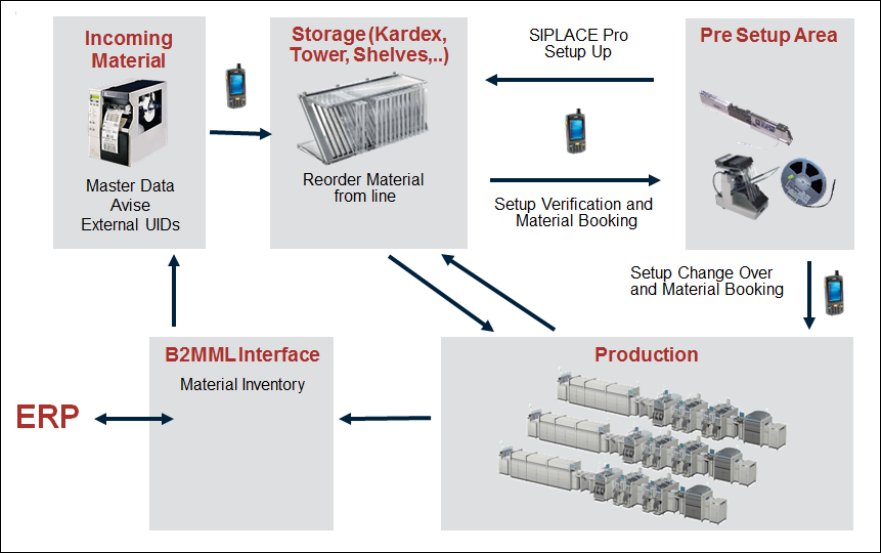
Figure 1-1: Process overview
Incoming material
– Identify and generate packaging units and print labels.
– Forward material information to SIPLACE Setup Center.
Storage
– Warehouse management for SMT material based on packaging units.
– Support for various storage systems (Kardex, Royonic, SMD Tower) or manual storage.
– Find materials easily using the convenient browse feature.
– MSD component handling, keeping track of MSD open times and locking the material or track if
the open time has been exceeded (SIPLACE Setup Center).
Pre Setup Area
– Set up materials on the component table using SIPLACE Pro setup lists or production
schedules with SIPLACE Setup Center.
– Optimized material reordering.
Production
– Log and report consumed component quantities for each package unit.
– Create material requirements lists for the timely reordering of materials.
B2MML interface
– Online inventory support through ongoing feedback on current stock levels.
– Import packaging unit data, e.g. from ERP.