YSM10_Mainte_E.pdf - 第84页
3-17 3 Periodic maintenance items 4 Perform the con vey or sensor tuning. 1. If an error occurred, press the [Sensor T une] button on the right of the [Unit] - [Conveyor] tab screen. 2. If pressing the [OK] button on the…
3-16
3
Periodic maintenance items
2.3 Conveyor
2.3.1 Checking the conveyor sensor condition and operation
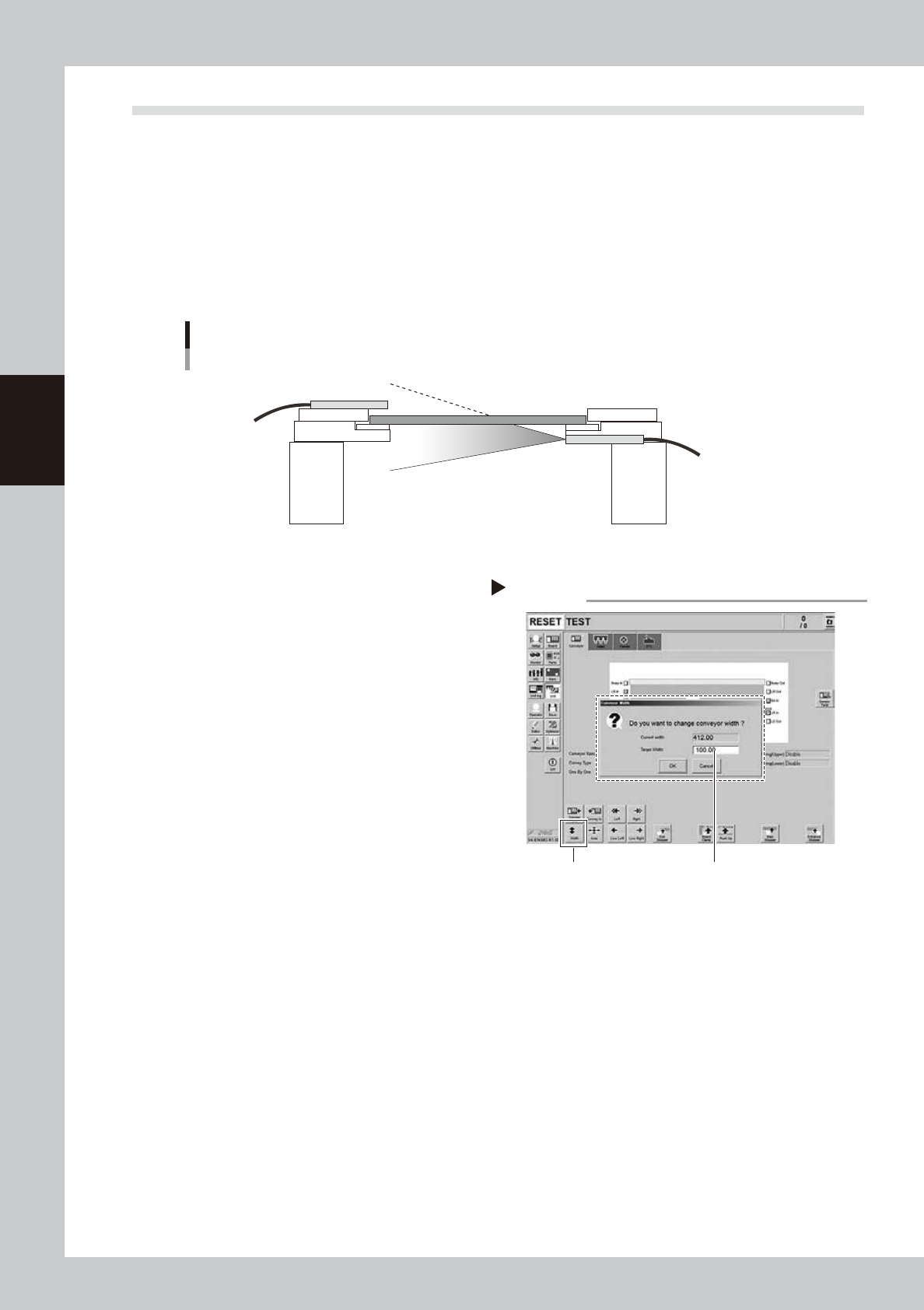
This machine uses a transmission type fiber sensor as the conveyor sensor.
As the conveyor width changes, the distance between the light emitting and light receiving sensors also
changes. Accordingly, the light receiving status of the sensor may change.
Therefore, a conveyor sensor tuning function is provided on this machine that stores the sensor light receiving
status after the conveyor rail width has been changed and automatically rewrites the sensor threshold value.
By changing the conveyor rail width periodically, you can check that the conveyor sensors and conveyor sensor
tuning operate correctly.
Checking the conveyor sensor condition and operation
Light emitting
Light receiving
53324-KMG-00
1
Prepare for work.
Check that there is no board on the
conveyor and that there is no push-up pin in
the conveyor movement range.
2
Change the conveyor width.
1. Open the [Unit] - [Conveyor] screen.
2. Press the [Width] button.
3. Enter the desired conveyor width and
press the [OK] button. The conveyor
width is changed to the specified width.
54301-KMG-00
3
Check that no error occurs.
When no error message appears after the
conveyor width has been changed, the
conveyor sensors operate correctly. So, no
further check is needed.
If an error occurred, perform "Conveyor sensor tuning" from Step 4.
Step2
[Width] button Enter desired conveyor width.
Changing the conveyor width
3-17
3
Periodic maintenance items
4
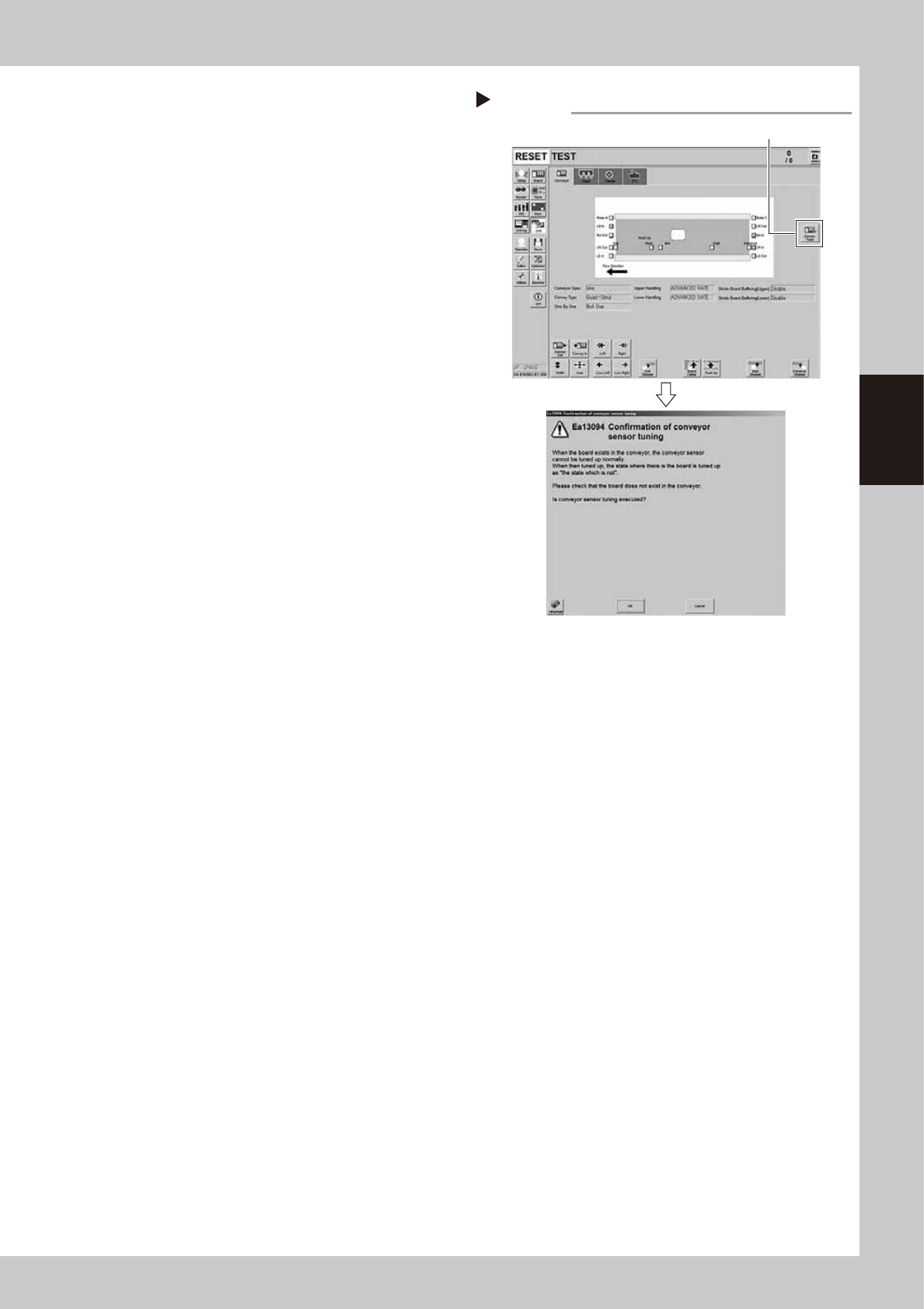
Perform the conveyor sensor
tuning.
1. If an error occurred, press the [Sensor
Tune] button on the right of the [Unit] -
[Conveyor] tab screen.
2. If pressing the [OK] button on the
confirmation screen, the threshold value
is calculated as the current sensor status
is no board.
54302-KMG-00
5
Check the sensor status.
Change the conveyor width again and
check that no error message appears.
6
Check the portion around the
sensor.
If the error message still appears, the light
receiving status around the sensor may be
poor, the sensor (amplifier) may be
malfunction, or the fiber may be broken.
First, remove contaminant or dust from the
sensor, then perform the conveyor sensor
tuning again.
Conveyor sensor tuning
Step 4
[Sensor tuning] button
3-18
3
Periodic maintenance items
3. Three-month inspection
This section describes the maintenance work performed once every 3 months.
3.1 Head unit
3.1.1 Cleaning and replacing the air filter
As a general guideline, the filter should be inspected once every 3 months, although this may vary somewhat
depending on the air supply conditions and the operating time. If lightly soiled, the filter can be clean by using
the air blow tool. The filter should be replaced when it can no longer be adequately cleaned by air-blowing.
n
NOTE
The procedure of HM head unit is described as example. The procedure of HM5 head unit is also the same.
1
Prepare for the work.
e
1. Press the emergency stop button to open
the machine safety cover.
2. Move the head unit forward.
3.
Place a square cloth under the head unit
.
2
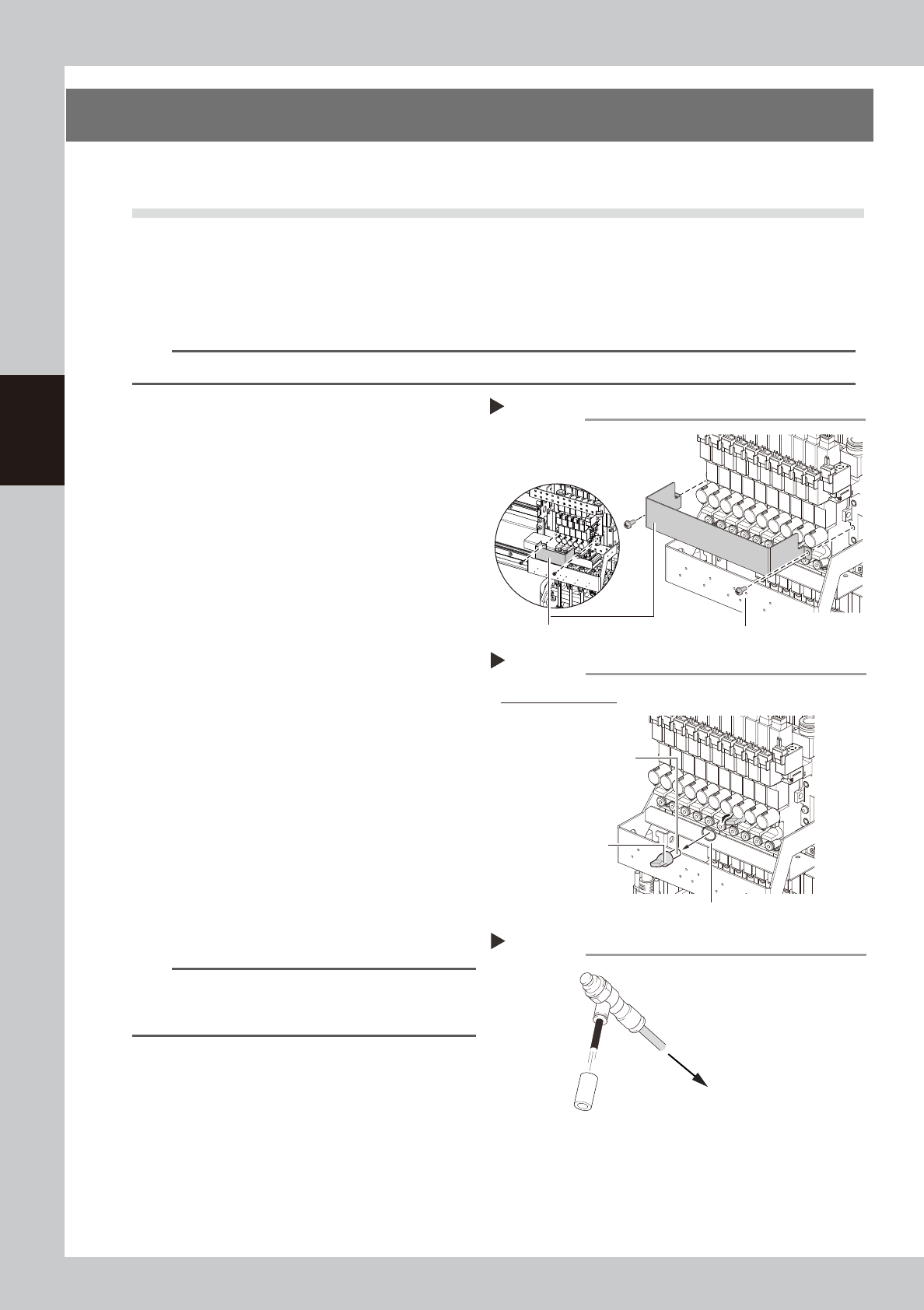
Detach the baffle plate.
Remove the 2 screws mounting the baffle
plate with a phillips screwdriver.
53325-KMG-00
3
Remove the filter.
Turning the filter cap left will remove it
together with the filter.
53326-KMG-00
4
Clean the filter.
If the filter is only lightly soiled, it can be
cleaned by the air blow tool, and then
reused.
If the filter is badly soiled or discolored,
replace it with a new one.
5
Reattach the filter.
1. Fit the filter into the filter cap.
2. Insert the filter cap into its original
position and turn it right to mount it.
53327-KMG-00
n
NOTE
When attaching the filter, check also the status of the
filter gasket. If the gasket deteriorates or is deformed,
replace it with a new one.
6
Reattach the baffle plate.
1. Reattach the baffle plate.
2. Remove the square cloth.
Step 3
Example of HM head
Filter gasket
Removing the filter
Filter cap
Filter
Step 2
Mounting screw (2 locations)
Removing the baffle plate
Baffle plate
HM5 head
HM head
Cleaning the filter
Step 4
Filter
Air blow tool
To air connector