00193707-01.pdf - 第47页
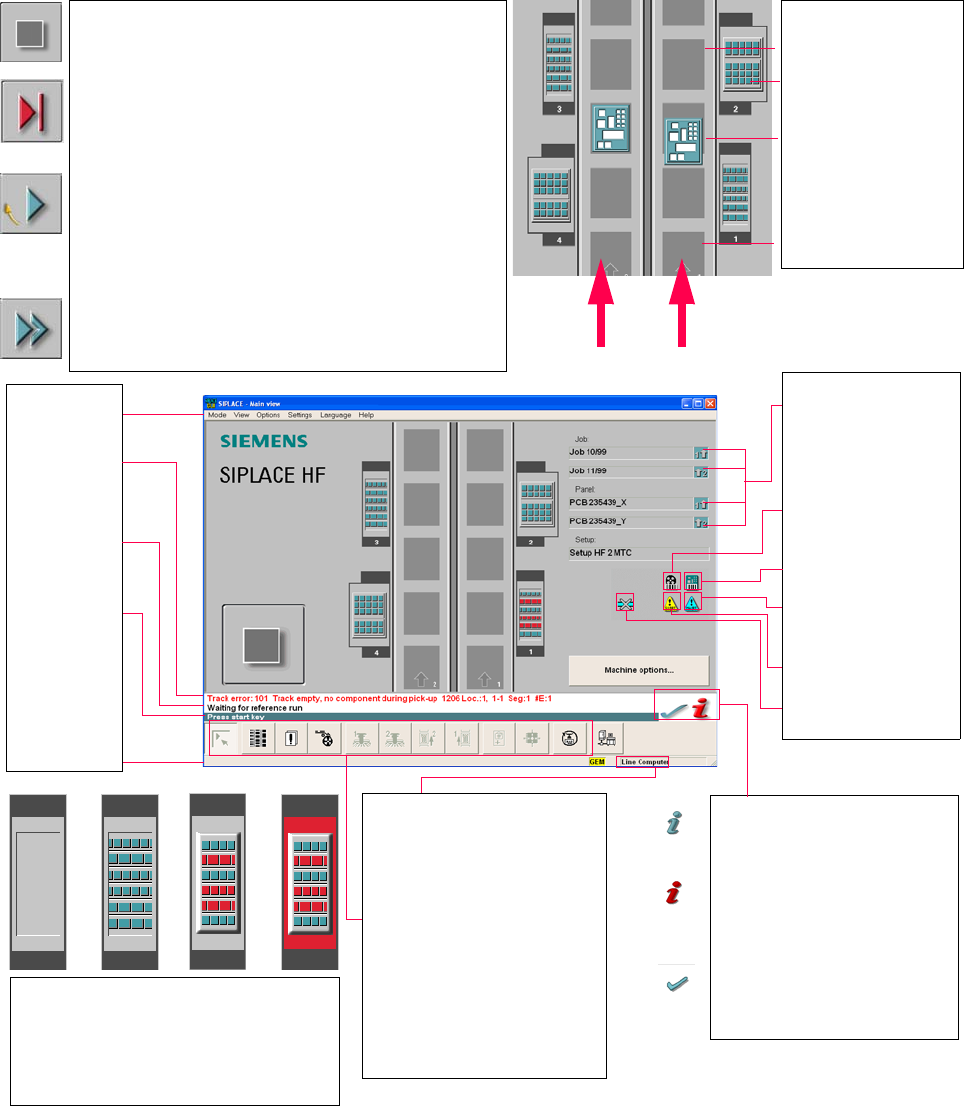
SIPLACE 软件指南 SR.504.xx 3 图形用户界面 2003 年 1 月版 3.4 47 3.4 主视图流程图 3 3 3 Pull-down men us 3 Error informa tion bar 3 S tatus indication and proces s status 3 Notification about a specific action to carry out 3 Informati on ba…

3 图形用户界面 SIPLACE 软件指南 SR.504.xx
3.3 用户界面 - 视图与菜单 2003 年 1 月版
46
3.3.2.5 “语言” 菜单
通过 “Language (语言)”菜单设置集成到站计算机软件中的用户界面的语言版本。
从任何视图将用户界面更改为不同的语言。
在 “德语”和 “英语”之间进行选择。 3
Æ 单击对应于所需语言的菜单项。
屏幕将以所选语言显示用户界面文字。
Æ 可使用语言光盘扩展语言的范围 (种类)来安装其它的语言。
3.3.2.6 “帮助”菜单
此菜单可使您访问调用帮助系统所需的全部功能,还可为您提供关于站计算机或软件的一般信
息。 3
内容 Ctrl+F1 3
此项功能可调用联机帮助系统。 3
帮助 Alt+F1 3
此项功能可调用帮助系统并显示关于当前视图的信息。 3
使用帮助 3
此项功能可显示关于如何使用帮助系统的信息。 3
信息 ... 3
此项功能可显示关于当前安装软件版本 (SC 版本)、服务包、语言光盘的信息以及关于站计算机
的信息。 3
注意
使用按钮 (右下方),可从用户界面的任何视图来调用联机帮助系统。
此项功能可调用针对当前视图的帮助系统。
第六章对帮助菜单的各项功能进行了详细介绍。 3
Æ 单击 “Help (帮助)”菜单的菜单项,或按下相应组合键。
3
SIPLACE 软件指南 SR.504.xx 3 图形用户界面
2003 年 1 月版 3.4
47
3.4
主视图流程图
3
3
3
Pull-down menus
3
Error information
bar
3
Status indication
and process status
3
Notification about a
specific action to
carry out
3
Information bar
2
Control modes:
Stand alone
SIPLACE Pro
2
Submenu icons with info box:
Main view
Setup
Error
Feeders
Gantry 1, 2
PCB conveyor 2, 1
Teach fiducial
Test component
SITEST
GEM
2
Output conveyor
The output conveyor is empty.
MTC on location 2
Central conveyor
The PCB is supplied.
Input conveyor
The input conveyor is empty.
2
Context-sensitive help system
This also provides a short description of all
displayed operating elements.
2
Help system for errors
Starts a help system displaying possible
causes of the current error along with correc-
tive actions.
2
Error deletion
After the error has been successfully cor-
rected, the currently active error is deleted.
Transport 2
Transport 1
2
Identifies the job or panel of the
right conveyor lane, or of the
single conveyor, and of the left
conveyor lane (dual conveyors
only).
2
Barcode-supported component
refilling
2
PCB barcode is activated.
2
Machine options have been
changed
2
Software options configured
2
Compressed air switch-off
mechanism configured
1234
1 No setup available on the corresponding location
2 Setup available
3 Setup available - at least one empty track error
4 Machine standstill due to track error
2
This display appears during the start-up process of the machine. Only when the
reference run has been completed successfully will the display appear in the form
of a button.
2
Status
The machine is running, or is in its 'ready' state.
Pressing the button:
The machine stops.
2
Status
The machine is placing components; 'stop' is activated. The assembly of the
PCBs located in processing conveyors 1 and 2 or in the central conveyor will be
terminated and the PCBs will be transported to the intermediate or output
conveyor. Subsequently, the machine will stop.
Pressing the button:
The machine continues to run without interruption.
2
Status
Machine is in the stopped state.
Pressing the button:
The machine resumes the placement operation.
3 图形用户界面 SIPLACE 软件指南 SR.504.xx
3.4 2003 年 1 月版
48