00197727-12_IM_SE3.11_DE.pdf - 第15页
Installations- und Konfigurationsanleitung SIPLACE Explorer 2 Sy stemkomponenten und -Konfigurationen Ausgabe 11/2020 DE 2.3 Standard-Installations-Varianten des SIPL ACE Explorer 15 2.3 S t andard-Inst allations-V arian…
2 Systemkomponenten und -Konfigurationen Installations- und Konfigurationsanleitung SIPLACE Explorer
2.2 SIPLACE Explorer in der SIPLACE Softwarelandschaft Ausgabe 11/2020 DE
14
– SIPLACE Explorer:
SIPLACE Explorer liest die Daten aus OIS und SIS, speichert sie in der SIPLACE Explorer
Datenbank und stellt diese dem Benutzer zur Verfügung.
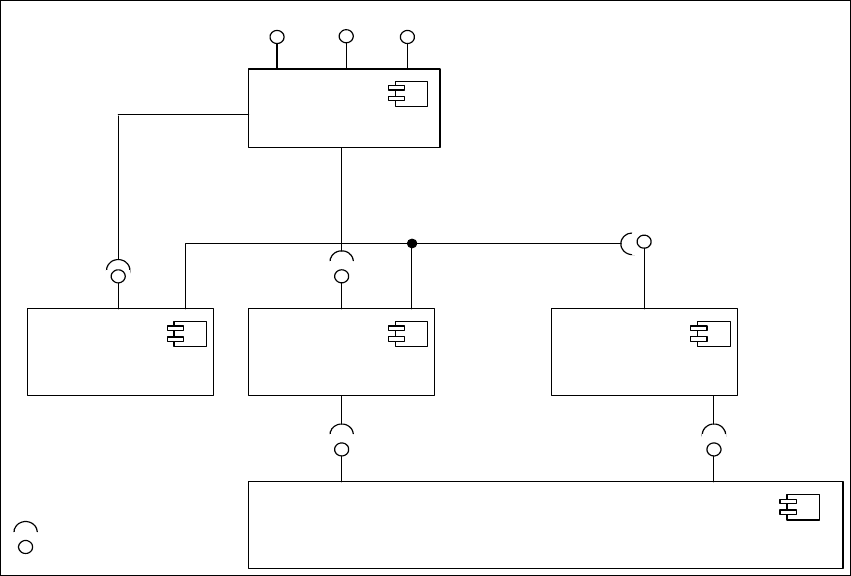
Die folgende Übersicht stellt die nötigen Software-Komponenten im SIPLACE-LAN dar: 2
2
Abb. 2.2 - 1 Software-Komponenten im SIPLACE-LAN
Station-SW
<<Bauelement >>
IDownload
SIPLACE Pro
<< Bauelement>>
SPI
IOIS
OIS
<< Bauelement >>
SIPLACE Explorer
<< Bauelement >>
SIS
<< Bauelement >>
SIS DB-View
OIS DB -View
IBackflush
Schnittstellen
IMaintenance
Manager
ITraceHost

Installations- und Konfigurationsanleitung SIPLACE Explorer 2 Systemkomponenten und -Konfigurationen
Ausgabe 11/2020 DE 2.3 Standard-Installations-Varianten des SIPLACE Explorer
15
2.3 Standard-Installations-Varianten des SIPLACE
Explorer
In SIPLACE Explorer gibt es verschiedene Installations-Varianten für die unterschiedlichen
Komponenten. In diesem Abschnitt werden folgende Installations-Varianten aufgezeigt: 2
– Factory Layout Cl (siehe Seite 15)
– Factory Layout Dl (siehe Seite 17)
– Single-Line-Layout (siehe Seite 19)
Diese Installations-Varianten gelten als Empfehlungen. Wählen Sie eine dieser Installations-
Varianten für Ihre Installation aus. 2
2.3.1 Factory Layout Central Installation (CI)
Mit dem Factory-Layout-Cl werden sog. "Multi Lines" unterstützt, d.h. innerhalb einer Fertigungs-
linie werden verschiedene Plattformen der Stations-Software unterstützt. Der gesamte Betrieb der
Fertigungslinien wird über ein zentrales SIPLACE Pro mit den entsprechenden OIS-/SIS-Installa-
tionen gesteuert. 2
SIPLACE Pro ist auf dem SIPLACE Linien-Server und auf dem Factory-Server installiert und OIS/
SIS auf dem SIPLACE Linien-Server. 2
Bei dieser Installations-Variante wird SIPLACE Explorer immer auf einem separaten SIPLACE Ex-
plorer Server installiert. Dabei werden alle Komponenten von SIPLACE Explorer auf diesem Ser-
ver installiert. Somit kann die Administration und ein möglicher Update von SIPLACE Explorer
zentral an einer Stelle erfolgen. 2
Auf dem SIPLACE Explorer Server werden die zu überwachenden Daten von allen dazugehöri-
gen Fertigungslinien gesammelt. 2
HINWEIS
Auf diesem Computer können die Daten von bis zu 5 Applikationen mit bis zu 20 Maschinen
überwacht werden. 2
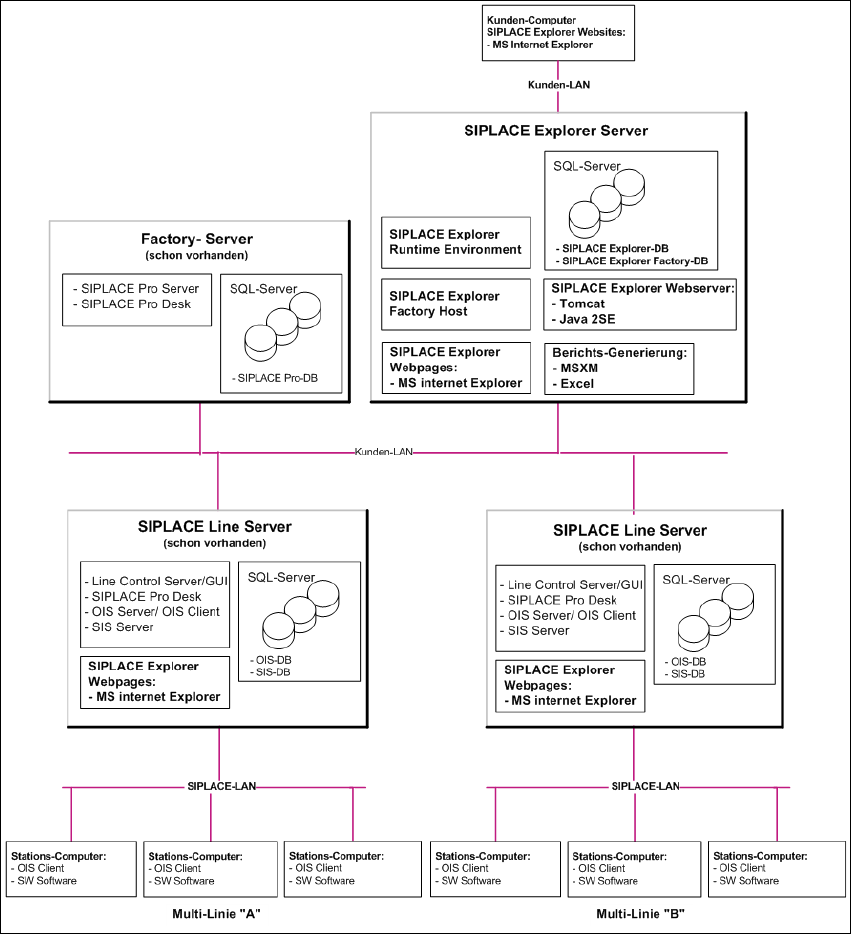
Die folgende Übersicht stellt ein Beispiel für die Installations-Variante "Factory-Layout Cl" dar: 2
2 Systemkomponenten und -Konfigurationen Installations- und Konfigurationsanleitung SIPLACE Explorer
2.3 Standard-Installations-Varianten des SIPLACE Explorer Ausgabe 11/2020 DE
16
2
Abb. 2.3 - 1 Installations-Variante: Factory-Layout Cl