00197727-12_IM_SE3.11_DE.pdf - 第20页
2 Systemkomponenten und -Konfigurationen Installations- und Konf igurationsanleitung SIPLACE Explorer 2.3 Standard-Installations-Varianten des SIPLACE Explorer Ausgab e 11/2020 DE 20
Installations- und Konfigurationsanleitung SIPLACE Explorer 2 Systemkomponenten und -Konfigurationen
Ausgabe 11/2020 DE 2.3 Standard-Installations-Varianten des SIPLACE Explorer
19
2.3.3 Single-Line-Layout
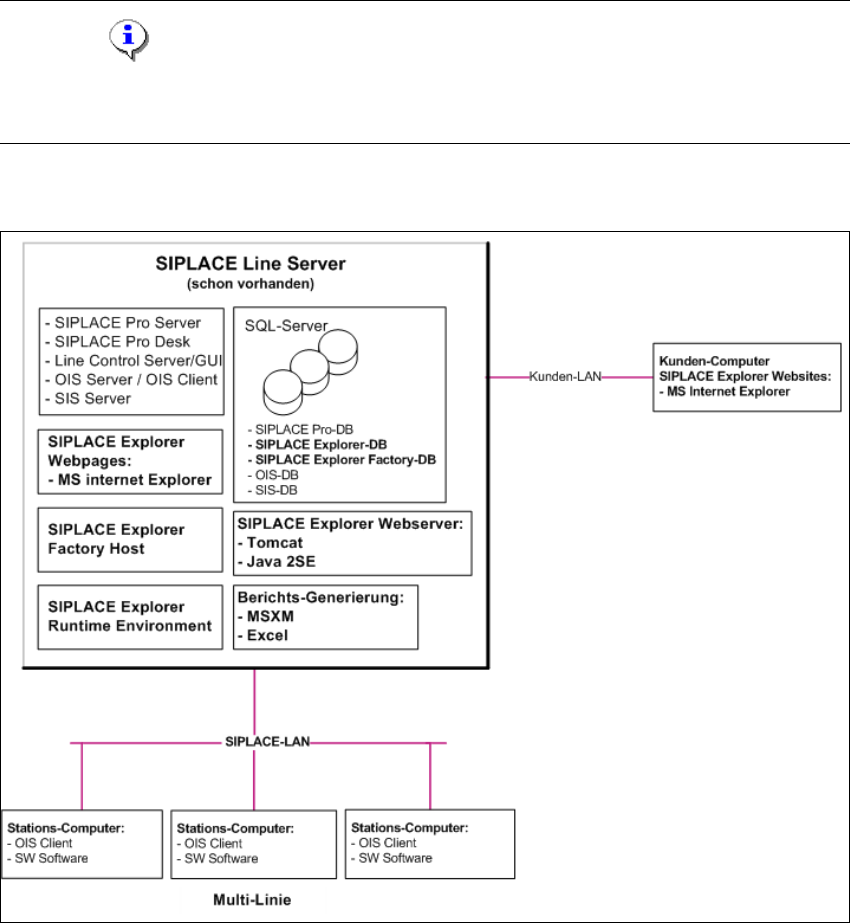
Die Installations-Variante Single-Line-Layout unterstützt genau eine Multi Line. 2
Dabei wird SIPLACE Explorer komplett mit allen Systemkomponenten auf dem vorhandenenden
SIPLACE Linien-Server installiert. SIPLACE Pro und OIS/SIS sind ebenfalls auf diesem SIPLACE
Linien-Server installiert. 2
HINWEIS
Achten Sie darauf, dass mit dieser Installations-Variante nur eine Applikation mit bis zu 7
Maschinen überwacht werden kann. 2
Die folgende Übersicht stellt ein Beispiel für die Installations-Variante "Single-Line-Layout" dar: 2
2
Abb. 2.3 - 3 Installations-Variante: Single-Line-Layout
2
2 Systemkomponenten und -Konfigurationen Installations- und Konfigurationsanleitung SIPLACE Explorer
2.3 Standard-Installations-Varianten des SIPLACE Explorer Ausgabe 11/2020 DE
20
Installations- und Konfigurationsanleitung SIPLACE Explorer 3 Installation des SIPLACE Explorer
Ausgabe 11/2020 DE 3.1 Erstinstallation von SIPLACE Explorer 3.11
21
3 Installation des SIPLACE Explorer
Bei der Installation von SIPLACE Explorer 3.11 gibt es zwei Möglichkeiten: 3
– Erstinstallation von SIPLACE Explorer 3.11
Sie haben noch keine Version von SIPLACE Explorer in Ihrem System installiert. Dazu
gehen Sie vor, wie unter “Erstinstallation von SIPLACE Explorer 3.11” auf Seite 21
beschrieben.
– Update-Installation von SIPLACE Explorer 3.11
Sie haben schon eine lauffähige Version von SIPLACE Explorer 2.0 - 3.10 auf Ihrem
System. Dazu gehen Sie vor, wie unter “Update-Installation von SIPLACE Explorer 3.11”
auf Seite 25 beschrieben.
HINWEIS
Da SIPLACE Explorer nur Daten anzeigt, hängt die Qualität der Daten von den Datenquellen ab.
Eine hohe Datenqualität ist nur mit den jeweils aktuellsten Versionen der Stations-Software
gewährleistet. 3
3.1 Erstinstallation von SIPLACE Explorer 3.11
Die für SIPLACE Explorer benötigten Software-Komponenten sind auf dem ASM Software
Collection USB Medium R20-2 USB-Stick enthalten. 3
(1) SIPLACE Explorer (siehe Seite 26):
Für SIPLACE Explorer gibt es drei Installationsoptionen: 3
– SIPLACE Explorer Runtime Environment
– SIPLACE Explorer Factory Configuration Utility
– SIPLACE Explorer Development Environment