Vakuumtooling an HS60.pdf - 第41页
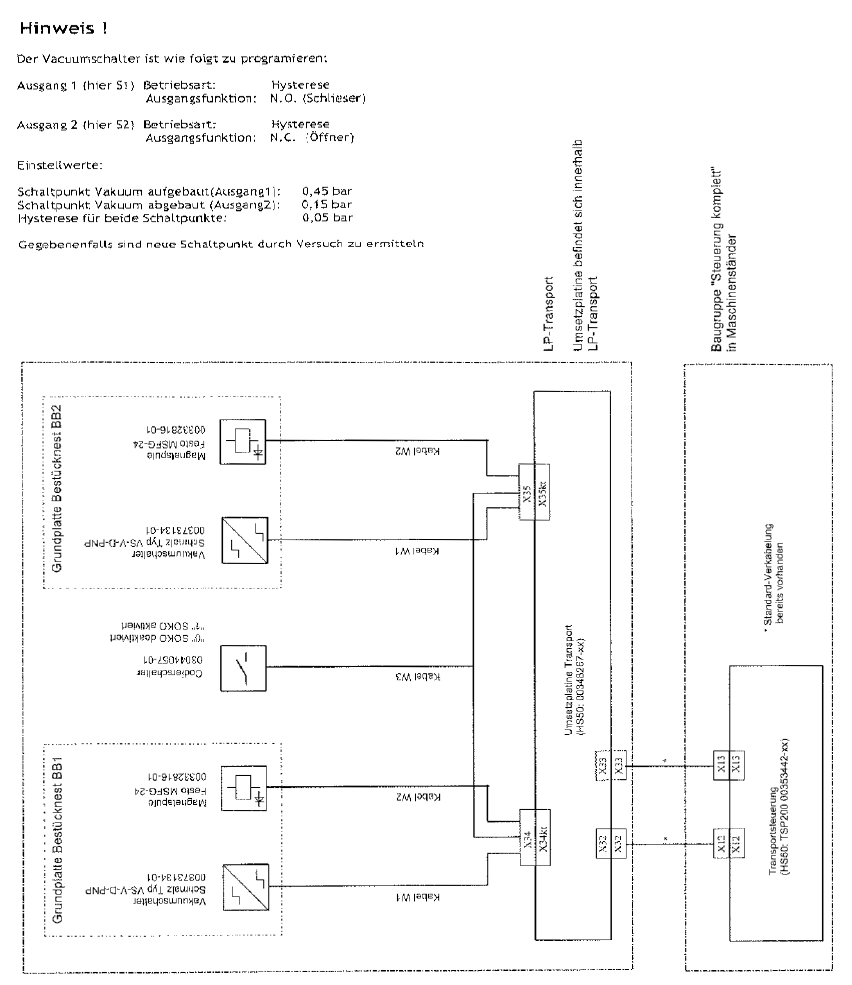
Special design 2 Assembly in structions Special design Vacuum tooling SIPLACE HS-60 10/2006 Edition 41 Recommended settin gs: 2 2.8.1.4 Wiring 2 OUT1 2 OUT2 2 HYS, N.O. 2 HYS, N.C. 2 H-1= 0,45bar 2 H-2=0,15bar 2 h-1=0,05…
2 Assembly instructions Special design Vacuum tooling SIPLACE HS-60 Special design
10/2006 Edition
40
2
Vakuum switch
x
Pressure switch
VS-D
Series
BA 30.10.06.00010_E
Status 12.2005 / Index 01
J. Schmalz GmbH, Aacher Straße 29, D-72293 Glatten
Tel 07443/2403-0, Fax -259
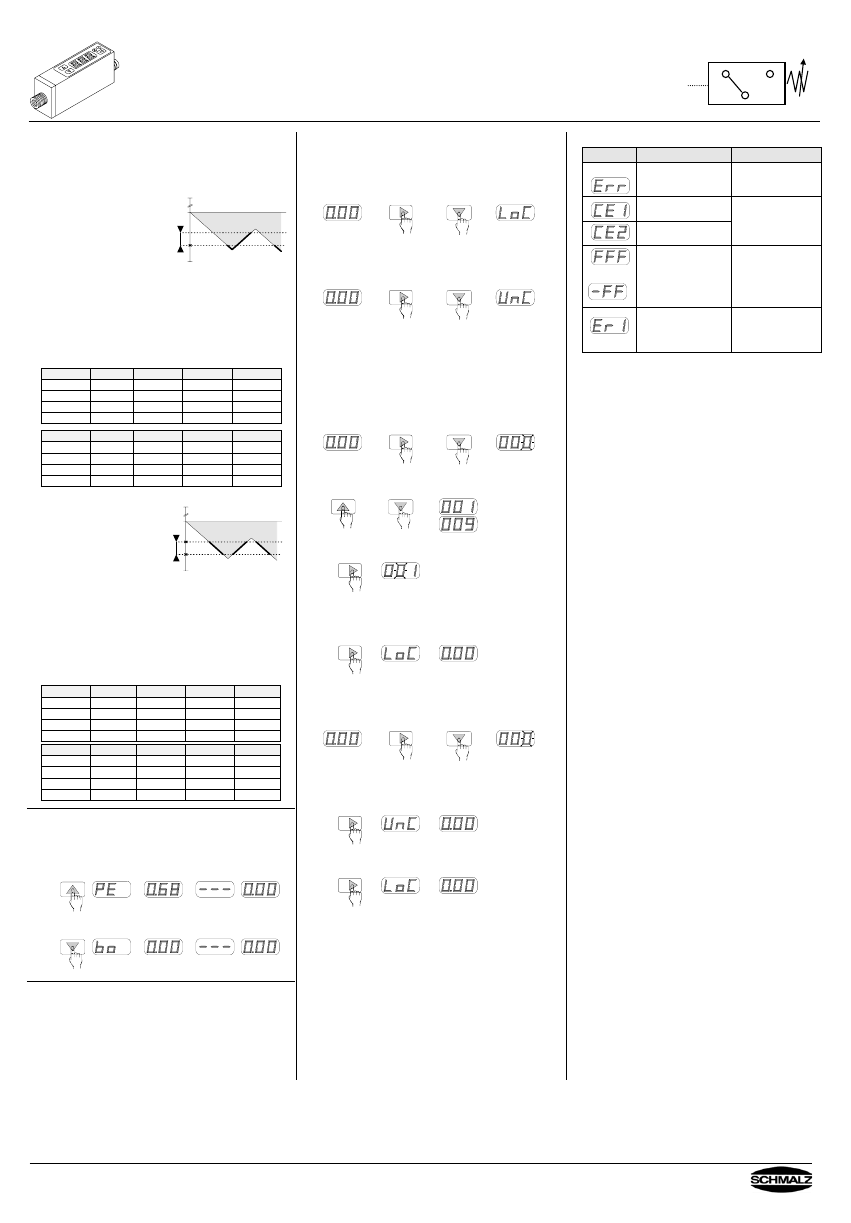
8. Operating modes of the outputs
The outputs can be operated in two different modes.
Each output can be adjusted independent of the other.
The modes are described in the following.
8.1 Hysteresis mode
Settings are switching point
H and hysteresis h.
Example: VS-V-D
H = -0.60 bar
h = 0.15 bar
N.O. (Normally Open)
0 bar
h
off on off
H
-1 bar
At 0 bar, the digital output is off.
When the vacuum level increases up to the switching point H,
the digital output switches on. As long as the vacuum is higher
than -0.45 bar ( = 0.6 bar - 0.15 bar), the digital output stays on.
When the vacuum decreases and passes -0.45 bar, the digital
output switches off.
For the configuration of N.C. (Normally Closed), the output
switches reverse ( off > H, on < H-h).
Factory setting: Output 1 & 2 in Hysteresis mode
VS-V-D mmHg inHg kPa bar
H - 1 345 13.6 -46 0.46
h - 1 50 2.0 -7 0.07
H - 2 595 23.4 -79 0.79
h - 2 50 2.0 -7 0.07
VS-P10-D psi kgf/cm² MPa bar
H – 1 67 4.75 0.46 4.6
h - 1 10 0,70 0.07 0.7
H - 2 115 8.2 0.79 7.9
h - 2 10 0.7 0.07 0.7
8.2 Window Comparator mode
Settings are lower margin A
and upper margin b.
Example: VS-V-D
A = -0.45 bar
b = -0.60 bar
N.O. (Normally Open)
0 bar
A
off
w
on on on
b
-1 bar off off
At 0 bar, the digital output is off.
When the vacuum level increases up to the lower margin A,
the digital output switches on. As long as the vacuum level is in
the ”window” between the lower margin A and the upper
margin b, the digital output stays on.
When the vacuum level becomes higher than the
upper margin b, the digital output switches off.
For the configuration of N.C. (Normally Closed), the output
switches reverse (A < off < b, A < on > b).
Factory setting: Output 1 & 2 in Window Comparator mode
VS-V-D mmHg inHg kPa bar
A - 1 195 7.6 -26 0.26
b- 1 400 15.6 -53 0.53
A - 2 495 19.4 -66 0.66
b - 2 645 25.4 -86 0.86
VS-P10-D psi kgf/cm² MPa bar
A - 1 38 2.7 0.26 2.6
b- 1 77 5.5 0.53 5.3
A - 2 96 6.85 0.66 6.6
b - 2 125 8.90 0.86 8.6
9. Display of Peak and Bottom values
The built-in memory stores in normal operation the peak value
and bottom value since the switch was connected to the power
supply.
These will be displayed as follow:
To display the peak valve, push the ”Up”-key
1x
Peak value
To display the bottom valve, push the ”Down”-key
1x
bottom value
10. Rotate display
If the mounting position is twisted (rotated on head), the display
can be rotated . When connecting the power supply, push and
hold the buttons “Up” and “Down”.
Note that the decimal point lights up now at the upper
margin of the display. The functions keys retain their
function , that means that the “Up“-key shows downwards
in twisted mounting position !
11. Locking the set values
11.1 Standard versions
Whilst pushing the ”Mode“-key, push the ”Down“-key. The
switch is locked, which means that the set values can’t be
changed. On the display appears ”LoC”, the switch is locked.
hold
When doing this once more, the switch gets unlocked and the
settings can be changed again.
On the display appears ”UnC”, the switch is unlocked.
hold
11.2 Version with PIN code (VS-...-C)
The lock prevents unauthorised persons changing the settings.
A 3-digit number combination (PIN code) guarantees that only
people who know the PIN code (set by the operator) can
change the settings.
Activating the lock:
To activate the lock, press and hold the “Mode” button, then
press the “Down” button.
hold
Press the “Up” or “Down” button to change the right digit.
The value for the right digit is saved when you press the “Mode”
button. The centre digit flashes.
1x
The centre digit can now be changed. Press the “Mode” button
again to change the left digit.
When the “Mode” button is pressed again, the PIN code entered
is saved. “LoC” appears on the display and the lock is activated.
1x
Deactivating the lock:
To deactivate the lock, press and hold the “Mode” button, then
press the “Down” button.
“000” appears on the display and the right digit flashes.
hold
The saved PIN code must be entered as described above for
locking. If the PIN code is correct, “UnC” is displayed and the
switch is unlocked.
1x
If the PIN code is incorrect, “LoC” is displayed and the switch
remains locked.
1x
If you forget the PIN code saved, the switch can be
unlocked in the SCHMALZ factory.
12. Error messages
Error Message Solution
Pressure during Zero-
point adjustment was
higher than ±3% F.S.
Make Zero-point
adjustment again at
environment pressure.
Overcurrent at
Output 1
Loaded current
exceeds rated power
Overcurrent at
Output 2
of 180mA max.
Check output.
*
Applied pressure
exceeds measuring
range.
Apply pressure within
the measuring range.
EEPROM defective,
calibration storage
could not be read
anymore
Switch defective,
replace it
* A display change from 0.00 to –FF or e.g. 0.01 at a
tmospheric pressure is not an error, but caused by
fluctuations in the air pressure.
This can be rectified by setting the zero point.
The zero point must also be set after performing a “Clear
all” (CLA).
Special design 2 Assembly instructions Special design Vacuum tooling SIPLACE HS-60
10/2006 Edition
41
Recommended settings: 2
2.8.1.4 Wiring
2
OUT1 2 OUT2 2
HYS, N.O. 2 HYS, N.C. 2
H-1= 0,45bar 2 H-2=0,15bar 2
h-1=0,05bar 2 h-2=0,05bar 2
2 Assembly instructions Special design Vacuum tooling SIPLACE HS-60 Special design
10/2006 Edition
42
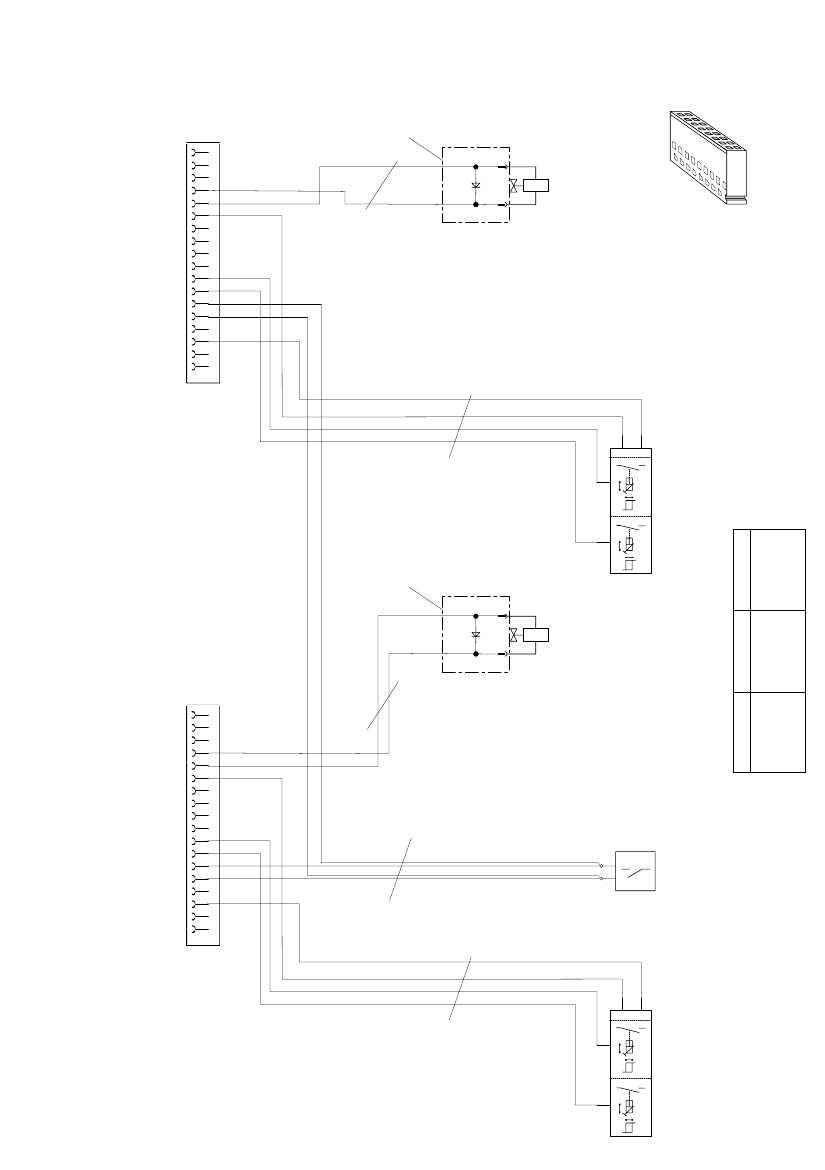
2.8.1.5 Circuit diagram
2
S t r o m l a u f
V a k u u m t o o l i n g
B E R U
( H S 5 0 M a s c h i n e 2 )
s w
w s
S 1 / S 2
V S - V - D - P N P
S 2
S 1
b n
b l
V -V +
s w
w s
b n
b l
b n
b l
b l
b n
V 1 1 N 4 0 0 7
Y 1
M a g n e t s p u l e
M S F G - 2 4
0 0 3 3 2 8 1 6 - 0 1
2
1
V a k u u m a u f g e b a u t
V e n t i l V a k u u m
G N D
V a k u u m a b g e b a u t
+ 2 4 V
G N D
1
2
3
4
5
6
7
8
9
1 0
1 1
1 2
1 3
1 4
1 5
1 6
1 8
1 7
X 3 4
9
9
K e y
K e y
D e r S t e c k e r l i e g t
d e r M a g n e t s p u l e b e i .
D i e S c h u t z d i o d e i s t
u n t e r d e r S t e c k e r k a p p e
e i n z u b a u e n .
K o d i e r u n g f ü
r S o f t w a r e s o n d e r f u n k t i o n
K o d i e r u n g f ü r S o f t w a r e s o n d e r f u n k t i o n
A b m a n t e l l ä n g e w 1 , w 2 b e i X 3 4 / 3 5
f ü r b e i d e K a b e l j e 5 0 m m .
D i e K a b e l s i n d
i m B e r e i c h d e s M a n t e l e n d e s
m i t
S c h r u m p f s c h l a u c h
z u s a m m e n z u f a s s e n .
w s
b n
g ng e
C o d i e r s c h a l t e r
R o h m a t e r i a l : 0 0 3 7 0 7 6 2 - 0 1 ( C o d i e r s c h a l t e r L P - A u s r i c h t u n g )
C r i m p k o n t a k t e a u s S t e c k e r 1 " X 3
6 " u n d 2 " X 3 7 " e n t f e r n e n ,
A d e r n w s / b n w e r d e n a n X 3 4 d e r S O K O a n g e s c h l o s s e n ,
A d e r n g e / g n w e r d e n a n X 3 5 d
e r S O K O a n g e s c h l o s s e n .
Z u b e a c h t e n i s t d a ß . . . .
d i e Z ä h l f o l g e e i n e s L o c k i n g - C l i p S t e c k e r s v o n
d e r R ü c k s e i t e d e s G e h ä u s e s b e t r a c
h t e t w e r d e n m u ß
S t e c k e r X 3 4 / 3 5
A M P M O D U L o c k i n g C l i p
1 8 p o l .
!
#
&
%
s w
w s
S 1 / S 2
V S - V - D - P N P
S 2
S 1
b n
b l
V -V +
s w
w s
b n
b l
b n
b l
b l
b n
V 1 1 N 4 0 0 7
Y 1
M a g n e t s p u l e
M S F G - 2 4
0 0 3 3 2 8 1 6 - 0 1
2
1
V a k u u m a u f g e b a u t
V e n t i l V a k u u m
G N D
V a k u u m a b g e b a u t
+ 2 4 V
G N D
1
2
3
4
5
6
7
8
9
1 0
1 1
1 2
1 3
1 4
1 5
1 6
1 8
1 7
X 3 5
9
9
K e y
K e y
D e r S t e c k e r l i e g t
d e r M a g n e t s p u l e b e i .
D i e S c h u t z d i o d e i s t
u n t e r d e r S t e c k e r k a p p e
e i n z u b a u e n .
K o d i e r u n g f ü
r S o f t w a r e s o n d e r f u n k t i o n
K o d i e r u n g f ü r S o f t w a r e s o n d e r f u n k t i o n
B e s t ü c k b e r e i c h 1
B e s t ü c k b e r e i c h 2
g n
g e
9 !
L ä n g e w 1
L ä n g e w 2
L ä n g e w 3
2 0 0 0 m m
1 8 0 0 m m
2 0 0 0 m m
1 1 5 0 m m
9 5 0 m m
1 1 5 0 m m
B B 1 B B 2
K a b e l l ä n g e n ( M a s c h i n e 2 )
500mm
S t r o m l a u f V a k u u m t o o l i n g B E R U
( H S 5 0 M a s c h i n e 2 )
s w
w s
S 1 / S 2
V S - V - D - P N P
S 2
S 1
b n
b l
V -V +
s w
w s
b n
b l
b n
b l
b l
b n
V 1 1 N 4 0 0 7
Y 1
M a g n e t s p u l e
M S F G - 2 4
0 0 3 3 2 8 1 6 - 0 1
2
1
V a k u u m a u f g e b a u t
V e n t i l V a k u u m
G N D
V a k u u m a b g e b a u t
+ 2 4 V
G N D
1
2
3
4
5
6
7
8
9
1 0
1 1
1 2
1 3
1 4
1 5
1 6
1 8
1 7
X 3 4
9
9
K e y
K e y
D e r S t e c k e r l i e g t
d e r M a g n e t s p u l e b e i .
D i e S c h u t z d i o d e i s t
u n t e r d e r S t e c k e r k a p p e
e i n z u b a u e n .
K o d i e r u n g f ü
r S o f t w a r e s o n d e r f u n k t i o n
K o d i e r u n g f ü r S o f t w a r e s o n d e r f u n k t i o n
A b m a n t e l l ä n g e w 1 , w 2 b e i X 3 4 / 3 5
f ü r b e i d e K a b e l j e 5 0 m m .
D i e K a b e l s i n d
i m B e r e i c h d e s M a n t e l e n d e s
m i t
S c h r u m p f s c h l a u c h
z u s a m m e n z u f a s s e n .
w s
b n
g ng e
C o d i e r s c h a l t e r
R o h m a t e r i a l : 0 0 3 7 0 7 6 2 - 0 1 ( C o d i e r s c h a l t e r L P - A u s r i c h t u n g )
C r i m p k o n t a k t e a u s S t e c k e r 1 " X 3
6 " u n d 2 " X 3 7 " e n t f e r n e n ,
A d e r n w s / b n w e r d e n a n X 3 4 d e r S O K O a n g e s c h l o s s e n ,
A d e r n g e / g n w e r d e n a n X 3 5 d
e r S O K O a n g e s c h l o s s e n .
Z u b e a c h t e n i s t d a ß . . . .
d i e Z ä h l f o l g e e i n e s L o c k i n g - C l i p S t e c k e r s v o n
d e r R ü c k s e i t e d e s G e h ä u s e s b e t r a c
h t e t w e r d e n m u ß
S t e c k e r X 3 4 / 3 5
A M P M O D U L o c k i n g C l i p
1 8 p o l .
!
#
&
%
s w
w s
S 1 / S 2
V S - V - D - P N P
S 2
S 1
b n
b l
V -V +
s w
w s
b n
b l
b n
b l
b l
b n
V 1 1 N 4 0 0 7
Y 1
M a g n e t s p u l e
M S F G - 2 4
0 0 3 3 2 8 1 6 - 0 1
2
1
V a k u u m a u f g e b a u t
V e n t i l V a k u u m
G N D
V a k u u m a b g e b a u t
+ 2 4 V
G N D
1
2
3
4
5
6
7
8
9
1 0
1 1
1 2
1 3
1 4
1 5
1 6
1 8
1 7
X 3 5
9
9
K e y
K e y
D e r S t e c k e r l i e g t
d e r M a g n e t s p u l e b e i .
D i e S c h u t z d i o d e i s t
u n t e r d e r S t e c k e r k a p p e
e i n z u b a u e n .
K o d i e r u n g f ü
r S o f t w a r e s o n d e r f u n k t i o n
K o d i e r u n g f ü r S o f t w a r e s o n d e r f u n k t i o n
B e s t ü c k b e r e i c h 1
B e s t ü c k b e r e i c h 2
g n
g e
9 !
L ä n g e w 1
L ä n g e w 2
L ä n g e w 3
2 0 0 0 m m
1 8 0 0 m m
2 0 0 0 m m
1 1 5 0 m m
9 5 0 m m
1 1 5 0 m m
B B 1 B B 2
K a b e l l ä n g e n ( M a s c h i n e 2 )
500mm
500 mm