VI User Manual.pdf - 第375页
Options Vision 2007 4.10 User Manua l Rev 01 15 - 5 15.2.3 Setting To activate the option, open MACHINE PARAMETERS , in Production tab tick Activate on the "Work manager" module fr ame. Then, click Setting to d…

Options
15 - 4 Vision 2007 4.10 User Manual Rev 01
15.2.2 Correspondence text file
This text file is filled in manually by the user. It contains specific key words:
CONVEYOR_WIDTH and PROGRAM_NAME.
The text file must have a special format.
Tabulation or spaces are used for separators.
Comment lines begin with #.
Several barcode roots can be used to load the same .tst file.
Position corresponds to the position of the specified first digit in the bar code (1, …, n). If
you do not specify a position, it is means that it is the 1st character.
#Conveyor width in mm
CONVEYOR_WIDTH 119
#Path + name of the Test file
PROGRAM_NAME C:\Vit\data\test1.tst
#Digits Position
3G- 1
3TD 3
3SW
PROGRAM_NAME C:\Vit\data\test2.tst
27K
2U
2AZ
PROGRAM_NAME "C:\Vit\data\test 3.tst"
300
2IA
2CT
Be careful:
If the path or the name of the test file contains one or several space, you need
to add inverted commas at the beginning and at the end of the strings:
PROGRAM_NAME "C:\Vit\data\test 3.tst"
Key information must be on the same line:
PROGRAM_NAME C:\Vit\data\test1.tst
If you do not specify the key CONVEYOR_WIDTH, the width defined in the 1st
.tst file loaded in production will be used for conveyor adjustment.
Automatic Bar Code Changeover (ABC)
Options
Vision 2007 4.10 User Manual Rev 01 15 - 5
15.2.3 Setting
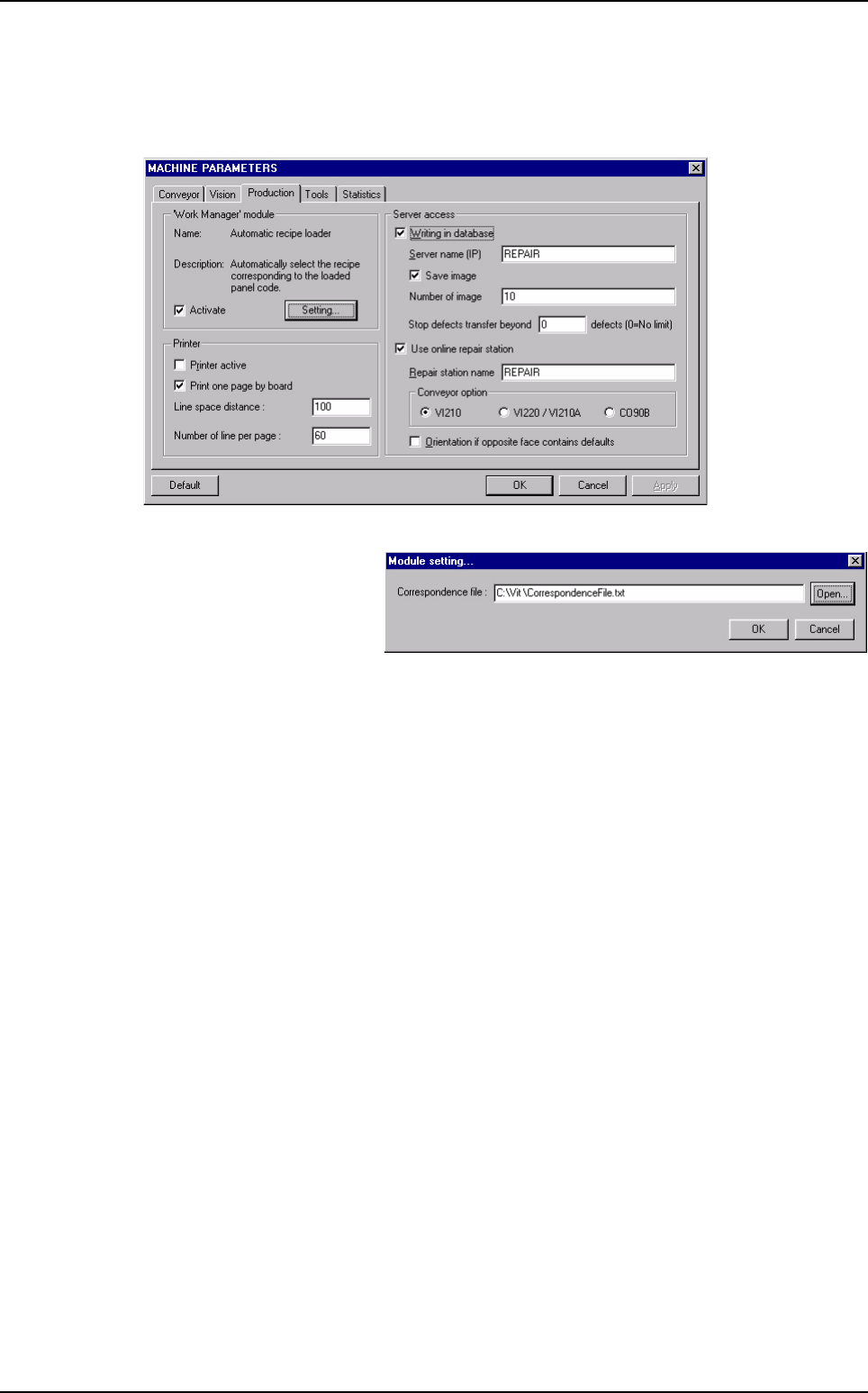
To activate the option, open MACHINE PARAMETERS, in Production tab tick Activate on
the "Work manager" module frame.
Then, click Setting to define
the path to the correspon-
dence text file.
Automatic Bar Code Changeover (ABC)
Options
15 - 6 Vision 2007 4.10 User Manual Rev 01
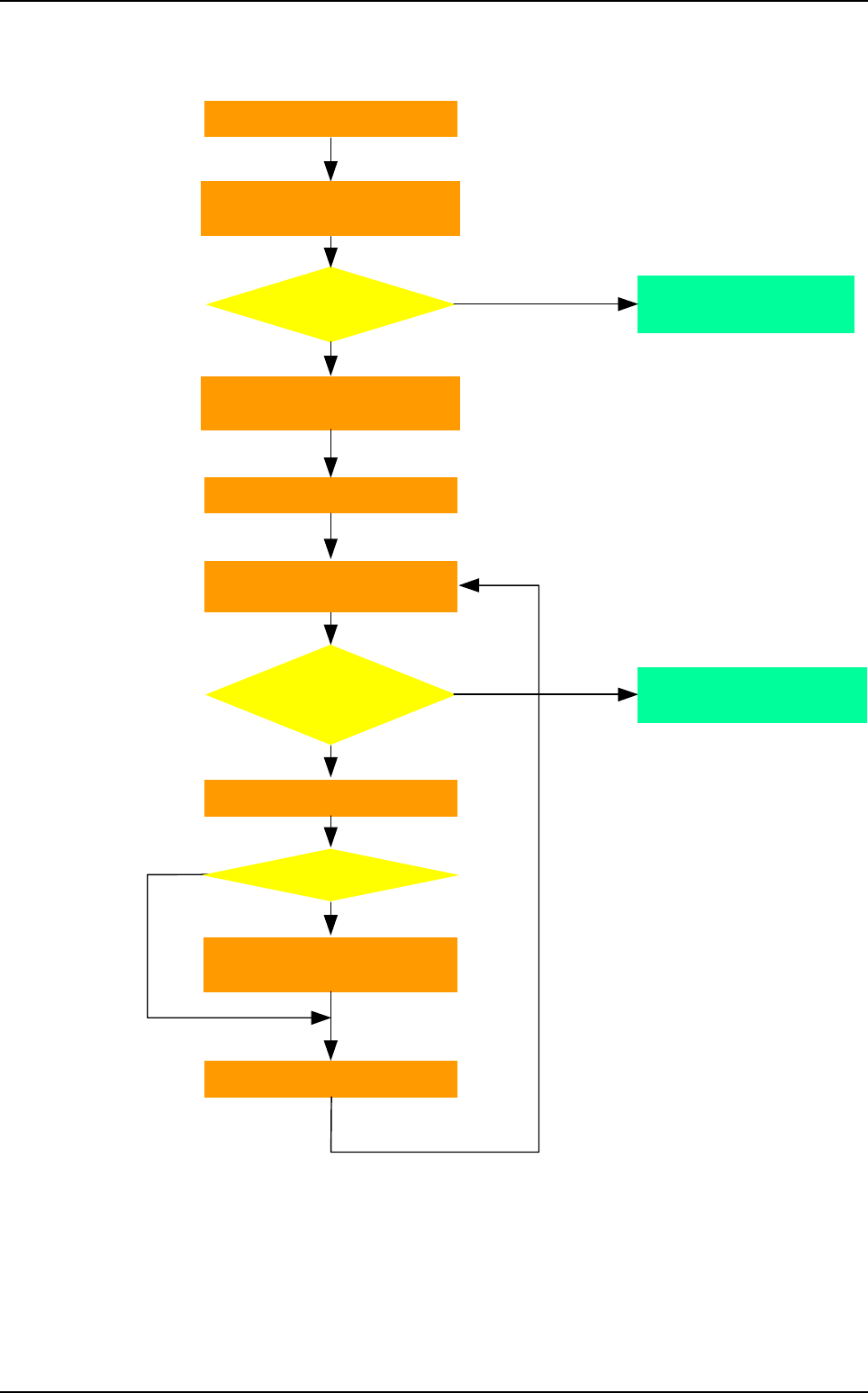
15.2.4 Production algorithm
Barcode initialisation
Load product with
ba
r
code
?
No
Standard algorithm
to start production …
Yes
Yes
No
Manual selection of the .tst file
(standard algorithm)
Start Supervisor
& Repair station
Load .tst file & load product
on Supervisor & Repair station
Same product ?
No
Yes
Reading of the conveyor width on
the correspondence file or .tst file
Start production
Read correspondence file
Inspect & eject board
Read
error or not found
in the correspondence
file
Load board in the vision machine
+ read barcodes
Automatic Bar Code Changeover (ABC)