QP-242E 工程师培训手册 (6.0).pdf.pdf - 第44页
FK-9F98-07 QP242E Schooling Text for Service Engineer 6th edition 6. Proper Data Measurement [ 3 /20] Fuji Machine Mfg. Co., Ltd. Okazaki SMT Equipment Quality Assurance Dept. Technical Support Div. Section No.2 6- 3 5) …
FK-9F98-07 QP242E Schooling Text for Service Engineer
6th edition 6. Proper Data Measurement [2/20]
Fuji Machine Mfg. Co., Ltd. Okazaki
SMT Equipment Quality Assurance Dept.
Technical Support Div. Section No.2
6-2
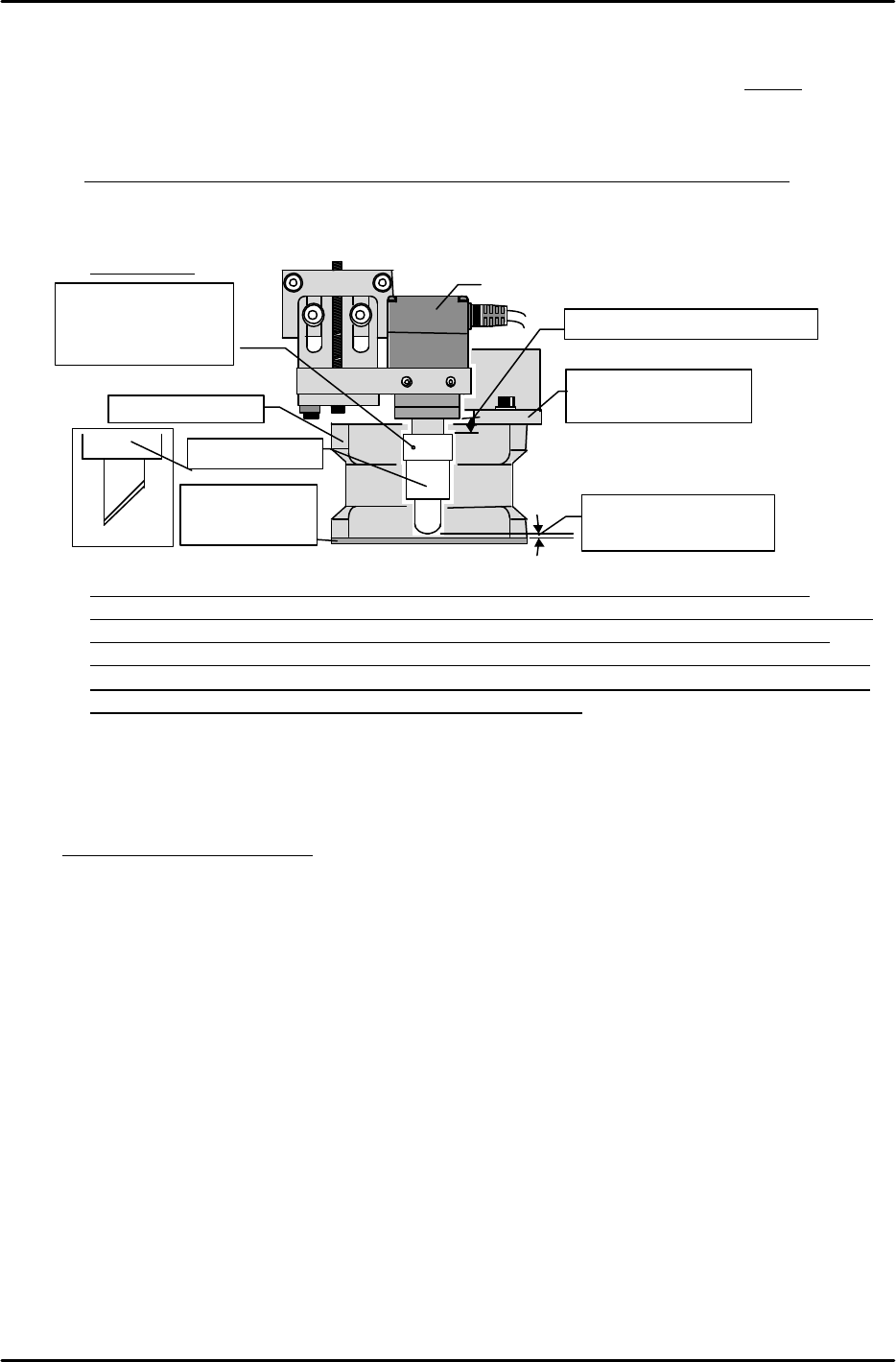
[6-2] Temporary Adjustment of Lens Half Mirror Gap
1) After removing the light source unit, turn the half mirror’s cut face toward the rear of the machine
and temporarily secure it at the position where dimension “A” (see figure below) is 2.5mm.
2) Secure the light source unit after adjusting the tilt so that the dispersion plate is horizontal
to the base. If the tilt in the direction of the mounting bracket’s bend causes interference,
replace the mounting bracket.
Note: Be careful not to disconnect harnesses when mounting and removing the light
source unit.
Note: The camera part number is different at front parts-supply and rear parts-supply
machines. Be sure to verify the part number when changing cameras (refer to the Parts
List). Number labels are affixed to the camera head and camera controller. Always
assemble with same-number items. A mismatch may adversely affect performance, and
may even make image acquisition impossible. When changing cameras, be sure that the
camera head and camera controller are a matched pair.
[6-3] Focusing the Mark Camera
* Each time the number of linked modules is increased, the adjustment module becomes farther
away from the image display monitor, making focusing more difficult. To avoid this problem,
turn the machine power off and connect a portable external monitor to the image output
source for easy and accurate focusing.
1) Verify that the camera is mounted in a perpendicular position, and that the mounting bolts
are tight.
2) Adjust the conveyor width to the width of the plate jig for camera measurement, then place
the jig on the control module (ICM) conveyor.
3) Click the [LOADER] à[LOAD BOARD] commands. A message then displays inquiring where
(which module) the PCB is located. Execute the [CONTROL MODULE] à [CR] à [START]
command sequence to designate module 1 as the jig location and then clamp the jig. Verify
that the jig is securely clamped.
4) Execute the [PROPER] à [CAMERA] à [RESOLUTION] à [MARK CAMERA] command
sequence to turn on the camera lamp and to display the real image at the monitor. Move the
head until the characters or marks on the jig are displayed.
Temporarily secure at 2.5mm
After focusing, adjust
the gap to 1mm
Mounting bracket
for Light source unit
Half mirror
M/C front
M/C rear
Light source unit
Camera
A
Dispersion plate
should be
horizontal to base
Apply
silicone
to the
set screw when
securing the unit at
its final position
FK-9F98-07 QP242E Schooling Text for Service Engineer
6th edition 6. Proper Data Measurement [3/20]
Fuji Machine Mfg. Co., Ltd. Okazaki
SMT Equipment Quality Assurance Dept.
Technical Support Div. Section No.2
6-3
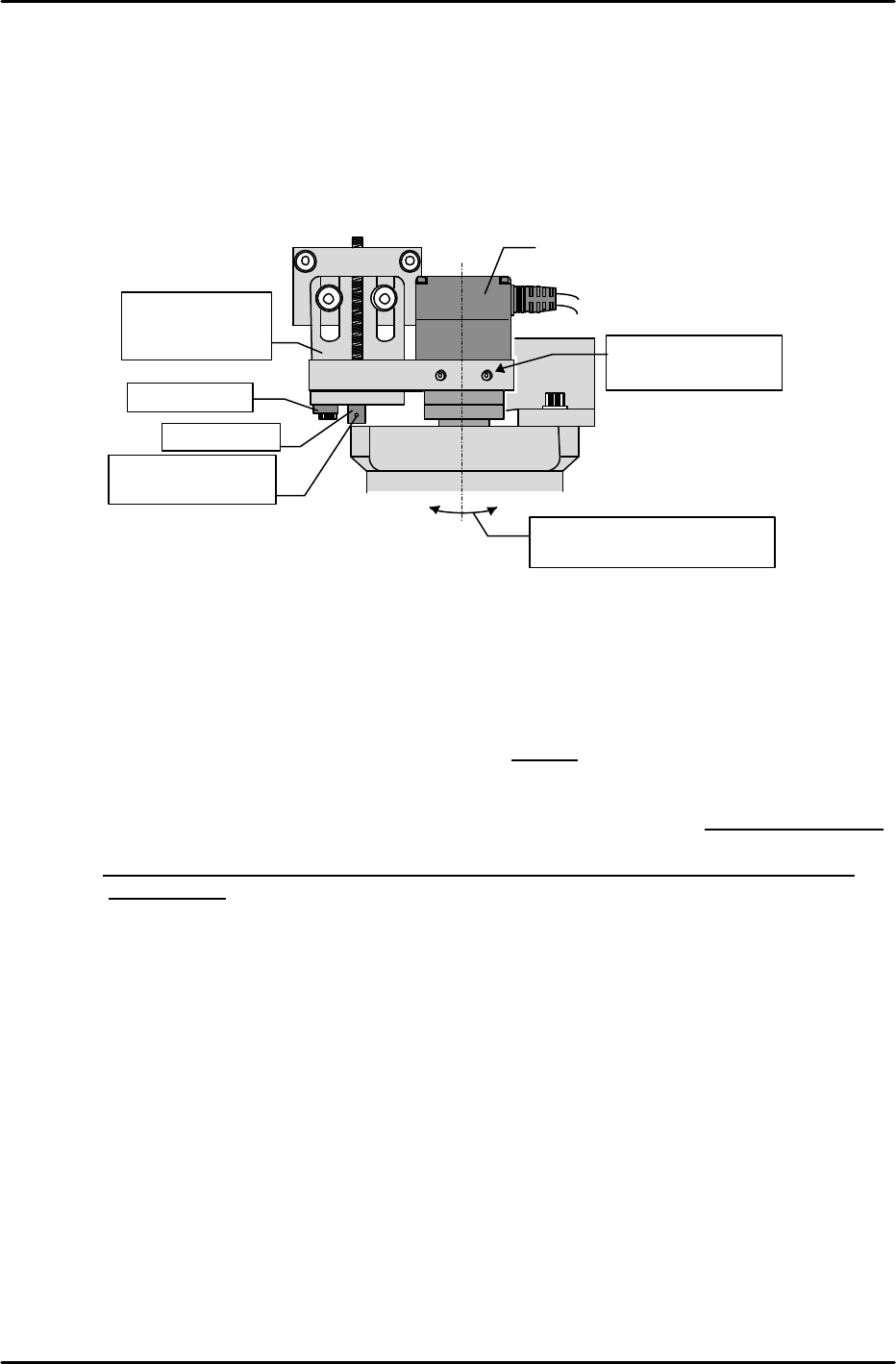
5) Loosen the bracket bolt, then turn the adjusting bolt to move the camera up and down until
the real image is in focus. When focused, retighten the bracket bolt.
6) Slightly loosen the adjusting bolt (do not loosen to the point where it makes contact with the
camera bracket) and insert an R-pin into the head’s through-hole to prevent falls.
[6-4] Securing the Half Mirror
1) After focusing the camera, partially cover the light source unit’s dispersion plate and check
the gap to the end of the half mirror.
2) Remove the light source unit again, and then, after noting the current half mirror position
(length), remove the half mirror from the lens.
3) Remove the half mirror set bolts (3 bolts) and apply silicone to them. Use care to avoid
dropping and losing the set bolts.
4) Based on the previously noted gap extending to the dispersion plate’s top face and the half
mirror position at that time, calculate the final position so that the gap is approximately 1mm,
then secure the half mirror at that position before the sealer dries.
Note: Avoid over-tightening the half mirror’s set bolts as this can adversely affect the lens
performance.
5) Mount the light source unit and verify that the gap is appropriate.
Hole where R-pin
is inserted
Focus by
moving bracket
up and down
Fulcrum pin
Set screw
Camera
Mount in a perpendicular
position (no tilt)
Verify that camera
lock bolt is tight
FK-9F98-07 QP242E Schooling Text for Service Engineer
6th edition 6. Proper Data Measurement [4/20]
Fuji Machine Mfg. Co., Ltd. Okazaki
SMT Equipment Quality Assurance Dept.
Technical Support Div. Section No.2
6-4
[6-5] Checking the X-axis Stroke
1) Remove the camera measurement plate jig and turn on the “Y022 CVR BD STPR IN” I/O at
the relevant module to raise the stopper. Clamp a maximum sized board with the board
against the stopper.
2) Move the head until the left edge of the maximum sized board is aligned with the mark
camera’s cross-hairs (vertical line), and check the servo counter value at this position. If the
counter value is 400 pulses (1mm) or more from the Min Limit or Max Limit, the board
stopper position (see above) and camera tilt adjustments are OK.
3) Check the right edge of the board in the same manner.
If the adjustment results are not OK, readjust the board stopper position and the camera tilt.
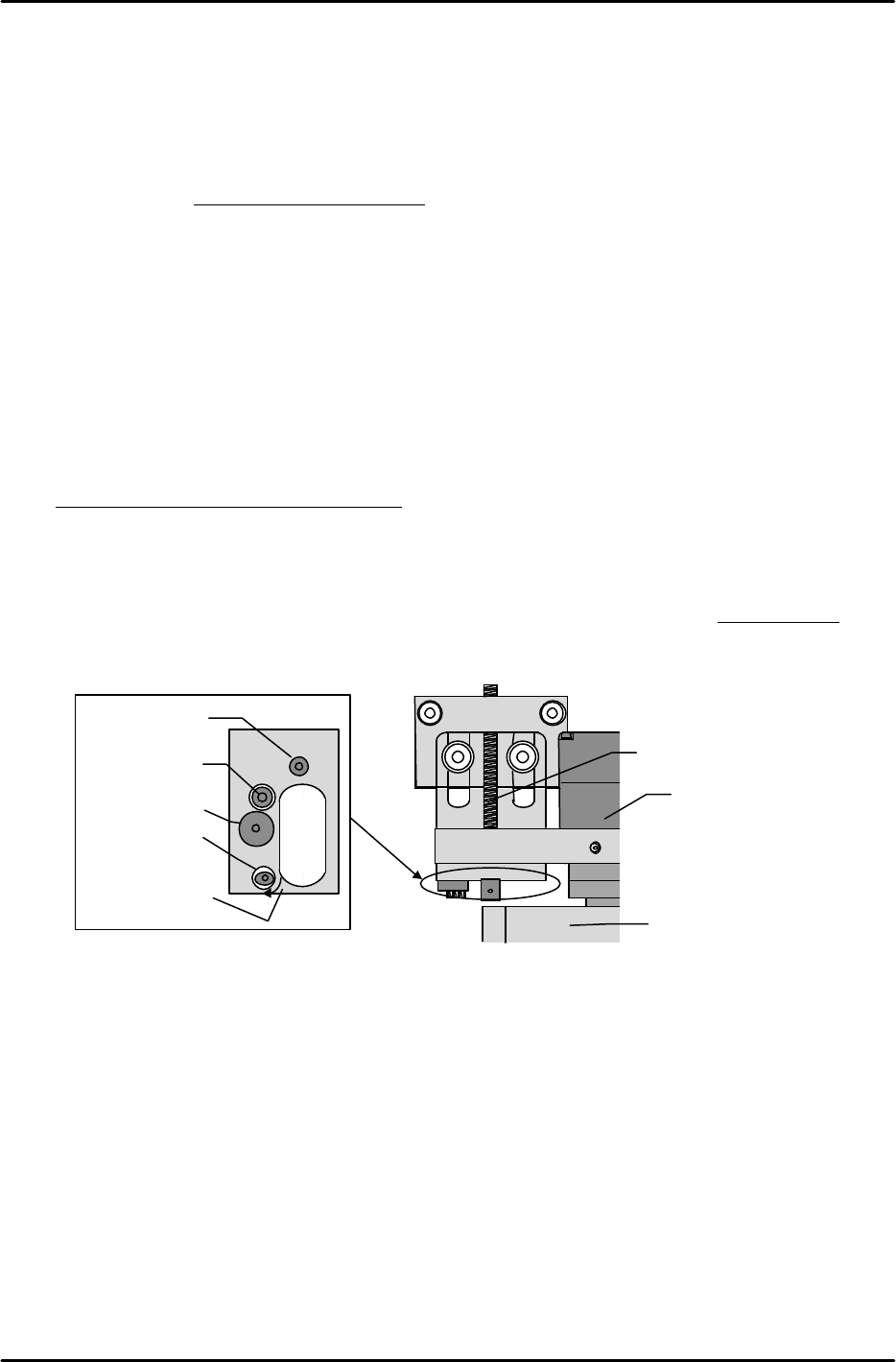
[6-6] Mark Camera X,Y,Q
1) Clamp a camera measurement plate jig, and, while watching the monitor, move the head until
the center of the plate jig’s mark is aligned with the camera center.
2) With the jig mark centered, use the following command sequence to perform an automatic
measurement: [RESOLUTION] à [MARK CAMERA] à [START].
3) Following the automatic measurement, check the measurement resolution. If it is within a
“1140326 (17.4um) to 1218969 (18.6um)” range for the Mark Camera X and Y, proceed to the
[Mark Camera Q] adjustment. If the measurement resolution is not within the above range,
the camera height (focus) is incorrect. In this case, readjust the camera height, then check the
Mark Camera X and Y values again.
[Ex] If the measured values are too low, raise the camera.
4) Loosen the lock bolt beside the camera and turn the eccentric bolt until the Q-value is “0”.
After re-tightening the lock bolt, check the measurement again.
Bottom View
Set screw
Fulcrum pin
Lock bolt
Eccentric pin
M/C rear
M/C front
+
Arrow indicates
“+” direction
Set screw
Camera
Light source unit