QP-242E 工程师培训手册 (6.0).pdf.pdf - 第93页
FK-9F98-07 QP242E Training Text for Service Engineers 6th edition 10. STU Adjustment & Operation Check [ 7 /8] Fuji Machine Mfg. Co., Ltd. Okazaki SMT Equipment Quality Assurance Dept. Technical Support Div. Section …
FK-9F98-07 QP242E Training Text for Service Engineers
6th edition 10. STU Adjustment & Operation Check [6/8]
Fuji Machine Mfg. Co., Ltd. Okazaki
SMT Equipment Quality Assurance Dept.
Technical Support Div. Section No.2
10-6
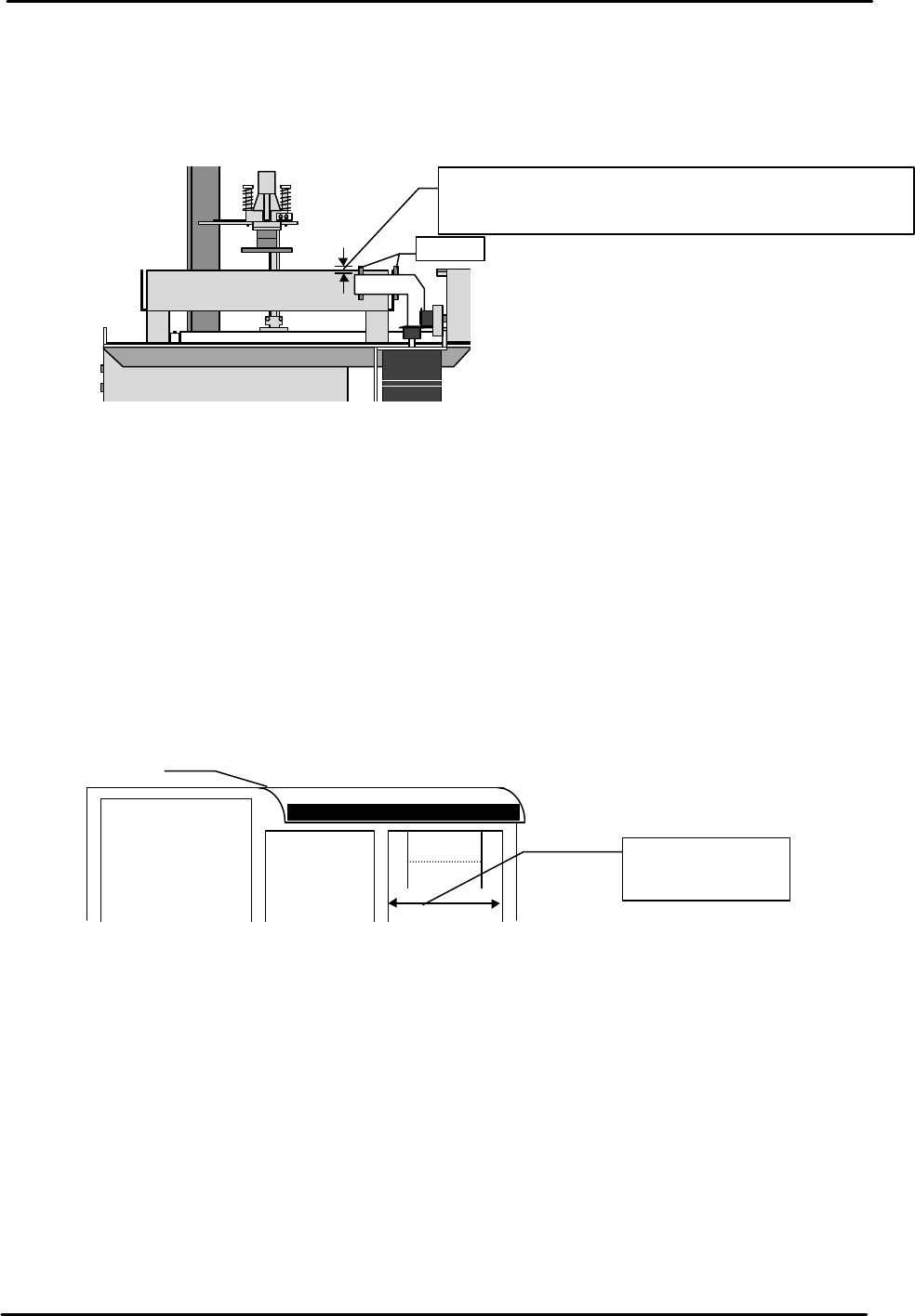
[10-13] Tray Eject Sensor Adjustment
1) Loosen the hollow bolt and adjust so that the distance from the top of the sensor mount bracket to
the top of the sensor is 5 mm and so the sensor amp is on.
2) When the transparent tray eject box is set after the sensor has been adjusted, verify that the
sensor light beam is positioned 1 mm above the box.
[10-14] STU Operation Check
1) Transmit a program for placing one tray of QF 100 pin parts to the machine.
2) Check the part name and set the part on the STU.
3) Attach the nozzle to be used on the nozzle holder or on the nozzle change unit.
4) Activate automatic operation and confirm that the STU works properly.
[10-15] Remover Operation Check
Load a 240 g empty tray (maximum allowable weight) on the STU and verify that the remover is
able to hold the tray.
[10-16] Check of Restrictions When STU is Installed
When an STU-1 or STU-2 is set on the MFU there are restrictions that apply to the feeder
positions as outlined below. Verify that the setup is in conformance with these restrictions.
View from the side of the STU
Tray eject box
Sensor
Move up or down to adjust both sensors to 5 mm together.
After adjusting verify that the distance between the top of
the tray eject box and the sensor light beam is 1 mm.
MFU
Reject
parts
conveyor L
or M type
STU 1 or 2
Device positions
at which feeders
can be set
FK-9F98-07 QP242E Training Text for Service Engineers
6th edition 10. STU Adjustment & Operation Check [7/8]
Fuji Machine Mfg. Co., Ltd. Okazaki
SMT Equipment Quality Assurance Dept.
Technical Support Div. Section No.2
10-7
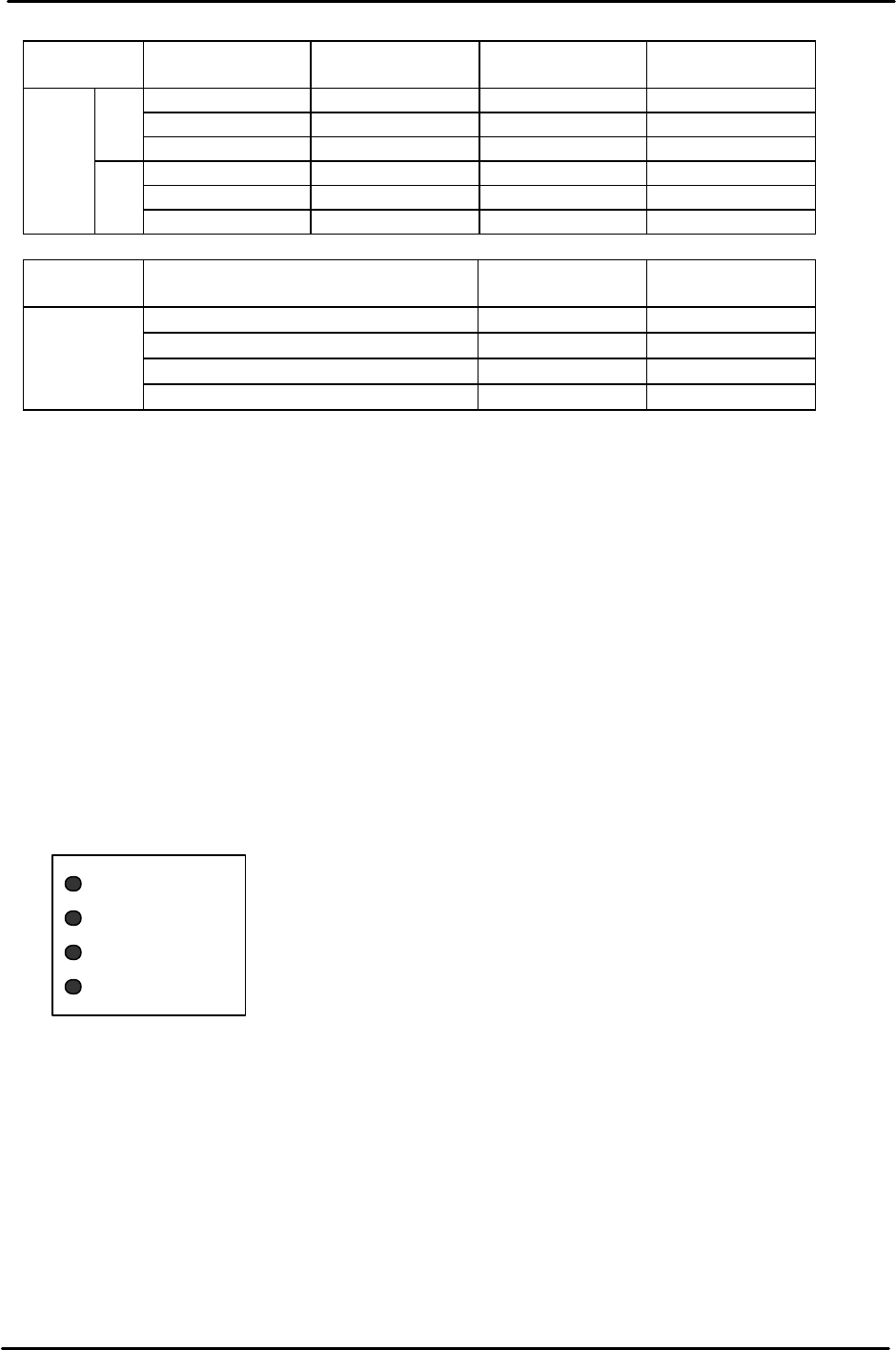
MFU-58 STU-1
Reject parts
conveyor(M)
Reject parts
conveyor (L)
Feeder
1~9 10~12 None 13~31
1~9 None None 13~31
1-load
1~9 None 10~15 16~31
1~9,10~18 19~21 None 22~31
1~9,10~18 None None 22~31
Device
No.
2 -load
1~9,10~18 None 19~25 26~31
MFU-58 STU-2
Reject parts
conveyor(M)
Feeder
1~7,8~14,15~21 22~24 25~31
1~7,8~14,15~21 None 22~31
1~7,8~14,15~21,22~28 29~31 None
Device
No.
1~7,8~14,15~21,22~28 None 29~31
Note: * When an STU-1 or STU-2 is used without installing a reject parts conveyor,
interference space is required as shown in the following examples so do not set
feeders in these positions. If a feeder is set in one of these device positions the
head
and feeder will collide when the STU part is picked.
Example:
When an STU-1 (D1 ~ D9) is set : D10 ~ D12
When one STU-2 (D1 ~ D7) is set : D8 ~ D10
When two STU-2 units (D1 ~ D7, D8 ~ D14) are set : D15 ~ D17
* An STU-1 and STU-2 cannot be loaded on the same MFU.
* When an STU is installed at device positions other than those given in the
examples above, the number of occupied device positions may increase depending
on the unit that is set adjacent to the STU.
[10-17]
STU Rear LED Display
There are LEDs on the rear of the STU to notify the operator of STU alarms, when to supply trays
to set in the STU and when the empty tray eject box is full. Use the explanation for each of the LED
displays given below as a reference.
[POWER]: Indicates that power is being supplied to the STU.
[ALARM]: The contents of the alarm are indicated by the number of times the connected LED
flashes.
POWER
ALARM
NO TRAY
TRAY FULL

FK-9F98-07 QP242E Training Text for Service Engineers
6th edition 10. STU Adjustment & Operation Check [8/8]
Fuji Machine Mfg. Co., Ltd. Okazaki
SMT Equipment Quality Assurance Dept.
Technical Support Div. Section No.2
10-8
Number
of flashes
Contents Details
1
Sequencer
alarm
Trouble with the sequencer
2
Cycle time
expired
Tray positioning or the tray eject operation did not finish
within 60 seconds.
3 Tray eject alarm
The descent of the empty tray could not be verified when
discharged or the empty tray eject box has become full.
4 Tray add alarm Too many trays have been added.
Remover SOL
alarm
The remover did not arrive at the forward limit (retract
limit) when the remover was advanced (retracted).
Vacuum OFF
defect
The vacuum did not cut off even though the remover is at
the retract limit.
5
Remover LS
alarm
The remover forward limit and retract limit sensors are
both on.
[NO TRAY]: There are no tray parts. Supply parts.
[TRAY FULL]: The empty tray eject box is full. Remove the empty trays in the box.