Nordson_EFD_Automated_Dispensing_Systems_Maintenance_Guide.pdf - 第21页
21 www.nordsonefd.com info@nordsonefd.com +1-401-431-7000 Sales and service of Nordson EFD dispensing systems are available worldwide. Automated Dispensing Systems Maintenance & Parts Guide Timing Belt and Motor Repl…
Automated Dispensing Systems Maintenance & Parts Guide
20 www.nordsonefd.com info@nordsonefd.com +1-401-431-7000 Sales and service of Nordson EFD dispensing systems are available worldwide.
16
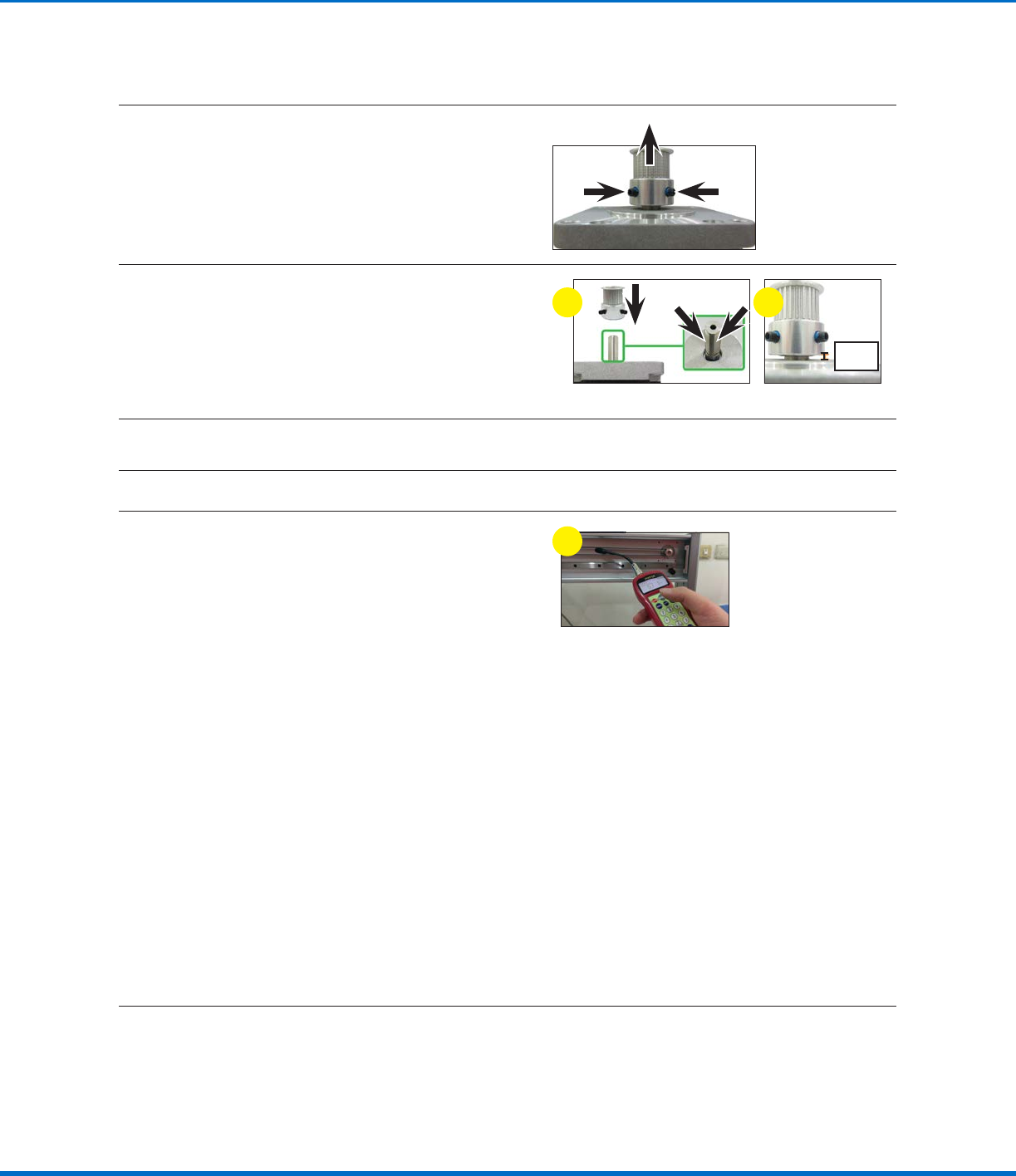
Remove the two (2) set screws on the timing
pulley and then pull the timing pulley away from
the motor.
17
a. Assemble the timing pulley onto the shaft of
the new motor; align the timing pulley such
that the two (2) set screws contact the two
flat surfaces of the motor shaft.
b. Ensure that the distance from the base of
the timing pulley to the top of the motor is
4mm (0.16").
4 mm
(0.16")
a b
18
Place the new Xaxis motor into position and secure it with the four (4) screws removed previously.
19
Place the Xaxis timing belt around the timing pulley.
20
Measure the tension on the timing belt as
follows:
a. Move the Xaxis linear guideway plate to the
left‑most position.
b. Enter the timing belt mass, width, and span
(length) into the tension meter. Refer to
“Timing Belt Mass, Width, and Span Data”
on page16 for these values.
c. Hold the meter 20 mm (0.8") from the timing
belt, then strum the belt (as if it were a guitar
string).
d. Observe the measurement displayed on the
meter:
• If the tension is within 50–70 N•m
(37–52ft‑lb), the tension is correct
• If the tension is outside 50–70 N•m (37–
52ft‑lb), adjust the timing belt adjusting
kit base screw again and repeat the
tension measurement. Repeat as needed
until the tension measures 50–70 N•m
(37–52ft‑lb).
c
Reinstall the XAxis Front Cover
21
Reinstall the Xaxis cover. Refer to “Reinstall the XAxis Front Cover” on page5 for detailed
instructions.
Timing Belt and Motor Replacement: XAxis (continued)
Replace the XAxis Motor (continued)
21www.nordsonefd.com info@nordsonefd.com +1-401-431-7000 Sales and service of Nordson EFD dispensing systems are available worldwide.
Automated Dispensing Systems Maintenance & Parts Guide
Timing Belt and Motor Replacement: YAxis
CAUTION
Risk of injury or equipment damage. Before performing any service procedure, complete the steps under
“Preparation for all Service Procedures” on page3.
Remove the YAxis, the Control Assembly, and the Control Assembly Cover
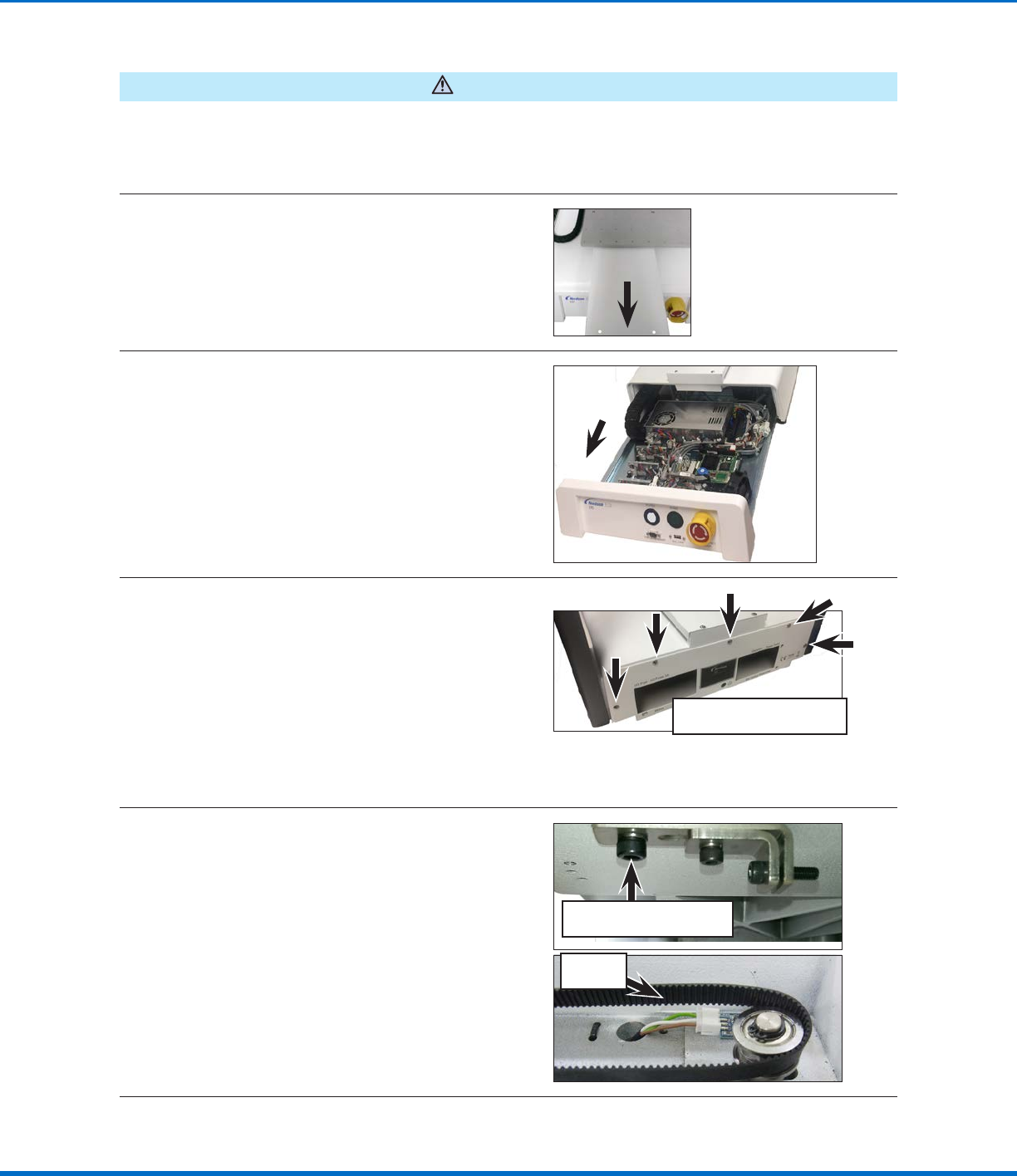
1
Remove the Yaxis cover. Refer to “Remove
the YAxis Cover” on page6 for detailed
instructions. Return here to continue.
2
Remove the control assembly. Refer to the
applicable steps under “Remove and Clean the
Control Assembly” on page14 to remove the
control assembly. Return here to continue.
3
Remove all remaining screws on the back of the
robot that secure the control assembly cover
and then remove the cover to allow access to
the Yaxis motor.
NOTE: The quantity and location of the screws
that secure the control assembly cover differs
for each robot model.
Typical control assembly cover
screw locations
Replace the YAxis Timing Belt
4
Release the timing belt adjusting kit base screw
that sits in the front opening of the robot where
the control assembly was previously installed.
This loosens the timing belt enough to remove it
from the idler and timing pulleys.
NOTE: The screw only needs to be loosened,
not completely removed.
Loose
timing belt
Timing belt adjusting kit
base screw
Continued on next page
Automated Dispensing Systems Maintenance & Parts Guide
22 www.nordsonefd.com info@nordsonefd.com +1-401-431-7000 Sales and service of Nordson EFD dispensing systems are available worldwide.
Timing Belt and Motor Replacement: YAxis (continued)
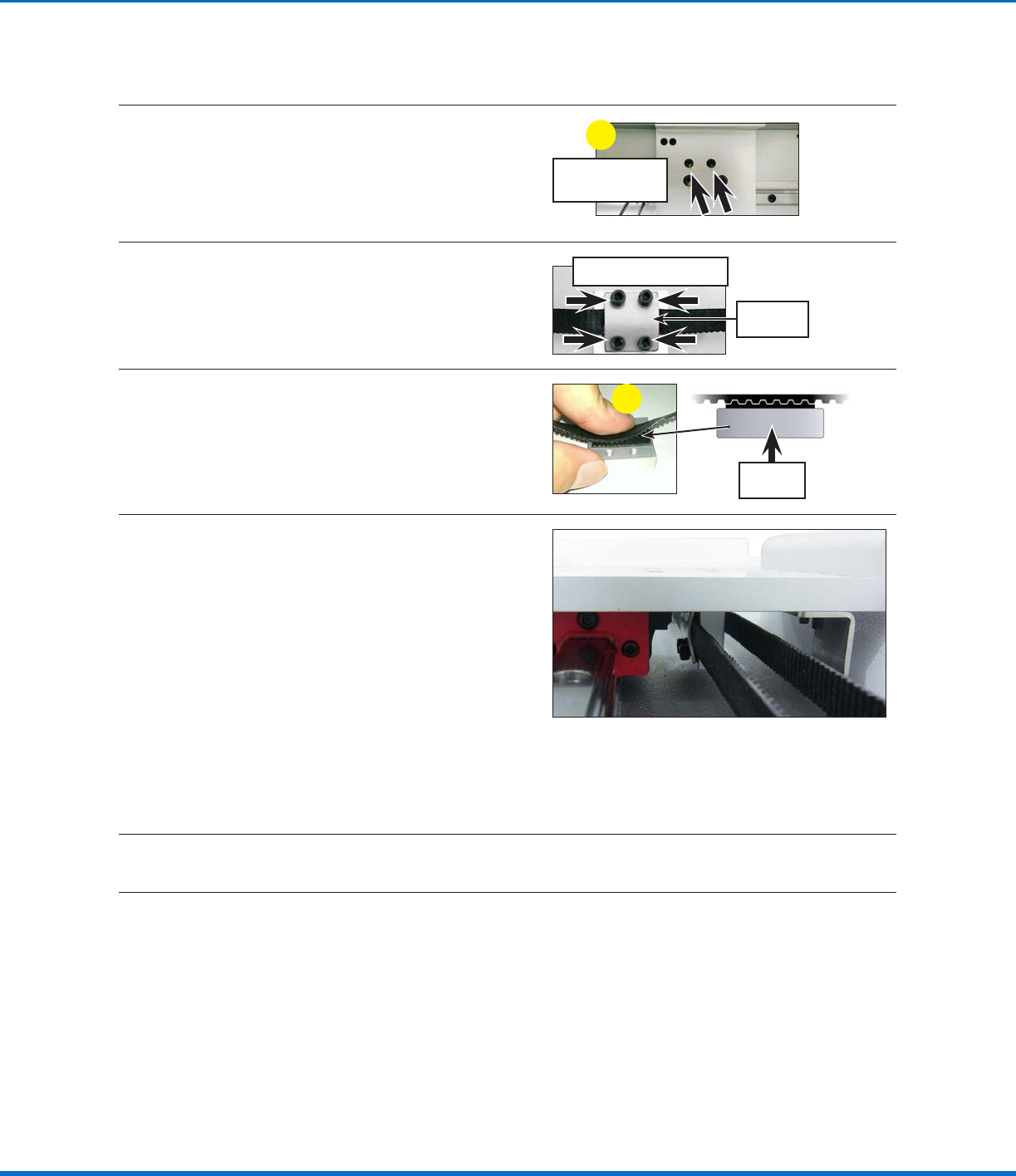
5
a. Remove two (2) screws that fasten the
timing belt fixing base and then detach the
fixing base from the Yaxis linear guideway
plate.
b. Move the timing belt and timing belt fixing
base to a work space away from the robot.
Timing belt fixing
base screws
a
6
Remove the four (4) screws that fasten the
timing belt cover to the timing belt fixing base
and then remove the old timing belt from the
assembly.
Timing belt fixing base
Timing belt
cover
7
a. Match the sawtooth pattern of the new
timing belt to the sawtooth pattern on the
timing belt fixing base.
b. Secure the timing belt cover to the timing
belt fixing base with the four (4) screws
removed previously.
a
Timing belt
fixing base
8
a. Move the timing belt and timing belt fixing
base assembly under the Yaxis linear
guideway plate. Ensure that:
• The timing belt fixing base is on the left
side of the loop as viewed from the front
of the robot.
• The belt cover is the left‑most part of
the assembly, closest to the Yaxis linear
guideway.
b. Place the timing belt around the idler and
timing pulleys, then secure the timing belt
fixing base to the Yaxis linear guideway
plate with the two (2) screws removed
previously.
NOTE: The timing belt should still be loose.
9
To add tension to the belt, tighten the timing belt adjusting kit base screw that sits in the front opening
of the robot where the control assembly was previously installed.
Continued on next page
Replace the YAxis Timing Belt (continued)